Creating a Cluster
Download
Modo Foco
Tamanho da Fonte
This document describes how to quickly create a TKE general cluster via the new TKE console. You can create a worker node after the cluster is created.
Prerequisites
Before creating a cluster, you need to complete the following tasks:
Sign up for a Tencent Cloud account and complete identity verification.
When you log in to the TKE console for the first time, you need to grant the current account TKE permissions to operate CVMs, CLBs, CBS, and other cloud resources. For details, see Description of Role Permissions Related to Service Authorization.
For creating a container cluster with the VPC network type, you need to create a VPC in the target region and create a subnet in the target availability zone under the VPC.
During creation of a cluster, you will use the resources such as VPCs, subnets, and security groups. Each region has a resource quota. For details, see Quota Limits for Cluster Purchase.
Creating a Cluster in the Console
1. Log in to the TKE console and select Clusters in the left sidebar.
2. Click Create above the cluster list.
3. Select Standard Cluster for the cluster type and click Create.
1. (Required) Entering the Cluster Information
On the Cluster Information page, set the basic configuration and network configuration of the cluster as shown below:
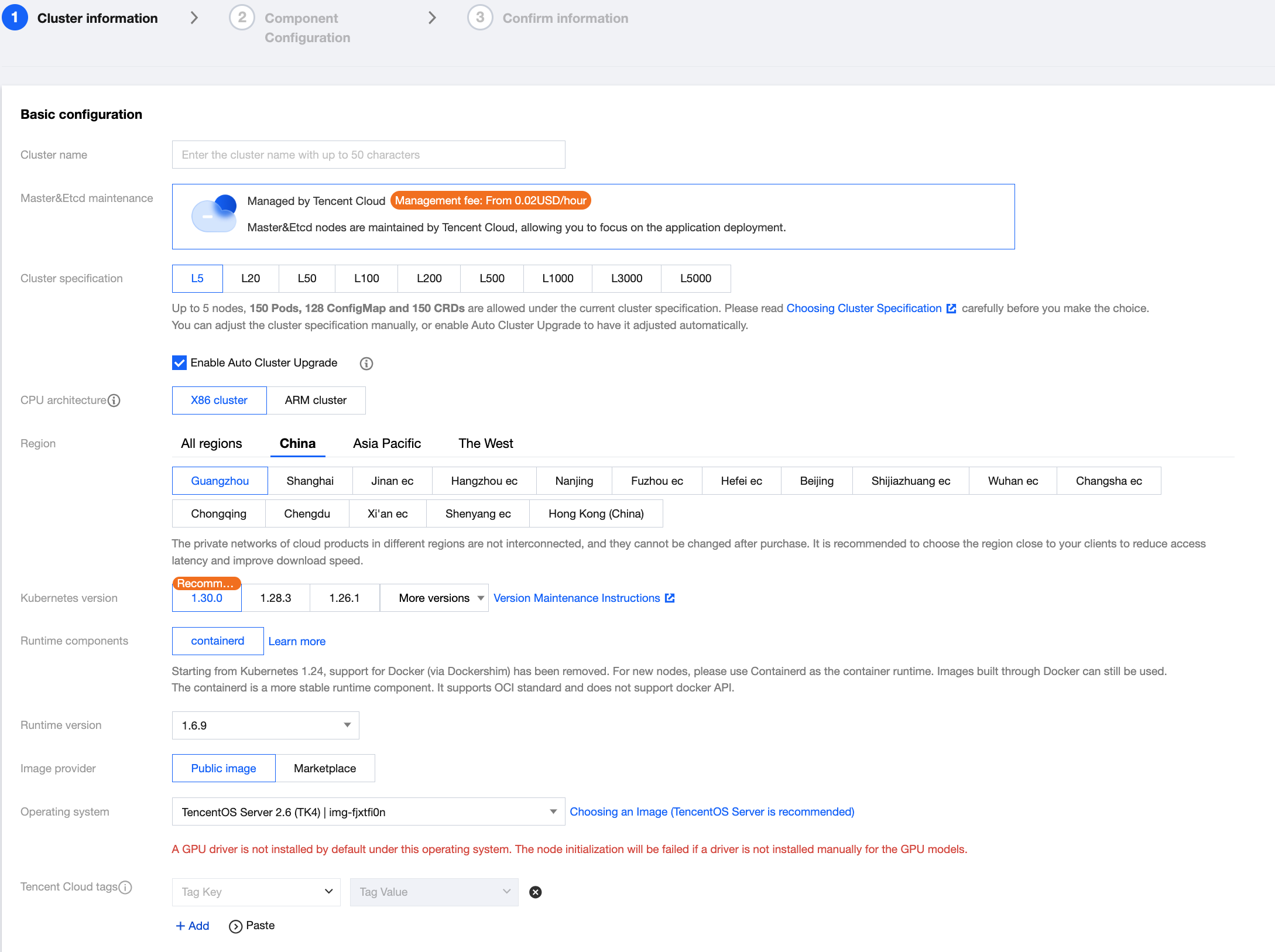
Core Parameter Descriptions of Basic Configuration
Parameter Name | Use Instructions |
Cluster name | Enter the name of the cluster to be created, which contains up to 50 characters. |
Master&Etcd maintenance | Platform management: The cluster control plane components are maintained by Tencent Cloud's professional team, requiring certain management fees. For details, see Cluster Management Fees. Self-maintenance: Users need to purchase, maintain, and manage control plane resources on their own. The platform does not provide service guarantees. |
Cluster specification | Select an appropriate cluster specification as needed. For details, see Choosing Cluster Specification. You can adjust the cluster specification manually or enable Auto Cluster Upgrade for automatic adjustment. |
Kubernetes version | It is recommended to select the latest version. For the version support range, see TKE Kubernetes Revision Version History. For version maintenance rules, see TKE Kubernetes Version Maintenance Mechanism. |
Runtime components | It is recommended to select the latest Containerd version supported. (Starting from Kubernetes 1.24, support for Docker via Dockershim has been removed. The container runtime for new TKE nodes only supports Containerd 1.6.9.) |
Operating system | TKE provides various public images including TencentOS, Ubuntu, and CentOS. You can select one based on actual situations. For details, see List of Public Images Supported by TKE. |
Tencent Cloud tags | Binding tags to a cluster enables categorized management of resources. Cloud resources created within the cluster will inherit the cluster tags by default. |
Advanced settings | Node hostname naming mode: the host and node naming rule, which supports automatic naming (private IP by default) and manual naming.
Project of new-added resource: Select a project based on actual requirements. New resources will be automatically assigned to this project. |
Core Parameter Descriptions of Network Configuration
Parameter Name | Use Instructions |
VPC | |
Container network add-on | Container Network Interface (CNI) is a network add-on providing network solutions for Kubernetes clusters, to achieve flexible, scalable, and high-performance network connection. The CNI network add-on of TKE follows the CNI specification and enables seamless integration of Kubernetes clusters with various network solutions, to meet different business needs and performance requirements. TKE offers three CNI modes: VPC-CNI, Global Router, and Cilium-Overlay. For details, see How to Choose a TKE Network Mode. Note: It is recommended to use VPC-CNI in public cloud scenarios and Cilium-Overlay in registered node scenarios. VPC-CNI The VPC-CNI mode is recommended by default in TKE. VPC-CNI is provided by TKE based on Tencent Cloud VPC and can directly assign native VPC ENIs to Pods, achieving network interconnection between the Pods. It is applicable to scenarios with high latency requirements. In this network mode, containers and nodes are distributed on the same network plane and container IP addresses are ENI IP addresses allocated by the IPAMD component. For details, see VPC-CNI Mode.
Global Router
Global Router is provided by TKE based on the global routing capabilities of Tencent Cloud VPC. The CIDR IP range for Pods is independent of that for the VPC and the Pod CIDR information of different nodes is distributed to the VPC through global routing, enabling cross-node Pod communication. For details, see Global Router Mode.
Cilium-Overlay
Cilium-Overlay is provided by TKE based on Cilium VXLan to achieve network management when registered nodes are added to a TKE cluster in distributed cloud scenarios. For details, see Cilium-Overlay Mode. |
Advanced settings | Kube-proxy proxy mode: Select iptables or ipvs. The IPVS mode is applicable to large-scale services in clusters. Once enabled, it cannot be disabled. For details, see Enabling IPVS for a Cluster. |
2. (Optional) Configuring Add-Ons
Note:
The selected add-ons can be properly deployed only after node resources are ready. You can also skip this step and install the add-ons via the add-on management page after the cluster is created and initialized. For details, see Add-On Management.
On the Component Configuration page, configure cluster add-ons and cloud native services as shown below:
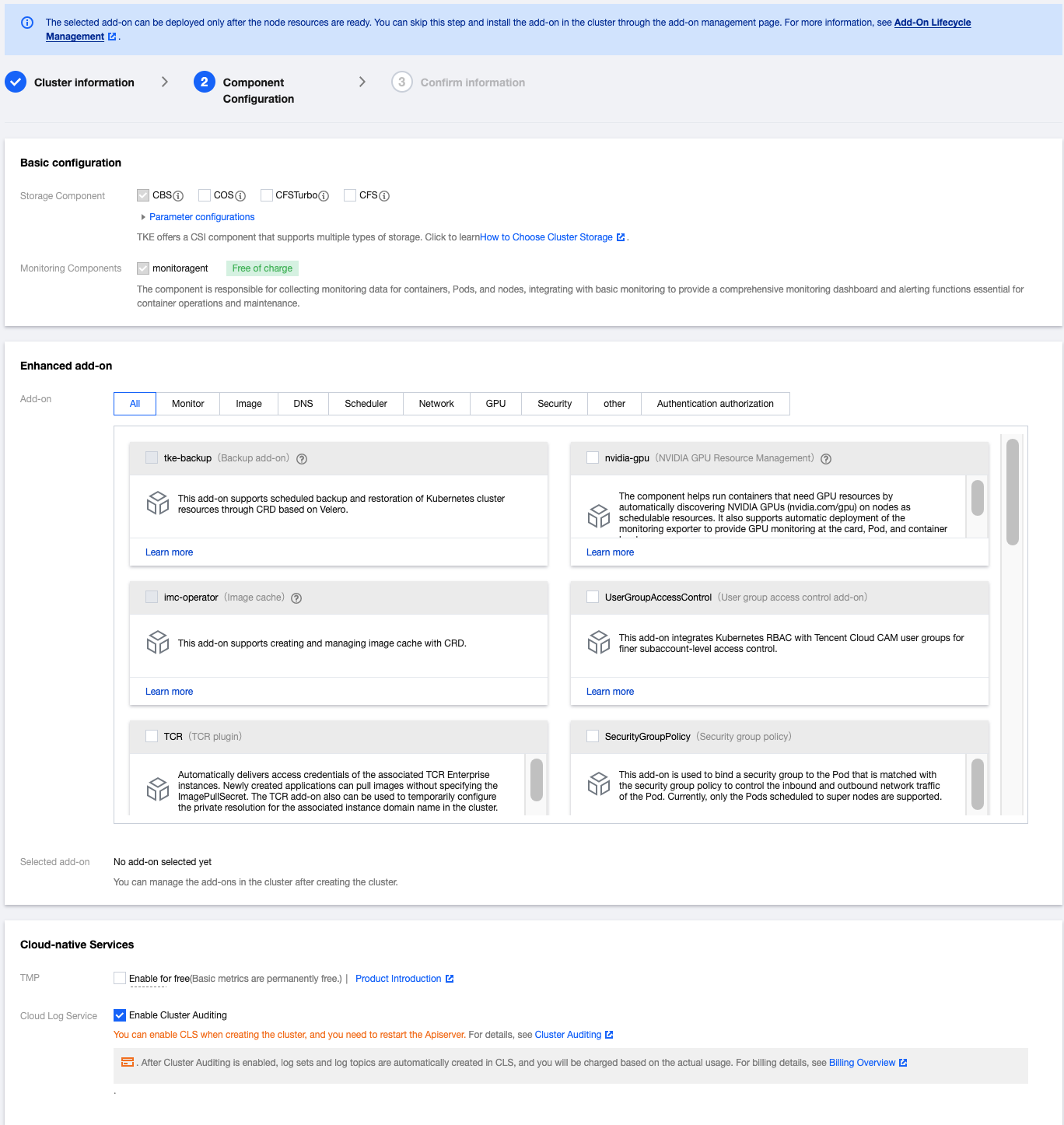
Parameter Descriptions of Cloud Native Services
Parameter Name | Use Instructions |
TMP | After it is enabled, you can flexibly configure data collection rules and alarm rules as needed. Then you can view the monitoring data on the Grafana dashboard. For details, see TMP Overview. |
Log Service |
3. Confirming the Information
On the Information Confirmation page, confirm the selected configuration and billing information for the cluster and select I have read and agreed to the Tencent Kubernetes Engine Service Level Agreement as shown below:
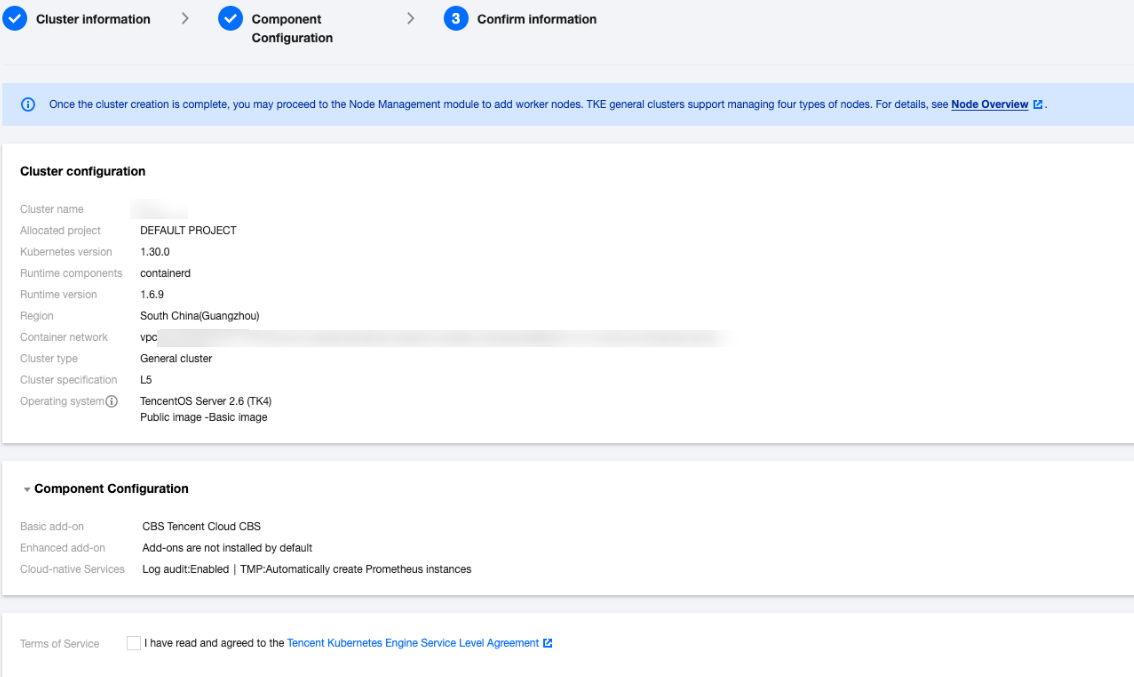
Click Complete to finish the creation of the TKE general cluster without worker nodes.
Related Operations
Ajuda e Suporte
Esta página foi útil?
Você também pode entrar em contato com a Equipe de vendas ou Enviar um tíquete em caso de ajuda.
comentários