In static IP address mode, after a Pod in VPC-CNI mode is created and used, the network component will create the CRD object VpcIPClaim with the same name as the Pod in the same namespace. This object describes the Pod's requirements for the IP address. The network component will then create the CRD object VpcIP based on the object and associate it with the corresponding VpcIPClaim. VpcIP is the name of the actual IP address, indicating that an actual IP address is occupied.
You can run the following command to view IP address usage in the container subnet of the cluster:
kubectl get vip
For a Pod to which a non-static IP address is bound, VpcIPClaim will be terminated and VpcIP will be terminated and reclaimed after the Pod is terminated. For a Pod to which a static IP address is bound, VpcIPClaim and VpcIP will be retained after the Pod is terminated. After the Pod with the same name is started, it will use the VpcIP associated with the VpcIPClaim with the same name, so as to retain the IP address.
As the network component will look for available IP addresses based on VpcIP during IP address allocation in the cluster, static IP addresses need to be reclaimed promptly if not used (the current default policy indicates never to reclaim); otherwise, IP addresses will be wasted, and no IP addresses will be available. This document describes reclaiming after expiration, manual reclaiming, and cascade reclaiming of an IP address.
Reclaiming after expiration
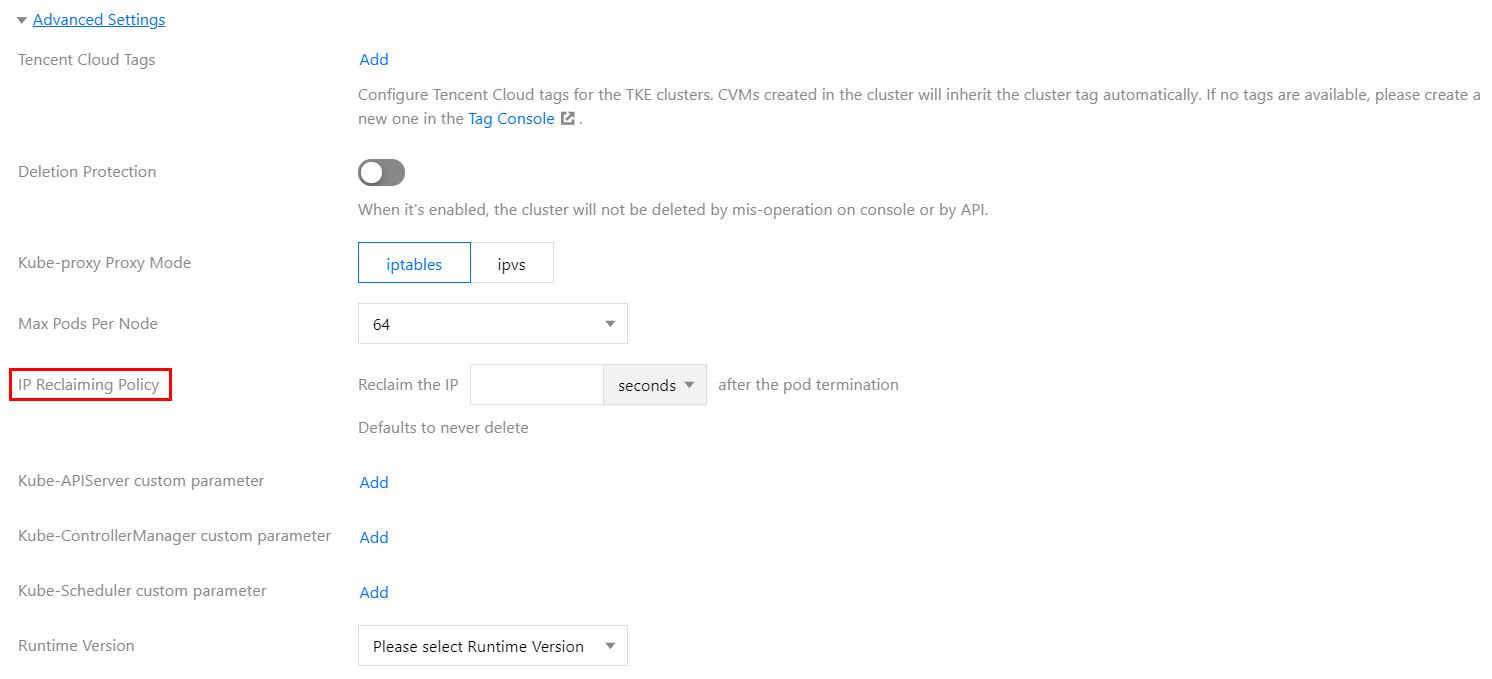
On Creating a Cluster page, select VPC-CNI for Container Network Add-on and check Enable Support for Static Pod IP, as shown in the figure below:
Set IP Reclaiming Policy in Advanced Settings. You can set how many seconds after the Pod is terminated to reclaim the static IP address.
You can modify the existing clusters with the following method:
tke-eni-ipamd v3.5.0 or later
1. Log in to the TKE console and click Cluster in the left sidebar.
2. On the Cluster Management page, click the ID of the target cluster to go to the cluster details page.
3. On the cluster details page, select Add-On Management in the left sidebar.
4. On the Add-On Management page, click Update configuration in the Operation column of the eniipamd add-on.
5. On the Update configuration page, enter the expiration time in the static IP reclaiming policy, and click Done.
tke-eni-ipamd earlier than v3.5.0 or no eniipamd to manage
Run the command kubectl edit deploy tke-eni-ipamd -n kube-system to modify the existing tke-eni-ipamd deployment.
Run the following command to add the launch parameter to spec.template.spec.containers[0].args or modify the launch parameter.
--claim-expired-duration=1h # You can enter a value that is not less than 5m
Manual reclaiming
For an IP address that urgently needs to be reclaimed, you need to find its Pod and namespace before running the following command to manually reclaim it:
Note:
You must make sure that the Pod of the IP address to be reclaimed has been terminated; otherwise, the Pod network will become unavailable.
kubectl delete vipc <podname> -n <namespace>
Cascade reclaiming
Currently, the static IP address is bound to a Pod, regardless of the specific workload (e.g., Deployment, Statefulset). After the Pod is terminated, it is uncertain when to reclaim the static IP address. TKE has implemented that the static IP address was deleted once the workload to which the Pod belongs was deleted.
You can enable cascade reclaiming by the following steps:
tke-eni-ipamd v3.5.0 or later
1. Log in to the TKE console and click Cluster in the left sidebar.
2. On the Cluster Management page, click the ID of the target cluster to go to the cluster details page.
3. On the cluster details page, select Add-On Management in the left sidebar.
4. On the Add-On Management page, click Update configuration in the Operation column of the eniipamd add-on.
5. On the Update configuration page, select Cascade reclaiming, and click Done.
tke-eni-ipamd earlier than v3.5.0 or no eniipamd to manage
1. Run the command kubectl edit deploy tke-eni-ipamd -n kube-system to modify the existing tke-eni-ipamd deployment.
2. Run the following command to add the launch parameter to spec.template.spec.containers[0].args.
--enable-ownerref
After the modification, ipamd will automatically restart and take effect. At that time, a new workload can implement the cascade deletion of the static IP, which is not supported for an existing workload.
FAQs
What should I do if the EIP cannot be bound and Pods cannot be scheduled to a node in shared ENI mode?
After a node is added to a cluster, IPAMD will try binding an EIP from the subnet in the same AZ as the node (the subnet configured for IPAMD) to the node. If IPAMD becomes abnormal or it is not configured with a subnet in the same AZ as the node, IPAMD cannot allocate a secondary ENI to the node. In addition, if the current VPC uses more secondary ENIs than the upper limit, no secondary ENIs can be allocated to the node.
Run the following command for troubleshooting:
kubectl get event
If event displays ENILimit, the quota is not appropriate. You can fix the problem by increasing the quota of ENIs for the VPC.
Check whether the container subnet in the AZ of the node has sufficient IP addresses, and if not, add some.
What should I do if the prompt says that the number of ENIs exceeds the upper limit and no ENIs can be allocated for the node?
Symptom
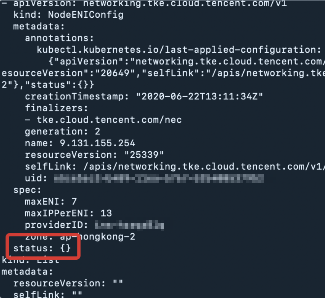
The ENIs configured for the node cannot be bound, and the VIP associated with nec failed to be attached. View nec, and you can see that its status is empty.
Run the following command to view nec:
kubectl get nec -o yaml
If the nec status of the node is empty, the returned result will be as shown below:
Run the following command to view the VIP associated with nec:
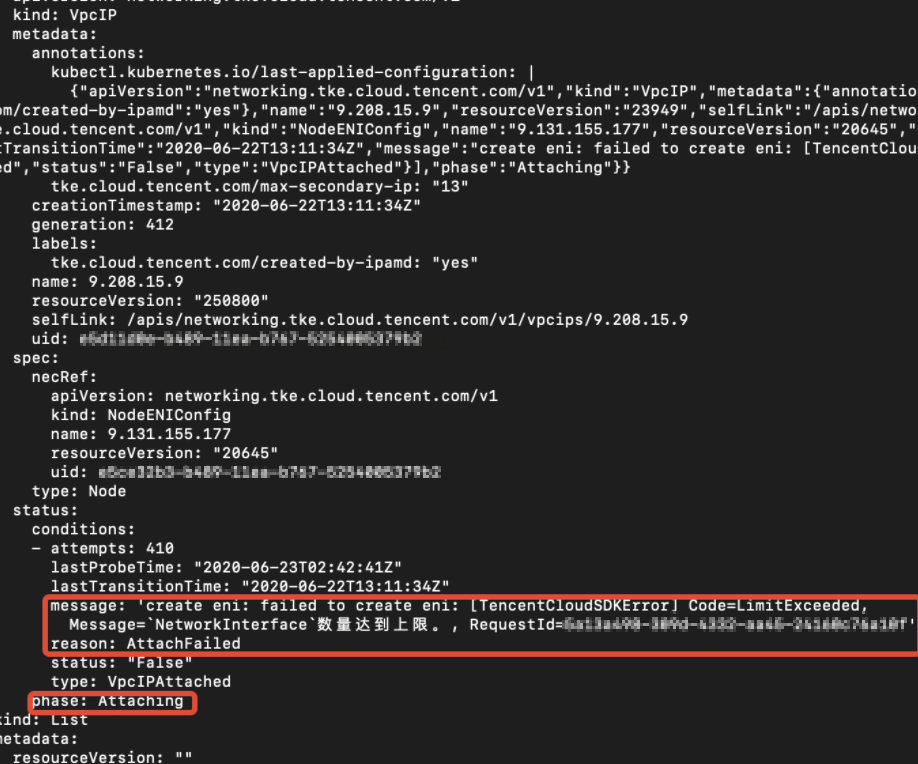
kubectl get vip -oyaml
If the command returns a success result, the VIP status is Attaching. The error message is as shown below:
Solution
Currently, up to 1,000 ENIs can be bound to a VPC. To increase the quota, submit a ticket for application. The quota will take effect by region.