Based on the original single ENI with multiple IP addresses of VPC-CNI mode, the Pod with exclusive ENI mode supports that the container directly uses the ENI exclusively. It can seamlessly connect with all features of Tencent Cloud's VPC products, while making a great improvement in performance.
Note:
This feature is currently in beta. If you want to try it out, please submit a ticket.
Overview
The new VPC-CNI mode network solution has the following new capabilities:
Pod can be directly bound to EIP/NAT, and no longer relies on the public network access capability of the node, nor does it need SNAT, which can be applicable to the public network access scenarios with high concurrency and high bandwidth such as Crawler and video conference.
It supports static IP address based on Pod name. The IP address can remain unchanged after Pod is scheduled and restarted.
It supports CLB-to-Pod direct connection without forwarding through NodePort, so as to improve forwarding performance and provide a unified CLB view.
Method
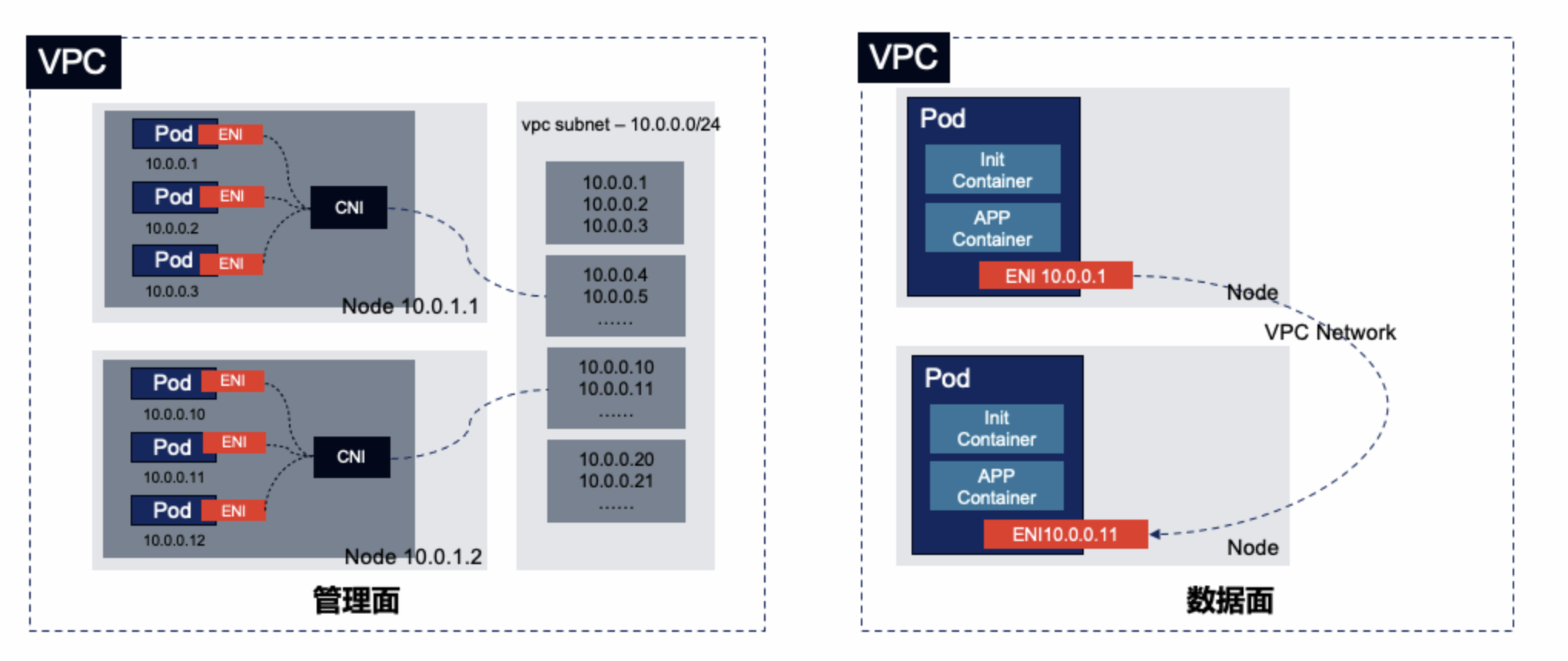
The new VPC-CNI mode network solution is an extension of the original VPC-CNI mode. Relying on the ENI, the ENI bound to the node can be configured to the container network namespace through CNI, so that the container can directly use the ENI exclusively. The principle is shown in the figure below:
IP Address Management Principle
Non-static IP address mode
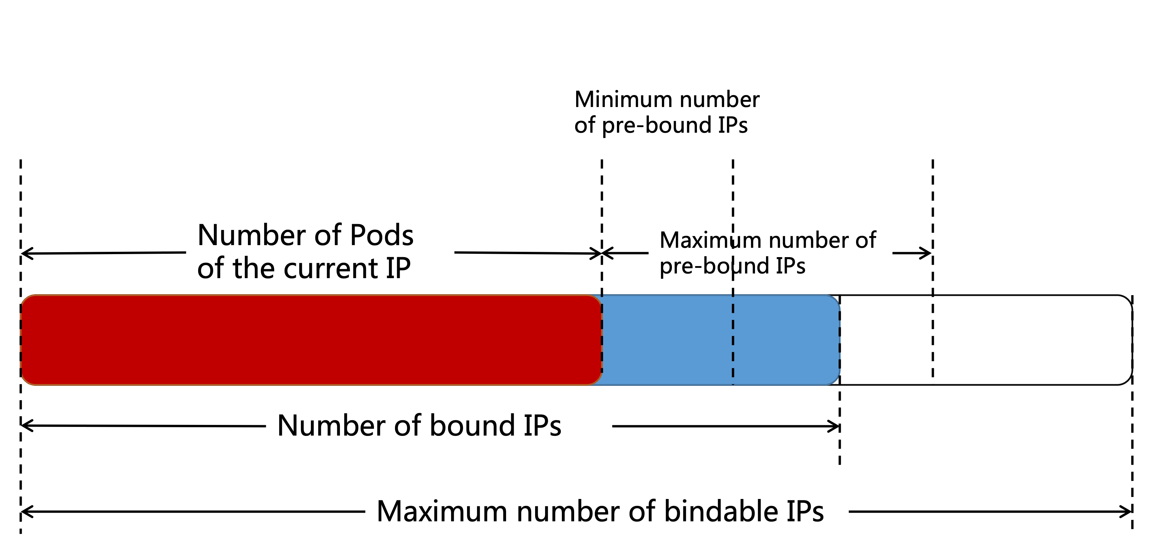
TKE maintains an auto-scaling ENI pool on each node. The number of bound ENIs ranges from the number of Pods + the minimum number of pre-bound ENIs to the number of Pods + the maximum number of pre-bound ENIs.
When the number of bound ENIs is less than the number of Pods + the minimum number of pre-bound ENIs, new ENIs will be bound to make the number of bound ENIs = the number of Pods + the minimum number of pre-bound ENIs.
When the number of bound ENIs is larger than the number of Pods + the maximum number of pre-bound ENIs, an ENI will be released about every 2 minutes until the number of bound ENIs = the number of Pods + the maximum number of pre-bound ENIs.
When the maximum number of bindable ENIs is less than the number of bound ENIs, the unnecessary idle ENIs will be released directly to make the number of bound ENIs equal to the maximum number of bindable ENIs.
When a Pod with an exclusive ENI is created, an available ENI is randomly allocated from the node's available ENI pool.
When a Pod with an exclusive ENI is terminated, its ENI will be released and returned to the ENI pool of the node instead of being released (deleted) in the VPC, so that another Pod can continue to use the ENI.
When the node is deleted, all bound ENIs will be released (deleted).
When there are multiple container subnets, the ENI is preferentially allocated to the subnet with the largest number of available IP addresses.
Static IP address mode
TKE does not maintain an ENI pool on each node, and the ENI is not pre-bound to the node.
When a Pod with an exclusive ENI is created, an ENI is directly bound to the node and used by this Pod.
When a Pod with an exclusive ENI of the non-static IP address is terminated, the ENI used by the Pod will be deleted and released directly in the VPC. When a Pod with an exclusive ENI of the static IP address is terminated, the ENI will only be unbound, but not be deleted and released.
When the node is deleted, all bound ENIs will be released (deleted).
When there are multiple container subnets, the ENI is preferentially allocated to the subnet with the largest number of available IP addresses.
Use Limitations
The network mode is only available to some models such as S5, SA2, IT5 and SA3.
The number of Pods with exclusive ENIs running on a node is limited by the number of ENIs that can be bound to model. The maximum number of Pods with exclusive ENIs running on a node = the maximum number of bindable ENIs - 1.For more information, see Limits on the Number of Pods in VPC-CNI Mode.
The new network solution is only suitable for the new TKE clusters.
There are unified restrictions on the VPC-CNI mode:
You need to plan a dedicated subnet for containers, and the subnet is not recommended to be shared with other Tencent Cloud services such as CVMs and CLBs.
The nodes in the cluster need to be in the same AZ as the subnet, otherwise, the Pod cannot be scheduled.