Binding a Login Method
Baixar
Modo Foco
Tamanho da Fonte
Scenarios
Tencent Cloud supports email, passkey, and WeChat login. You can link your registered Tencent Cloud account with these methods to log in to Tencent Cloud.
Use Limits
An email address can be bound to only one Tencent Cloud account.
An account can create up to five passkeys.
A WeChat account can be linked to up to 50 Tencent Cloud accounts.
For more related restrictions, see Tencent Cloud Account Restrictions.
Operation Steps
Linking an Existing Account with WeChat
If you previously registered a Tencent Cloud account using a non-WeChat method, you need to link the WeChat login method with your existing Tencent Cloud account. The steps are as follows:
Method 1:
1. Go to the Tencent Cloud homepage and click Sign Up Free in the upper-right corner.
2. In the Other Registration Methods section, select Sign Up with Wechat.
3. Open the WeChat app on your mobile phone and scan the QR code on the page. Then, confirm your account information within WeChat and click Allow.
4. On the Register Tencent Cloud page, select Link Existing Account.
5. Log in to your existing Tencent Cloud account to complete the linking.
Method 2:
1. Log in to the Tencent Cloud console and go to the Account Information page.
2. In the Login Methods section, locate WeChat and click Link.
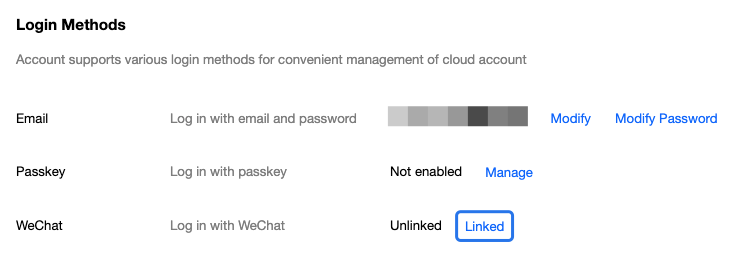
3. In the pop-up window, complete the identity verification as prompted on the page.
4. On the Scan to link WeChat page, use the WeChat app on your mobile phone to scan the QR code on the page and click Allow to complete the linking.
Creat a Passkey for an Existing Account
After creating a passkey, you can securely log in to Tencent Cloud using your fingerprint, facial recognition, screen unlock, or a FIDO2 security key, eliminating the need to enter your account password. The creation steps are as follows:
1. Log in to the Tencent Cloud console and go to the Account Information page.
2. In the Login Methods section, locate Passkey and click Manage.
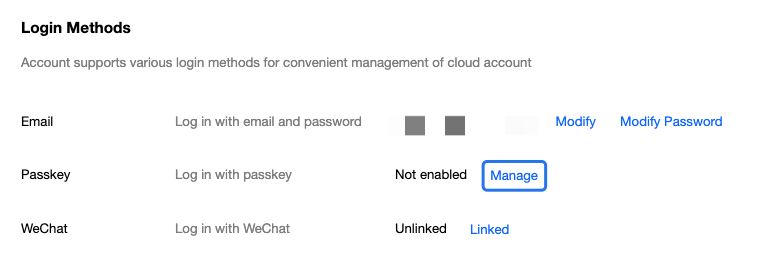
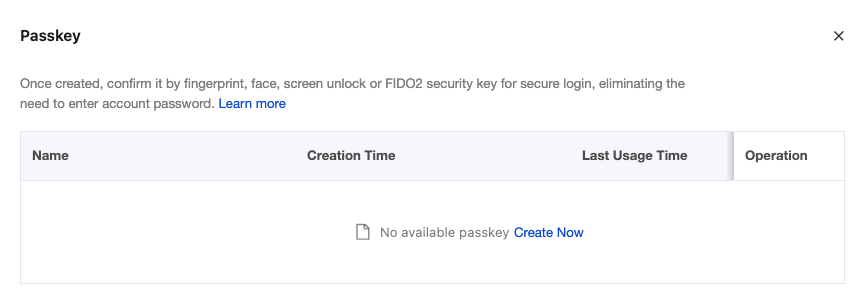
3. In the pop-up window, click Create Now.
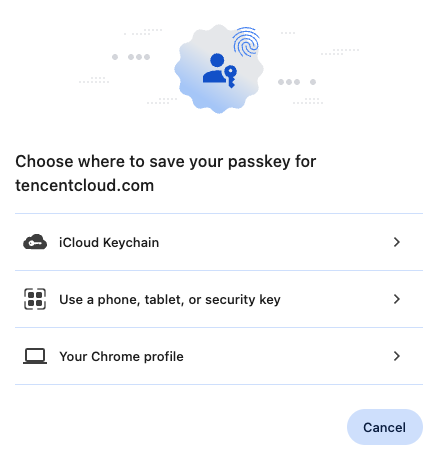
4. In the browser pop-up page, select the appropriate device as needed according to the page prompts to create a passkey. For detailed steps, see Create Passkey.
5. After successful creation, you can view the passkey creating result on the current page. You can also modify the key name as needed to facilitate better management.
Ajuda e Suporte
Esta página foi útil?
Você também pode entrar em contato com a Equipe de vendas ou Enviar um tíquete em caso de ajuda.
comentários