Third-Party Integration
Baixar
Modo Foco
Tamanho da Fonte
Background
A standardized log output interface is a fundamental feature that all network devices or business systems must provide. Through standardized protocols, users can forward iOA logs to third-party log management or analysis systems for centralized log management and analysis, enabling security event response.
Usage Instructions
Step 1: Identify the log server used by the user, and complete log server integration on the iOA console. For details, see iOA Console Configuration.
Step 3: Users can implement security event response requirements based on the API document.
Step 1: iOA Console Configuration
syslog Server Integration
During a query, you can enter a server address or name for fuzzy search, or filter by protocol type (TCP/UDP).
1. Log in to the Tencent iOA Zero Trust Security Management System console and choose Third-Party Peering > Syslog Server. in the left sidebar.
2. On the Syslog Server page, click Adding Server.
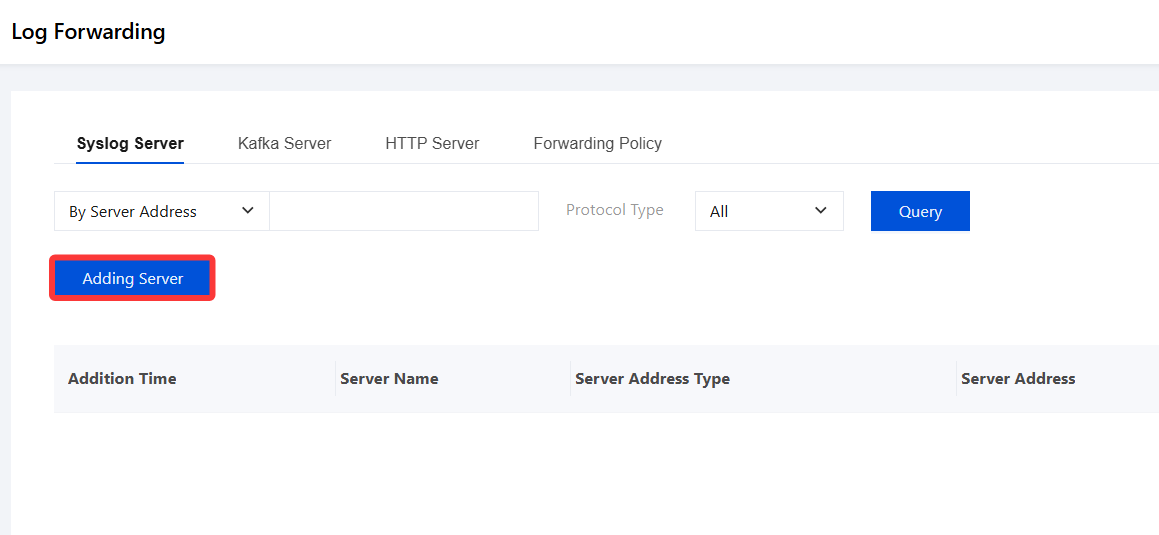
3. In the Create syslog Server dialog, configure the relevant parameters.
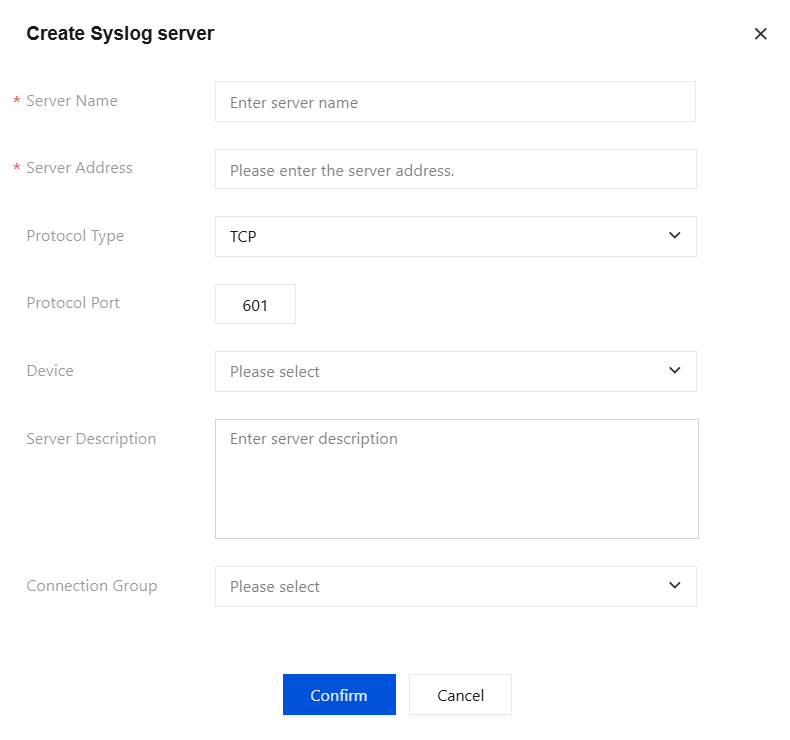
Parameter Name | Description |
Server name | Custom. Maximum 32 characters. Only Chinese, English, digits, and underscores are supported. |
Server address | Supports switching between IP addresses and domain names. Up to 300 characters. Only standard IP addresses and domain names are supported. |
Protocol Type | TCP or UDP. Select based on the actual situation. |
Protocol Port | 1~65535. |
Device/Facility | Supports local0 to local7. |
Server Description | Custom. Maximum 255 characters. Only Chinese, English, digits, and underscores are supported. |
Connection Group | Select a connection from the drop-down list. |
Note:
IP address validation regex: /^(?:(?:25[0-5]|2[0-4][0-9]|[01]?[0-9][0-9]?)\\.){3}(?:25[0-5]|2[0-4][0-9]|[01]?[0-9][0-9]?)$/
Domain name validation regex: /[a-zA-Z0-9][-a-zA-Z0-9]{0,62}(\\.[a-zA-Z0-9][-a-zA-Z0-9]{0,62})+\\.?/
4. After configuration, click Confirm to save. Once the syslog server is added, the addition time, server name, server address type, server address, protocol type, device/Facility, and server description are displayed in the list.
Kafka Server
During a query, you can perform a fuzzy search by Kafka address, server name, and Kafka topic.
1. Log in to the Tencent iOA Zero Trust Security Management System console and choose Third-Party Peering > Kafka Server. in the left sidebar.
2. On the Kafka Server page, click Adding Server.
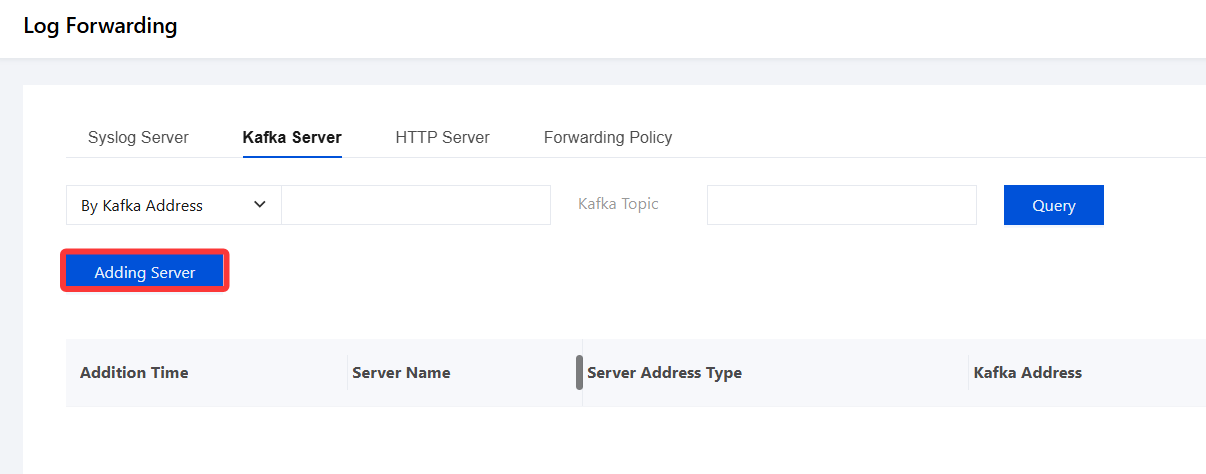
3. In the Create Kafka Server dialog, configure the relevant parameters.
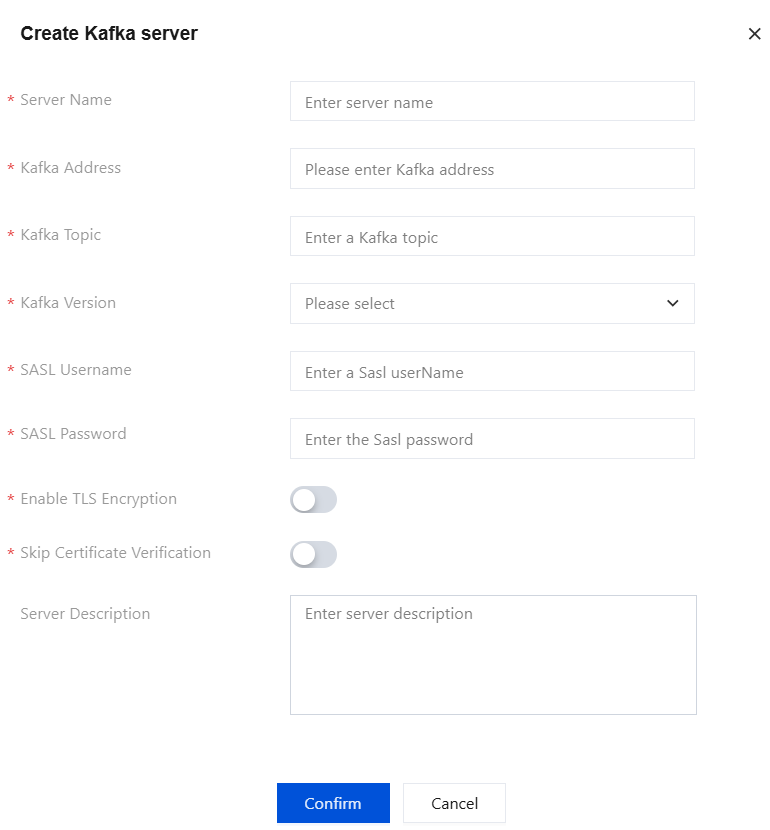
Parameter Name | Description |
Server name | Custom. Maximum 32 characters. Only Chinese, English, digits, and underscores are supported. |
Kafka Address | Custom. Up to 255 characters. |
Kafka Topic | Any value. Up to 255 characters. |
Kafka Version | Custom. Maximum 255 characters. Only Chinese, English, digits, and underscores are supported. |
Sasl username | Custom. Maximum 255 characters. Only Chinese, English, digits, and underscores are supported. |
Sasl password | Custom. Maximum 255 characters. Only Chinese, English, digits, and underscores are supported. |
Enable TLS Encryption. | After enabled, TLS encryption protects communication data between the server and third-party log systems from leakage or tampering during transmission. |
Skip Certificate Verification. | After enabled, security risks may exist. |
Server Description | Custom. Maximum 255 characters. Only Chinese, English, digits, and underscores are supported. |
4. After configuration, click Confirm to save. Once the Kafka server is added, the addition time, server name, server address type, Kafka address, Kafka topic, SASL mechanism, SASL username, and server description are displayed in the list.
HTTP Server
During a query, you can perform a fuzzy search by HTTP address or server name.
1. Log in to the Tencent iOA Zero Trust Security Management System console and choose Third-Party Peering > HTTP Server. in the left sidebar.
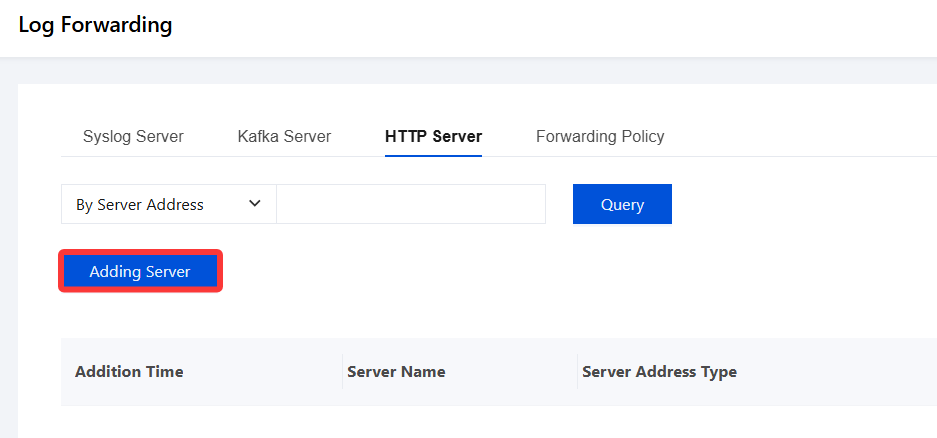
2. On the HTTP Server page, click Adding Server.
3. In the Create HTTP Server dialog, configure the relevant parameters.
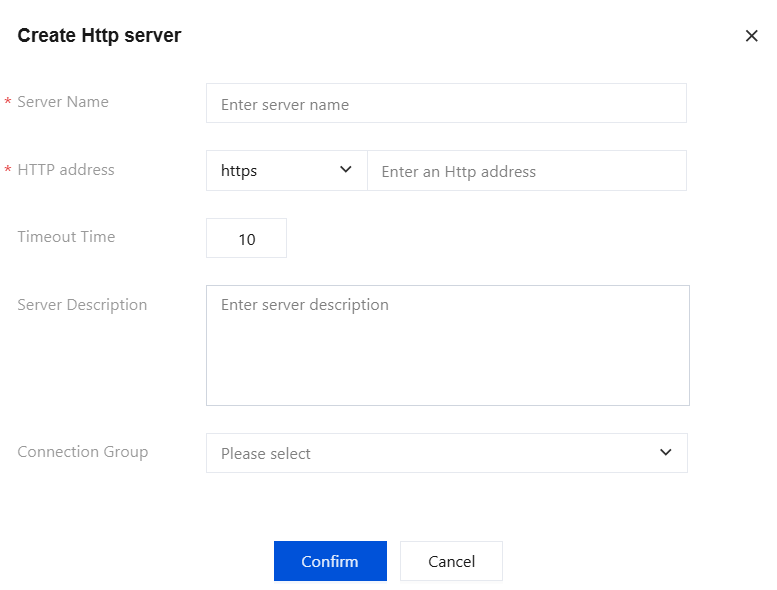
Parameter Name | Description |
Server name | Custom. Maximum 32 characters. Only Chinese, English, digits, and underscores are supported. |
Http address | Custom. A maximum of 300 characters. Only standard domain names are supported. Domain name validation regex: /[a-zA-Z0-9][-a-zA-Z0-9]{0,62}(\\.[a-zA-Z0-9][-a-zA-Z0-9]{0,62})+\\.?/. |
Timeout Time | 0 ms ~ 65535 ms. |
Server Description | Custom. Maximum 255 characters. Only Chinese, English, digits, and underscores are supported. |
Connection Group | Select a connection from the drop-down list. |
4. After configuration, click Confirm to save. Once the HTTP server is added, the addition time, server name, server address type, HTTP address, timeout period, and server description are displayed in the list. You can add, edit, and delete servers.
Forwarding Policies
During a query, you can filter results by forwarding log type.
1. Log in to the Tencent iOA Zero Trust Security Management System console and choose Third-Party Peering > Forwarding Policy. in the left sidebar.
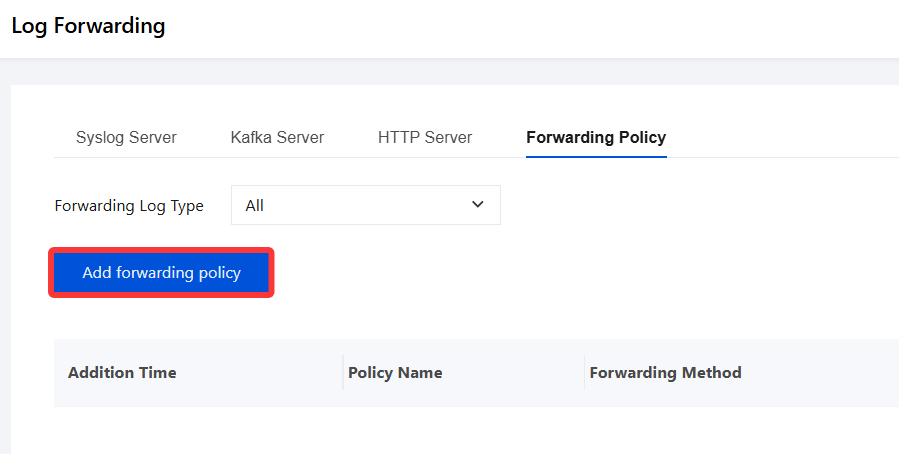
2. On the Forwarding Policy page, click Add Forwarding policy.
3. In the Create Forwarding Policy dialog, configure the relevant parameters.
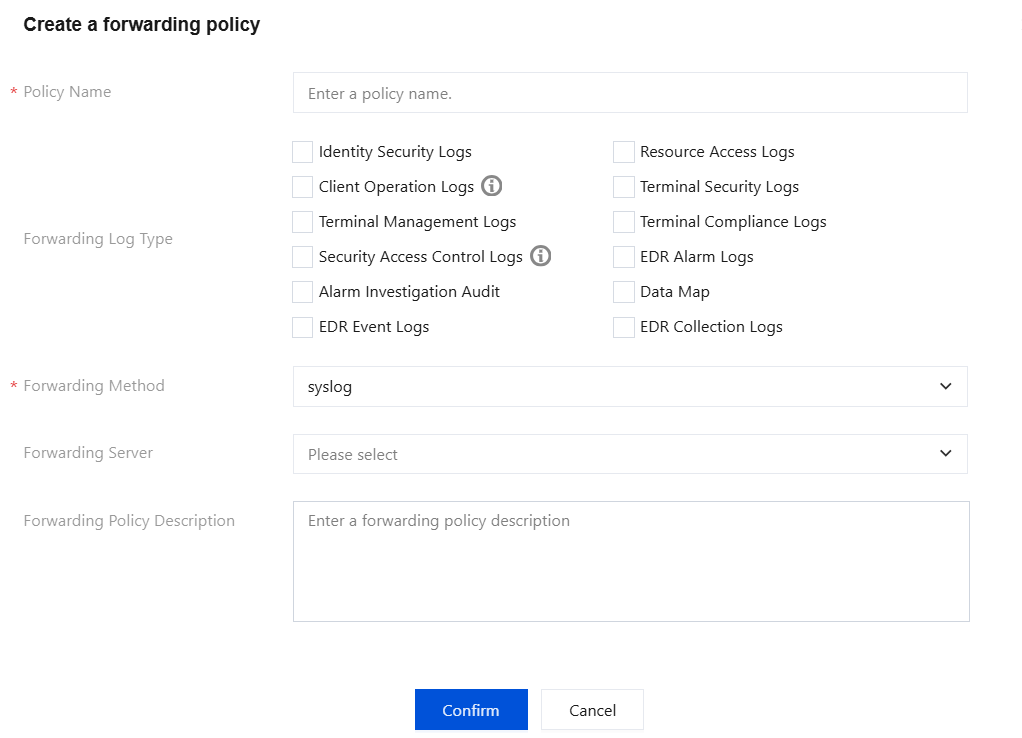
Parameter Name | Description |
Policy Name | Custom. Maximum 32 characters. Only Chinese, English, digits, and underscores are supported. |
Forwarded Log Type | Select the logs to be forwarded. |
Forwarding Method | Currently, only syslog, Kafka, and HTTP are supported. |
Forwarding Server | Only a service name configured in the server list can be selected. |
Forwarding Policy Description | Custom. Maximum 255 characters. Only Chinese, English, digits, and underscores are supported. |
4. The corresponding log IDs in the backend database are as follows: (Forwarding is also supported for macOS and mobile devices if the system has the following logs).
Log Category (Major) | Business Logs | Log Details (Subcategory), Supported | Log No. |
Terminal Logs | Endpoint Security | Virus detection | 7002 |
| | System repair | 7002 |
| | Real-time protection | 7003 |
| | Vulnerability Fixing | 7009 |
| | Network attack (network defense) | 7028 |
| | Illegal outbound connection | 7033 |
| | Process control | 7036 |
| | Service control | 7044 |
| Terminal Control - Data Protection | USB storage device plugging and unplugging | 7038 |
| | Device disabling | 7021 |
| | File operation auditing | 7501 |
| | File access and operations | 7102 |
| | Terminal network access control | 7066 |
| Compliance Detection | Third-party antivirus software | 7039 |
| | Patch list | 7040 |
| | Software security baseline | 7041 |
| | Non-compliant processes | 7045 |
| | Non-compliant service | 7046 |
| | Non-compliant ports | 7047 |
| | Laptop encryption | 7057 |
| | Domain join | 7058 |
| | iOA version | 7059 |
| | Operating system. | 7060 |
| | Weak password for domain/local account | 7061 |
| | Non-compliant registry entry | 7062 |
| | Compliance detection | 7302 |
| System Settings | Installation | 7006 |
| | Uninstall | 7007 |
| | Terminal upgrade | 7004 |
| | Power on/off | 7015 |
| | Exit client | 7014 |
Gateway Logs | Business Access | Zero Trust Office - Terminal Access Log | 7053 |
| | NGN Gateway Reporting | 7055 |
5. After configuration, click Confirm to save. Once the forwarding policy is added, the addition time, policy name, forwarding method, forwarding log type, forwarding configuration server, and policy description are displayed in the list.
Step 2: Log API Interface Details
Ajuda e Suporte
Esta página foi útil?
Você também pode entrar em contato com a Equipe de vendas ou Enviar um tíquete em caso de ajuda.
comentários