Client operation logs
Baixar
Modo Foco
Tamanho da Fonte
Log Feature Overview
1. Log in to the Tencent iOA Zero Trust Security Management System console and choose iOA Client Ops > General Management Policy > Client Operation Logs in the left sidebar.
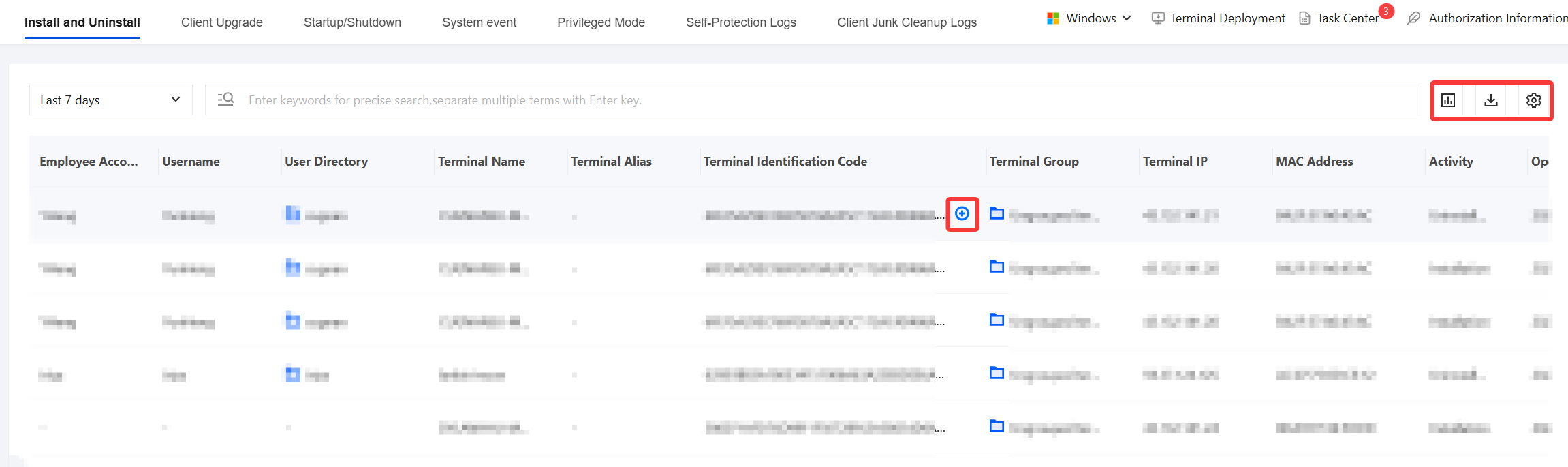
2. On the client operation log page, you can view logs such as installation and uninstallation, client upgrades, and power on/off events.
Icon | Icon description |
 | Supports quickly selecting preset time ranges (last 7 days/last 10 days/last 30 days) and custom exact time ranges. |
 | Data statistics charts are displayed as bar charts. |
 | Supports exporting audit data to files for offline analysis. |
 | Supports custom display of report fields. |
 | Supports quickly searching for and displaying identical content in reports. |
Audit Log Description
Log audit consists of the following modules:
Client operation logs | Log content |
Installation and uninstallation | Display iOA client installation, uninstallation, startup, and exit logs. |
Client upgrade | Display iOA client upgrade logs. |
Power on and off | Display iOA client startup and shutdown logs. |
System events | Record and display behavior events in scenarios such as terminal user logon, system startup, system shutdown, user logoff, user-initiated restart, user logon, abnormal shutdown, system startup, system wake-up, and unlock. |
Privileged mode | Display the startup of iOA client privileged mode. |
Remote assistance logs | Display iOA client remote assistance status. |
Self-protection logs | View self-protection alarms and log information. Any terminal behavior that attempts to compromise iOA, such as stopping processes, stopping services, or deleting files, triggers the client self-protection policy and generates self-protection logs. |
Client junk cleanup logs | Display iOA client junk cleanup status. |
Ajuda e Suporte
Esta página foi útil?
Você também pode entrar em contato com a Equipe de vendas ou Enviar um tíquete em caso de ajuda.
comentários