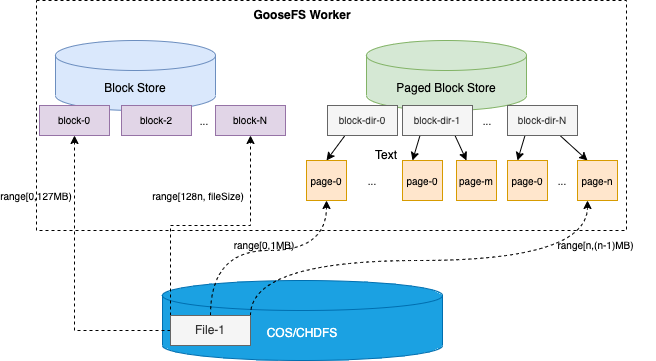
Starting from GooseFS version 1.7.0 and above, the new Page Store caching feature is supported. Compared with the traditional Block Store caching, the former can significantly optimize the cache space utilization and cold read efficiency for discrete IO access models. The architectural comparison between Page Store and Block Store is as follows.
The Page Store storage architecture breaks the limitation of the default 128MB Block size per Worker node as the minimum caching unit. Without adding any additional metadata burden to the Master node, it allows caching data in 1MB Page format on Worker nodes.
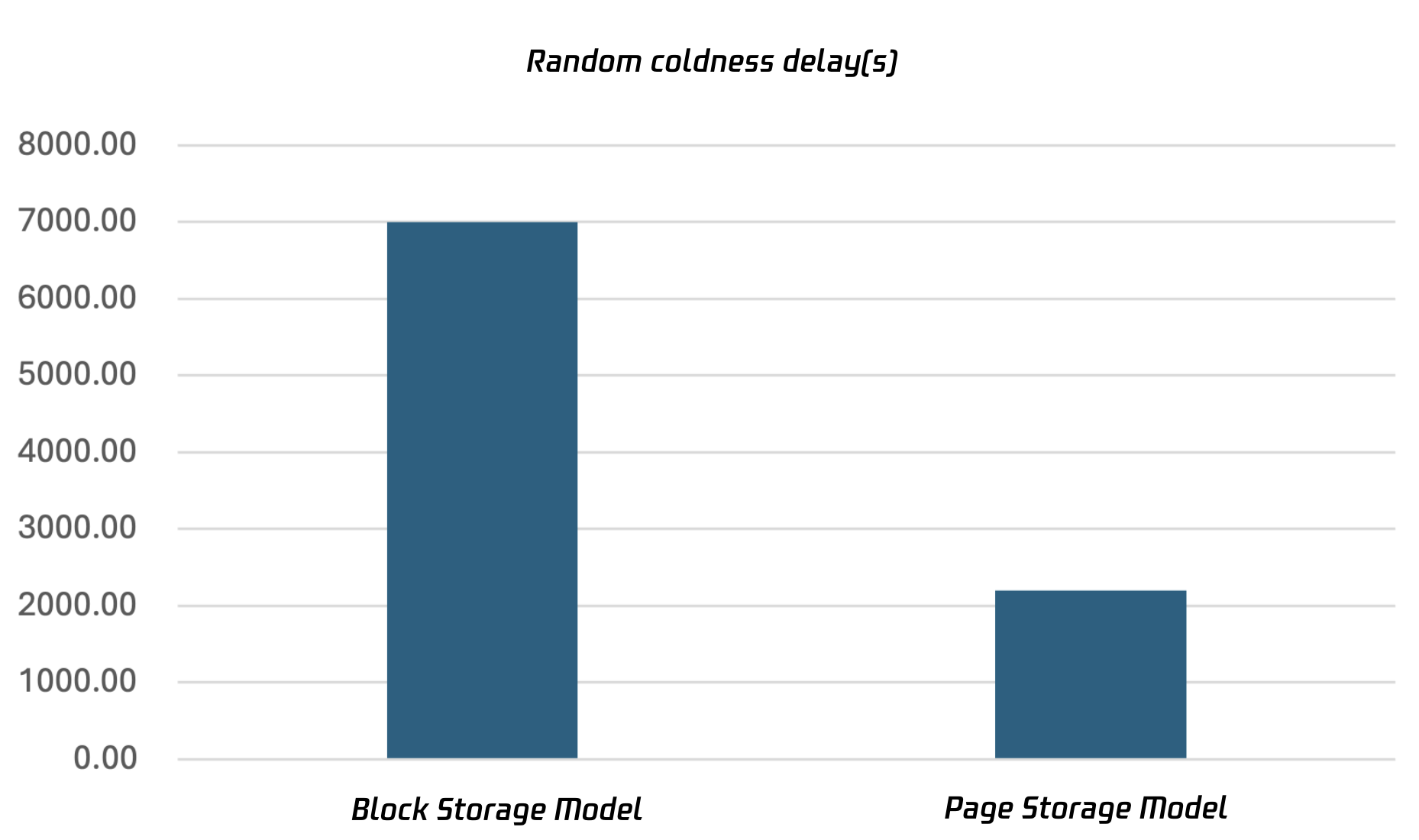
This storage architecture, on one hand, significantly improves cache space utilization. On the other hand, in scenarios involving random cold reads for single files, it can noticeably reduce request response time and cache activation latency. Below is a comparison of cold read latency between Block mode and Page mode in a random read scenario for an OLAP query.
Using Page Store
To use the Page Store mode, you need to add the following configuration to the Worker's data storage:
Then distribute the configuration synchronization to all nodes, and restart the Worker processes on all nodes for it to take effect.
Directory Structure between Page Store and Block Store
Under the data catalog of Page Store, a level 4 directory structure is adopted:
The first-level subdirectory is DEFAULT LOCAL and cannot be changed;
The second-level subdirectory represents the Page Size in this directory. For example, the subdirectory 2097152 in the figure indicates that the size of each Page in this directory is 2MB;
The third level is a hash bucket value, which is calculated using the hash value of each Block directory name and ${goosefs.worker.page.store.local.store.file.buckets};
The fourth-level subdirectory is the Block directory, which stores all cached Pages belonging to this Block. The naming rule for this directory is: paged_block_${blockId}.
Note:
Under the second-level subdirectory, there is usually a .TEMP directory, which stores all ongoing write operations Block data. The naming convention for each Block directory under the .TEMP directory is paged_block_${blockId}session{sessionId}.
Switching between Page Store and Block Store
Currently, when short-circuit read-write is not enabled by default, it allows free switching of storage types by modifying the configuration. Specifically, change the configuration item `goosefs.worker.block.store.type` to the corresponding storage type, then restart the Worker Server for the changes to take effect. The Worker will load and cache data based on the data path specified by the corresponding storage type.
When short-circuit read is enabled, the above method can also be used to modify and take effect, but the process where the Client is located must be restarted simultaneously; otherwise, a short-circuit read/write exception may occur.
Configuration Parameters of PageStore
Parameter
Default Value
Description
goosefs.worker.block.store.type
FILE
Specify the storage type on the Worker, with options being FILE and PAGE.
Default is FILE, which is the traditional Block storage mode. Specify PAGE for Page storage mode.
goosefs.worker.page.store.page.size
1MB
Specify the size of each Page. The default size is 1MB, which can be assigned as required, such as 128KB or 256KB.
goosefs.worker.page.store.dirs
/tmp/goosefs-cache
Assign the data directory for Page Store. For example: /data/goosefs-data/paged-block.
goosefs.worker.page.store.size
512MB
Assign the size of the data directory for Page Store. The default is 512MB. If it exceeds the capacity constraint, Page-granularity elimination will be triggered.
goosefs.worker.cache.request.pending.timeout
500ms
Option to optimize timeout wait for cache breakdown issues in high-concurrency cold read scenarios, default is 500 ms.
If a concurrent read causing cache breakdown occurs on the same Worker node, the later requests will attempt to wait for 500ms to directly return data from the cache rather than penetrate to the underlying storage.
If the waiting timeout occurs, it will read from the underlying storage and return.
When this value is set to less than or equal to 0, it is equivalent to disabling cache breakdown optimization.
goosefs.worker.page.store.overhead
0.1
Reserved space for Page storage. The default value is 0.1, which means 10 percent of the space is reserved as reserved space. When the water level is reached, eviction is triggered.
Number of Hash buckets for storing Paged Block directories, default is 1000.
About Hierarchical Storage
GooseFS does not support tiered storage under the Page Store storage type, meaning only the default first-layer storage medium is available. This design is due to the high overhead of indexing and flowing discrete Pages between multi-level storage, which significantly impacts Worker node resource usage and performance.