Configuring a Priority Queue
Baixar
Modo Foco
Tamanho da Fonte
Priority queues are a special type of queue in RabbitMQ that allows messages to be consumed in a preset priority order. Unlike the first-in-first-out (FIFO) mechanism of classic queues, priority queues reorder messages based on their priority properties, ensuring that high-priority messages are obtained and processed first by consumers.
Core Features
Priority range: It supports 256 priority levels from 0 to 255, where a higher number indicates a higher priority.
Memory sorting: All messages are sorted by priority in memory, which may increase memory consumption.
Performance impact: The sorting operation incurs additional CPU overheads.
Hybrid mode: It can be used in combination with features such as persistence and TTL.
Scenarios
Urgent task processing: For example, in e-commerce systems, order cancellation requests (high-priority) should be processed before ordinary orders (low-priority).
Alarm system: Different levels of alarm messages (CRITICAL > WARNING > INFO) require differentiated processing.
VIP customer service: Messages from high-level customers are assigned a higher priority.
Resource scheduling: Critical background tasks have priority access to computing resources.
Constraints and Limitations
Only Managed Edition clusters support configuring priority queues. Serverless Edition clusters do not currently support configuring them.
Configuring a Message Priority Range for Queues
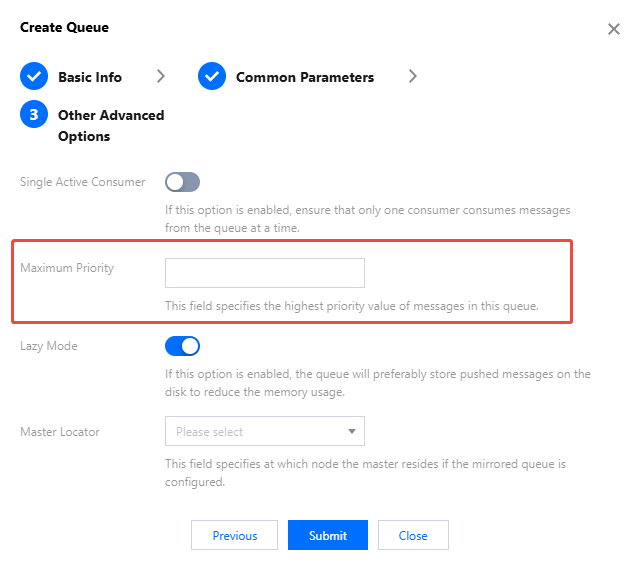
When creating a queue, set the maximum priority for messages in the queue in Other Advanced Options. For specific steps, see Creating a Queue.
Set the maximum priority for messages in this queue, with an optional range of [0, 255]. Higher values incur greater sorting overheads.
After this parameter is configured, the priority feature is enabled. When sending messages, producers specify the priority level (between 0 and Maximum Priority) via the priority property. High-priority messages are consumed before lower-priority ones. The priority level of messages without a priority setting defaults to 0.
Sending a Priority Message
Take the Java client as an example to send messages with a priority property.
// Create message properties with a priority.AMQP.BasicProperties properties = new AMQP.BasicProperties.Builder().priority(5) // Set the priority to 5 (range: 0–255)..deliveryMode(2) // Persistent messages..build();// Send a message.channel.basicPublish("exchange.direct", // Exchange name."priority.routing", // Routing Key.properties, // Message properties."important order data".getBytes() // Message body.);
Ajuda e Suporte
Esta página foi útil?
Você também pode entrar em contato com a Equipe de vendas ou Enviar um tíquete em caso de ajuda.
comentários