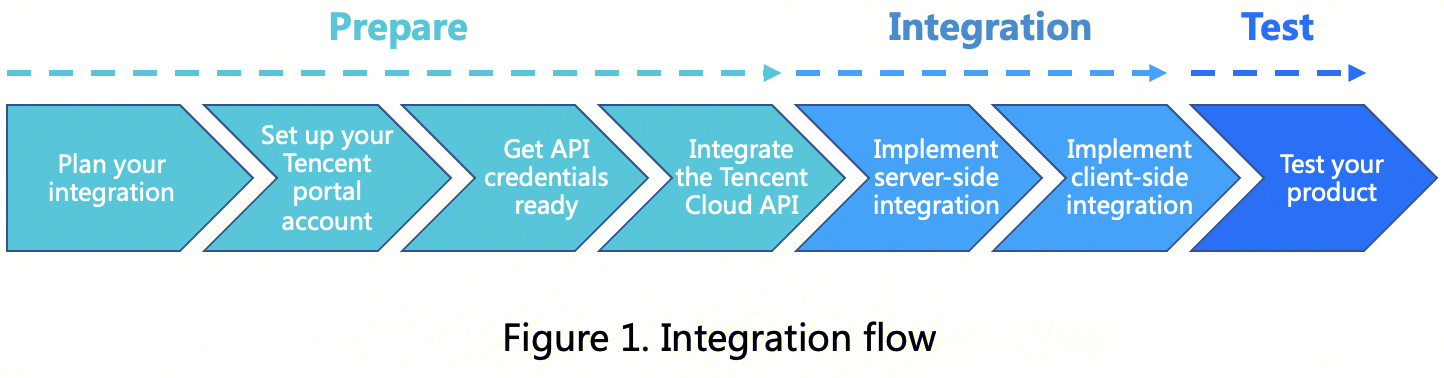
Integrate the Tencent Cloud eKYC service with your application in the following three stages: preparation, integration, and testing.
The following sections describe the three stages in detail.
Prepare
Prepare for the integration in the following steps:
1. Plan your integration
Select appropriate products based on the features you need.
Subproduct
Feature Overview
Feature Details
Service Deployment Region
Supported Integration Method
Selfie verification
Determine whether the user in the video is a live person, and compare the user with the photo uploaded from the customer's backend to determine whether they are the same person.
●Real-time face detection
●Liveness detection (available modes: video-based, motion-based, reflection-based, and blinking-and-reflection-based)
●Comparison with the photo provided by the backend
●Hong Kong (China)
●Singapore
●Indonesia
●Thailand
●Malaysia
●Brazil
●App SDK
● Mobile H5
● Pure API
Identity Verification
Provides an automated identity authentication solution that prompts users to take a photo of their identity documents and take video selfies, so as to determine whether a user is a live person and whether the user is the person shown in the document.
●ID document OCR
●ID photo extraction
●Real-time face detection
●Liveness detection (available modes: video-based, motion-based, reflection-based, and blinking-and-reflection-based)
●ID photo and selfie comparison
●App SDK
● Mobile H5
Tencent Cloud eKYC provides different integration methods for you to integrate with various products. Currently, two subproducts support five integration methods:
Selfie Verification
Integration Method
Description
Selfie Verification (App SDK)
Integrate the eKYC Selfie Verification service with native mobile applications.
Selfie Verification (Mobile H5)
Integrate the eKYC Selfie Verification service with mobile web (H5) applications, or interact via modern mobile web browsers.
Selfie Verification (API Only)
Integrate the eKYC Selfie Verification service with server-side applications via API.
ID Card and Selfie Verification
Integration Method
Description
Card, Liveness, and Face Verification (App SDK)
Integrate the eKYC Card and Selfie Verification service with native mobile applications.
Card, Liveness, and Face Verification (Mobile H5)
Integrate the eKYC Card and Selfie Verification service with mobile web (H5) applications, or interact via modern mobile web browsers.
How to Choose an Integration Method
Select based on your business requirements:
Verify documents (such as ID card, passport, and so on) → Selfie Verification
Verify face only (user photo already exists) → Selfie Verification.
Select based on your technical platform:
Native iOS/Android App → App SDK
Official Account/Mini Program/Mobile Web Page → Mobile H5
Server-side batch processing/Custom interface → Pure API
Select based on your development stage:
For quick testing/initial integration → First verify the feature using Mobile H5.
For official launch/performance optimization → Switch to the App SDK later.
How to Choose Between Different Versions
For both liveness face comparison and card liveness face comparison services, Tencent Cloud eKYC offers multiple editions with flexible combinations of capabilities such as liveness comparison, device risk control, and face shield.
Access Mode
Version
SdkVersion
Liveness
Face comparison
Device Risk Control
Face Shield
Pure API
Basic(default)
This parameter is not provided.
Yes
Yes
No
No
App SDK
Basic(default)
BASIC
Yes
Optional
No
No
App SDK
Enhance
ENHANCED
Yes
Optional
Yes
No
App SDK
Pro
PRO
Yes
Optional
No
Yes
App SDK
Plus
PLUS
Yes
Optional
Yes
Yes
Mobile H5
Basic(default)
BASIC
Yes
Optional
Yes
No
Mobile H5
Plus
PLUS
Yes
Optional
No
Yes
If you need further assistance, please contact us.
2. Set up your Tencent portal account
A. Sign up for a Tencent Cloud account
To use the eKYC service, sign up for a Tencent Cloud account as instructed in Signing Up and complete Enterprise Identity Verification. (If you have already signed up, skip this step.)
B. Activate the eKYC service
Log in to the eKYC console using your Tencent Cloud account and activate the service.
3. Get API credentials ready
Tencent Cloud uses SecretId and SecretKey to verify your identity and permissions. You can get the Tencent Cloud API credentials in the following steps:
A. Go to the TencentCloud API key management page and select CAM > API Key Management on the left sidebar to enter the API key management page.
B. Click Create Key to create a key and save the SecretId and SecretKey for subsequent API calls. You can skip this step if you already have a Tencent Cloud key.
4. Integrate the Tencent Cloud API (Integrate the Tencent Cloud API)
Tencent Cloud APIs can be called on the online debugging page of API 3.0 Explorer. To view the input parameters and responses of APIs, see Quick API Run. Before integrating Tencent Cloud API, you must integrate Tencent Cloud SDK to simplify the API integration process as well as to ensure that both API requests and responses meet expectations. For more information about integration, see Connecting to TencentCloud API.
Integration
eKYC provides different integration methods. Complete integration by following the instructions provided in the guide corresponding to your integration method.
After completing the integration, you can verify whether your integration is successful through testing. We strongly recommend that you complete end-to-end testing before deploying to the production environment. Tencent Cloud currently does not provide a dedicated testing environment. You can perform your integration testing using the Tencent Cloud production environment.