Announcements
Feb 10, 2022 - CCN API Authentication Upgrade
The authentication feature of some CCN APIs were upgraded and optimized during 10:00–18:00 on February 10, 2022. After the upgrade, sub-users need to apply for CAM policy authorization from the root account to call these APIs; otherwise, the call will fail. For the application process, see Granting Sub-accounts the Policy Permission.
Related APIs
API Type | API | Feature |
Read API | Gets the information of CCN bandwidth change | |
| Gets the information of CCN bandwidth renewal order | |
| Queries compliance review form | |
| Queries order payment status | |
Write API | Edits CCN route priority | |
| Sets auto-renewal flag for cross-region CCN bandwidth cap | |
| Conducts compliance review | |
| Modifies compliance review form | |
| Creates compliance review form | |
| Clears CCN route table selection policies | |
Granting Sub-accounts the Policy Permission
Complete the policy authorization for your sub-users as instructed below to prevent failed calls to the upgraded APIs.
1. Log in to the CAM console.
2. Click Policies on the left sidebar.
3. Click All Policies.
4. Click Associate Users/Groups on the right of the target policy.
5. In the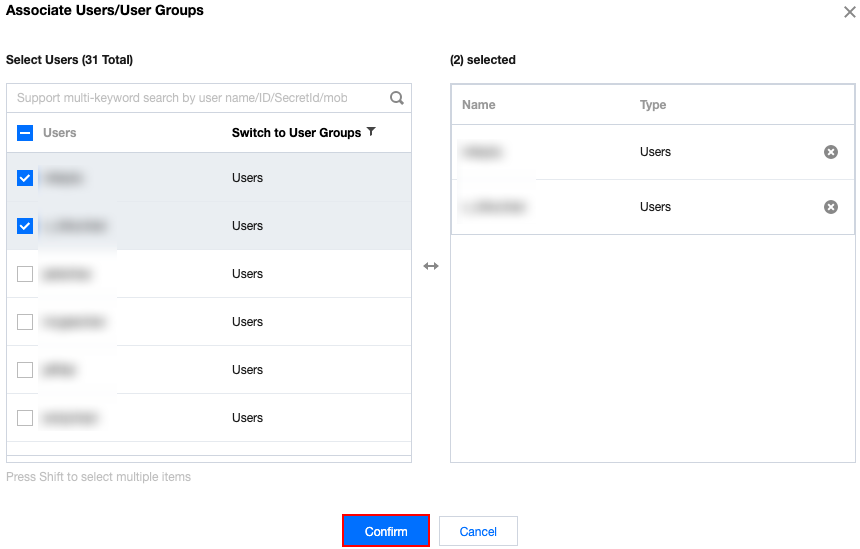
pop-up windo
w, select target users from the box on the left to the Selected box on the right, and click Confirm.
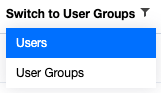
6. (Optional) To associate a user group, click Switch to User Groups -> User Groups in the pop-up window, and repeat the operations in step 5.
Ajuda e Suporte
Esta página foi útil?
Você também pode entrar em contato com a Equipe de vendas ou Enviar um tíquete em caso de ajuda.
comentários