In some cases, the bulk rejection or search rejection rate of a cluster increases. Specifically, an error message similar to the following will appear when bulk writes/searches are performed:
Error 1:
[2019-03-01 10:09:58][ERROR]rspItemError: {"reason":"rejected execution of org.elasticsearch.transport.TransportService$7@5436e129 on EsThreadPoolExecutor[bulk, queue capacity = 1024, org.elasticsearch.common.util.concurrent.EsThreadPoolExecutor@6bd77359[Running, pool size = 12, active threads = 12, queued tasks = 2390, completed tasks = 20018208656]]","type":"es_rejected_execution_exception"}
Error 2:
[o.e.a.s.TransportSearchAction][1590724712002574732][31691361796] Failed to execute fetch phase
Caused by: org.elasticsearch.common.util.concurrent.EsRejectedExecutionException: rejected execution of org.elasticsearch.common.util.concurrent.TimedRunnable@63779fac on QueueResizingEsThreadPoolExecutor[name =1585899116000088832/search, queue capacity =1000, min queue capacity =1000, max queue capacity =1000, frame size =2000, targeted response rate = 1s, task execution EWMA =2.8ms, adjustment amount =50, org.elasticsearch.common.util.concurrent.QueueResizingEsThreadPoolExecutor@350da023[Running, pool size =49, active threads =49, queued tasks =1000, completed tasks =57087199564]]
You can see that the bulk rejection/search rejection rate has increased in Cloud Monitor.
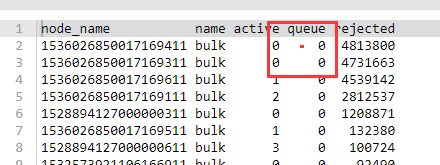
You can also view the number of bulk writes that are being rejected or have been rejected by running the following command in the Kibana console.
GET _cat/thread_pool/bulk?s=queue:desc&v
GET _cat/thread_pool/search?s=queue:desc&v
Generally, the default value for a queue is 1024. If there is 1024 under a queue, rejections have occurred on the node.
Troubleshooting
1. Check whether the body size of the bulk request is unreasonable. The size of a single bulk request should be below 10 MB; otherwise, it will take too long to process a single bulk request, causing the queue to fill up. However, if the size is too small, too many bulk requests will be generated, also causing the queue to fill up.
2. Check whether the write QPS matches the cluster configuration. The empirical value is that if shards are distributed evenly, a 4-core 16-GB 3-node cluster can sustain 20,000–30,000 write QPS, but more query requests lead to a lower QPS. Specifically, you can determine the highest write QPS capacity that the cluster can withstand through stress testing and select the appropriate configuration.
3. Check whether the shard data volume is too high. A too large shard size may result in bulk rejections; therefore, we recommend you limit the size of one shard to 20–50 GB. You can view the size of each shard in the index by running the following command in the Kibana console:
GET _cat/shards?index=index_name&v
Check whether the shards are unevenly distributed
Sometimes, the shards may be unevenly distributed across all the nodes in the cluster. Some nodes are assigned with too many shards, while some too few.
You can check that in Cluster Monitoring > Node Status on the cluster details page in the ES console. For more information, please see Viewing Monitoring Data.
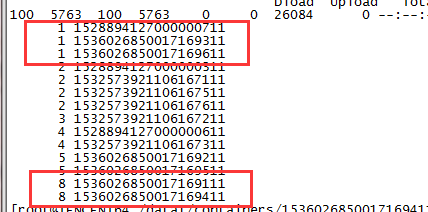
You can also view the number of shards assigned to each node in the cluster by using ES APIs.
GET /_cat/shards?index={index_name}&s=node,store:desc
The results are as follows (the first column shows the number of shards, and the second shows the node ID), where some nodes are assigned with one shard, while some eight.
Solutions
1. Set the shard size
The shard size can be configured by using the number_of_shards parameter in the index template (after the template is created, it will take effect when you create new indexes, and previous indexes will not be adjusted).
2. Fix the uneven distribution of shards
Temporary solution
If you find that shards are not evenly assigned, you can dynamically adjust a certain index by setting the routing.allocation.total_shards_per_node parameter. For more information, please see Total Shards Per Node.
Note:
A certain buffer should be reserved for total_shards_per_node so as to prevent any machine failure from rendering allocation of shards impossible (for example, if there are 10 machines and an index has 20 shards, total_shards_per_node should be set to above 2, such as 3).
PUT {index_name}/_settings
{
"settings":{
"index":{
"routing":{
"allocation":{
"total_shards_per_node":"3"
}
}
}
}
}
Set an index before production: set the number of shards per node through the index template.
PUT _template/{template_name}
{
"order":0,
"template":"{index_prefix@}*", // Prefix of the index to be adjusted
"settings":{
"index":{
"number_of_shards":"30", // Specify the number of shards assigned to the index based on a shard size of about 30 GB
"routing.allocation.total_shards_per_node":3 // Specify the maximum number of shards that a node can accommodate