tencent cloud

Tag

Product Introduction
Overview
Features
Scenarios
Use Limits
Resource Types Supporting Tag APIs
Purchase Guide
Getting Started
Creating Tags and Binding Resources
Querying Resources by Tag
Operation Guide
Creating Tags
Tagging Resources
Unbinding Tags
Unbinding or Modifying Tags in Batches
Deleting Tags
Viewing Tagged Resources
Querying and Editing Resource Tags
Setting Tag Quotas
Exporting Resource Tags
Query Tag Modification Record
CreatedBy
Tag Policy
Exporting a Tag List
API Documentation
History
Introduction
API Category
Making API Requests
Write APIs
Read APIs
Project APIs
Data Types
Error Codes
FAQs
Glossary

Disable CreatedBy

PDF
포커스 모드
폰트 크기
마지막 업데이트 시간: 2024-05-21 17:45:25

Overview

If users do not need the system to automatically bind the createdBy when they create new resources, consider disabling this feature.

Directions

1. Log in to the Tag console.
2. In the left sidebar, click CreatedBy to enter the createdBy page.
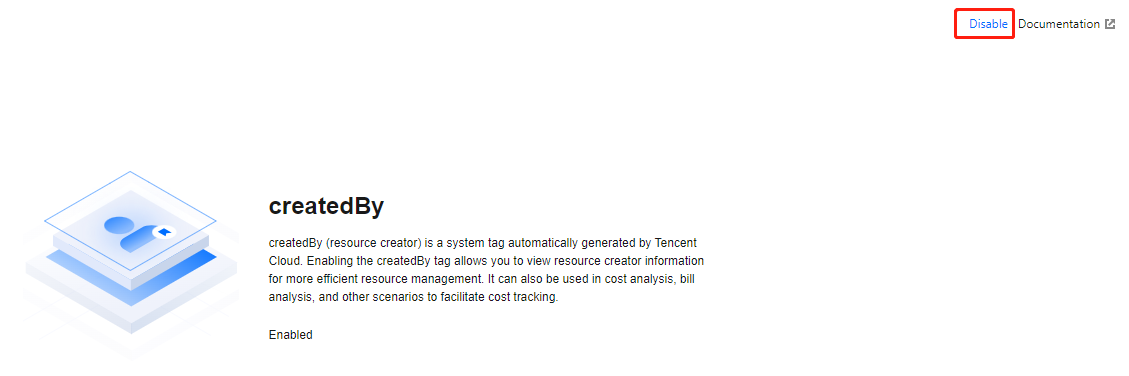
3. In the upper right corner, click Disable CreatedBy.
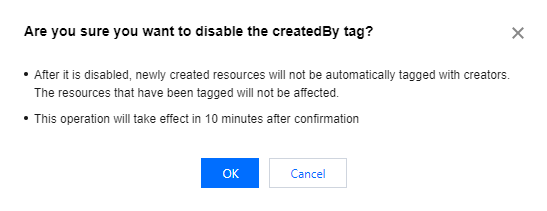
4. In the pop-up, click OK.
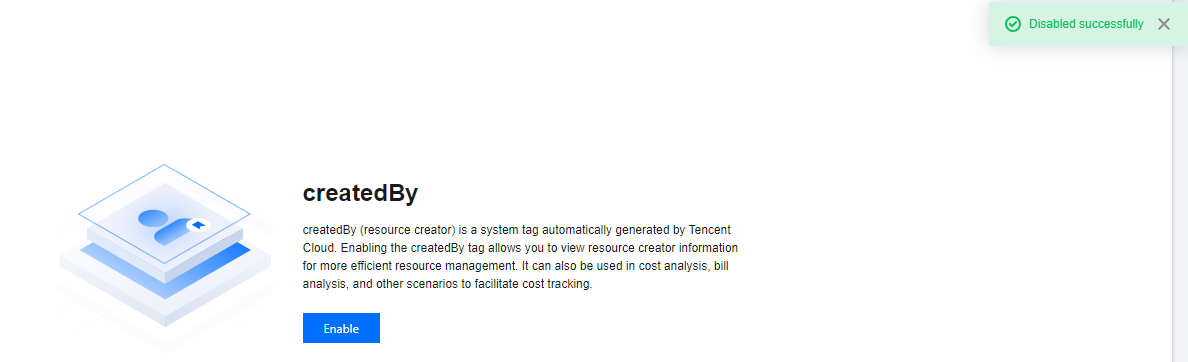
5. The page indicates Disabled Successfully, and the status is recovered to before enabling. This indicates the createdBy has been disabled. Subsequent new resources will no longer be associated with this tag.


도움말 및 지원

문제 해결에 도움이 되었나요?

피드백