Hybrid Cloud Gateway Connection
다운로드
포커스 모드
폰트 크기
If your business is deployed on third-party public clouds, private clouds, or on-premises IDC data centers, you can utilize the hybrid cloud WAF connection method to centrally manage and perform Ops for your web services across cloud and on-premises environments through Web Application Firewall (WAF). Hybrid cloud WAF connection extends cloud-based protection capabilities to other cloud platforms or local IDC regions, delivering an integrated web application security management solution that combines local and cloud resources.
Use Cases
Hybrid cloud business, with services simultaneously deployed on Tencent Cloud, other public clouds, private clouds, on-premises IDC, and VPC private networks, requires a unified Web service protection solution.
For special businesses where traffic cannot be routed to public cloud WAF protection for local-specific Web services, yet requiring the use of Tencent Cloud's public cloud WAF protection capabilities.
Feature Strengths
Unified security operations and maintenance management for cloud and on-premises assets and protection policies, reducing the complexity and workload of security operations.
Localized deployment solutions provide localized protection for customer services while supporting Web protection services in diverse and complex environments, minimizing risks associated with business transformation.
Cloud-based protection rules and threat intelligence capabilities are synchronized in real time, reducing Ops costs.
It supports custom application gateway SDK integration and out-of-band detection, as well as manual bypass capability, enhancing business operation stability.
Supporting cluster object access protection, with cluster-level default protection policies taking effect by default, reducing the risk of missed blocking and comprehensively converging the risk exposure surface.
Activation conditions
Activate a cloud-native WAF instance with a yearly/monthly subscription Enterprise Edition or Ultimate Edition, and maintain at least 2 hybrid cloud nodes.
Ensure that the required node deployment resources are prepared. For resource recommendations, see Deploying Hybrid Cloud Protection Nodes.
Hybrid Cloud WAF Cluster Management and Traffic Access Configuration
Step 1: Create a hybrid cloud cluster
1. Log in to the WAF console, and at the top of the left sidebar, switch the console to the region where your instance is located (Chinese mainland/Non-Chinese mainland).
2. In the left sidebar, choose Service Settings > Hybrid Cloud Management.
3. On the Hybrid Cloud Cluster Management page, click Configure to automatically create a hybrid cloud cluster.
Step 2: Local protection node deployment
Contact Tencent Cloud After-sales support experts to obtain the deployment scripts and images for this protection node, supporting on-premises deployment.
Automated installation is suitable for scenarios with relatively relaxed R&D environments, mainly including: importing db data, installing helm applications, requiring kubectl access permissions. After modifying the files, run
./install.sh.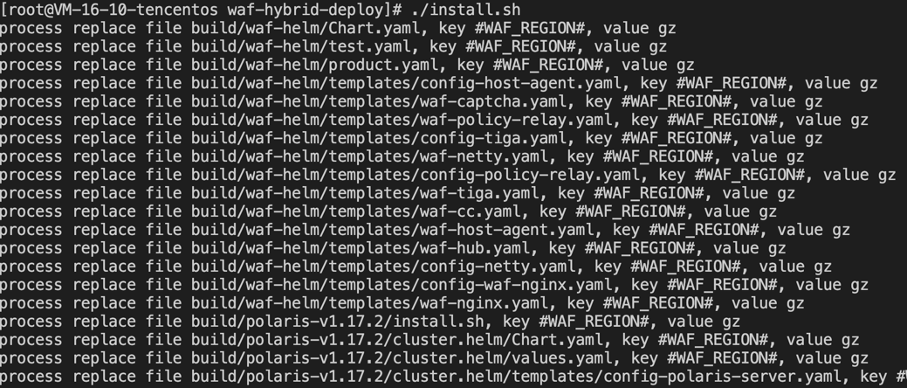
Step 3: Onboard Domains and Cluster Objects
1. Log in to the WAF console, and choose Connection Management > Domain Onboarding in the left sidebar.
2. On the Domain names page, click Add domain, fill in the relevant configuration parameters, and click OK to complete the process.
Field Description
Associated instance: Select the cloud-native type and the corresponding cloud-native WAF instance name.
Domain name: In the domain name input box, add the domain to protect, such as test.com.
Traffic source: Select Hybrid Cloud Gateway.
Use proxy: Based on your actual business needs, choose whether to use proxy services such as Anti-DDoS, CDN, or Cloud Acceleration.
Select No: Requests received by WAF come directly from the client. WAF uses the IP address that established the connection with the client as the client IP address.
Select Yes: Requests received by WAF come from other layer-7 proxy services. To obtain the real client IP address for security analysis, configure the client IP address determination method:
First IP in X-Forwarded-For
Network layer remote_ip (prevent XFF forgery)
IP in the specified header
Note:
It is recommended to use a custom Header in your service to store the client IP address and configure the corresponding Header field in WAF. This approach reduces the risk of attackers bypassing WAF protection rules by forging the XFF field, thereby enhancing service security.
Cluster name: Custom cluster name.
Protection object group: Select the protection object group bound to the web rule template. The custom web rule template takes effect automatically.
Remarks: Enter remarks for the domain name (optional) to facilitate subsequent management and identification of the domain's purpose.
Tag: Configure resource tags for access domains. Tags can be assigned based on tag keys and values. After tags are configured, you can search for and filter domains by tag in the domain list. Tags can also be used for billing and permission management.
Click Add Tag to add a new tag key-value pair.
You can use the Key-Value Clipboard to batch paste existing tag key-value pairs.
It supports quickly selecting previously used tags from the Historical Records.
3. After the OK button is clicked, you will return to the Domain Access page where information such as the domain name protected by SaaS WAF, Gateway Instance ID, and Name can be viewed.
Step 4: Install the SDK and enable traffic routing
The SDK integration requires deploying an SDK plugin on the Unified Access Gateway. The SDK plugin replicates a copy of the gateway's service traffic to the WAF protection cluster. In this mode, the hybrid cloud WAF protection cluster does not participate in traffic forwarding, achieving decoupling of service traffic forwarding and detection.
Step 5: Verification testing
Enter the URL
http://test.com/?test=alert(123) (a request simulating a Web attack) in your browser and access it. The browser returns a block page, indicating that the WAF protection feature is functioning normally.Attention:
test.com is the example domain name in this case. Replace the domain name here with the one you actually added.
피드백