tencent cloud

문서Cloud Log Service

Text

Download
포커스 모드
폰트 크기
마지막 업데이트 시간: 2026-05-11 17:50:40
The text type chart supports MarkDown syntax, you can insert text, image links, hyperlinks, etc. on the dashboard page. This chart is only supported for use in the dashboard.

Directions

1. Log in to the CLS console, click Dashboard > Dashboard List, select the dashboard you want to view.
2. Click Add Chart to create a chart, and select Text as the chart type.
3. Edit the text according to the MarkDown syntax, the example is as follows:
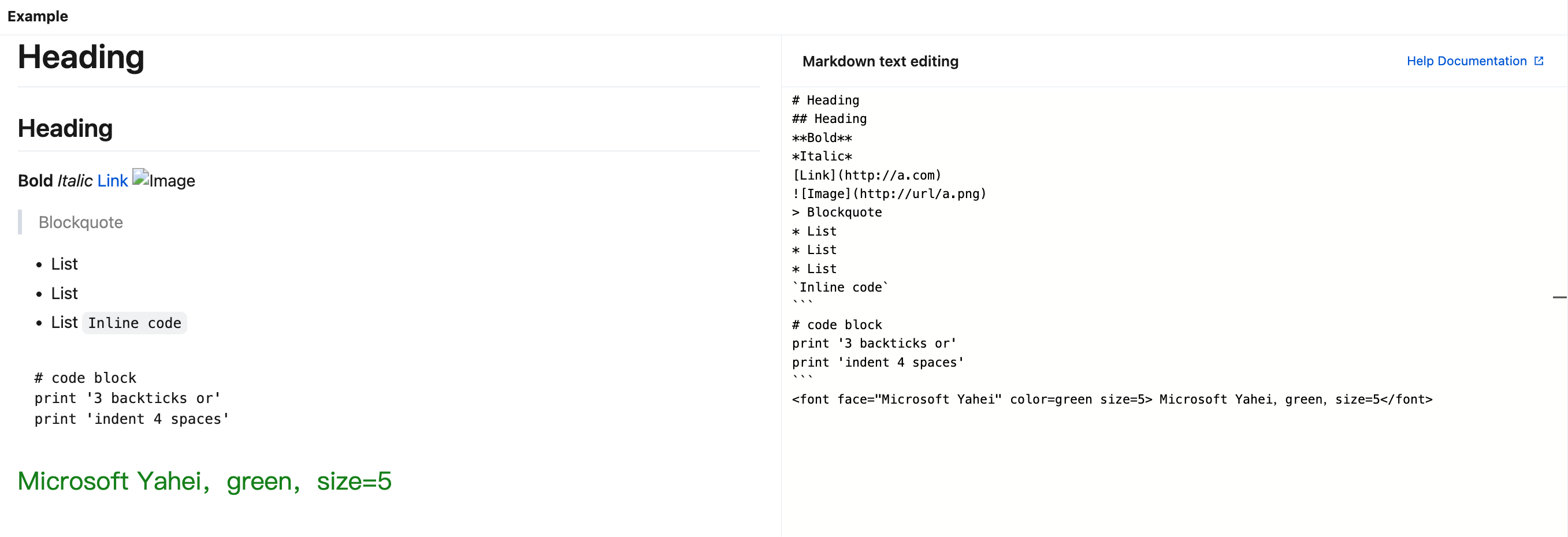


Syntax
Note
# Heading
Heading 1
## Heading
Heading 2
**Bold**
Bold font
*Italic*
Italic font
[Link](http://a.com)
Hyperlink
![Image](http://url/a.png)
Image link
> Blockquote
Quote
* List * List * List
List
Horizontal rule:
---
Dividing line
`Inline code`
Inline code block
``` # code block print '3 backticks or' print 'indent 4 spaces' ```
Code block
<font face="Microsoft Yahei" color=green size=5> Microsoft Yahei,green,size=5</font>
Styled text

도움말 및 지원

문제 해결에 도움이 되었나요?

피드백