Security Protection
Download
포커스 모드
폰트 크기
Global Application Acceleration Platform (GAAP) provides a basic security protection plan by default (2 Gbps of bandwidth for general users and 10 Gpbs for VIP users). For higher level of protection, go to Assets on Cloud to upgrade in the Anti-DDoS Pro console.
The GAAP console also allows you to configure a blocklist/allowlist. You can configure it as follows:
1. Log in to the GAAP console, enter Access Management page, and click ID/Connection Name of the selected connection.
2. Select Attack Defense > Add Rule, and perform the following configuration steps:
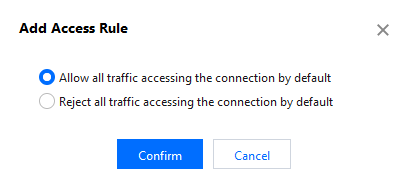
2.1 Add an access rule and choose to allow or deny all traffic accessing the connection by default.
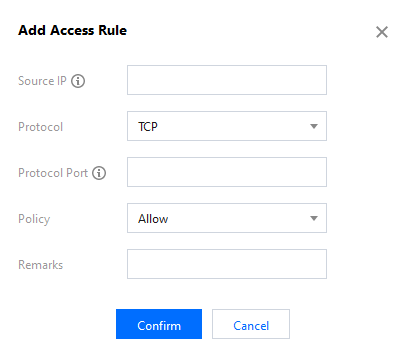
2.2 Add a source IP, select a protocol and add a protocol port. Then choose Allow or Reject to process access from the IP.
Note:
i. A maximum of 100 access rules can be added.
3. Click Confirm.
피드백