You can configure the concurrency capability of each function.
Concurrency Management
SCF supports account-level concurrency quota and function-level reserved concurrency quota.
Account-level concurrency quota
|- Function-level reserved quota
Note:
Provisioned concurrency has nothing to do with the concurrency capability. It only serves as the ability to start instances in advance. Versions under the same function share the concurrency of the function.
Account-Level Concurrency Quota
Each account has a total concurrency quota limit at the region level. The default value is 128,000 MB or 64,000 MB. For more information, see Quota Limits. The concurrency quotas between regions are independent of each other and don't affect each other.
By default, the account-level concurrency quota is shared by all functions in the current region. This means that at any specific time point, the sum of actual concurrently running instances of all functions can reach up to the concurrency quota of the account. Requests exceeding the concurrency quota will encounter the overrun error (432 ResourceLimitReached). You can purchase extra packages to increase the account-level quota.
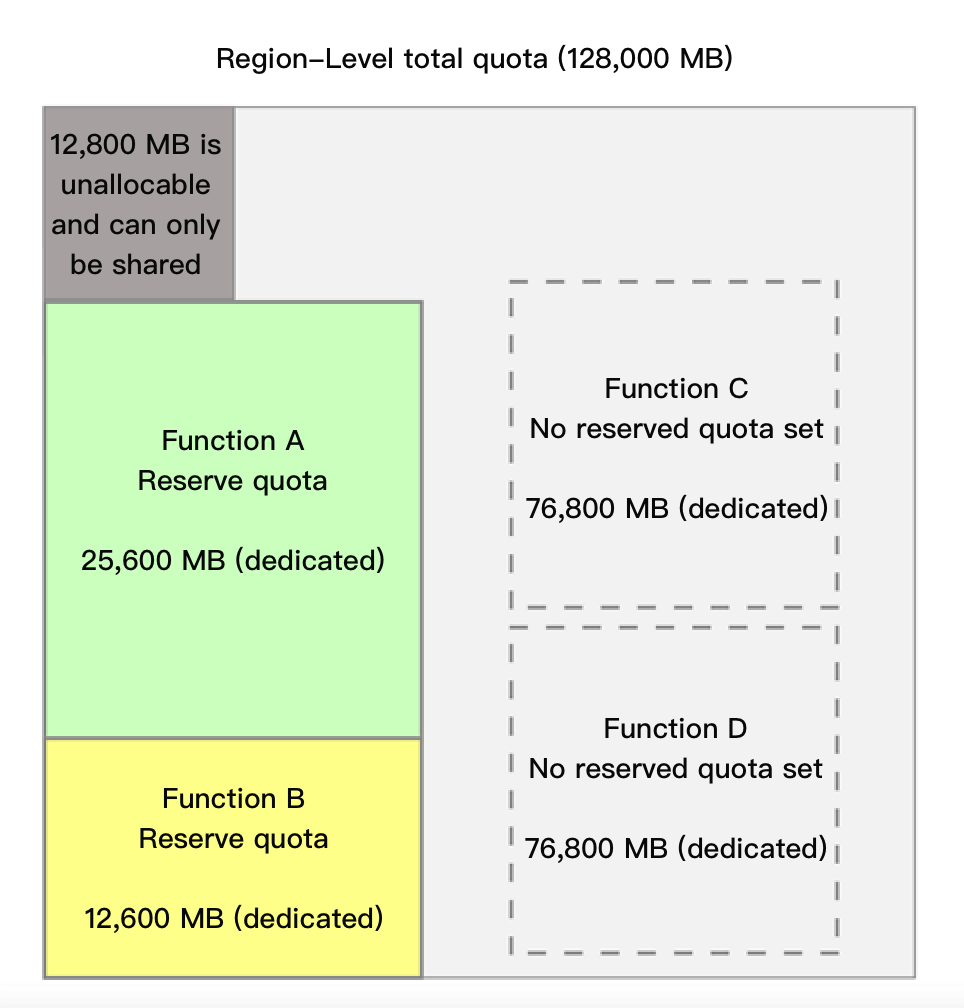
By setting the function's reserved quota, you can allocate the region-level concurrency to a certain function. 12,800 MB of the account-level concurrency quota can only be shared by functions without the reserved quota configured. This is to avoid the situation where functions with no reserved quota set cannot be invoked after the account-level quota is fully allocated.
Reserved quota
Reserved quota is the concurrency management capability at the function level. When you set a reserved quota for a function, it will have the following two effects:
The reserved quota is the upper limit of the concurrency quota of this function. The sum of the concurrency quotas of all versions is less than or equal to the reserved quota.
The concurrency quota is allocated exclusively to this function and will not be shared by other functions.
The reserved quota is the upper limit of the function concurrency quota. You can use this capability to manage the function concurrency and control the costs so as to avoid out-of-control costs. At the same time, you can also disable a function by setting its reserved quota to 0. Then, all requests for this function will encounter the concurrency overrun error.
The function reserved quota counts toward the regional concurrency quota. It can not be set if the regional unoccupied quota (= regional quota - reserved quotas allocated to other functions - 12,800 MB) is insufficient.
Setting the reserved quota
You can set the desired reserved quota for a function in the following steps:
1. Log in to the SCF console and select Functions on the left sidebar.
2. On the Functions list page, select the name of the target function to enter the Function management page.
3. Select Concurrency quota from the left, in the Reserved quota section, click Settings.
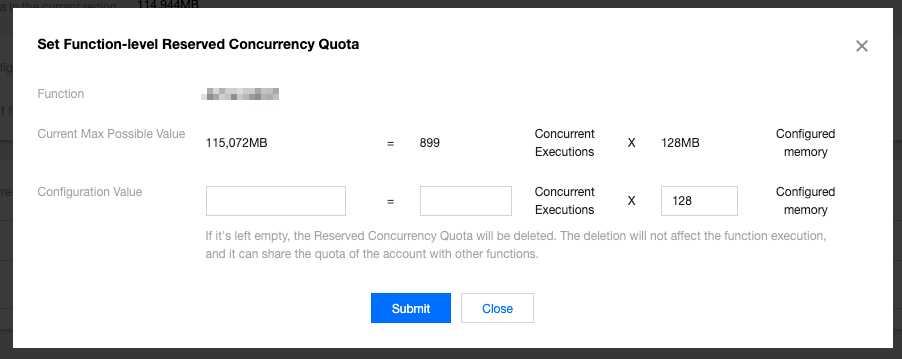
4. In the Set function-level reserved concurrency quota window that pops up, set the desired maximum dedicated quota and click Submit.
Then, you can view the configuration status in the Reserved Quota section on the Concurrency Management page.
Deleting reserved quota
If you no longer use the reserved quota, you can delete it. After the deletion, the function will share the concurrency quota at the account level with other functions.
Note:
Deleting the reserved quota and setting the it to 0 are different configurations.
Deleting reserved quota: The function does not have a dedicated quota and uses the shared quota in the region. The upper limit is subject to the usage of the shared quota.
Setting reserved quota to 0: Both the function's dedicated quota and concurrency upper limit are 0, so the function cannot run and stops responding to triggering events.
1. Log in to the SCF console and select Functions on the left sidebar.
2. On the Functions list page, select the name of the target function to enter the Function management page.
3. Select Concurrency quota from the left, in the Reserved quota section, click Delete.