tencent cloud

Serverless Cloud Function

Release Notes and Announcements
Release Notes
Announcements
User Guide
Product Introduction
Overview
Related Concepts
How It Works
Strengths
Scenarios
Related Products
Purchase Guide
Billing Overview
Billing Mode
Billable Items and Billing Modes
Function Computing Power Support
Free Tier
SCF Pricing
Billing Example
Payment Overdue
Getting Started
Creating Event Function in Console
User Guide
Quota Management
Managing Functions
Web Function Management
Log Management
Concurrence Management
Trigger Management
Function URL
A Custom Domain Name
Version Management
Alias Management
Permission Management
Running Instance Management
Plugin Management
Managing Monitors and Alarms
Network Configuration
Layer Management
Execution Configuration
Extended Storage Management
DNS Caching Configuration
Resource Managed Mode Management
Near-Offline Resource Hosting Model
Workflow
Triggers
Trigger Overview
Trigger Event Message Structure Summary
API Gateway Trigger
COS Trigger
CLS Trigger
Timer Trigger
CKafka Trigger
Apache Kafka Trigger
MQTT Trigger
Trigger Configuration Description
MPS Trigger
CLB Trigger Description
TencentCloud API Trigger
Development Guide
Basic Concepts
Testing a Function
Environment Variables
Dependency Installation
Using Container Image
Error Types and Retry Policies
Dead Letter Queue
Connecting SCF to Database
Automated Deployment
Cloud Function Status Code
Common Errors and Solutions
Developer Tools
Serverless Web IDE
Calling SDK Across Functions
Third-Party Tools
Code Development
Python
Node.js
Golang
PHP
Java
Custom Runtime
Deploying Image as Function
Web Framework Development
Deploying Framework on Command Line
Quickly Deploying Egg Framework
Quickly Deploying Express Framework
Quickly Deploying Flask Framework
Quickly Deploying Koa Framework
Quickly Deploying Laravel Framework
Quickly Deploying Nest.js Framework
Quickly Deploying Next.js Framework
Quickly Deploying Nuxt.js Framework
Quickly Deploying Django Framework
Use Cases
Overview
Solutions with Tencent Cloud Services
Business Development
TRTC Practices
COS Practices
CKafka Practice
CLS
CLB Practice
MPS
CDN
CDWPG
VOD
SMS
ES
Scheduled Task
Video Processing
Success Stories
Tencent Online Education
Online Video Industry
Tencent Online Education
Best Practice of Tencent IEG Going Global
API Documentation
History
Introduction
API Category
Making API Requests
Other APIs
Namespace APIs
Layer Management APIs
Async Event Management APIs
Trigger APIs
Function APIs
Function and Layer Status Description
Data Types
Error Codes
SDK Documentation
FAQs
General
Web Function
Billing FAQs
Network FAQs
Log FAQs
SCF utility class
Event Handling FAQs
API Gateway Trigger FAQs
Related Agreement
Service Level Agreement
Contact Us
Glossary

Creating Sample Bash Function

PDF
포커스 모드
폰트 크기
마지막 업데이트 시간: 2024-12-02 18:12:22

Scenario

This document describes how to create, package, and release a Custom Runtime cloud function to respond to the triggered event. You will learn the development process and operating mechanism of Custom Runtime.

Directions

Before creating a Custom Runtime cloud function, you need to create a runtime boot file bootstrap and function file.

Creating a bootstrap file

Bootstrap is a runtime entry bootloader. When Custom Runtime loads a function, it retrieves the file named “bootstrap” and executes the file to start Custom Runtime, which allows developers to develop runtime functions using any programming language and version. Bootstrap must:
Have the execute permission.
Be able to run in the SCF system environment (CentOS 7.6).
You can refer to the following sample code to create a bootstrap file in a command line terminal. Bash is used as an example in this document.
#! /bin/bash
set -euo pipefail

# Initialization - Load the function file.
source ./"$(echo $_HANDLER | cut -d. -f1).sh"

# After the initialization is completed, access the runtime API to report the readiness.
curl -d " " -X POST -s "http://$SCF_RUNTIME_API:$SCF_RUNTIME_API_PORT/runtime/init/ready"

### Start the loop that listens to events, handles events, and pushes event handling results.
while true
do
HEADERS="$(mktemp)"
# Gets event data through long polling
EVENT_DATA=$(curl -sS -LD "$HEADERS" -X GET -s "http://$SCF_RUNTIME_API:$SCF_RUNTIME_API_PORT/runtime/invocation/next")
# Invokes a function to handle the event
RESPONSE=$($(echo "$_HANDLER" | cut -d. -f2) "$EVENT_DATA")
# Pushes the function handling result
curl -X POST -s "http://$SCF_RUNTIME_API:$SCF_RUNTIME_API_PORT/runtime/invocation/response" -d "$RESPONSE"
done

Sample description

In the preceding sample, Custom Runtime has two phases, the initialization and invocation phases. Initialization is executed only once during the cold start of a function instance. After the initialization, the invocation loop starts, which listens to events, invokes functions for handling, and pushes the handling results.
Initialization phase
For more information, see Initializing function.
After the initialization, you need to proactively invoke the runtime API to report the readiness to SCF. The sample code is as follows:
# After the initialization is completed, access the runtime API to report the readiness.
curl -d " " -X POST -s "http://$SCF_RUNTIME_API:$SCF_RUNTIME_API_PORT/runtime/init/ready"
Because Custom Runtime is implemented with a custom programming language and version, a standard protocol is needed for the communication between Custom Runtime and SCF. In the current sample, SCF provides runtime APIs and built-in environment variables to Custom Runtime over HTTP. For more information, see Environment Variables.
SCF_RUNTIME_API: Runtime API address
SCF_RUNTIME_API_PORT: Runtime API port
Initialization logs and exceptions
For more information, see Logs and exceptions.
Invocation phase
For more information, see Function invocation.
1.1 After initialization, the invocation loop starts. A function is invoked to listen to events. The sample code is as follows:
# Gets event data through long polling
EVENT_DATA=$(curl -sS -LD "$HEADERS" -X GET -s "http://$SCF_RUNTIME_API:$SCF_RUNTIME_API_PORT/runtime/invocation/next")
During the long-polling of events, do not set timeout of the GET method. Access the runtime event acquisition API (/runtime/invocation/next) to wait for event delivery. If you access this API repeatedly within an invocation, the same event data will be returned. The response body is event_data. The response header includes:
Request_Id: Request ID, identifying the request that triggers function invocation.
Memory_Limit_In_Mb: Function memory limit, in MB.
Time_Limit_In_Ms: Function timeout limit, in milliseconds.
1.2 Based on the environment variables, response header information, and event information, construct parameters of the function and start function invocation for event handling. The sample code is as follows:
# Invokes a function to handle the event
RESPONSE=$($(echo "$_HANDLER" | cut -d. -f2) "$EVENT_DATA")
1.3 Access the runtime invocation response API to push the function handling result. The first invocation success will be considered as the final event status, which will be locked by SCF. The pushed result cannot be changed. The sample code is as follows:
# Pushes the function handling result
curl -X POST -s "http://$SCF_RUNTIME_API:$SCF_RUNTIME_API_PORT/runtime/invocation/response" -d "$RESPONSE"
If an error occurs during function invocation, access the runtime invocation error API to push the error message, which ends the current invocation. The first invocation result will be considered as the final event status, which will be locked by SCF. The pushed result cannot be changed. The sample code is as follows:
# Push the function handling error.
curl -X POST -s "http://$SCF_RUNTIME_API:$SCF_RUNTIME_API_PORT/runtime/invocation/error" -d "parse event error"
Invocation logs and exception
For more information, see Logs and exceptions.

Creating a function file

Note:
The function file contains the implementation of function logic. The execution method and parameters can be implemented by Custom Runtime.
Create index.sh in the command line terminal.
function main_handler () {
EVENT_DATA=$1
echo "$EVENT_DATA" 1>&2;
RESPONSE="Echoing request: '$EVENT_DATA'"
echo $RESPONSE
}

Releasing a Function

1. After the bootstrap file and function file are successfully created, the directory structure is as follows:
├ bootstrap
└ index.sh
2. Run the following command to grant execute permission on the bootstrap file:
Note:
Windows does not support the chmod 755 command. Therefore, you need to run the command in Linux or macOS.
$ chmod 755 index.sh bootstrap
3. Create and publish functions by using Serverless Cloud Framework. Or, run the following command to generate a ZIP package and then create and publish functions through the SDK or SCF console.
$ zip demo.zip index.sh bootstrap
adding: index.sh (deflated 23%)
adding: bootstrap (deflated 46%)

Using Serverless Cloud Framework to create and publish a function

Creating a function

2. Configure the Serverless.yml file in the bootstrap directory to create the dotnet function.
#Component information
component: scf # Component name. `scf` is used as an example.
name: ap-guangzhou_default_helloworld # Instance name.
#Component parameters
inputs:
name: helloworld #Function name.
src: ./
description: helloworld blank template function.
handler: index.main_handler
runtime: CustomRuntime
namespace: default
region: ap-guangzhou
memorySize: 128
timeout: 3
events:
- apigw:
parameters:
endpoints:
- path: /
method: GET
Note:
For more information on the configurations of SCF components, see Configuration Documentation.
3. Run the scf deploy command to create a cloud function. A successful creation returns the following message:
serverless-cloud-framework
Action: "deploy" - Stage: "dev" - App: "ap-guangzhou_default_helloworld" - Instance: "ap-guangzhou_default_helloworld"
functionName: helloworld
description: helloworld blank template function.
namespace: default
runtime: CustomRuntime
handler: index.main_handler
memorySize: 128
lastVersion: $LATEST
traffic: 1
triggers:
apigw:
- http://service-xxxxxx-123456789.gz.apigw.tencentcs.com/release/
Full details: https://serverless.cloud.tencent.com/apps/ap-guangzhou_default_helloworld/ap-guangzhou_default_helloworld/dev
36s › ap-guangzhou_default_helloworld › Success
Note:
For more information, see SCF Component.

Invoking a function

As events is set to apigw in the serverless.yml file, an API gateway is created together with the function. The cloud function can be accessed over this API gateway. If a message similar to the following is returned, the access is successful.
Echoing request:
'{
"headerParameters":{},
"headers":{
"accept":"text/html,application/xhtml+xml,application/xml;q=0.9,image/avif,image/webp,image/apng,*/*;q=0.8,application/signed-exchange;v=b3;q=0.9",
"accept-encoding":"gzip, deflate",
"accept-language":"zh-CN,zh-TW;q=0.9,zh;q=0.8,en-US;q=0.7,en;q=0.6",
"cache-control":"max-age=259200",
"connection":"keep-alive",
"host":"service-eiu4aljg-1259787414.gz.apigw.tencentcs.com",
"upgrade-insecure-requests":"1",
"user-agent":"Mozilla/5.0 (Windows NT 10.0; Win64; x64) AppleWebKit/537.36 (KHTML, like Gecko) Chrome/85.0.4183.121 Safari/537.36",
"x-anonymous-consumer":"true",
"x-api-requestid":"b8b69e08336bb7f3e06276c8c9******",
"x-api-scheme":"http",
"x-b3-traceid":"b8b69e08336bb7f3e06276c8c9******",
"x-qualifier":"$LATEST"},
"httpMethod":"GET",
"path":"/",
"pathParameters":{},
"queryString":{},
"queryStringParameters":{},
"requestContext":{"httpMethod":"GET","identity":{},"path":"/",
"serviceId":"service-xxxxx",
"sourceIp":"10.10.10.1",
"stage":"release"
}
}'

Using SDK to create and release a function

Creating a function

Run the following commands to use the Python SDK of SCF to create a function named CustomRuntime-Bash.
from tencentcloud.common import credential
from tencentcloud.common.profile.client_profile import ClientProfile
from tencentcloud.common.profile.http_profile import HttpProfile
from tencentcloud.common.exception.tencent_cloud_sdk_exception import TencentCloudSDKException
from tencentcloud.scf.v20180416 import scf_client, models
from base64 import b64encode
try:
cred = credential.Credential("SecretId", "secretKey")
httpProfile = HttpProfile()
httpProfile.endpoint = "scf.tencentcloudapi.com"

clientProfile = ClientProfile()
clientProfile.httpProfile = httpProfile
client = scf_client.ScfClient(cred, "na-toronto", clientProfile)

req = models.CreateFunctionRequest()
f = open('demo.zip', 'r')
code = f.read()
f.close()

params = '{\\"FunctionName\\":\\"CustomRuntime-Bash\\",\\"Code\\":{\\"ZipFile\\":\\"'+b64encode(code)+'\\"},\\"Timeout\\":3,\\"Runtime\\":\\"CustomRuntime\\",\\"InitTimeout\\":3}'
req.from_json_string(params)

resp = client.CreateFunction(req)
print(resp.to_json_string())

except TencentCloudSDKException as err:
print(err)

Special parameters of Custom Runtime

Parameter Type
Description
"Runtime":"CustomRuntime"
Runtime type of Custom Runtime.
"InitTimeout":3
Initialization timeout period. Custom Runtime adds a configuration of initialization timeout period. The initialization period starts from the boot-time of bootstrap and ends when the runtime API is reported ready. When the initialization period exceeds the timeout period, the execution ends and an initialization timeout error is returned.
"Timeout":3
Invocation timeout period. This parameter configures the timeout period of function invocation. The invocation period starts from the event delivery time and ends upon the time when the function pushes the handling result to the runtime API. When the invocation period exceeds the timeout period, the execution ends and an invocation timeout error is returned.
Invoking a function

Run the following commands to use the Python SDK of SCF to invoke the CustomRuntime-Bash function.
from tencentcloud.common import credential
from tencentcloud.common.profile.client_profile import ClientProfile
from tencentcloud.common.profile.http_profile import HttpProfile
from tencentcloud.common.exception.tencent_cloud_sdk_exception import TencentCloudSDKException
from tencentcloud.scf.v20180416 import scf_client, models
try:
cred = credential.Credential("SecretId", "secretKey")
httpProfile = HttpProfile()
httpProfile.endpoint = "scf.tencentcloudapi.com"

clientProfile = ClientProfile()
clientProfile.httpProfile = httpProfile
client = scf_client.ScfClient(cred, "na-toronto", clientProfile)

req = models.InvokeRequest()
params = '{\\"FunctionName\\":\\"CustomRuntime-Bash\\",\\"ClientContext\\":\\"{ \\\\\\"key1\\\\\\": \\\\\\"test value 1\\\\\\", \\\\\\"key2\\\\\\": \\\\\\"test value 2\\\\\\" }\\"}'
req.from_json_string(params)

resp = client.Invoke(req)
print(resp.to_json_string())

except TencentCloudSDKException as err:
print(err)
If a message similar to the following is returned, the invocation is successful.
{"Result":
{"MemUsage": 7417***,
"Log": "", "RetMsg":
"Echoing request: '{
\\"key1\\": \\"test value 1\\",
\\"key2\\": \\"test value 2\\"
}'",
"BillDuration": 101,
"FunctionRequestId": "3c32a636-****-****-****-d43214e161de",
"Duration": 101,
"ErrMsg": "",
"InvokeResult": 0
},
"RequestId": "3c32a636-****-****-****-d43214e161de"
}

Creating and publishing a function in the console

Creating a function

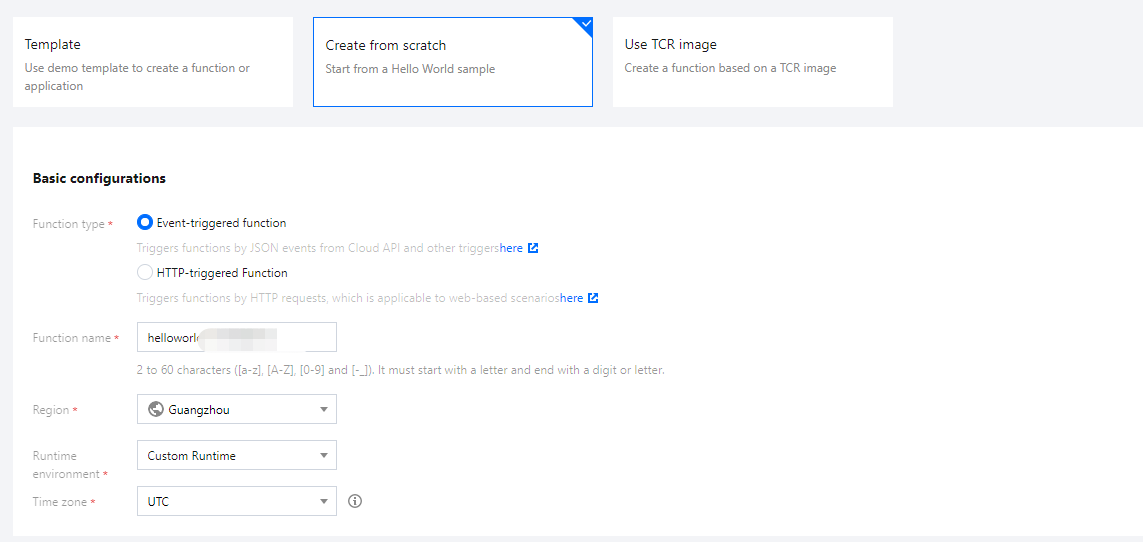
1. Log in to the SCF console and click Functions on the left sidebar.
2. Choose a region at the top of the Functions page and click Create to start creating a function.
3. On the Create function page, click Create from scratch and select Custom Runtime in Running environment.


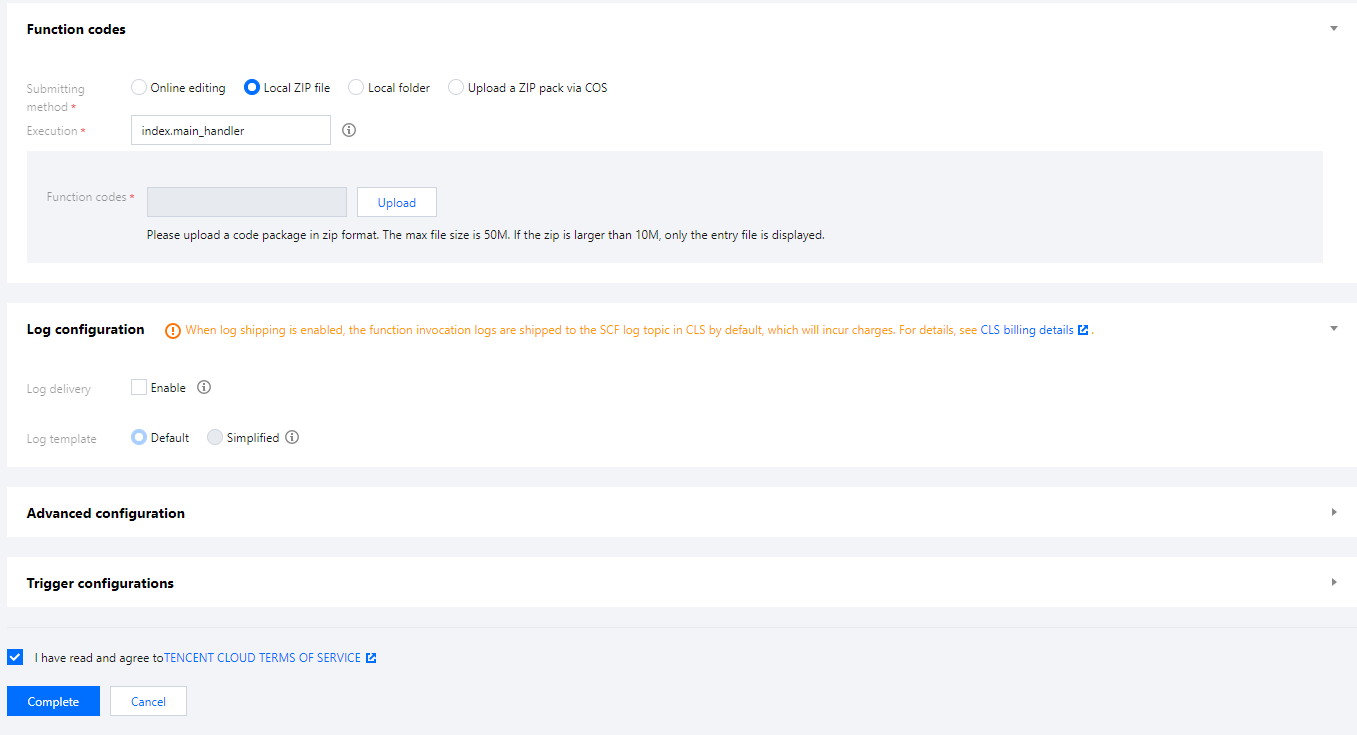
4. In Function codes, set Submitting method and Function codes.


Submitting method: Select Local ZIP file.
Function codes: Select the demo.zip.
Advanced settings: Expand Advanced settings and set Initialization timeout period as well as other related parameters.
5. Click Complete.

Invoking a function

1. Log in to the SCF console and click Functions on the left sidebar.
2. Choose a region at the top of the Functions page, and click the function to be invoked to go to the function detail page.
3. Select Function management on the left and select the Function codes tab.


4. Click Test below the editor, and the invocation execution result and log will be displayed in the console.


도움말 및 지원

문제 해결에 도움이 되었나요?

피드백