You can use the alias of an SCF function to implement the grayscale release scheme for the function, which has the following advantages:
You can distribute traffic among multiple versions as needed, with no need to frequently modify the settings externally or at each trigger location.
The traffic can be distributed smoothly to avoid traffic miss.
By using the same traffic switch scheme, you can quickly roll back the version when a failure occurs.
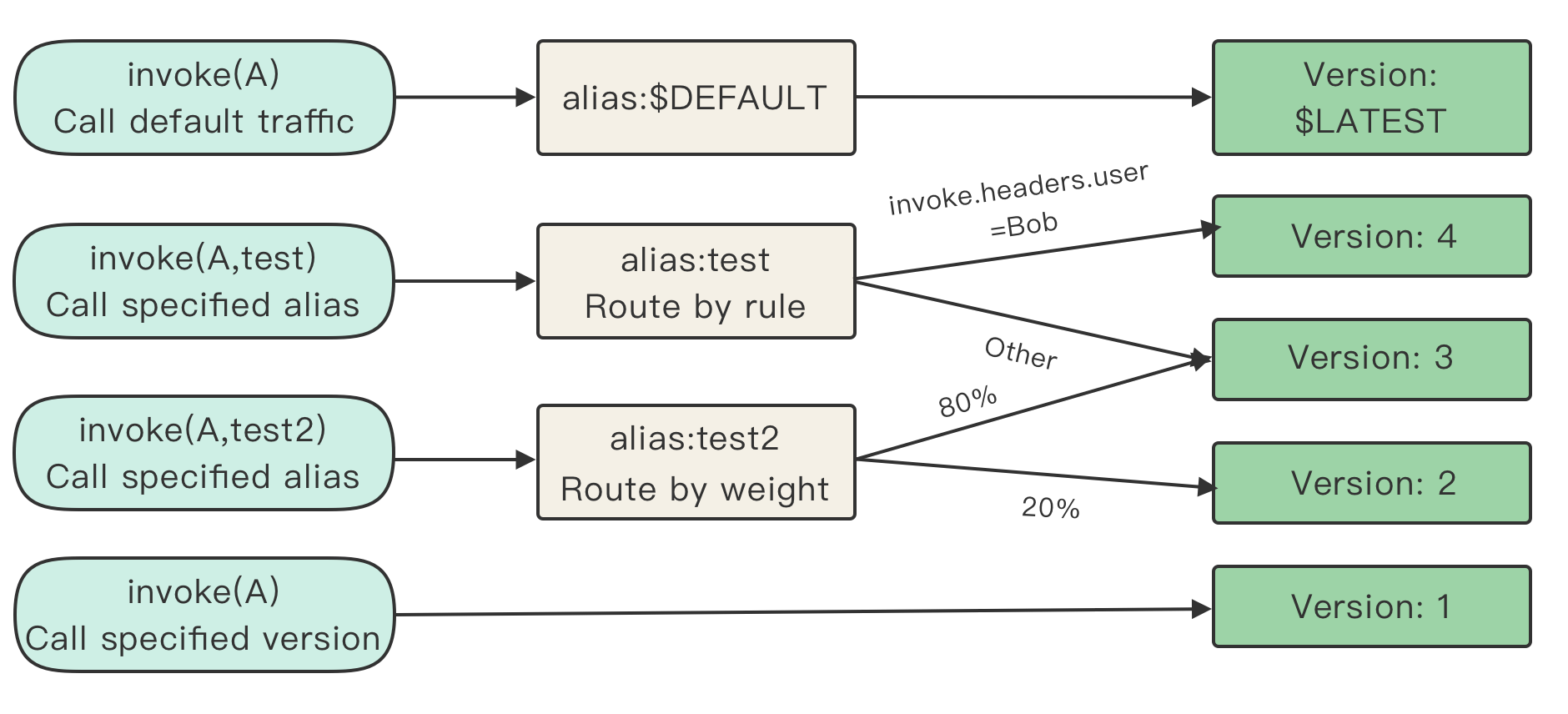
The following is the scheme diagram:
Glossary
Function
It refers to an SCF function you create.
Version
An SCF function version contains the code and function configuration information and is specified by a specific version number. You can generate a specific version and version number through release. Code and configuration only on the latest version can be modified, but all versions can be called. For more information on the SCF function version, please see Version Management Overview.
Latest version ($LATEST)
It refers to the version whose code and configuration can be modified. After a function is created, it will have the latest version by default. When the function is published, it will be published on the latest version with the specific version number.
Alias
An alias can have a custom name starting with a letter. It is a reference that can be configured to point to one or two versions. If it points to two versions, the traffic percentages can be set for them. All aliases can be called.
Default traffic/default alias ($DEFAULT)
It is a special alias. If a call request does not point to any version or another alias, the default alias will be used to point to the latest version by default. The version pointed to can be modified.
Scheme Use Cases
Use case based on API Gateway trigger
Background
You have created an SCF function, but have not published its new version or created an alias.
You want to have separate test, pre-release, and release environments, where the SCF function can enter the next stage only after completing the test at the current stage. In addition, you want to implement grayscale release to ensure that your function can be launched smoothly.
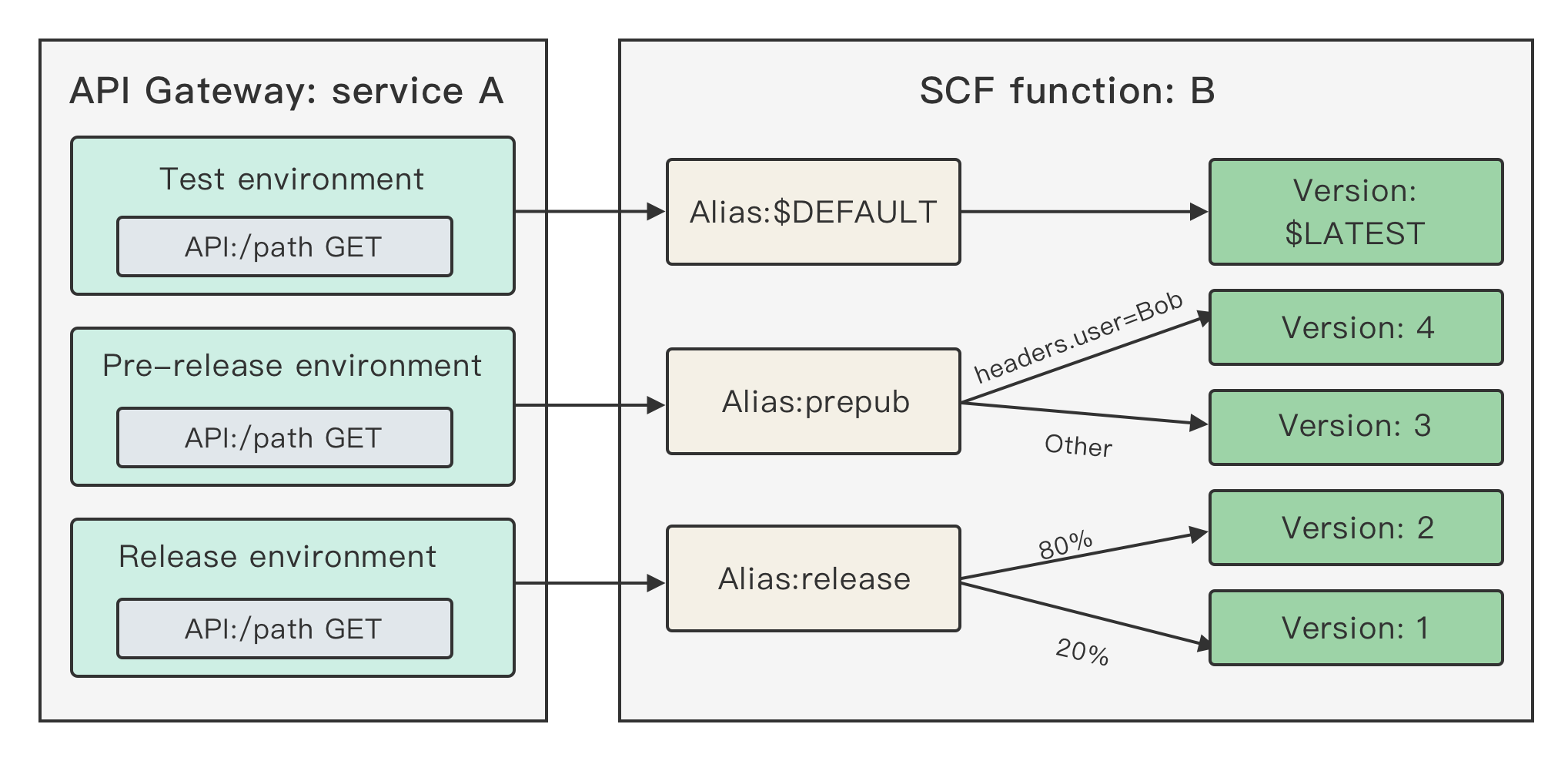
The following is the diagram of the overall scheme:
Initial configuration
1. Create an alias:
Create aliases release and prepub in SCF function B, which temporarily point to the $LATEST version.
2. Create an API gateway:
Create API service A in API Gateway, configure the API to point to the release alias of function B, and publish it to the release stage of the API service. For more information on how to create and publish an API, please see API Creation and API Release.
3. Modify API configuration:
a. Point the API to the prepub alias of function B and publish it into the prepub stage of the API service.
b. Point the API to the default traffic of function B and publish it into the dev stage of the API service.
At this point, the test, pre-release, and release environments have been separated, but they all point to the $LATEST version. API Gateway configuration is completed, and there will be no need to modify and publish the API Gateway configuration again.
Continuous development, test, release, and launch
1. Publish versions:
In SCF, continuously develop and publish versions 1, 2, 3, and 4 in sequence. Suppose version 1 is in the release environment, version 2 is tested in the pre-release environment, and versions 3 and 4 are tested in the test environment.
2. Develop the latest version that needs to be tested:
By configuring the $DEFAULT alias to point it to the $LATEST version, you can perform continuous development based on this version. After development is completed, the version can be published.
3. Test in the pre-release environment:
When version 3 can enter the pre-release environment, if the prepub alias of function B is configured to point to version 3, version 3 can be tested and trialed in the pre-release environment.
4. Implement grayscale release by user in the pre-release environment:
If version 4 can enter the pre-release environment, calls of user Bob need to be routed to version 4 of function B, calls of other users need to be routed to version 3, and the prepub alias of function B needs to be configured for routing by rule with the content invoke.headers.User exact Bob. For more information on routing by rule, please see Routing by Rule.
5. Enter the release environment from the pre-release environment and implement grayscale release:
If version 2 has been trialed in the pre-release environment and can be launched, gradually switch the traffic configuration of the release alias of function B from version 1 to 2 and continuously observe the function status during the grayscale release. For more information on how to configure alias traffic, please see SCF Traffic Routing Configuration.
6. Continuously monitor during release:
View the grayscale release process through monitoring information and logs and check whether the traffic of version 2/1 increases/decreases normally, errors of each version during the release, and overall errors.
Prompt rollback upon failure during release
Suppose a failure occurs when version 2 is launched. In this case, you need to roll back to the previous version by modifying the release alias of function B to point all of its traffic to version 1.
Use case with invoke API
Background
You have created an SCF function, but have not published its new version or created an alias.
You need to directly use an API or the SDK to run SCF functions.
You want to have separate test, pre-release, and release environments, where the SCF function can enter the next stage only after completing the test at the current stage. In addition, you want to implement grayscale release to ensure that your function can be launched smoothly.
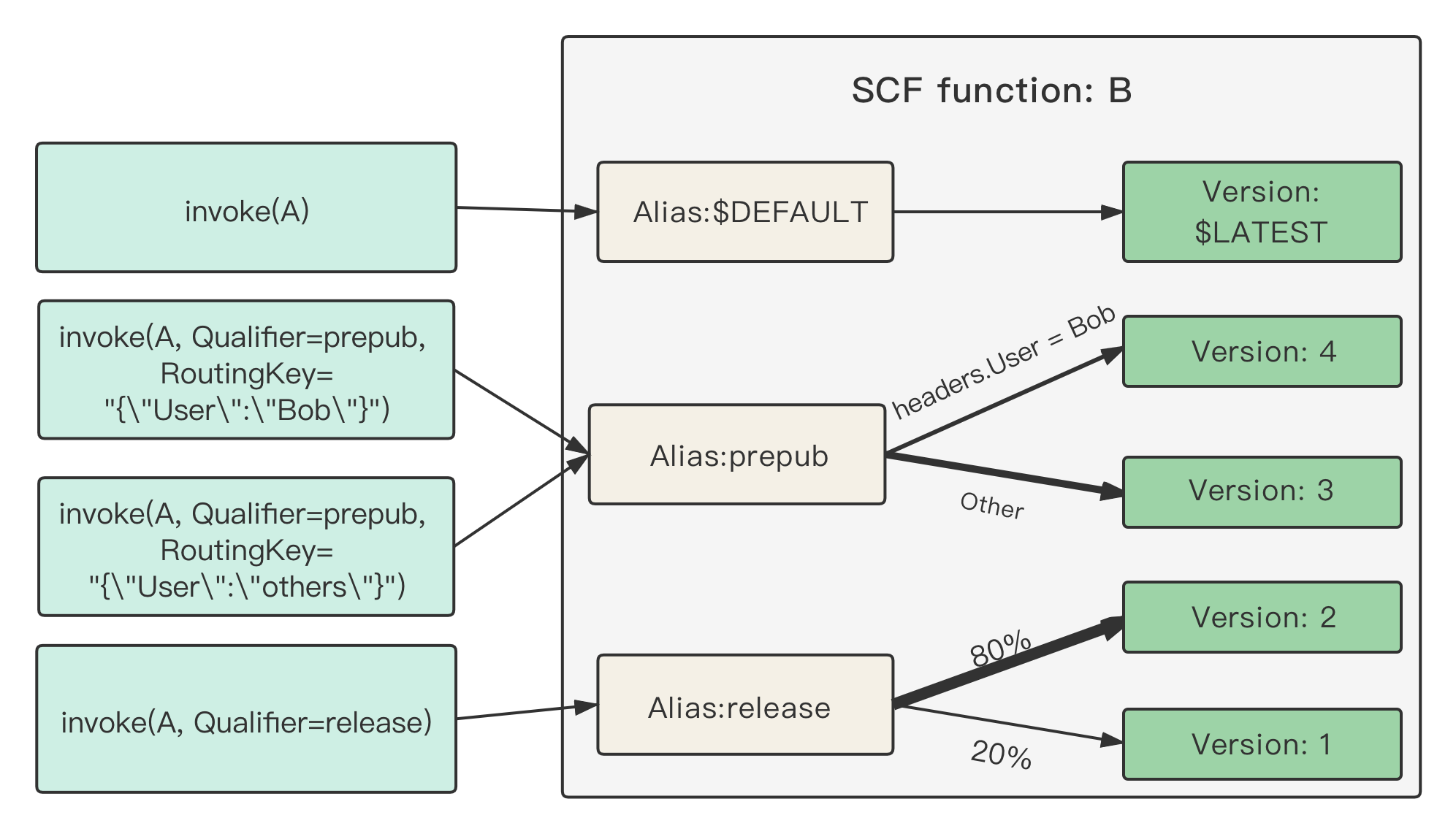
The following is the diagram of the overall scheme:
Initial configuration
Create aliases release and prepub in SCF function B, which temporarily point to the $LATEST version.
Continuous development, test, release, and launch
1. Publish versions:
In SCF, continuously develop and publish versions 1, 2, 3, and 4 in sequence. Suppose version 1 is in the release environment, version 2 is tested in the pre-release environment, and versions 3 and 4 are tested in the test environment.
2. Develop the latest version that needs to be tested:
By configuring the $DEFAULT alias to point it to the $LATEST version, you can perform continuous development based on this version. After development is completed, the version can be published.
3. Test in the pre-release environment:
When version 3 can enter the pre-release environment, if the prepub alias of function B is configured to point to version 3, version 3 can be tested and trialed in the pre-release environment.
4. Route by rule in the pre-release environment:
If version 4 can enter the pre-release environment, you can configure routing by rule for function B. Customize the key and value passed in to point them to version 4. When calling the invoke API, retain the key-value pair in the RoutingKey input parameter in json format. If RoutingKey has any key-value pair matching the rule, version 4 will be routed to. For more information on routing by rule, please see Routing by Rule and Running Function Through API.
5. Enter the release environment from the pre-release environment and implement grayscale release:
If version 2 has been trialed in the pre-release environment and can be launched, gradually switch the traffic configuration of the release alias of function B from version 1 to 2 and continuously observe the function status during the grayscale release. For more information on how to configure alias traffic, please see SCF Traffic Routing Configuration.
6. Continuously monitor during release:
View the grayscale release process through monitoring information and logs and check whether the traffic of version 2/1 increases/decreases normally, errors of each version during the release, and overall errors.
Prompt rollback upon failure during release
Suppose a failure occurs when version 2 is launched. In this case, you need to roll back to the previous version by modifying the release alias of function B to point all of its traffic to version 1.
Serverless Cloud Framework use case
When using Serverless Cloud Framework, you can use stages to distinguish between the test, pre-release, and release environments. When implementing grayscale release in the release environment, you can use the following commands for gradual switch. For detailed directions, please see Using tencent-express Component to Deploy Express Website.
scf deploy --inputs.traffic=0.1 # Deploy and switch 10% traffic to the `$latest` version
scf deploy --inputs.traffic=1.0 # Deploy and switch 100% traffic to the `$latest` version
scf deploy --inputs.traffic=1.0 # Deploy and switch 100% traffic to the `$latest` version