tencent cloud

Elastic Network Interface

Product Introduction
Product Overview
Key Concepts
Usage Limits
Related Products
Purchasing Guide
Billing Overview
Purchasing Method
Operation Guide
Operations Overview
Viewing ENI Information
Creating an ENI
Configuring Security Groups
Binding and Configuring an ENI
Setting Service Level
Deleting an ENI
Unbinding from a CVM
Binding Secondary Private IP Addresses
Releasing Secondary Private IP Addresses
Binding EIPs
Unbinding EIPs
Modifying Primary Private IPs
API Documentation
Contact Us
Glossary

Unbinding from a CVM

PDF
포커스 모드
폰트 크기
마지막 업데이트 시간: 2024-10-23 10:24:13
1. Log in to the VPC console.
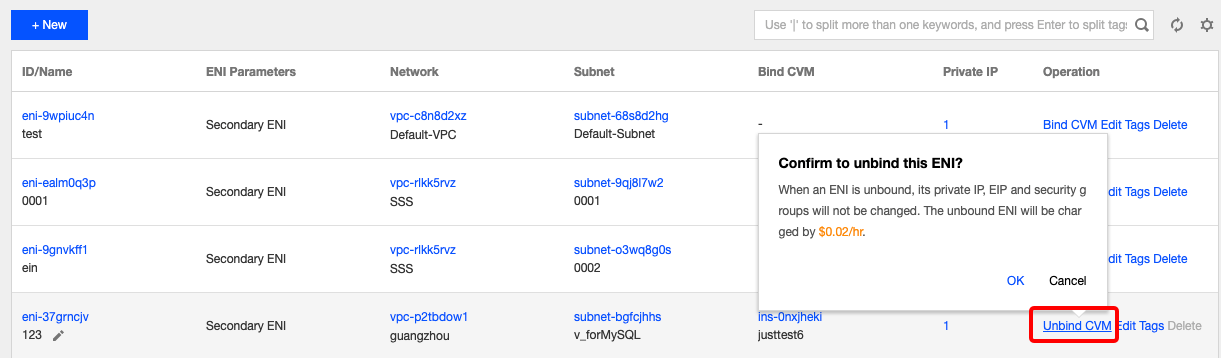
2. Choose IP and ENI > ENI in the left sidebar to go to the ENI list page.
3. Locate the target ENI, and click More > Unbind from the CVM in the Operation column.
Note:
You can also click the ENI ID to go to the details page, and click Unbind from the CVM.

4. In the pop-up window, click OK.
Note:
When an EIP is unbound, an idle is incurred. Release unused EIPs to avoid unnecessary costs.

도움말 및 지원

문제 해결에 도움이 되었나요?

피드백