tencent cloud
최신 혜택
상품
솔루션
가격
파트너
마켓플레이스
더 알아보기
Prev
Next
Elastic Network Interface
Product Introduction
Product Overview
Key Concepts
Usage Limits
Related Products
Purchasing Guide
Billing Overview
Purchasing Method
Operation Guide
Operations Overview
Viewing ENI Information
Creating an ENI
Configuring Security Groups
Binding and Configuring an ENI
Setting Service Level
Deleting an ENI
Unbinding from a CVM
Binding Secondary Private IP Addresses
Releasing Secondary Private IP Addresses
Binding EIPs
Unbinding EIPs
Modifying Primary Private IPs
API Documentation
Contact Us
Glossary
문서
Elastic Network Interface
Operation Guide
Viewing ENI Information
Viewing ENI Information
PDF
포커스 모드
폰트 크기
마지막 업데이트 시간: 2024-10-23 10:24:13
1.
Log in to the
VPC Console
.
2.
Choose
IP and ENI
->
ENI
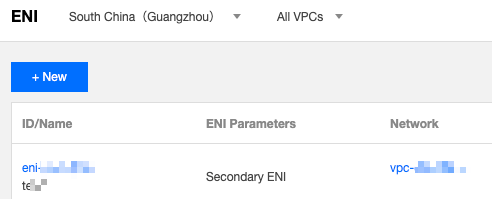
in the left sidebar to go to the ENI list page.
3.
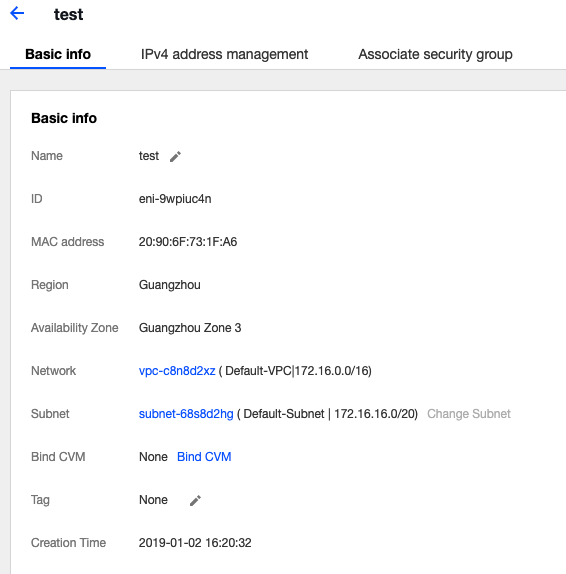
Locate the ENI and click its ID/Name to enter the details page.
이전 주제: Operations Overview
다음 주제: Creating an ENI
도움말 및 지원
문제 해결에 도움이 되었나요?
예
아니오
더 자세한 내용은
문의하기
또는
티겟 제출
을 통해 문의할 수 있습니다.
피드백