Restarting an Instance
Unduh
Mode fokus
Ukuran font
A restart is often a necessary means of maintaining a cloud database. Restarting a PostgreSQL instance is equivalent to restarting the database (services and processes) on a local server.
Must-Knows
Due to the importance of the database to your business, we recommend that you restart it with caution. Before restarting, disconnect the server from the database as early as possible and stop writing data.
Restarting an instance does not change its physical characteristics. Therefore, the public IP address, private IP address, and any stored data of the instance remain unchanged.
After a restart, your business needs to reconnect to the database. Make sure that your business has a reconnection mechanism in place.
Make sure to restart during off-peak hours to improve the success rate and minimize the impact on your business.
Operation Steps
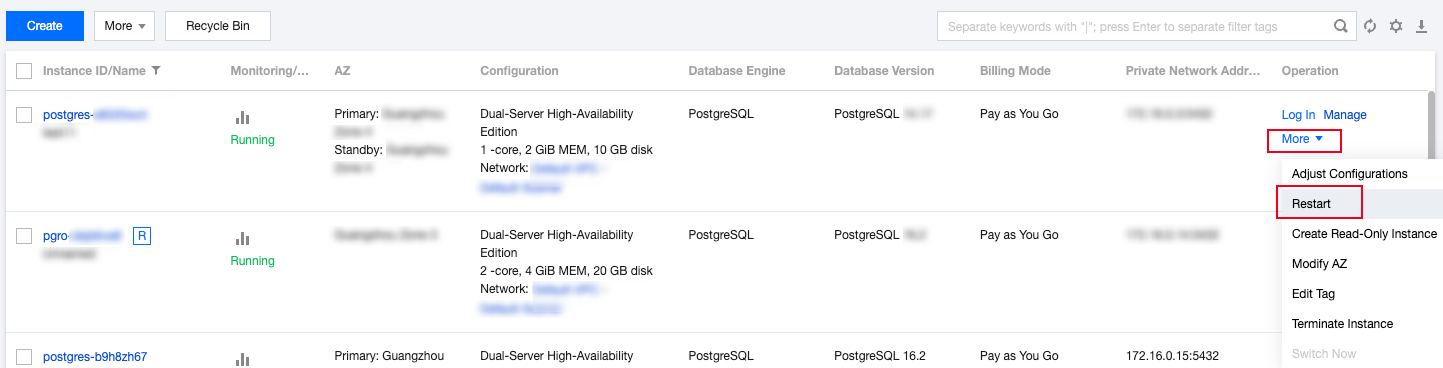
1. Log in to the PostgreSQL console, select the desired instance in the instance list, and choose More > Restart in the Operation column.
Note:
A restart typically takes from a few seconds to a few minutes. During this time, the instance cannot be accessed normally, and existing connections are dropped. Make necessary preparations in advance to avoid impacts.
During a restart, if the business write volume is too large or there are too many dirty pages, the restart may fail. If the restart fails, the instance returns to its pre-restart state and remains accessible.
Restarting the database may fail. If the restart is not completed within 10 minutes, submit your feedback through the Tencent Cloud ticket system.
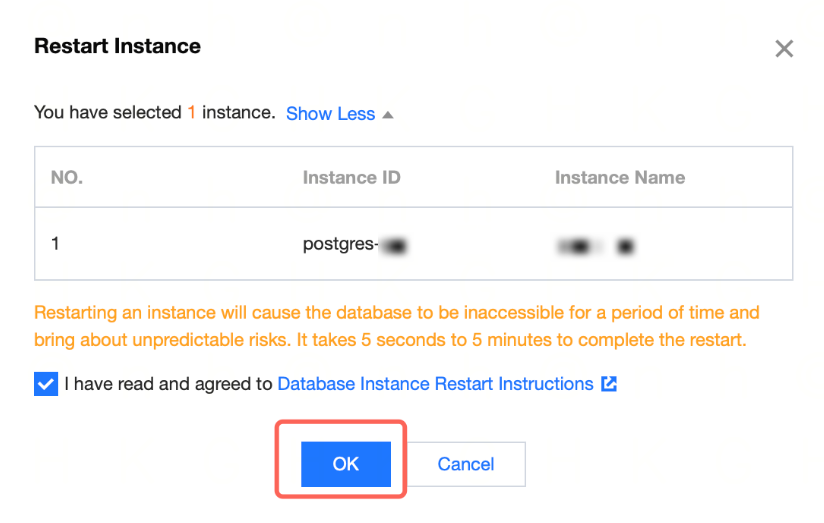
2. In the dialog box that appears, select the consent option and then click OK.
Bantuan dan Dukungan
Apakah halaman ini membantu?
Anda juga dapat Menghubungi Penjualan atau Mengirimkan Tiket untuk meminta bantuan.
masukan