Backup Principles and Solutions
다운로드
포커스 모드
폰트 크기
TencentDB for PostgreSQL supports automatic full backup, manual full backup, and log backup. You can configure automatic backup settings to perform database backups on a regular basis. If a database failure or accidental deletion occurs, you can restore the database from stored backup files. TencentDB for PostgreSQL supports storing database backups in a compressed format. The compressed backup file is approximately 30% of the size of the original file. The specific compression ratio strongly depends on the data stored in the instance, and more duplicate data results in a higher compression ratio.
Backup Principles
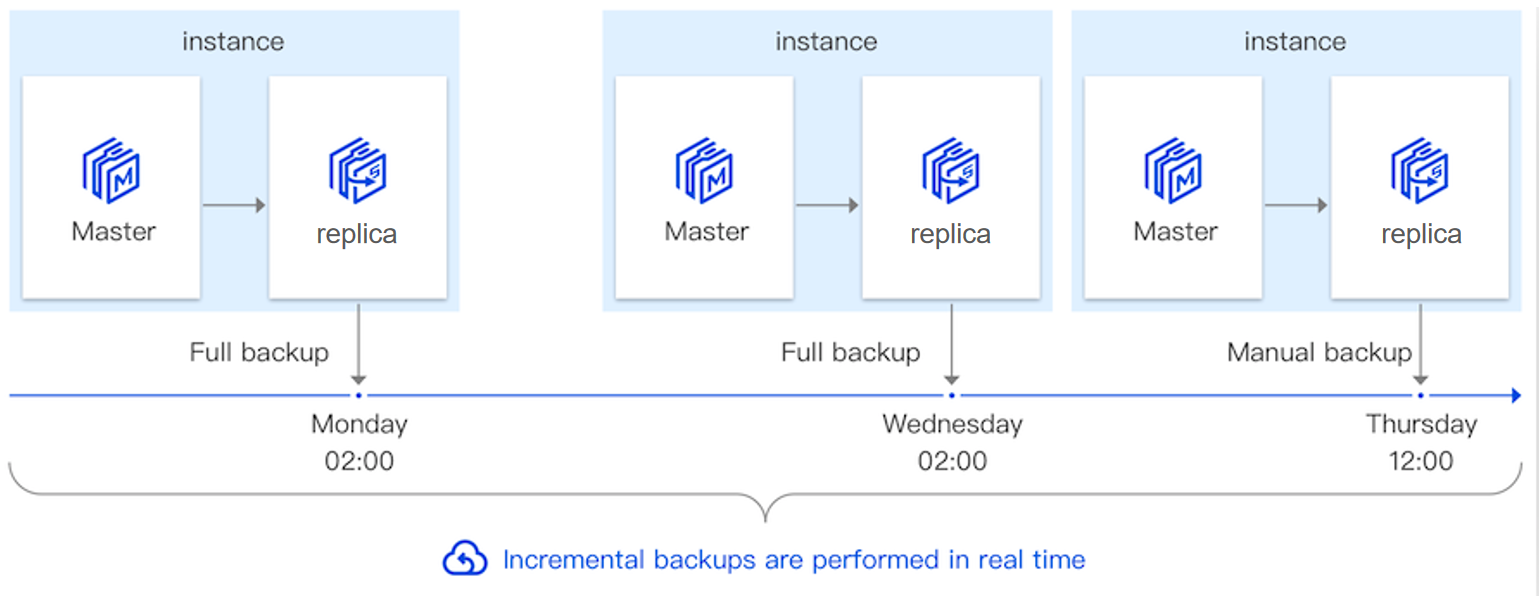
In a dual-server high availability architecture (one primary and one standby), the system pulls data from the standby node of the instance after a backup task is triggered, compresses the data, and uploads it to COS. Backup space does not occupy the disk space of the instance. If a database failure or accidental deletion occurs, you can restore the database from stored backup files. To restore data, you can clone the instance. For details, see Cloning an Instance. You can also download backup files and restore data on your own. For details, see Restoring PostgreSQL Data on a CVM. The following figure shows the principle:
Backup Solutions
Operation Type | Backup Type | Operation Steps |
Data backup | Automatic Full Backup | The system triggers a full data backup within the specified time based on your automatic backup settings. The backup method is physical backup, which offers fast backup speed and higher recovery efficiency. Generated full automatic backup data is retained based on the backup retention period you set. The backup data will not be deleted when the instance is terminated, but will be automatically deleted after expiration. This meets your requirement of retaining backup data for an extended period to prevent serious impact caused by accidental instance deletion. Full backups occupy backup storage space, so you can delete them promptly if needed. Automatic backup data within one week cannot be deleted, while automatic backup data older than one week can be flexibly deleted as needed. Once backup data is deleted, it cannot be recovered. Proceed with caution. |
| Manual Full Backup | You can perform a manual backup in the console based on application needs. After the manual backup task is initiated, the system performs a full instance backup using the physical backup method within 1 minute. Manual backups expire one week after they are initiated. Manual backups occupy backup storage space, so you can delete them promptly if needed. |
| Incremental Backup | Incremental backup is WAL log backup. The system enables incremental backup automatically by default, and it cannot be disabled. Incremental backups are retained based on the backup retention period you set. The system performs real-time backups based on the WAL logs generated by the database. Incremental backups occupy backup storage space, so you can delete them promptly if needed. Incremental backup data within one week cannot be deleted, while incremental backup data older than one week can be flexibly deleted as needed. Once incremental backup data is deleted, point-in-time recovery cannot be performed. Proceed with caution. |
Backup file download | Download Full Backup. | Supports local browser download and download by address. |
| Download Incremental Backup. | Supports local browser download and download by address. |
Transfer historical backups through SCF. | Transfer Through SCF. | Supports transferring historical backup data through SCF. For details, see Transferring PostgreSQL Historical Backups Through SCF. |
Backup Encryption
Backup encryption using the AES-256 encryption algorithm is currently supported. If you need to use the backup encryption feature, submit a ticket to contact us and obtain a solution.
Backup Costs
TencentDB for PostgreSQL backup files are stored in compressed packages. The compressed backup file is approximately 30% of the size of the original file. Backup space for a single instance is provided based on the purchased capacity, and most instances do not require additional payment. For specific billing rules, see Backup Space Billing Description.
피드백