Modifying Audit Rules
다운로드
포커스 모드
폰트 크기
Scenarios
TencentDB for MongoDB audit service supports adjusting audit rules according to business scenarios at any time to ensure efficient, accurate, and compliant regulation of databases.
Prerequisites
The Creating a TencentDB for MongoDB instance operation has been completed, and Database Audit has been enabled for the instance.
The status of the replica set instance or sharded instance of TencentDB for MongoDB is Running.
Directions
1. Log in to the TencentDB for MongoDB console.
2. In the left sidebar, select MongoDB > Database Audit.
3. At the top of the Database Audit page on the right, select Region.
4. In the upper right corner of the audit instance list, select an instance with Audit Status being Enabled.
5. Click the search box to search the target instance in the drop-down list by Instance ID, Instance Name, Tag Key, or Tag.
6. In the Audit Rule column of the target instance, click 
7. On the Audit Rule tab displayed on the right, you can modify the Audit Rule method by re-selecting Full Audit or Rule- Based Audit.
Note:
Separate multiple database names, collection names, client IP addresses, and usernames with commas.
Up to 5 database names, 5 collection names, 5 client IP addresses, and 5 usernames can be configured.
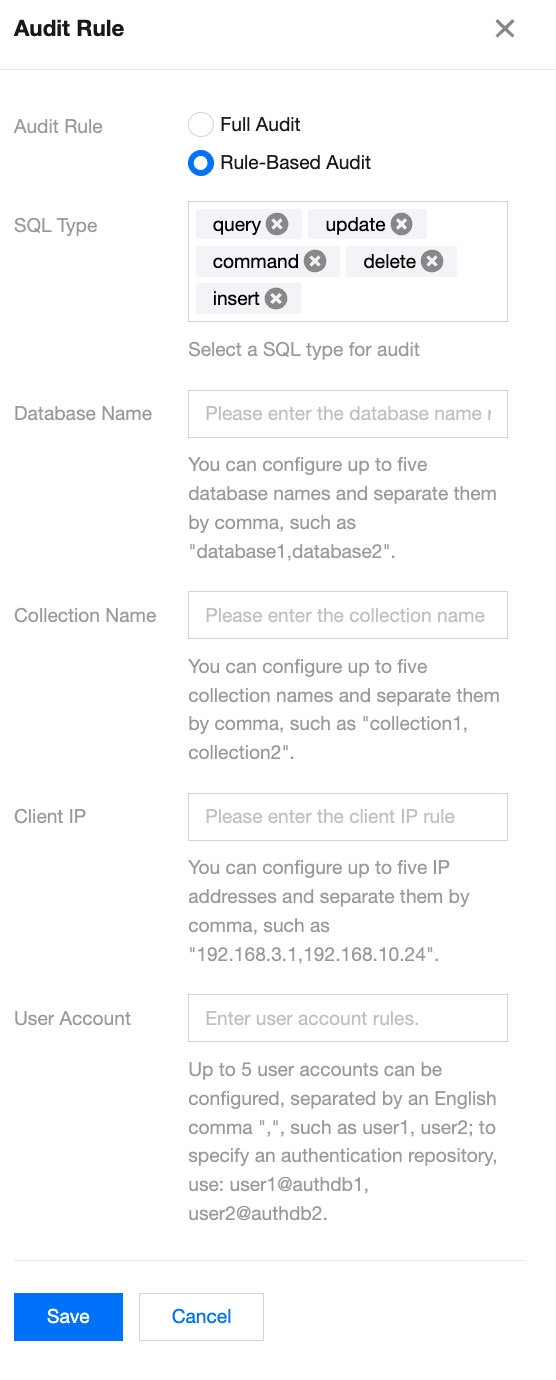
8. Click Save to complete the modification. The database will be audited based on new audit rules.
피드백