Iptables Forwarding
다운로드
포커스 모드
폰트 크기
Overview
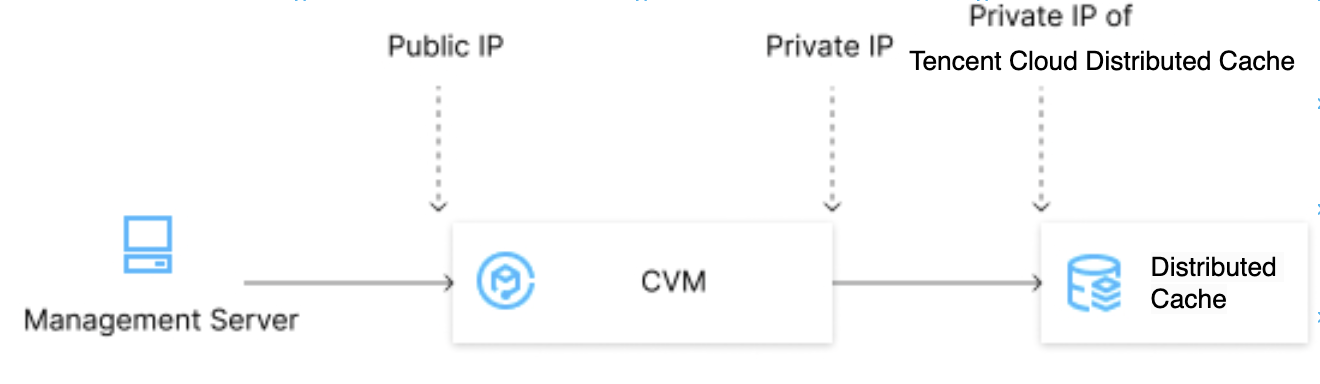
Tencent Cloud Distributed Cache currently supports public network addresses in the following regions: Chengdu, Beijing, Shanghai, and Guangzhou. To access an instance over the public network in other regions, you can use a CVM instance with a public IP address to forward ports.
Note:
Because iptables-based forwarding may be unstable, we recommend that you do not access instances over the public network in the production environment.
Directions
1. Log in to a CVM instance and enable the IP forwarding feature. For more information, see Logging In to Linux Instance (Web Shell).
Note:
The CVM and TencentDB instances must be under the same account and in the same VPC in the same region, or both in the classic network.
echo 1 > /proc/sys/net/ipv4/ip_forward
Running Environment
Operating System: Ubuntu 24.04.3 LTS / x86_64
Runtime Version: GNU bash, version 5.2.21(1)-release (x86_64-pc-linux-gnu)
2. Configure the forwarding rule. The sample code below forwards access requests originally to
26.xx.x.2:10001 (CVM instance public address with a custom port as desired) to the Tencent Cloud Distributed Cache instance with the private address 10.0.0.5:6379:iptables -t nat -A PREROUTING -p tcp --dport 10001 -j DNAT --to-destination 10.0.0.5:6379iptables -t nat -A POSTROUTING -d 10.0.0.5 -p tcp --dport 6379 -j MASQUERADE
Running Environment
Operating System: Ubuntu 24.04.3 LTS / x86_64
Runtime Version: GNU bash, version 5.2.21(1)-release (x86_64-pc-linux-gnu)
3. Configure the security group to open the public port of the CVM instance. We recommend that you configure a security group rule to allow only the source which needs to connect to the instance.
4. Connect to the private network Distributed Cache instance from the access end through the public network address (26.xx.xx.2:10001 in this example). The connection command is the same as that for the private network. For details, see Connecting via Client Tools.
5. After connecting to Tencent Cloud Distributed Cache, run the
info command. If database information is returned, the connection is successful.피드백