Conditionals
다운로드
포커스 모드
폰트 크기
Feature Introduction
Condition Judgment node branches the workflow based on the value of any variable which can be a system variable, upstream reply type, API output, classification Tag, or assignment variable. You can think of it as a general-purpose
if / else if / else structure. Its capability far exceeds the limitation of business hour judgment, which only supports date/time checks.Guide
Go to the created workflow canvas. Then, choose Start Call> +> Conditional on the canvas in order. Fill in the following configuration items in the pop-up window.
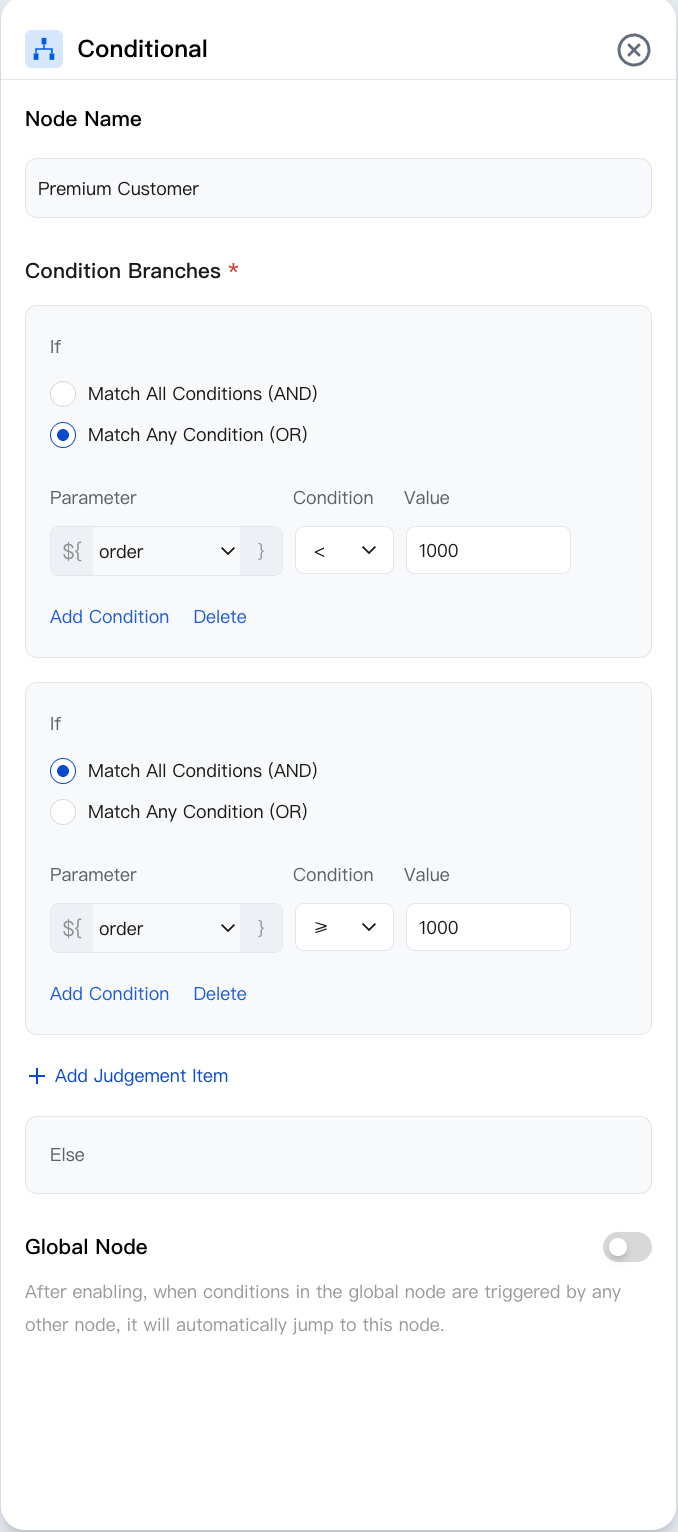
Node Name
Enter the node name. For example, "Is it a high-value customer?" or "Order total > 1000".
Conditional Branch
You can add one or more rule lines. The node evaluates them from top to bottom and adopts the first rule that evaluates to true. If none match, it takes the default branch. Each rule line contains:
Field | Description |
Parameter | Select the variable to compare from the drop-down menu (system variable/upstream node output). |
Condition | Available operators include ==, !=, >, >=, <, <=, contains, not contains, is empty, is not empty, and in (list). The available operators depend on the variable type (numeric, text, boolean, list). |
Value. | A literal value for comparison, or another variable. |
Combination method | When multiple conditions are added in the same row, combine them using and or or. |
Branch Tag | The tag displayed on the outgoing edge (such as "VIP" and "negative balance"). |
Node Overview
Node | Purpose |
Core interaction unit plays prompts, listens to user replies, classifies replies, and branches. | |
Exchanges data with external systems during a call (for example, queries orders, writes back results). | |
Explicitly writes or updates variables within a flow (sets default values, derives values, normalizes slots). | |
Branches based on variable values using comparison operators a generalized if/else if/else logic. | |
Branches based on date, time, and time zone (for example, business hours or non-business hours). | |
Collects numeric keypad inputs (0–9, *, #) applicable to menu-based IVR branching, Captcha/PIN entry, or numeric data collection. | |
Transfers the call to an Agent skill group. | |
Transfers the call to another AI Agent (dialog flow or proprietary model), retaining conversation history and variables. | |
Terminates the call with an optional closing message. |
Related Guidelines
Select the corresponding path based on your deployment method:
First time user? Deploy a functional AI Agent in just five minutes create a conversation flow or integrate an external model.
Want to learn about our conversation flow nodes? Go to Conversation Nodes.
Want to build a knowledge base for your dialogue flow? Go to Build Your Knowledge Base.
How to test your model? Refer to Test Dialogue Workflow.
Configure a voice AI Agent with your own model? Go to Integrate External Model, Edit Conversation Content, Configure Voice Interaction, and Add Call Control.
Want to view application scenarios? Try Voice Notification, Lead Mining, Feedback Collection, or Customer Support.
How to make outbound and inbound calls with an AI Agent? Refer to AI Agent Outbound Calls or AI Agent Inbound Calls.
View data logs? Refer to Call Records, Call Recordings, Latency.
How to create and view post-call tags? Refer to Post-call Tags (Created via Conversation Flow) or Post-call Tags (Created via External LLM).
피드백