iOS
다운로드
포커스 모드
폰트 크기
업무 프로세스
본 섹션에서 쇼 라이브 방송에서 자주 사용되는 업무 프로세스를 종합하여 전체 시나리오의 구현 프로세스를 더욱 쉽게 이해할 수 있도록 도와줍니다.
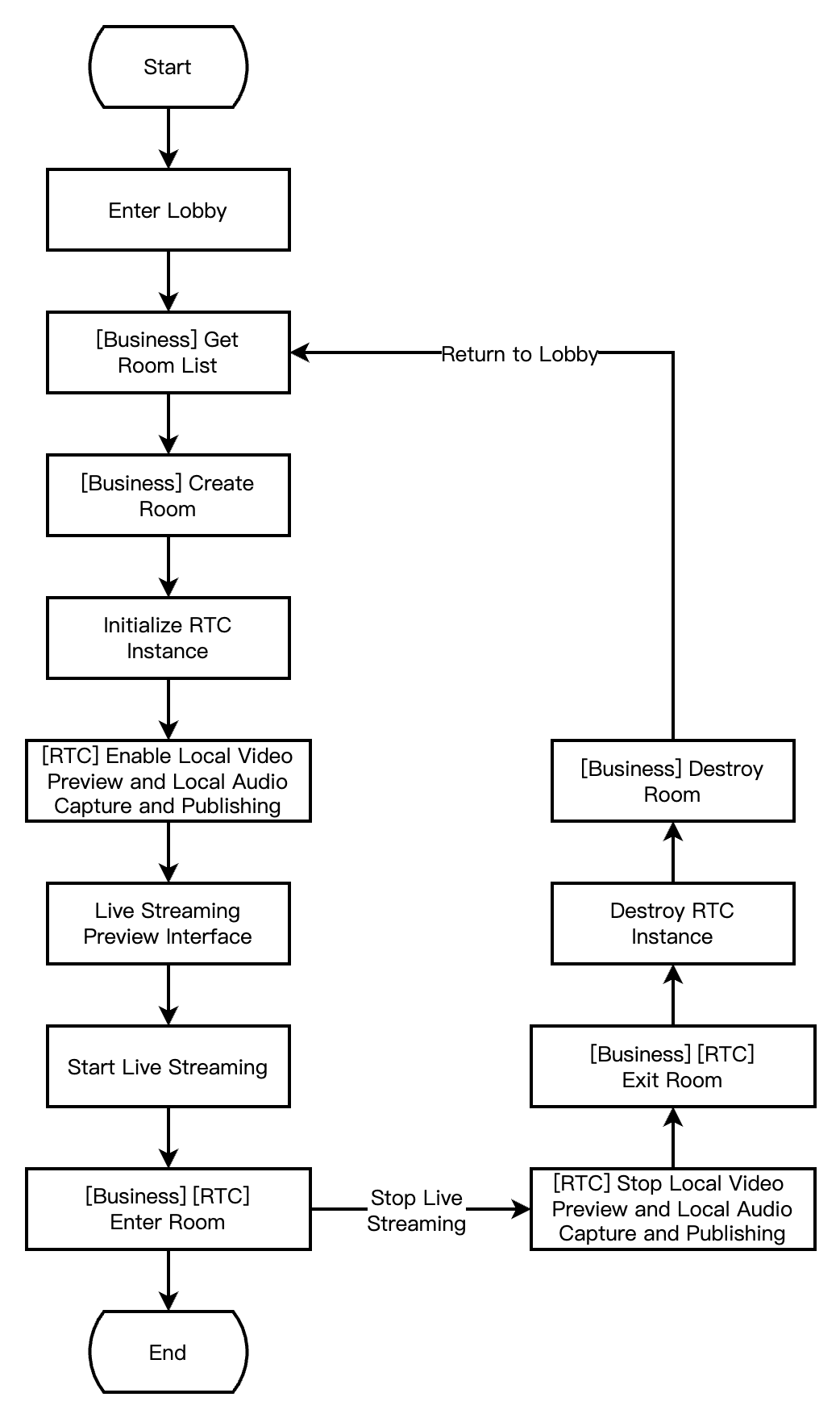
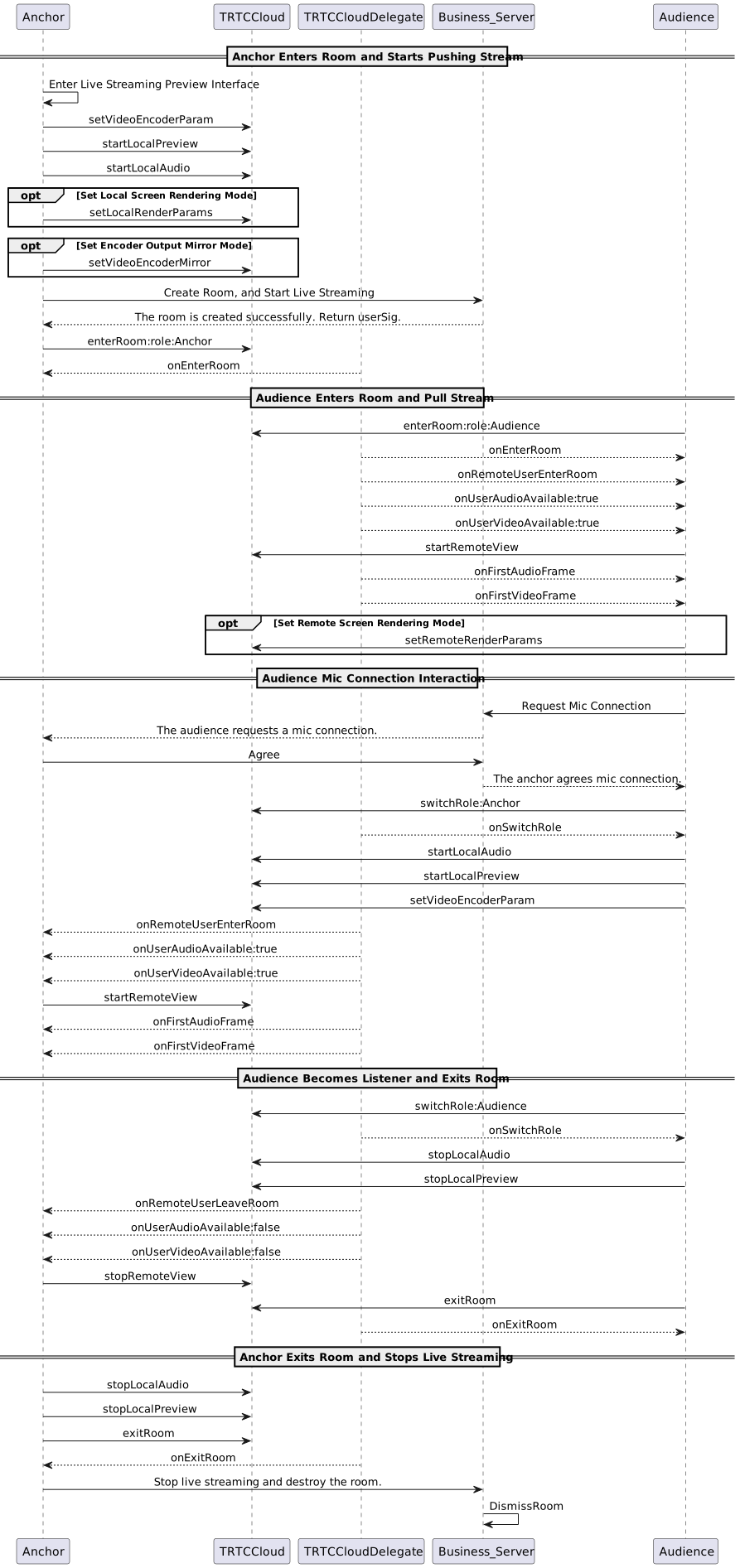
아래 그림은 스트리머(방주인)의 로컬 미리보기, 방 생성, 방 입장 및 방송 시작, 방 퇴장 후 방송 종료의 프로세스를 보여줍니다.
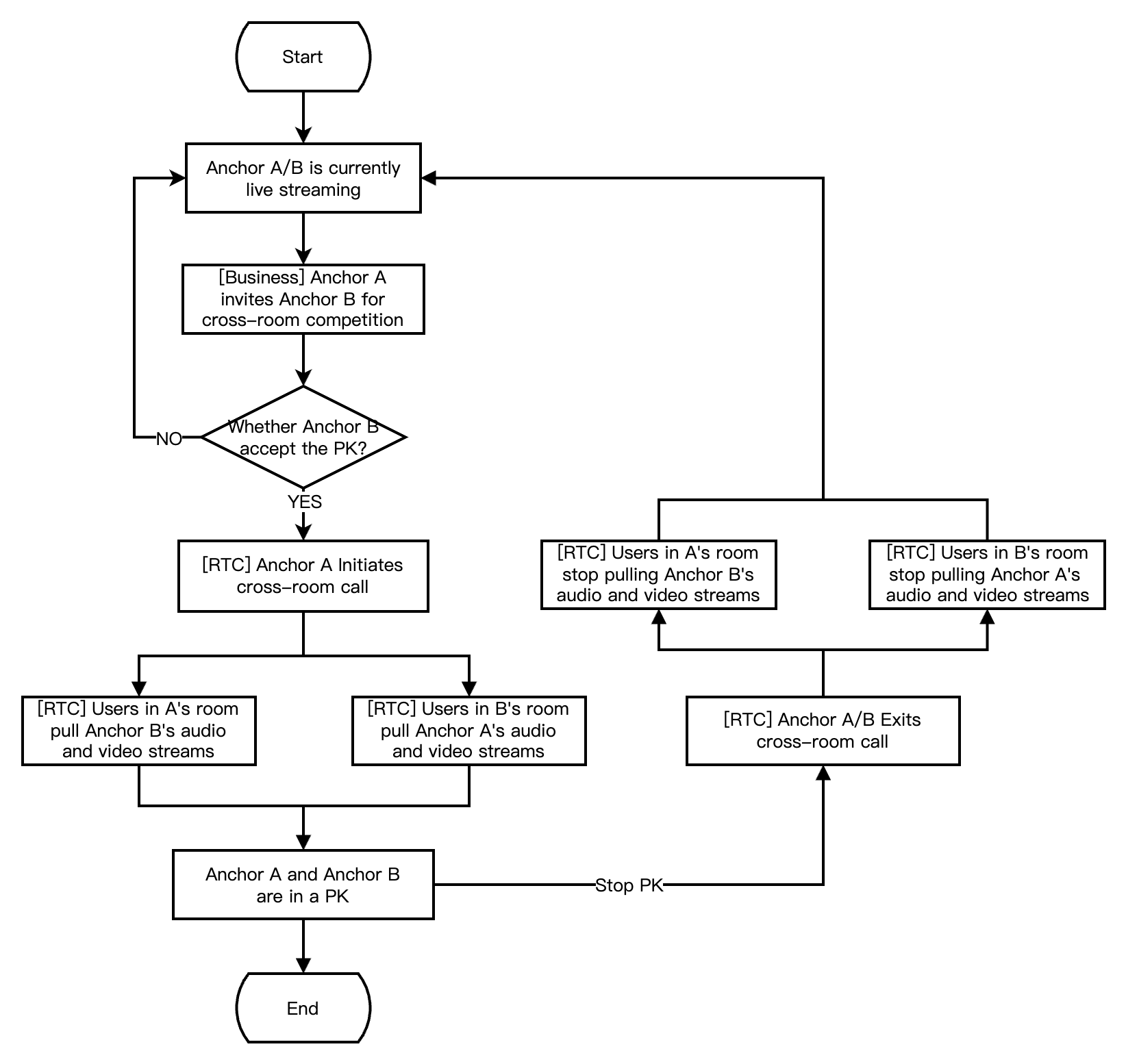
아래 그림으로 스트리머 A가 스트리머 B를 초청하여 크로스 룸 PK 연결을 진행하는 프로세스를 보여줍니다. 크로스 룸 PK 과정에서 두 방의 시청자 모두 두 방주인의 PK 연결 라이브 방송 화면을 볼 수 있습니다.
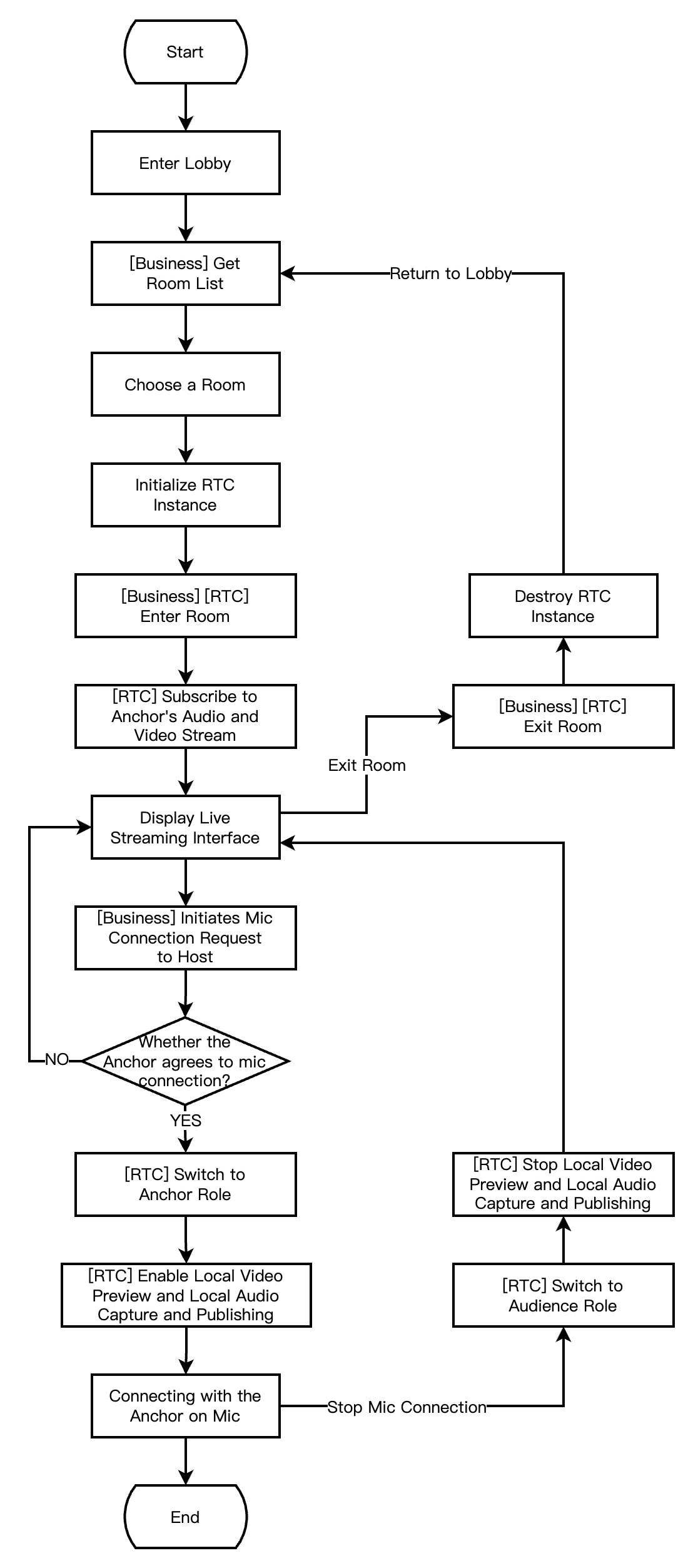
아래 그림으로 RTC 실시간 인터랙션 라이브 방송실에서 시청자의 방 입장, 마이크 연결 신청, 연결 종료, 방 퇴장 프로세스를 보여줍니다.
접수 준비
단계1: 서비스 개통
쇼 라이브 방송 시나리오는 일반적으로 RTC Engine와 뷰티 AR 두 가지 유료 PaaS 서비스에 의존하여 구축됩니다. 여기서 RTC Engine은 실시간 음성 및 영상 인터랙티브 기능을 제공하고, 뷰티 AR은 뷰티 효과 기능을 제공합니다. 타사 뷰티 제품을 사용하는 경우 뷰티 AR 통합 부분을 무시할 수 있습니다.
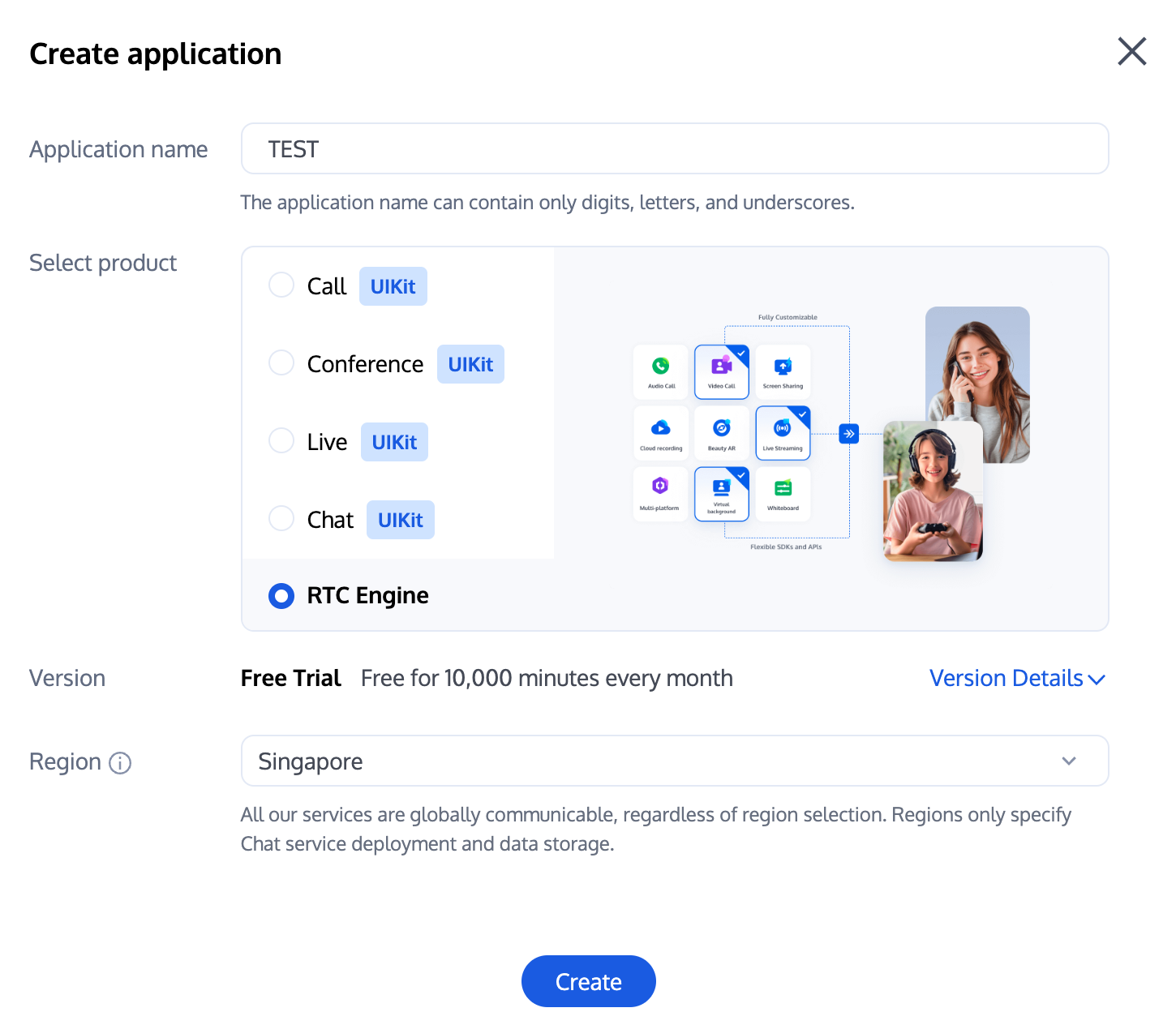
1. 먼저, RTC Engine 콘솔에 로그인하여 애플리케이션을 생성해야 합니다. 필요에 따라 RTC Engine 애플리케이션 버전을 업그레이드할 수 있으며, 예를 들어 프로페셔널 버전은 더 많은 부가 기능 서비스를 사용할 수 있습니다.
설명:
두 개의 애플리케이션을 생성하고 각각 테스트 환경과 프로덕션 환경에 적용하는 것을 권장하며, 1년 동안 각 텐센트 클라우드 계정(UIN)에 매월 10,000분의 무료 사용 시간이 제공됩니다.
RTC Engine 월정액 요금제는 체험판(기본), 라이트, 스탠다드, 프로페셔널로 구분되며, 각각 다른 부가 기능 서비스를 사용할 수 있습니다. 자세한 내용은 버전 기능 및 월정액 요금제 설명을 참조하세요.
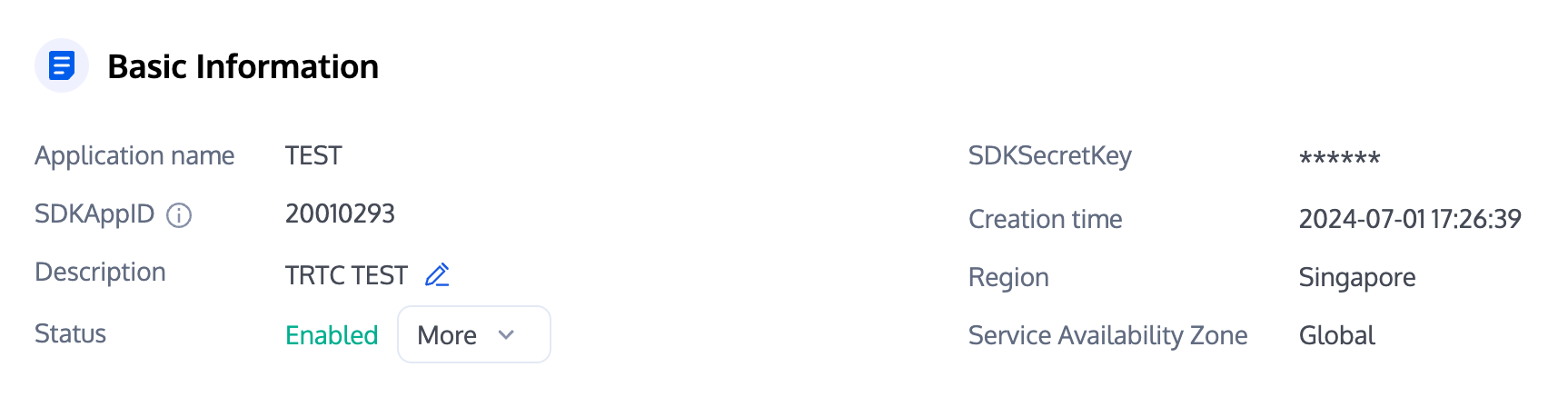
2. 애플리케이션 생성이 완료되면, 앱 관리 - 앱 개요 섹션에서 해당 애플리케이션의 기본 정보를 확인할 수 있습니다. 향후 사용을 위해 SDKAppID와 SDKSecretKey를 안전하게 보관해야 하며, 키 유출로 인한 트래픽 도용을 방지해야 합니다.
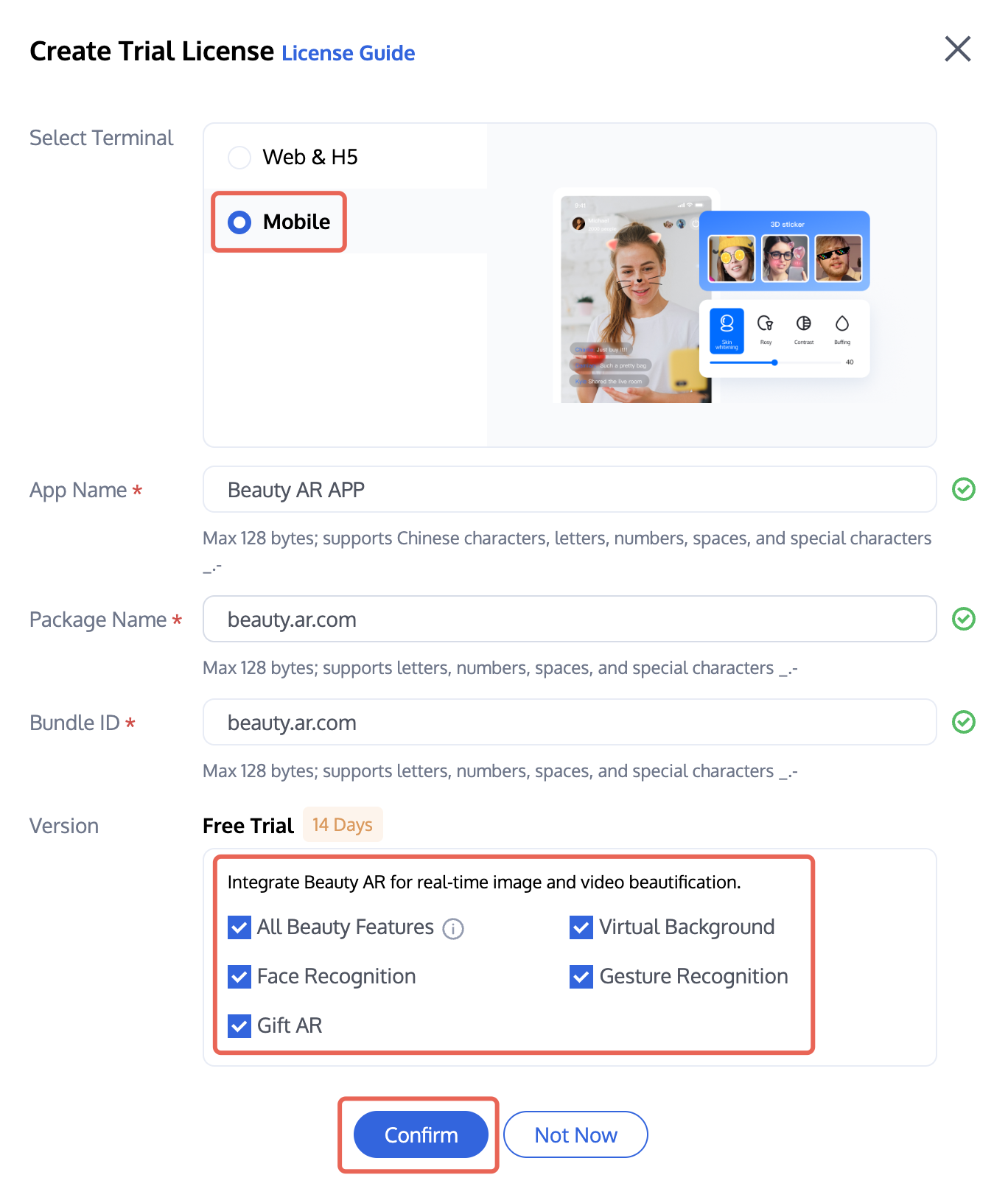
1. 뷰티 AR 콘솔 > 모바일 라이선스에 로그인하여 테스트 라이선스 생성을 클릭하세요(테스트 버전 라이선스는 무료로 14일간 유효하며, 1회 연장 가능하여 총 28일 사용 가능). 모바일을 선택하고 실제 필요에 따라 앱 이름, 패키지 이름 및 번들 ID를 입력하세요. 사용해 보고 싶은 기능을 선택하세요. 예를 들어 모든 뷰티 기능, 가상 배경, 얼굴 인식, 제스처 인식, 선물 애니메이션 효과 등, 그런 다음 확인을 클릭하세요.
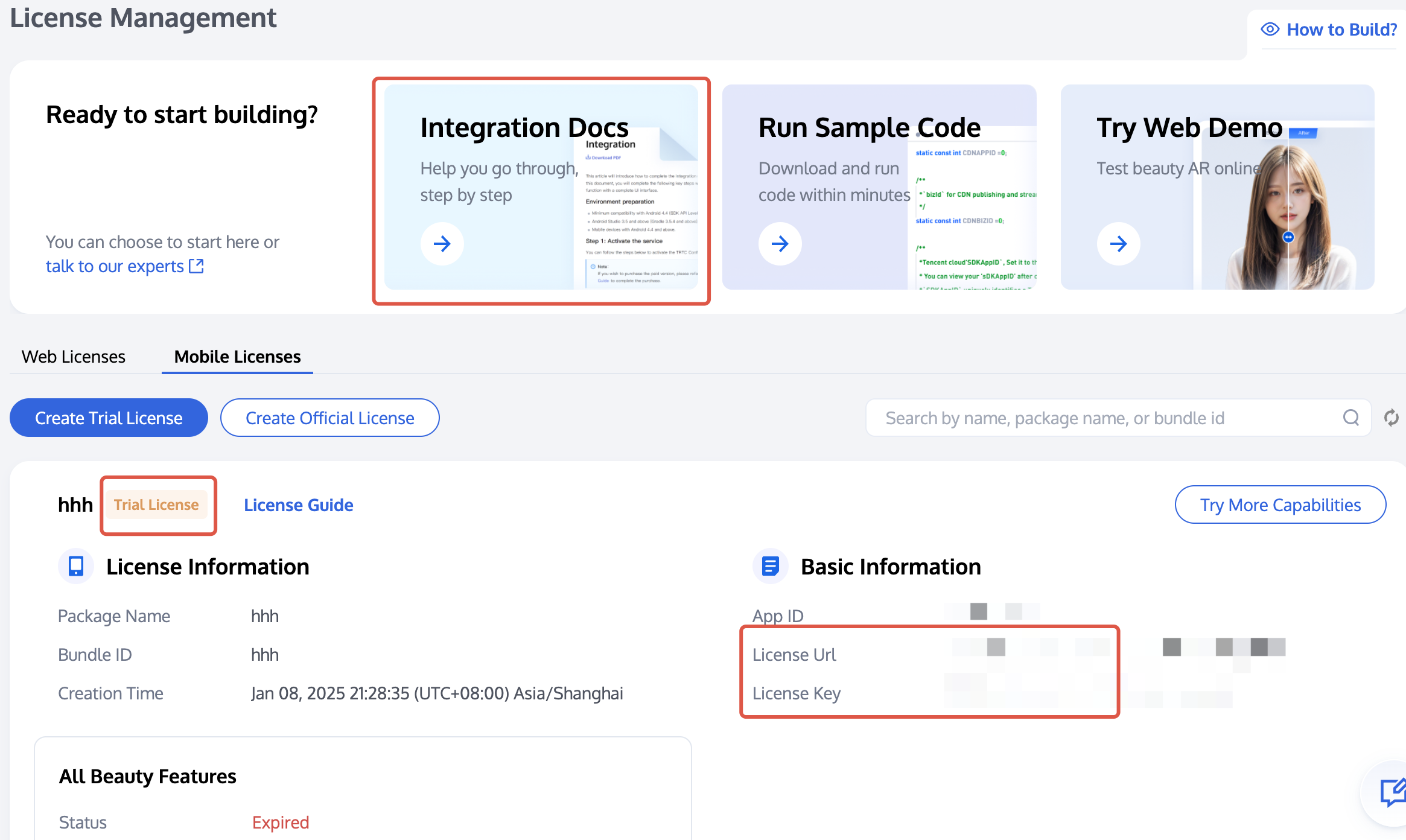
2. 활성화 후, 현재 페이지에서 손님의 정보를 확인하고 상단의 통합 가이드를 참조하여 통합할 수 있습니다. 통합 가이드에서 라이선스 Key와 라이선스 URL 사용 방법을 확인할 수 있습니다.
단계2: SDK 임포트하기
RTC Engine SDK와 뷰티 AR SDK는 CocoaPods 라이브러리에 릴리스되었으며 CocoaPods를 통해 통합할 수 있습니다.
1. CocoaPods를 설치합니다. 터미널 창구에 다음 명령을 입력하세요(Mac에 Ruby 환경을 미리 설치해야 함).
sudo gem install cocoapods
2. Podfile 파일을 생성합니다. 프로젝트 경로로 이동한 후 다음 명령줄을 입력하면 프로젝트 경로에 Podfile 파일이 생성됩니다.
pod init
3. Podfile 파일을 편집합니다. 프로젝트 요구 사항에 따라 적절한 버전을 선택하고 Podfile 파일을 편집하세요.
platform :ios, '8.0'target 'App' do# RTC Engine 라이트 버전# 설치 패키지 크기 증가가 최소화되었지만 RTC Engine와 라이브 방송 플레이어(TXLivePlayer) 두 가지 기능만 지원됩니다.pod 'TXLiteAVSDK_TRTC', :podspec => 'https://liteav.sdk.qcloud.com/pod/liteavsdkspec/TXLiteAVSDK_TRTC.podspec'# Professional 프로페셔널 버전# Real-Time Communication Engine (RTC Engine), 라이브방송 플레이어(TXLivePlayer), RTMP 푸시 스트리밍(TXLivePusher), VOD 플레이어(TXVodPlayer), 짧은 비디오 레코딩 및 편집(UGSV) 등 다양한 기능을 포함합니다.# pod 'TXLiteAVSDK_Professional', :podspec => 'https://liteav.sdk.qcloud.com/pod/liteavsdkspec/TXLiteAVSDK_Professional.podspec'# 뷰티 AR SDK 예: S1-07 패키지pod 'TencentEffect_S1-07'end
4. SDK를 업데이트하고 설치합니다.
터미널 창구에 다음 명령을 입력하여 로컬 라이브러리 파일을 업데이트하고 SDK를 설치하세요.
pod install
또는 다음 명령을 사용하여 로컬 라이브러리 버전을 업데이트합니다.
pod update
pod 명령 실행 후 SDK가 통합된 .xcworkspace 확장자의 프로젝트 파일이 생성되며, 더블 클릭하여 열 수 있습니다.
설명:
pod 검색이 실패할 경우, pod의 로컬 repo 캐시를 업데이트해 보는 것이 좋습니다. 업데이트 명령은 다음과 같습니다.
pod setuppod repo updaterm ~/Library/Caches/CocoaPods/search_index.json
추천하는 자동 로드 방식 외에도, SDK를 다운로드하여 수동으로 임포트할 수도 있으며, 자세한 내용은 RTC Engine SDK 수동 통합 및 뷰티 AR SDK 수동 통합를 참조하세요.
5. 뷰티 리소스를 실제 프로젝트에 추가합니다.
5.1 해당 패키지의 SDK 및 뷰티 리소스를 다운로드하고 압축을 해제한 후, resources/motionRes 폴더의 bundle 리소스를 실제 프로젝트에 추가합니다.
5.2 Build Settings의 Other Linker Flags에
-ObjC을 추가합니다.6. Bundle Identifier를 신청한 테스트 권한과 일치하도록 수정합니다.
단계 3: 엔지니어링 구성
1. 권한의 설정.
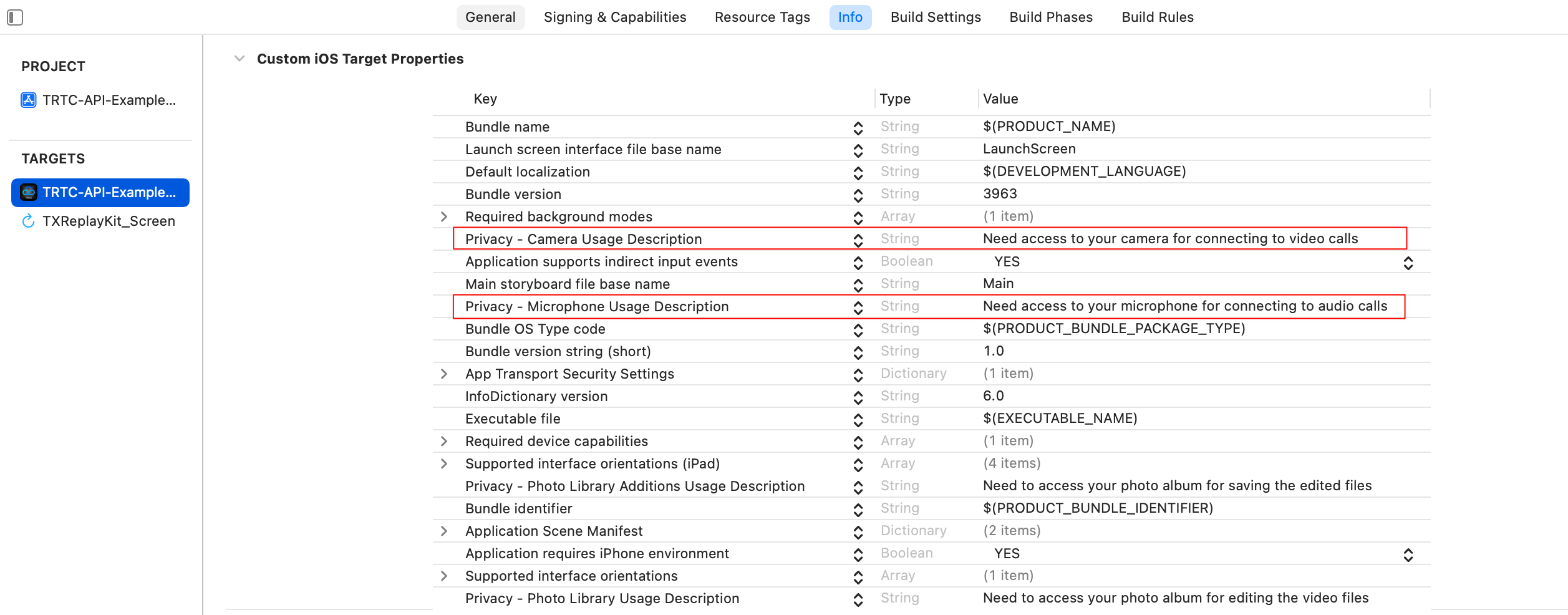
쇼 라이브 방송 시나리오에서 RTC Engine SDK 및 뷰티 AR SDK는 다음 권한이 필요합니다. App의 Info.plist에 다음 두 항목을 추가하세요. 각각 마이크와 카메라에 대한 시스템 권한 다이얼로그 박스의 안내 메시지에 해당합니다.
Privacy - Microphone Usage Description, 마이크 사용 목적에 대한 안내문을 입력하세요.
Privacy - Camera Usage Description,카메라 사용 목적 안내문을 입력하세요.
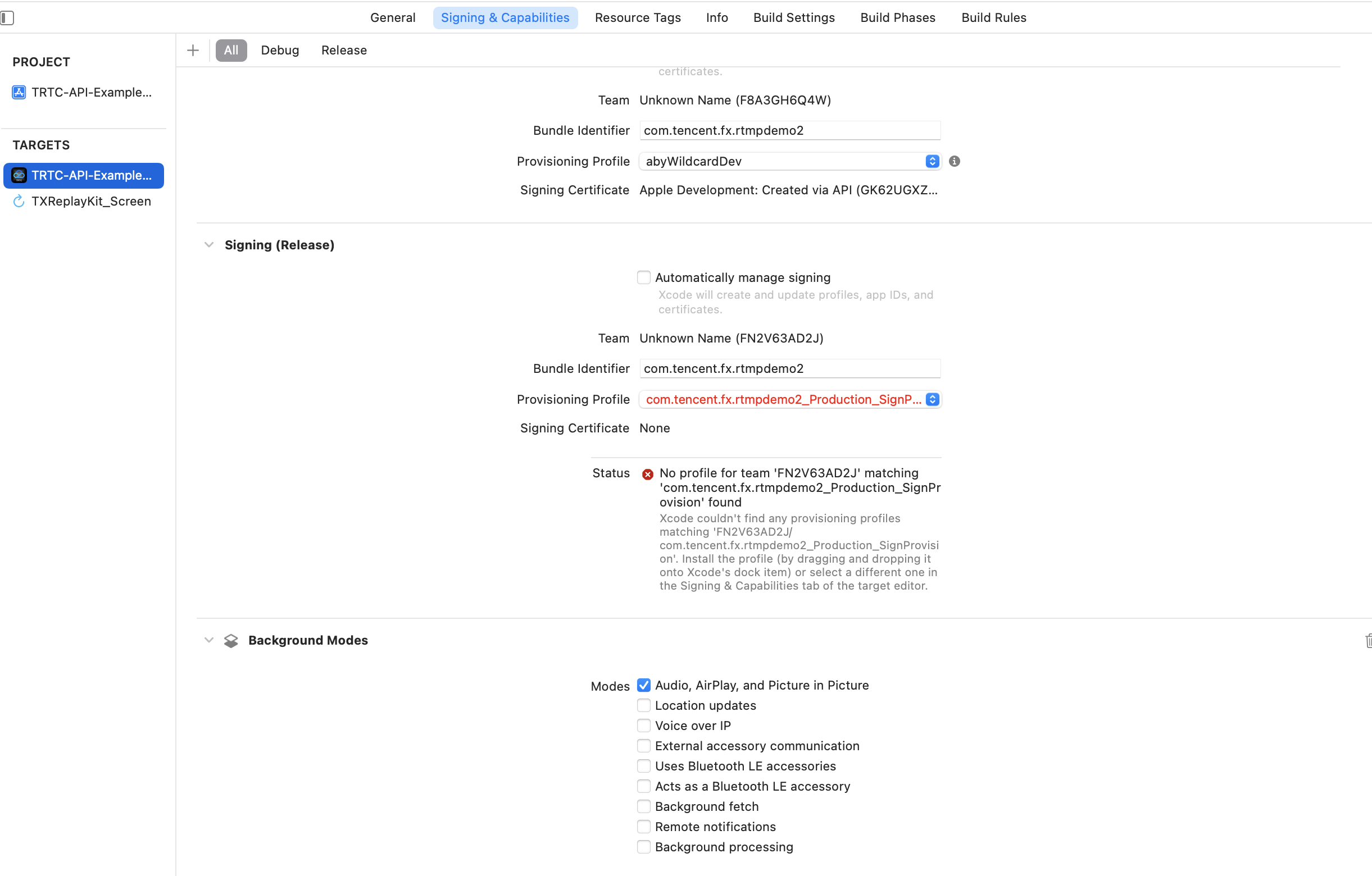
2. 앱이 백그라운드에서도 관련 기능을 계속 실행하려면 XCode에서 현재 프로젝트를 선택하고 Capabilities에 있는 Background Modes 설정을 ON으로 설정한 후 Audio, AirPlay and Picture in Picture을 클릭하세요. 아래 그림과 같습니다.
단계4: 인증 및 허가
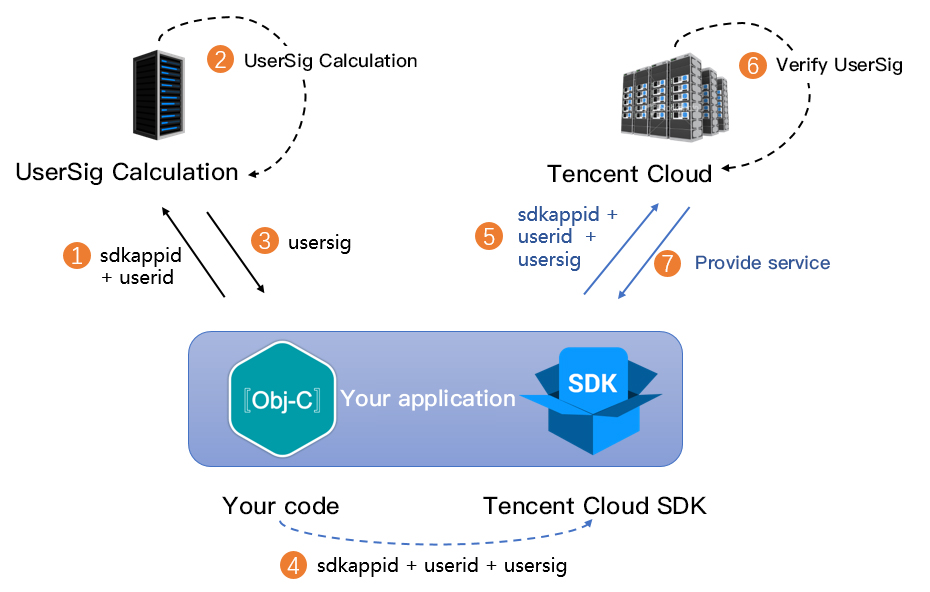
UserSig는 텐센트 클라우드가 설계한 보안 서명이고 악의적인 공격자가 손님의 클라우드 서비스 사용 권한을 도용하는 것을 방지하기 위한 것입니다. RTC Engine은 입장 시 이 인증 자격 증명을 검증합니다.
디버깅 및 테스트 단계: 클라이언트 예시 코드와 콘솔에서 가져오기 두 가지 방법으로 UserSig를 계산 및 생성할 수 있으며, 디버깅 및 테스트 용도로만 사용됩니다.
정식 운영 단계: 클라이언트가 역공학으로 키가 유출되는 것을 방지하기 위해 보안 등급이 더 높은 서버 UserSig 계산 방식의 사용을 권장합니다.
구체적인 구현 프로세스는 다음과 같습니다.
1. 손님의 App은 SDK 초기화 함수를 호출하기 전에 먼저 서버에 UserSig를 요청해야 합니다.
2. 손님의 서버는 SDKAppID와 UserID에 따라 UserSig를 계산합니다.
3. 서버는 계산된 UserSig를 손님의 App에 반환합니다.
4. 손님의 App은 획득한 UserSig를 특정 API를 통해 SDK에 전달합니다.
5. SDK는 SDKAppID + UserID + UserSig를 텐센트 클라우드 서버에 제출하여 검증합니다.
6. 텐센트 클라우드는 UserSig를 검증하여 합법성을 확인합니다.
7. 검증이 완료되면 RTC Engine SDK에 실시간 음성 및 영상 서비스를 제공합니다.
주의:
디버깅 단계의 로컬 UserSig 계산 방식은 온라인 환경에 적용하는 것을 권장하지 않으며, 역공학으로 인해 키가 유출될 수 있기 때문입니다.
여러 언어 버전(Java/Go/PHP/Node.js/Python/C#/C++)의 UserSig 서버 계산 소스 코드를 제공하며, 자세한 내용은 서버에서 UserSig 계산을 참조하세요.
뷰티 AR 사용 전에 텐센트 클라우드에 라이선스 증명을 검증해야 합니다. 라이선스 설정에는 라이선스 Key와 라이선스 URL이 필요하며 예시 코드는 다음과 같습니다.
[TELicenseCheck setTELicense:LicenseURL key:LicenseKey completion:^(NSInteger authresult, NSString * _Nonnull errorMsg) {if (authresult == TELicenseCheckOk) {NSLog(@"인증 성공");} else {NSLog(@"인증 실패");}}];
주의:
관련 업무 모듈의 초기화 코드에서 인증 허가를 트리거하고 사용하기 전에 임시로 라이선스를 다운로드하는 것을 피하며, 인증 시에는 네트워크 권한이 있어야 합니다.
실제 애플리케이션의 Bundle ID는 라이선스 생성 시 바인딩된 Bundle ID와 완전히 일치해야 하며, 그렇지 않으면 라이선스 검증이 실패합니다. 자세한 내용은 인증 오류 코드을 참조하세요.
단계5: SDK 초기화
// RTC Engine SDK 인스턴스의 생성(싱글톤 모드)self.trtcCloud = [TRTCCloud sharedInstance];// 이벤트 리스너의 설정self.trtcCloud.delegate = self;// SDK의 다양한 이벤트 알림(예: 오류 코드, 경고 코드, 오디오/비디오 상태 매개변수 등)- (void)onError:(TXLiteAVError)errCode errMsg:(nullable NSString *)errMsg extInfo:(nullable NSDictionary *)extInfo {NSLog(@"%d: %@", errCode, errMsg);}- (void)onWarning:(TXLiteAVWarning)warningCode warningMsg:(nullable NSString *)warningMsg extInfo:(nullable NSDictionary *)extInfo {NSLog(@"%d: %@", warningCode, warningMsg);}// 이벤트 리스너의 제거self.trtcCloud.delegate = nil;// RTC Engine SDK 인스턴스(싱글톤 모드)를 파기합니다.[TRTCCloud destroySharedIntance];
설명:
// 뷰티 관련 리소스의 로드NSDictionary *assetsDict = @{@"core_name":@"LightCore.bundle",@"root_path":[[NSBundle mainBundle] bundlePath]};// 텐센트 이펙트 SDK의 초기화self.beautyKit = [[XMagic alloc] initWithRenderSize:previewSize assetsDict:assetsDict];// 텐센트 이펙트 SDK의 릴리스[self.beautyKit deinit]
설명:
접속 과정
API 시퀀스 다이어그램
단계1: 스트리머가 방에 입장하여 스트리밍을 시작합니다
1. 스트리머가 방에 들어가기 전에 로컬 비디오 미리보기 및 오디오 수집을 시작합니다.
// 스트리머의 로컬 화면 미리보기를 표시하는 데 사용되는 비디오 렌더링 컨트롤 가져옵니다@property (nonatomic, strong) UIView *anchorPreviewView;@property (nonatomic, strong) TRTCCloud *trtcCloud;- (void)setupTRTC {self.trtcCloud = [TRTCCloud sharedInstance];self.trtcCloud.delegate = self;// 원격 사용자가 보는 화면 품질을 결정하는 비디오 인코딩 매개변수를 설정합니다.TRTCVideoEncParam *encParam = [[TRTCVideoEncParam alloc] init];encParam.videoResolution = TRTCVideoResolution_960_540;encParam.videoFps = 15;encParam.videoBitrate = 1300;encParam.resMode = TRTCVideoResolutionModePortrait;[self.trtcCloud setVideoEncoderParam:encParam];// isFrontCamera는 전면/후면 카메라를 사용하여 비디오를 캡처하도록 지정할 수 있습니다[self.trtcCloud startLocalPreview:self.isFrontCamera view:self.anchorPreviewView];// 여기서는 음질을 지정할 수 있으며, 낮음에서 높음 순으로 SPEECH/DEFAULT/MUSIC입니다.[self.trtcCloud startLocalAudio:TRTCAudioQualityDefault];}
주의:
업무 요구에 따라 비디오 인코딩 매개변수 TRTCVideoEncParam을 직접 설정할 수 있으며, 각 등급별 최적의 해상도와 비트레이트 조합은 해상도 비트레이트 참조표에서 확인할 수 있습니다.
enterRoom 전에 위 인터페이스를 호출하면 SDK는 카메라 미리보기와 오디오 수집만 시작하며, enterRoom을 호출한 후에야 스트리밍을 시작합니다.enterRoom 후에 위 인터페이스를 호출하면 SDK는 카메라 미리보기와 오디오 수집을 시작하고 자동으로 스트리밍을 시작합니다.2. 스트리머가 로컬 화면의 렌더링 매개변수 및 인코더 출력 화면 모드(선택 사항)를 설정합니다.
- (void)setupRenderParams {TRTCRenderParams *params = [[TRTCRenderParams alloc] init];// 화면 미러 모드params.mirrorType = TRTCVideoMirrorTypeAuto;// 화면 채우기 모드params.fillMode = TRTCVideoFillMode_Fill;// 화면 회전 각도params.rotation = TRTCVideoRotation_0;// 로컬 화면의 렌더링 매개변수를 설정합니다[self.trtcCloud setLocalRenderParams:params];// 인코더 출력 화면 미러 모드를 설정합니다[self.trtcCloud setVideoEncoderMirror:YES];// 비디오 인코더 출력 화면의 방향을 설정합니다[self.trtcCloud setVideoEncoderRotation:TRTCVideoRotation_0];}
주의:
로컬 화면 렌더링 파라미터의 설정은 로컬 화면의 렌더링 효과에만 영향을 줍니다.
인코더 출력 모드의 설정은 방의 다른 사용자들이 보는 (및 클라우드 레코딩 파일) 화면 효과에 영향을 줍니다.
3. 스트리머가 정식으로 라이브 방송을 시작하고 방에 입장하여 스트리밍 시작합니다.
- (void)enterRoomByAnchorWithUserId:(NSString *)userId roomId:(NSString *)roomId {TRTCParams *params = [[TRTCParams alloc] init];// 문자열 방 번호를 예로 들면params.strRoomId = roomId;params.userId = userId;// 업무 백엔드에서 가져온 UserSigparams.userSig = @"userSig";// 손님의 SDKAppID로 교체합니다params.sdkAppId = 0;// 스트리머 역할의 지정params.role = TRTCRoleAnchor;// 인터랙티브 라이브 방송 시나리오로 방 입장하기[self.trtcCloud enterRoom:params appScene:TRTCAppSceneLIVE];}// 방 입장 결과 이벤트의 콜백- (void)onEnterRoom:(NSInteger)result {if (result > 0) {// result는 방에 임장하는 데 소요된 시간(밀리초)을 나타냅니다.NSLog(@"Enter room succeed!");} else {// result는 방 입장 실패의 오류 코드를 나타냅니다.NSLog(@"Enter room failed!");}}
주의:
RTC Engine 방 번호는 정수형
roomId와 문자열 형식 strRoomId로 나뉘며, 두 유형의 방은 서로 통하지 않으므로 방 번호 유형을 통일하는 것이 좋습니다.RTC Engine 사용자 역할은 스트리머와 청취자로 구분되며, 스트리머만 스트리밍 권한을 가집니다. 방 입장 시 사용자 역할을 지정해야 하며, 지정하지 않으면 기본적으로 스트리머 역할로 설정됩니다.
쇼 라이브방송 시나리오에서는 방 입장 모드를
TRTCAppSceneLIVE으로 선택하는 것이 좋습니다.단계2: 시청자가 방에 들어가서 스트리밍을 시작합니다
1. 시청자가 RTC Engine 방에 입장합니다.
- (void)enterRoomByAudienceWithUserId:(NSString *)userId roomId:(NSString *)roomId {TRTCParams *params = [[TRTCParams alloc] init];// 문자열 방 번호를 예로 들면params.strRoomId = roomId;params.userId = userId;// 업무 백엔드에서 가져온 UserSigparams.userSig = @"userSig";// 손님의 SDKAppID로 교체합니다params.sdkAppId = 0;// 시청자 역할의 지정params.role = TRTCRoleAudience;// 인터랙티브 라이브 방송 시나리오로 방 입장하기[self.trtcCloud enterRoom:params appScene:TRTCAppSceneLIVE];}// 방 입장 결과 이벤트의 콜백- (void)onEnterRoom:(NSInteger)result {if (result > 0) {// result는 방에 임장하는 데 소요된 시간(밀리초)을 나타냅니다.NSLog(@"Enter room succeed!");} else {// result는 방 입장 실패의 오류 코드를 나타냅니다.NSLog(@"Enter room failed!");}}
2. 시청자가 스트리머의 오디오 및 비디오 스트림을 구독합니다.
- (void)onUserAudioAvailable:(NSString *)userId available:(BOOL)available {// 원격 사용자가 자신의 오디오를 게시/취소합니다// 자동 구독 모드에서는 사용자가 아무런 작업을 하지 않아도 SDK가 원격 사용자의 오디오를 자동으로 재생합니다.}- (void)onUserVideoAvailable:(NSString *)userId available:(BOOL)available {// 원격 사용자가 메인 비디오 화면을 게시/취소합니다if (available) {// 원격 사용자의 비디오 스트림을 구독하고 비디오 렌더링 컨트롤을 바인딩합니다[self.trtcCloud startRemoteView:userId streamType:TRTCVideoStreamTypeBig view:self.remoteView];} else {// 원격 사용자의 비디오 스트림 구독을 중지하고 렌더링 컨트롤을 릴리스합니다[self.trtcCloud stopRemoteView:userId streamType:TRTCVideoStreamTypeBig];}}
3. 시청자가 원격 화면의 렌더링 모드를 설정합니다(선택 사항).
- (void)setupRemoteRenderParams {TRTCRenderParams *params = [[TRTCRenderParams alloc] init];// 화면 미러 모드params.mirrorType = TRTCVideoMirrorTypeAuto;// 화면 채우기 모드params.fillMode = TRTCVideoFillMode_Fill;// 화면 회전 각도params.rotation = TRTCVideoRotation_0;// 원격 화면의 렌더링 모드를 설정합니다[self.trtcCloud setRemoteRenderParams:@"userId" streamType:TRTCVideoStreamTypeBig params:params];}
단계3: 시청자가 마이크 켜고 인터랙션 합니다
1. 시청자가 스트리머 역할로 전환됩니다.
- (void)switchToAnchor {// 스트리머 역할로 전환됩니다[self.trtcCloud switchRole:TRTCRoleAnchor];}// 역할 전환 이벤트의 콜백- (void)onSwitchRole:(TXLiteAVError)errCode errMsg:(NSString *)errMsg {if (errCode == ERR_NULL) {// 역할 전환 성공}}
2. 시청자가 로컬 오디오/비디오 수집 및 스트리밍을 시작합니다.
- (void)setupTRTC {// 원격 사용자가 보는 화면 품질을 결정하는 비디오 인코딩 매개변수를 설정합니다.TRTCVideoEncParam *encParam = [[TRTCVideoEncParam alloc] init];encParam.videoResolution = TRTCVideoResolution_480_270;encParam.videoFps = 15;encParam.videoBitrate = 550;encParam.resMode = TRTCVideoResolutionModePortrait;[self.trtcCloud setVideoEncoderParam:encParam];// isFrontCamera는 전면/후면 카메라를 사용하여 비디오를 캡처하도록 지정할 수 있습니다[self.trtcCloud startLocalPreview:self.isFrontCamera view:self.audiencePreviewView];// 여기서는 음질을 지정할 수 있으며, 낮음에서 높음 순으로 SPEECH/DEFAULT/MUSIC입니다.[self.trtcCloud startLocalAudio:TRTCAudioQualityDefault];}
주의:
업무 요구에 따라 비디오 인코딩 매개변수 TRTCVideoEncParam을 직접 설정할 수 있으며, 각 등급별 최적의 해상도와 비트레이트 조합은 해상도 비트레이트 참조표에서 확인할 수 있습니다.
3. 시청자가 마이크를 끄고 스트리밍을 중지합니다.
- (void)switchToAudience {// 시청자 역할로 전환됩니다[self.trtcCloud switchRole:TRTCRoleAudience];}// 역할 전환 이벤트의 콜백- (void)onSwitchRole:(TXLiteAVError)errCode errMsg:(NSString *)errMsg {if (errCode == ERR_NULL) {// 카메라 수집 및 스트리밍 중지합니다[self.trtcCloud stopLocalPreview];// 마이크 수집 및 스트리밍 중지합니다[self.trtcCloud stopLocalAudio];}}
단계4: 방 나가기 및 해산하기
1. 방에서 나가기.
- (void)exitRoom {[self.trtcCloud stopLocalAudio];[self.trtcCloud stopLocalPreview];[self.trtcCloud exitRoom];}// 방 나가기 이벤트의 콜백- (void)onExitRoom:(NSInteger)reason {if (reason == 0) {NSLog(@"exitRoom을 호출하여 방에서 나가기");} else if (reason == 1) {NSLog(@"서버에 의해 현재 방에서 나가게 됩니다");} else if (reason == 2) {NSLog(@"현재 방 전체가 해체됩니다");}}
주의:
SDK가 점유한 모든 리소스가 릴리스된 후, SDK는
onExitRoom 콜백을 통해 알려줍니다.enterRoom을 다시 호출하거나 다른 음성/영상 SDK로 전환하려면 onExitRoom 콜백이 발생한 후 관련 작업을 수행하십시오. 그렇지 않으면 카메라, 마이크 장치에 강제로 점유됨 등 다양한 이상 현상이 발생할 수 있습니다.2. 방 해산
서버 측 해산: RTC Engine은 서버 측 방 해산 API
DismissRoom(숫자 방 ID와 문자열 방 ID 구분)을 제공합니다. 이 인터페이스를 호출하여 방의 모든 사용자를 방에서 나가게 시키하고 방을 해산할 수 있습니다.클라이언트 측 해산: 각 클라이언트의 방에서 나가기
exitRoom 인터페이스를 통해 방 내 모든 스트리머와 청취자의 퇴장을 완료시키고, 퇴장 후 RTC Engine 방 라이프사이클 규칙에 따라 방이 자동으로 해산됩니다. 자세한 내용은 방에서 나가기를 참조하세요.주의:
라이브 방송이 종료된 후 서버 측에서 방 해산 API를 호출하여 방이 해산되도록 하는 것이 좋습니다. 이렇게 하면 시청자가 의도치 않게 방에 들어가 예상치 못한 비용이 발생하는 것을 방지할 수 있습니다.
고급 기능
스트리머 간 크로스 룸 PK 연결
1. 어느 한쪽이 크로스 룸 PK 연결을 신청합니다.
- (void)connectOtherRoom:(NSString *)roomId {NSMutableDictionary *jsonDict = [[NSMutableDictionary alloc] init];// 숫자 방 번호는 roomId입니다[jsonDict setObject:roomId forKey:@"strRoomId"];[jsonDict setObject:self.userId forKey:@"userId"];NSData *jsonData = [NSJSONSerialization dataWithJSONObject:jsonDict options:NSJSONWritingPrettyPrinted error:nil];NSString *jsonString = [[NSString alloc] initWithData:jsonData encoding:NSUTF8StringEncoding];[self.trtcCloud connectOtherRoom:jsonString];}// 크로스 룸 연결 결과의 콜백- (void)onConnectOtherRoom:(NSString *)userId errCode:(TXLiteAVError)errCode errMsg:(NSString *)errMsg {// 크로스 룸 연결을 하려는 다른 방의 스트리머의 사용자 ID// 에러 코드, ERR_NULL은 요청 성공을 나타냅니다// 에러 정보}
주의:
크로스 룸 PK 연결의 로컬 사용자와 상대 사용자는 모두 스트리머 역할이어야 하며, 오디오 또는 비디오 업스트림이 모두 있어야 합니다.
2. 두 방의 모든 사용자는 다른 방의 스크리머로부터 오디오/비디오 스트림 사용 가능 콜백을 받게 됩니다.
- (void)onUserAudioAvailable:(NSString *)userId available:(BOOL)available {// 원격 사용자가 자신의 오디오를 게시/취소합니다// 자동 구독 모드에서는 사용자가 아무런 작업을 하지 않아도 SDK가 원격 사용자의 오디오를 자동으로 재생합니다.}- (void)onUserVideoAvailable:(NSString *)userId available:(BOOL)available {// 원격 사용자가 메인 비디오 화면을 게시/취소합니다if (available) {// 원격 사용자의 비디오 스트림을 구독하고 비디오 렌더링 컨트롤에 바인딩합니다[self.trtcCloud startRemoteView:userId streamType:TRTCVideoStreamTypeBig view:self.remoteView];} else {// 원격 사용자의 비디오 스트림 구독을 중지하고 렌더링 컨트롤을 릴리스합니다[self.trtcCloud stopRemoteView:userId streamType:TRTCVideoStreamTypeBig];}}
3. 어느 한쪽이 크로스 룸 PK 연결을 종료합니다.
// 크로스 룸 채팅 연결 종료[self.trtcCloud disconnectOtherRoom];// 크로스 룸 연결 종료 결과의 콜백- (void)onDisconnectOtherRoom:(TXLiteAVError)errCode errMsg:(NSString *)errMsg {}
주의:
DisconnectOtherRoom()을 호출하면 모든 다른 방의 스트리머와의 크로스 룸 PK 연결이 종료됩니다.크로스 룸 PK 연결의 발신 측 또는 수신 측 중 어느 한쪽에서
DisconnectOtherRoom()을 호출하여 크로스 룸 PK 연결을 종료할 수 있습니다.제3자 뷰티 제품의 사용
RTC Engine은 서드파티 뷰티 효과 제품의 접근을 지원하며, 아래에서는 뷰티 AR을 예로 들어 서드파티 뷰티 접근 절차를 설명합니다.
1. 뷰티 AR SDK 통합 및 라이선스 권한의 신청에 대한 자세한 내용은 접속 준비 단계를 참조하세요.
2. SDK 소재 리소스 경로의 설정(해당하는 경우).
NSString *beautyConfigPath = [NSSearchPathForDirectoriesInDomains(NSDocumentDirectory, NSUserDomainMask, YES) lastObject];beautyConfigPath = [beautyConfigPath stringByAppendingPathComponent:@"beauty_config.json"];NSFileManager *localFileManager=[[NSFileManager alloc] init];BOOL isDir = YES;NSDictionary * beautyConfigJson = @{};if ([localFileManager fileExistsAtPath:beautyConfigPath isDirectory:&isDir] && !isDir) {NSString *beautyConfigJsonStr = [NSString stringWithContentsOfFile:beautyConfigPath encoding:NSUTF8StringEncoding error:nil];NSError *jsonError;NSData *objectData = [beautyConfigJsonStr dataUsingEncoding:NSUTF8StringEncoding];beautyConfigJson = [NSJSONSerialization JSONObjectWithData:objectDataoptions:NSJSONReadingMutableContainerserror:&jsonError];}NSDictionary *assetsDict = @{@"core_name":@"LightCore.bundle",@"root_path":[[NSBundle mainBundle] bundlePath],@"tnn_"@"beauty_config":beautyConfigJson};// SDK 초기화: width와 height는 각각 texture의 너비와 높이입니다.self.xMagicKit = [[XMagic alloc] initWithRenderSize:CGSizeMake(width,height) assetsDict:assetsDict];
3. 제3자 뷰티 제품의 비디오 데이터 콜백을 설정하여 뷰티 SDK가 처리한 각 프레임 데이터 결과를 RTC Engine SDK 내부로 전달하고 렌더링 처리합니다.
// RTC Engine SDK가 서드파티 뷰티의 비디오 데이터 콜백을 설정합니다[self.trtcCloud setLocalVideoProcessDelegete:self pixelFormat:TRTCVideoPixelFormat_Texture_2D bufferType:TRTCVideoBufferType_Texture];#pragma mark - TRTCVideoFrameDelegate// YTProcessInput을 구성하여 SDK 내부로 전달하여 렌더링 처리를 합니다- (uint32_t)onProcessVideoFrame:(TRTCVideoFrame *_Nonnull)srcFrame dstFrame:(TRTCVideoFrame *_Nonnull)dstFrame {if (!self.xMagicKit) {[self buildBeautySDK:srcFrame.width and:srcFrame.height texture:srcFrame.textureId];//XMagic SDK의 초기화self.heightF = srcFrame.height;self.widthF = srcFrame.width;}if(self.xMagicKit!=nil && (self.heightF!=srcFrame.height || self.widthF!=srcFrame.width)){self.heightF = srcFrame.height;self.widthF = srcFrame.width;[self.xMagicKit setRenderSize:CGSizeMake(srcFrame.width, srcFrame.height)];}YTProcessInput *input = [[YTProcessInput alloc] init];input.textureData = [[YTTextureData alloc] init];input.textureData.texture = srcFrame.textureId;input.textureData.textureWidth = srcFrame.width;input.textureData.textureHeight = srcFrame.height;input.dataType = kYTTextureData;YTProcessOutput *output = [self.xMagicKit process:input withOrigin:YtLightImageOriginTopLeft withOrientation:YtLightCameraRotation0];dstFrame.textureId = output.textureData.texture;return 0;}
주의:
단계1 및 단계2는 제3자 뷰티 제품의 구현 방식에 따라 다르며, 단계3은 RTC Engine이 제3자 뷰티를 통합하는 공통적이고 중요한 단계입니다.
듀얼 인코딩 모드
듀얼 인코딩 모드를 활성화하면 현재 사용자의 인코더가 [고화질 대형 화면]과 [저화질 소형 화면] 두 가지 비디오 스트림을 동시에 출력합니다(단, 오디오 스트림은 하나만 존재함). 이렇게 하면 방의 다른 사용자가 자신의 네트워크 상황이나 화면 크기에 따라 [고화질 대형 화면] 또는 [저화질 소형 화면]을 선택하여 구독할 수 있습니다.
1. 대형및 소형 화면 듀얼 인코딩 모드를 활성화합니다.
- (void)enableDualStreamMode:(BOOL)enable {// 소형 비디오 스트림의 인코딩 매개변수 (자체 정의 가능)TRTCVideoEncParam *smallVideoEncParam = [[TRTCVideoEncParam alloc] init];smallVideoEncParam.videoResolution = TRTCVideoResolution_480_270;smallVideoEncParam.videoFps = 15;smallVideoEncParam.videoBitrate = 550;smallVideoEncParam.resMode = TRTCVideoResolutionModePortrait;[self.trtcCloud enableEncSmallVideoStream:enable withQuality:smallVideoEncParam];}
주의:
듀얼 인코딩을 활성화하면 더 많은 CPU 및 네트워크 대역폭이 소모되므로 Mac, Windows 또는 고성능 Pad에서는 활성화를 고려할 수 있지만 모바일에서는 활성화하지 않는 것이 좋습니다.
2. 원격 사용자 비디오 스트림의 유형을 선택합니다.
// 원격 사용자 비디오 스트림을 구독할 때 선택 가능한 비디오 스트림의 유형[self.trtcCloud startRemoteView:userId streamType:TRTCVideoStreamTypeBig view:view];// 원격 사용자의 화면 크기를 언제든지 전환할 수 있습니다[self.trtcCloud setRemoteVideoStreamType:userId type:TRTCVideoStreamTypeSmall];
주의:
듀얼 스트림 인코딩 활성화 후,
streamType 비디오 스트림 유형을 TRTCVideoStreamTypeSmall로 지정하여 저화질 소형 화면을 가져올 수 있습니다.뷰 렌더링 컨트롤
업무에 표시 영역 전환과 관련된 인터랙티브 시나리오가 포함된 경우 RTC Engine SDK를 사용하여 로컬 미리보기 화면을 업데이트하고 원격 사용자 비디오 렌더링 컨트롤 기능을 구현할 수 있습니다.
// 로컬 미리보기 화면 렌더링 컨트롤의 업데이트[self.trtcCloud updateLocalView:view];// 원격 사용자 비디오 렌더링 컨트롤의 업데이트[self.trtcCloud updateRemoteView:view streamType:TRTCVideoStreamTypeBig forUser:userId];
주의:
전달 매개변수인
view를 대상 비디오 렌더링 컨트롤로 전달합니다.streamType은 TRTCVideoStreamTypeBig 및 TRTCVideoStreamTypeSub만 지원합니다.라이브 방송의 인터랙티브 메시지
라이브 인터랙션은 라이브 방송 시나리오에서 특히 중요합니다.사용자는 좋아요 메시지, 선물 메시지, 탄막 메시지 등을 통해 스트리머와 인터랙티브합니다. 라이브 인터랙션 기능을 구현하기 위해서는 Chat 서비스를 활성화하고 Chat SDK를 임포트해야 하며, 자세한 내용은 음성 채팅방 접근 가이드-접근 준비을 참조하십시오.
좋아요 메시지
1. 좋아요를 누른 사용자는 클라이언트에서 좋아요 관련 그룹 커스텀 메시지를 전송하며, 전송 성공 후 업무 측에서 로컬에 좋아요 효과를 렌더링합니다.
// 좋아요 메시지 본문 구성NSDictionary *msgDict = @{@"type": @1, // 좋아요 메시지의 유형@"likeCount": @10 // 좋아요 메시지의 수량};NSDictionary *dataDict = @{@"cmd": @"like_msg",@"msg": msgDict};NSError *error;NSData *data = [NSJSONSerialization dataWithJSONObject:dataDict options:0 error:&error];// 그룹 커스텀 메시지 전송 (좋아요 메시지는 낮은 우선순위로 설정 권장드립니다)[[V2TIMManager sharedInstance] sendGroupCustomMessage:data to:groupID priority:V2TIM_PRIORITY_LOW succ:^{// 좋아요 메시지 전송 성공// 로컬에서 좋아요 효과 렌더링합니다} fail:^(int code, NSString *desc) {// 좋아요 메시지 전송 실패}];
2. 방 내 다른 사용자의 클라이언트에서는 그룹 사용자의 커스텀 메시지 콜백을 수신한 후 메시지 파싱 및 좋아요 효과의 렌더링을 수행합니다.
// 그룹 커스텀 메시지의 수신[[V2TIMManager sharedInstance] addSimpleMsgListener:self];- (void)onRecvGroupCustomMessage:(NSString *)msgID groupID:(NSString *)groupID sender:(V2TIMGroupMemberInfo *)info customData:(NSData *)data {if (data.length > 0) {NSError *error;NSDictionary *dataDict = [NSJSONSerialization JSONObjectWithData:data options:0 error:&error];if (!error) {NSString *command = dataDict[@"cmd"];NSDictionary *msgDict = dataDict[@"msg"];if ([command isEqualToString:@"like_msg"]) {NSNumber *type = msgDict[@"type"]; // 좋아요 유형NSNumber *likeCount = msgDict[@"likeCount"]; // 좋아요 수// 좋아요 메시지의 유형과 수량에 따라 좋아요 효과 렌더링합니다}} else {NSLog(@"파싱 오류: %@", error.localizedDescription);}}}
선물 메시지
1. 선물 보내려고 하는 사용자가 업무 서버에 요청을 발송하면 업무 서버가 결제 정산을 완료한 후 REST API을 호출하여 그룹에 커스텀 메시지를 전송합니다.
1.1 URL 요청의 예시.
https://xxxxxx/v4/group_open_http_svc/send_group_msg?sdkappid=88888888&identifier=admin&usersig=xxx&random=99999999&contenttype=json
1.2 패킷 요청의 예시.
{"GroupId": "@TGS#12DEVUDHQ","Random": 2784275388,"MsgPriority": "High", // 메시지의 우선순위이고 선물 메시지는 높은 우선순위로 설정해야 합니다"MsgBody": [{"MsgType": "TIMCustomElem","MsgContent": {// type: 선물 유형; giftUrl: 선물 리소스 주소; giftName: 선물 이름; giftCount: 선물 수량"Data": "{""cmd"": ""gift_msg", ""msg"": {""type"": 1, ""giftUrl"": ""xxx", ""giftName"": ""xxx", ""giftCount"": 1}}"}}]}
2. 방 내의 다른 사용자 클라이언트는 그룹 커스텀 메시지 콜백을 수신한 후 메시지 파싱 및 선물 효과 렌더링을 수행합니다.
// 그룹 커스텀 메시지의 수신[[V2TIMManager sharedInstance] addSimpleMsgListener:self];- (void)onRecvGroupCustomMessage:(NSString *)msgID groupID:(NSString *)groupID sender:(V2TIMGroupMemberInfo *)info customData:(NSData *)data {if (data.length > 0) {NSError *error;NSDictionary *dataDict = [NSJSONSerialization JSONObjectWithData:data options:0 error:&error];if (!error) {NSString *command = dataDict[@"cmd"];NSDictionary *msgDict = dataDict[@"msg"];if ([command isEqualToString:@"gift_msg"]) {NSNumber *type = msgDict[@"type"]; // 선물 유형NSNumber *giftCount = msgDict[@"giftCount"]; // 선물 수량NSString *giftUrl = msgDict[@"giftUrl"]; // 선물 리소스 주소NSString *giftName = msgDict[@"giftName"]; // 선물 이름// 선물 유형, 선물 수량, 선물 리소스 주소, 선물 이름에 따라 선물 효과를 렌더링합니다.}} else {NSLog(@"파싱 오류: %@", error.localizedDescription);}}}
탄막 메시지
쇼 라이브 방송에는 일반적으로 텍스트 형식의 탄막 메시지가 나오며, 여기서는 Chat의 전송 및 그룹 채팅 일반 텍스트 메시지 수신을 통해 구현할 수 있습니다.
// 공개 탄막 메시지의 전송[[V2TIMManager sharedInstance] sendGroupTextMessage:text to:groupID priority:V2TIM_PRIORITY_NORMAL succ:^{// 탄막 메시지의 전송이 성공됩니다// 로컬에서 메시지 텍스트가 표시됨} fail:^(int code, NSString *desc) {// 탄막 메시지의 전송이 실패됩니다}];// 공개 탄막 메시지의 수신[[V2TIMManager sharedInstance] addSimpleMsgListener:self];- (void)onRecvGroupTextMessage:(NSString *)msgID groupID:(NSString *)groupID sender:(V2TIMGroupMemberInfo *)info text:(NSString *)text {// 발신자 정보 info 및 메시지 텍스트 text에 따라 탄막 메시지 렌더링합니다}
주의:
선물 메시지는 높은 우선순위로 설정하는 것을 권장합니다. 탄막 메시지는 일반 우선순위로 설정하며, 좋아요 메시지는 낮은 우선순위로 설정하는 것을 권장합니다.
본인이 클라이언트에서 그룹 채팅 메시지를 보내면 메시지 수신 콜백이 트리거되지 않으며 그룹 내의 다른 사용자만 수신할 수 있습니다.
이상 처리
고장및 오류 처리
1. UserSig 관련. UserSig 검증 실패로 인해 방 입장에 실패할 수 있으며, UserSig 도구를 사용하여 검증할 수 있습니다.
열거형 | 값 | 설명 |
ERR_TRTC_INVALID_USER_SIG | -3320 | 방 입장 매개변수 userSig가 올바르지 않습니다. TRTCParams.userSig이 비어 있는지 확인하세요. |
ERR_TRTC_USER_SIG_CHECK_FAILED | -100018 | UserSig 검증에 실패했습니다. 매개변수 TRTCParams.userSig이 올바르게 입력되었는지 또는 만료되지 않았는지 확인하세요. |
2. 입장및 퇴장 관련. 입장 실패 시 먼저 입장 매개변수가 올바른지 확인하고, 입장및 퇴장 인터페이스는 반드시 쌍으로 호출해야 합니다. 입장에 실패한 경우에도 퇴장 인터페이스를 호출해야 합니다.
열거형 | 값 | 설명 |
ERR_TRTC_CONNECT_SERVER_TIMEOUT | -3308 | 입장 요청 시간 초과, 네트워크 연결이 끊겼는지 또는 VPN이 켜져 있는지 확인하세요. 4G로 전환하여 테스트할 수도 있습니다. |
ERR_TRTC_INVALID_SDK_APPID | -3317 | 입장 매개변수 sdkAppId가 잘못되었습니다. TRTCParams.sdkAppId이 비어 있는지 확인하세요. |
ERR_TRTC_INVALID_ROOM_ID | -3318 | 입장 매개변수 roomId가 잘못되었습니다. TRTCParams.roomId 또는 TRTCParams.strRoomId이 비어 있는지 확인하세요. roomId와 strRoomId는 혼용할 수 없습니다. |
ERR_TRTC_INVALID_USER_ID | -3319 | 입장 매개변수 userId가 올바르지 않습니다. TRTCParams.userId이 비어 있는지 확인하세요. |
ERR_TRTC_ENTER_ROOM_REFUSED | -3340 | 입장 요청이 거부되었습니다. enterRoom을 연속적으로 호출하여 동일한 ID의 방에 입장했는지 확인하세요. |
3. 장치 관련. 장치 관련 오류를 감지할 수 있으며, 관련 오류 발생 시 UI에서 사용자에게 알립니다.
열거형 | 값 | 설명 |
ERR_CAMERA_START_FAIL | -1301 | Windows 또는 Mac 장치에서 카메라 구성 프로그램(드라이버)이 비정상일 경우, 카메라 열 수가 없습니다. 장치를 비활성화한 후 다시 활성화하거나, 기기를 재시작하거나, 구성 프로그램을 업데이트하세요. |
ERR_MIC_START_FAIL | -1302 | Windows 또는 Mac 장치에서 마이크 구성 프로그램(드라이버)에 이상이 있는 경우 마이크를 열 수 없습니다. 장치를 비활성화한 후 다시 활성화하거나, 기기를 재시작하거나, 구성 프로그램을 업데이트하세요. |
ERR_CAMERA_NOT_AUTHORIZED | -1314 | 카메라 장치에 권한이 없습니다. 일반적으로 모바일 장치에서 발생하며, 사용자가 권한을 거부했을 수 있습니다. |
ERR_MIC_NOT_AUTHORIZED | -1317 | 마이크 장치에 권한이 없습니다. 일반적으로 모바일 장치에서 발생하며, 사용자가 권한을 거부했을 수 있습니다. |
ERR_CAMERA_OCCUPY | -1316 | 카메라가 사용 중입니다. 다른 카메라를 열어 볼 수 있습니다. |
ERR_MIC_OCCUPY | -1319 | 마이크가 사용 중입니다. 예를 들어 모바일 장치에서 통화 중일 때 마이크를 열 수가 없습니다. |
원격 미러 모드의 무효 문제
RTC Engine 설정 화면 미러는 로컬 미리보기 미러
setLocalRenderParams와 비디오 인코더 미러 setVideoEncoderMirror로 나뉘며, 각각 로컬 미리보기 화면 미러 효과와 비디오 인코딩 출력 화면의 미러 효과(원격 시청자 및 클라우드 레코딩의 미러 모드)에 영향을 미칩니다. 로컬 미리보기의 미러 효과가 원격 시청자 측에서도 동시에 적용되도록 하려면 다음과 같이 코딩하십시오.// 로컬 화면의 렌더링 매개변수를 설정합니다TRTCRenderParams *params = [[TRTCRenderParams alloc] init];params.mirrorType = TRTCVideoMirrorTypeEnable; // 화면 미러 모드params.fillMode = TRTCVideoFillMode_Fill; // 화면 채우기 모드params.rotation = TRTCVideoRotation_0; // 화면 회전 각도[self.trtcCloud setLocalRenderParams:params];// 인코더 출력 화면 미러 모드를 설정합니다[self.trtcCloud setVideoEncoderMirror:YES];
카메라 줌/초점/전환 문제
쇼 라이브 방송 시나리오에서 스트리머는 카메라에 대한 커스텀 요구가 있을 수 있으며, RTC Engine SDK 장치 관리 클래스에는 이러한 요구를 해결하기 위한 관련 인터페이스가 있습니다.
1. 카메라 줌 배율의 조회 및 설정.
// 카메라 최대 줌 배율 가져오기(모바일 전용)CGFloat zoomRatio = [[self.trtcCloud getDeviceManager] getCameraZoomMaxRatio];// 카메라 줌 배율의 설정(모바일 전용)// 범위는 1-5이며, 1은 가장 먼 시야(일반 렌즈)이고 5는 가장 가까운 시야(확대 렌즈)를 나타냅니다. 최대값은 5를 권장하며 5를 초과하면 비디오 데이터가 흐릿해질 수 있습니다[[self.trtcCloud getDeviceManager] setCameraZoomRatio:zoomRatio];
2. 카메라 초점 기능 및 위치의 설정.
// 카메라 자동 초점 기능의 켜기 또는 끄기(모바일만 적용)[[self.trtcCloud getDeviceManager] enableCameraAutoFocus:NO];// 카메라 초점 위치의 설정(모바일 전용)// 해당 인터페이스를 사용하려면 먼저 enableCameraAutoFocus로 자동 초점 기능을 꺼야 합니다[[self.trtcCloud getDeviceManager] setCameraFocusPosition:CGPointMake(x, y)];
3. 전면 또는 후면 카메라의 판단 및 전환.
// 현재 전면 카메라인지 판단하세요(모바일만 적용)BOOL isFrontCamera = [[self.trtcCloud getDeviceManager] isFrontCamera];// 전면 또는 후면 카메라의 전환(모바일만 적용)// true 전달: 전면으로 전환; false 전달: 후면으로 전환[[self.trtcCloud getDeviceManager] switchCamera:!isFrontCamera];
피드백