Scheduling Parameters
I. Time Parameter
Scheduling parameters are parameters used during task scheduling. They will be automatically replaced according to the business time of task scheduling and the value format of scheduling parameters, realizing dynamic value retrieval of parameters within the task scheduling time.
Supported scheduling parameters
Instance data time: The reference time for processing business data. For daily, weekly, monthly, and yearly task instances, the instance data time is at 00:00 of the current day. For hourly task instances, it is at 00 minutes of that hour. For minute task instances, the instance data time equals the scheduled run time. The instance data time remains the same for the same instance across periodic tasks, data replenishment, and reruns.
Planned scheduling time: The execution time configured within the scheduling cycle, which is also the time for instance generation.
Instance execution time: The actual start time of instance execution.
Time zone
Any time zone
Scope of application
Data Integration
Data Development
Parameter Description
Scheduling Parameters | Parameter Value | Parameter Description |
Instance Data Time (UTC±n time zone) | ${UTC±n_time parameter} represents the instance data time based on the UTC±n time zone. The time parameters include the following, which can be combined arbitrarily, for example, ${UTC+0_yyyyMMdd}, ${UTC+7_yyyy-MM-dd}. ${UTC-3_HH:mm:ss} and ${UTC+0_yyyyMMddHHmmss}, etc. yyyy represents a 4-digit year, and yy represents a 2-digit year. MM represents the month. dd represents the day. HH represents hours. MM represents minutes. ss represents seconds. | Instance Data Time refers to the time when task processing handles business data, accurate to the second. The data time can be obtained through ${UTC±n_yyyyMMddHHmmss}, representing the instance data time in the UTC±n time zone. The instance data time rules are as follows: For minute-based tasks, data time = planned scheduling time; Hourly task, data time is yyyy-MM-dd HH:00:00 (yyyy-MM-dd HH is consistent with the planned scheduling time); For daily, weekly, yearly, and monthly tasks, the data time is yyyy-MM-dd 00:00:00 (yyyy-MM-dd is consistent with the planned scheduling time). For test runs, the acquisition time is the submission execution time. 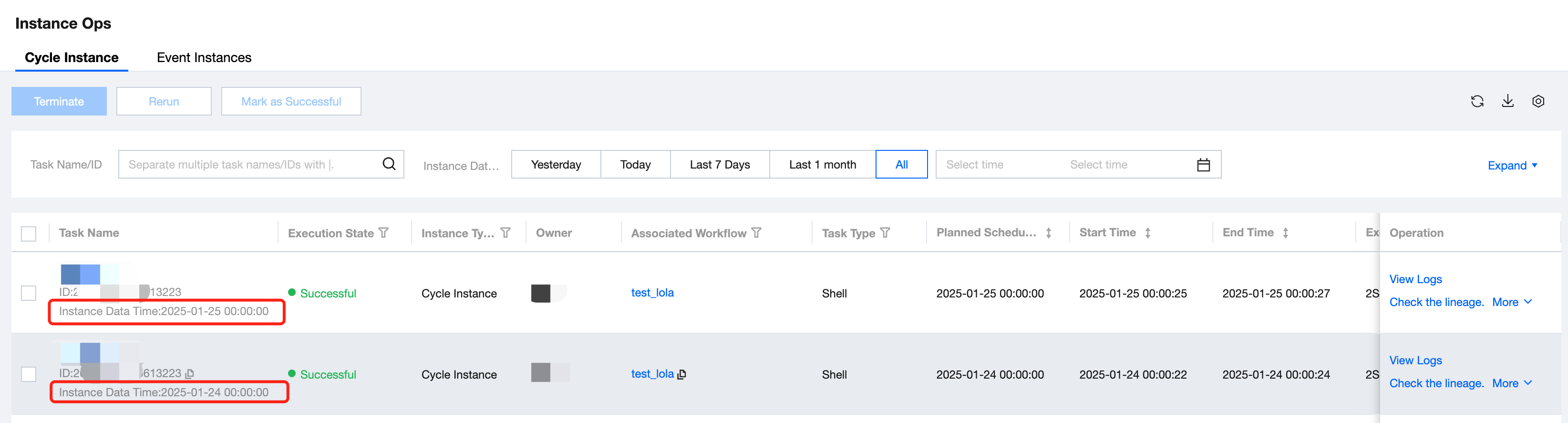 Common parameters: ${UTC+0_yyyyMMdd} ${UTC+0_yyyy-MM-dd} ${UTC+0_HH:mm:ss} ${UTC+0_yyyyMMddHHmmss} |
Plan scheduling time (UTC±n time zone) | $(UTC±n_time parameter) represents the planned scheduling time based on the UTC±n time zone. The time parameter is the same as the instance data time and can be combined arbitrarily. For example, $(UTC+7_yyyyMMdd), $(UTC+9_yyyy-MM-dd), $(UTC-1_HH:mm:ss) and $(UTC+0_yyyyMMddHHmmss). | Refers to the instance's planned scheduling time, which is also the instance generation time, accurate to the second. The planned scheduling time can be obtained through $(UTC±n_yyyyMMddHHmmss), representing the planned scheduling time in the UTC±n time zone. Specifically refers to the execution time defined in the scheduling configuration. 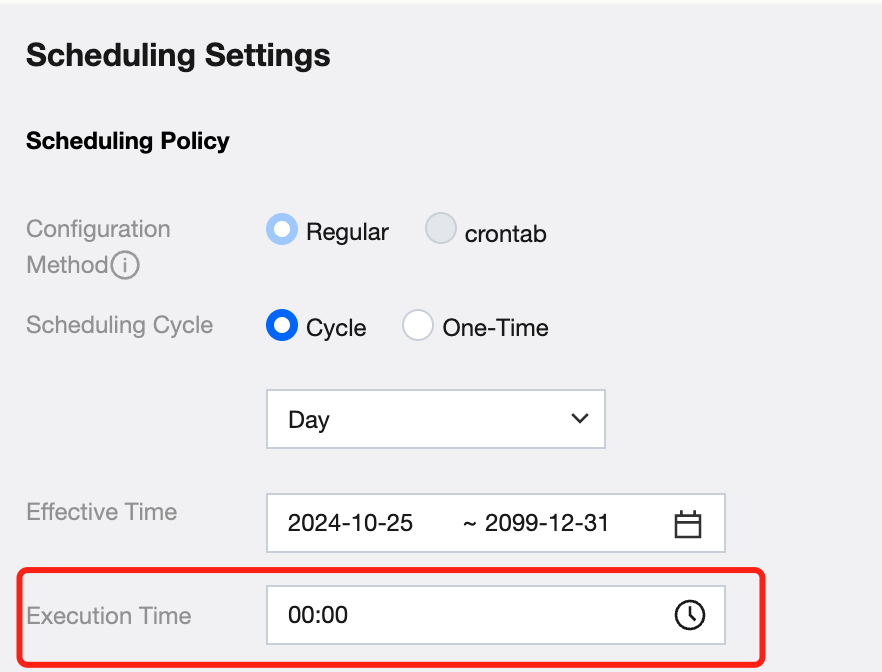 |
Instance Execution Time (UTC±n time zone) | $[UTC±n_time parameter] represents the instance execution time based on the UTC±n time zone. The time parameter is the same as the instance data time and can be combined arbitrarily. For example, $[UTC+7_yyyyMMdd], $[UTC+8_yyyy-MM-dd]. $[UTC-3_HH:mm:ss] and $[UTC+0_yyyyMMddHHmmss], etc. | Refers to the actual start time of the instance execution, accurate to the second. The instance execution time can be obtained through $[UTC±n_yyyyMMddHHmmss], representing the instance execution time in the UTC±n time zone. |
Instance Data Time (UTC+8 time zone) | ${time parameter} represents the instance data time based on the UTC+8 time zone. The time parameter is the same as above and can be combined arbitrarily. For example, ${yyyyMMdd}, ${yyyy-MM-dd}, ${HH:mm:ss}, and ${yyyyMMddHHmmss}. | Instance Data Time refers to the time when task processing handles business data, accurate to seconds. The data time can be obtained through ${yyyyMMddHHmmss}, representing the instance data time in the UTC+8 time zone. |
Plan scheduling time (UTC+8 time zone) | $(time parameter) represents the planned scheduling time based on the UTC+8 time zone. The time parameter is the same as above and can be combined arbitrarily, for example, $(yyyyMMdd), $(yyyy-MM-dd), $(HH:mm:ss), and $(yyyyMMddHHmmss). | Refers to the instance's planned scheduling time, which is also the instance generation time, accurate to the second. The planned scheduling time can be obtained through $(yyyyMMddHHmmss), representing the planned scheduling time in the UTC+8 time zone. |
Instance Execution Time (UTC+8 time zone) | $[time parameter] represents the instance execution time based on the UTC+8 time zone. The time parameter is the same as above and can be combined arbitrarily, for example, $[yyyyMMdd], $[yyyy-MM-dd], $[HH:mm:ss], and $[yyyyMMddHHmmss]. | Refers to the actual start time of the instance execution, accurate to the second. The instance execution time can be obtained through $[yyyyMMddHHmmss], representing the instance execution time in the UTC+8 time zone. |
Besides the above format, you can also obtain the required time by calculating based on the current parameters. The following takes the UTC+0 instance data time parameter as an example, and other parameters are the same.
Number | Time Parameter Format | Description | Remarks |
1 | ${UTC+0_yyyyMMdd+Ny} | In the next N years | If referencing dt=${yyyyMMdd-1M}, the replacement will be executed: dt=20210610
If referencing, the replacement will be executed: dt=20210709
If referencing time=${yyyyMMddHHmmss-3h}, the replacement will be executed: time=20210710050000
If referencing ti=${yyyyMMddHHmmss-25m}, the replacement will be executed: ti=20210710073500 |
2 | ${UTC+0_yyyyMMdd-Ny} | The previous N years | |
3 | ${UTC+0_yyyyMMdd+NM} | N months later | |
4 | ${UTC+0_yyyyMMdd-NM} | The previous N months | |
5 | ${UTC+0_yyyyMMdd+Nw} | N weeks later | |
6 | ${UTC+0_yyyyMMdd-Nw} | The previous N weeks | |
7 | ${UTC+0_yyyyMMdd+Nd} | N days later | |
8 | ${UTC+0_yyyyMMdd-Nd} | The previous N days | |
9 | ${UTC+0_yyyyMMddHHmmss+NH} | N hours later | |
10 | ${UTC+0_yyyyMMddHHmmss-NH} | The previous N hours | |
11 | ${UTC+0_yyyyMMddHHmmss+Nm} | N minutes later | |
12 | ${UTC+0_yyyyMMddHHmmss-Nm} | The previous N minutes | |
13 | ${timestamp} | Scheduling timestamp (10 digits) | ${timestamp}=1625875200
Supports the use of operators such as "+" and "-". |
14 | ${timestamp_ms} | Scheduling timestamp (13 digits) | ${timestamp_ms}=1698508800000 Supports processing with operators such as "+" and "-". |
Quick conversion expressions are provided for common dates. For example, the following takes the data time parameter of a UTC+0 instance as an example, and other parameters are the same.
Number | Time Parameter Format | Description |
1 | ${UTC+0_yyyyMMdd+TE} | The data date corresponding to the ten-day period end |
2 | ${UTC+0_yyyyMMdd+ME} | MONTH END data date corresponds to the end of the month |
3 | ${UTC+0_yyyyMMdd+QE} | The data date corresponds to the quarter end. |
4 | ${UTC+0_yyyyMMdd+HYE} | HALF YEAR END data date corresponds to the end of the half year |
5 | ${UTC+0_yyyyMMdd+YE} | YEAR END data date corresponds to the end of the year |
6 | ${UTC+0_yyyyMMdd+TS} | The data date corresponds to the beginning of the ten-day period. |
7 | ${UTC+0_yyyyMMdd+MS} | MONTH START data date corresponds to the beginning of the month |
8 | ${UTC+0_yyyyMMdd+HYS} | HALF YEAR START data date corresponds to the beginning of the half year |
9 | ${UTC+0_yyyyMMdd+YS} | YEAR START data date corresponds to the beginning of the year |
10 | ${UTC+0_yyyyMMdd+PME} | PRI MONTH END data date corresponds to the end of the previous month |
11 | ${UTC+0_yyyyMMdd+PYE} | PRI YEAR END data date corresponds to the end of last year |
Use an Instance
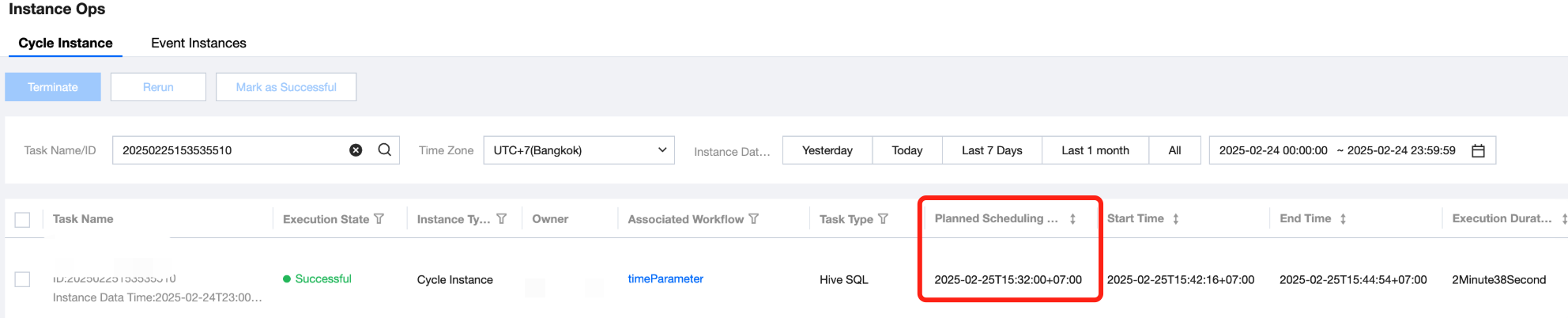
Example 1: For Daily Partition, Take the Date Of the Plan Scheduling Time In UTC+7
The usage in the code is as follows:
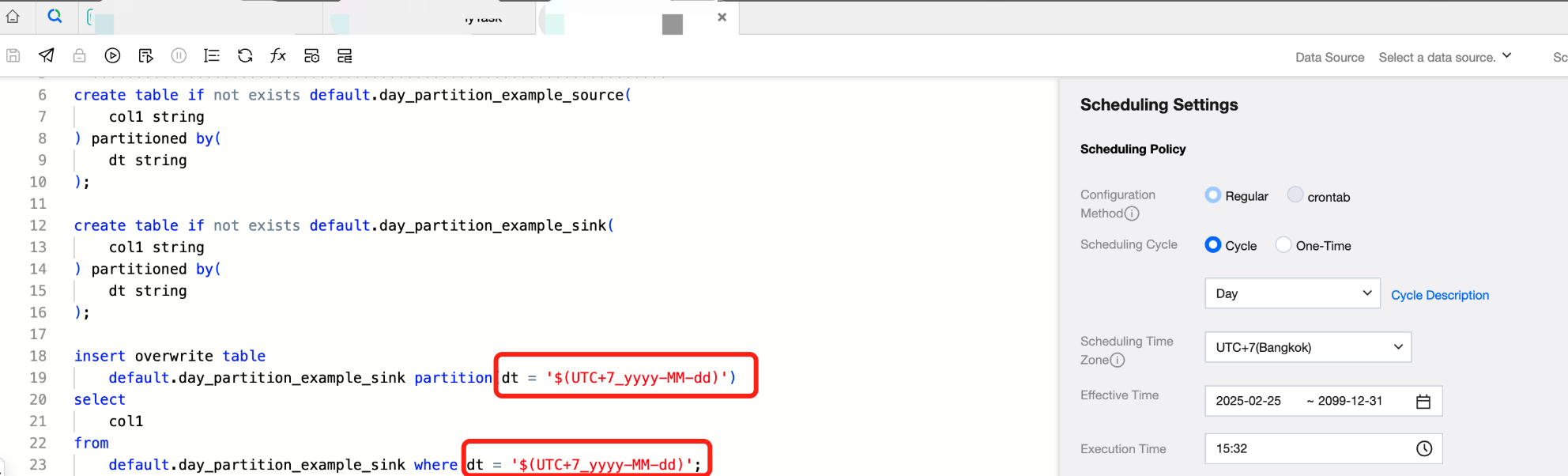
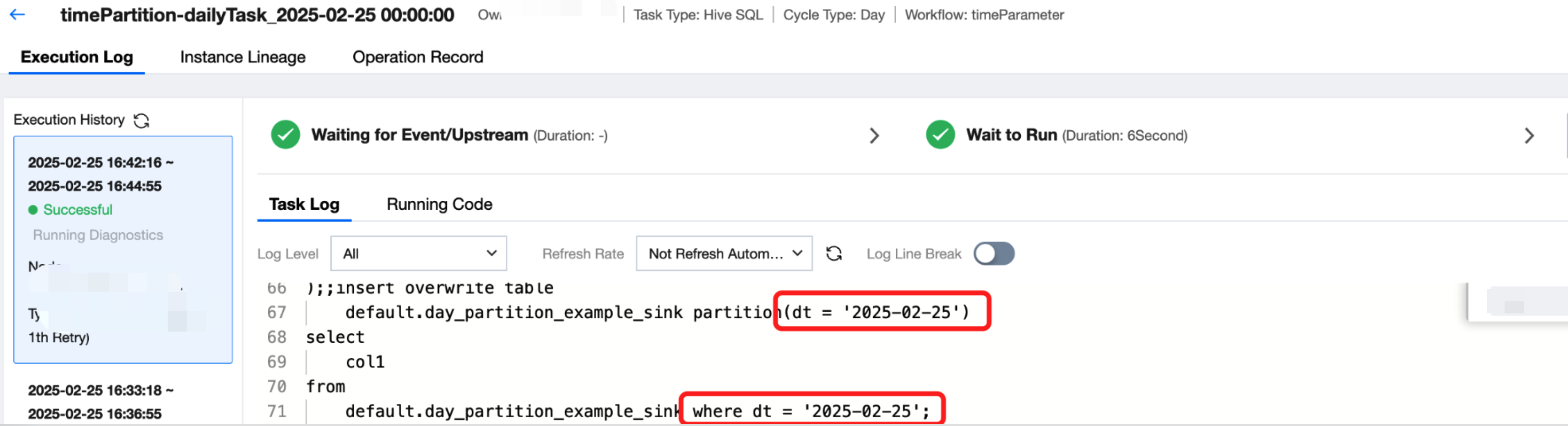
create table if not exists default.day_partition_example_source(col1 string) partitioned by(dt string);create table if not exists default.day_partition_example_sink(col1 string) partitioned by(dt string);insert overwrite tabledefault.day_partition_example_sink partition(dt = '$(UTC+7_yyyy-MM-dd)')selectcol1fromdefault.day_partition_example_sink where dt = '$(UTC+7_yyyy-MM-dd)';
The execution result is as follows:
Example 2: For Hourly Partition, Take the Hour Of the Planned Scheduling Time In UTC+7
The usage in the code is as follows:
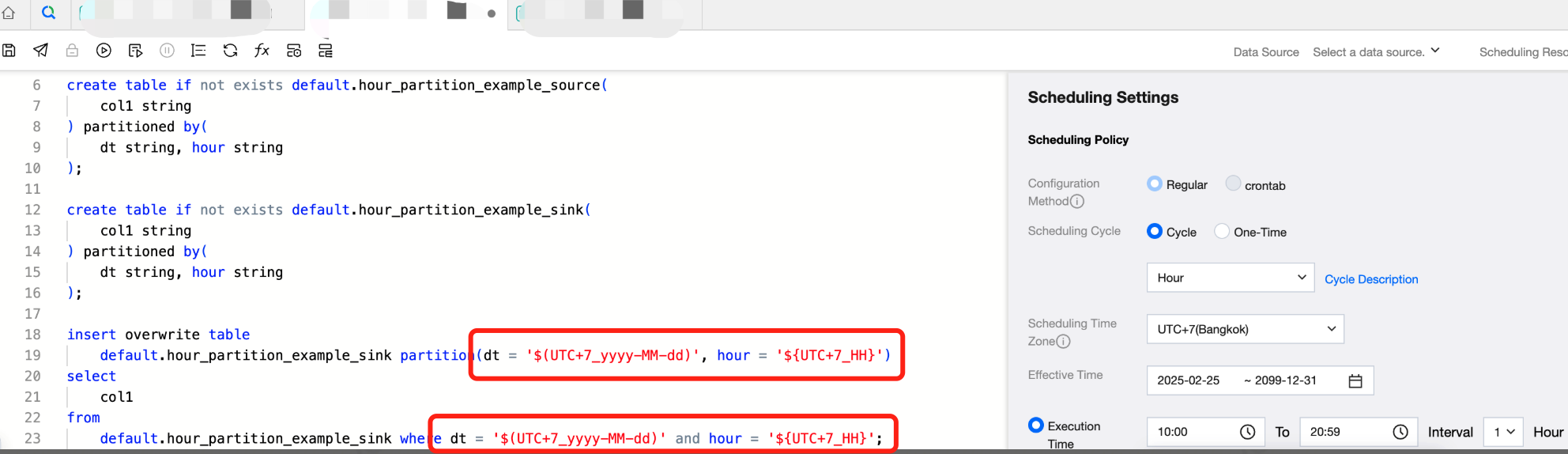
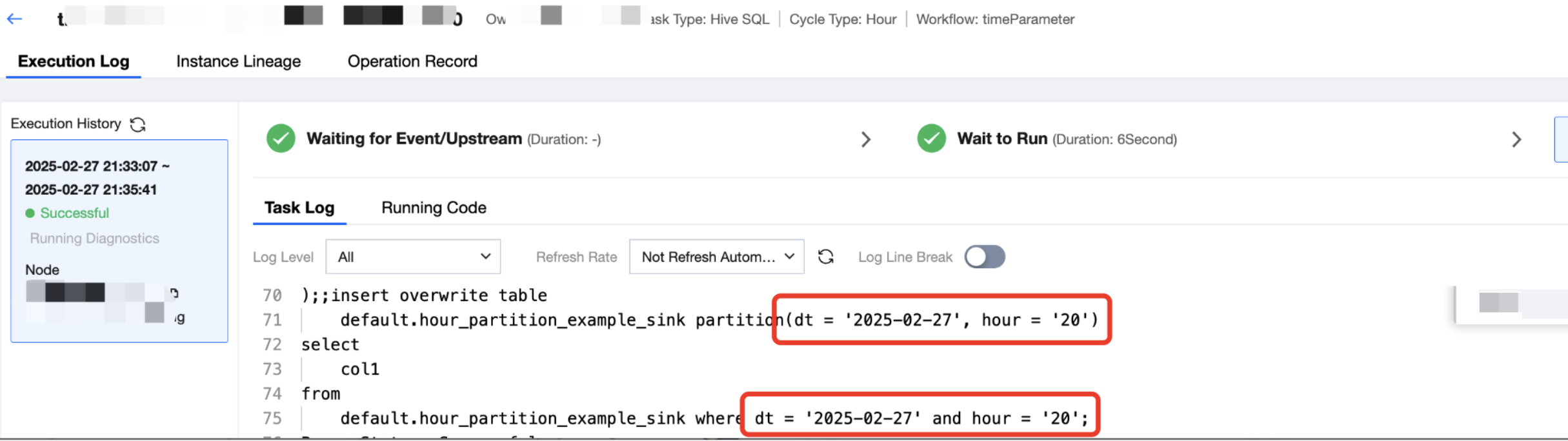
create table if not exists default.day_partition_example_source(col1 string) partitioned by(dt string, hour string,);create table if not exists default.day_partition_example_sink(col1 string) partitioned by(dt string, hour string);insert overwrite tabledefault.day_partition_example_sink partition(dt = '$(UTC+7_yyyy-MM-dd)', hour = '$(UTC+7_HH)')selectcol1fromdefault.day_partition_example_sink where dt = '$(UTC+7_yyyy-MM-dd)' and hour = '$(UTC+7_HH)';
The execution result is as follows:
II. Other Built-In System Parameters
Parameter | Meaning |
${projectIdent} | Project identifier |
${workflowName} | Workflow name |
${taskName} | Task Name |
${taskId} | Task ID |
${taskInCharge} | Owner |
${taskType} | Task type |
Usage Scenario 1
Use directly in SQL to obtain information such as the current project and workflow.
select
  "${projectIdent}" as projectIdent,
  "${workflowName}" as workflowName,
  "${taskName}" as taskName,
  "${taskId}" as  taskId,
  "${taskInCharge}"  as taskInCharge,
  "${taskType}" as   taskType,
  user_id
from
  wedata_demo_db.user_info
limit
  10;
Usage Scenario 2
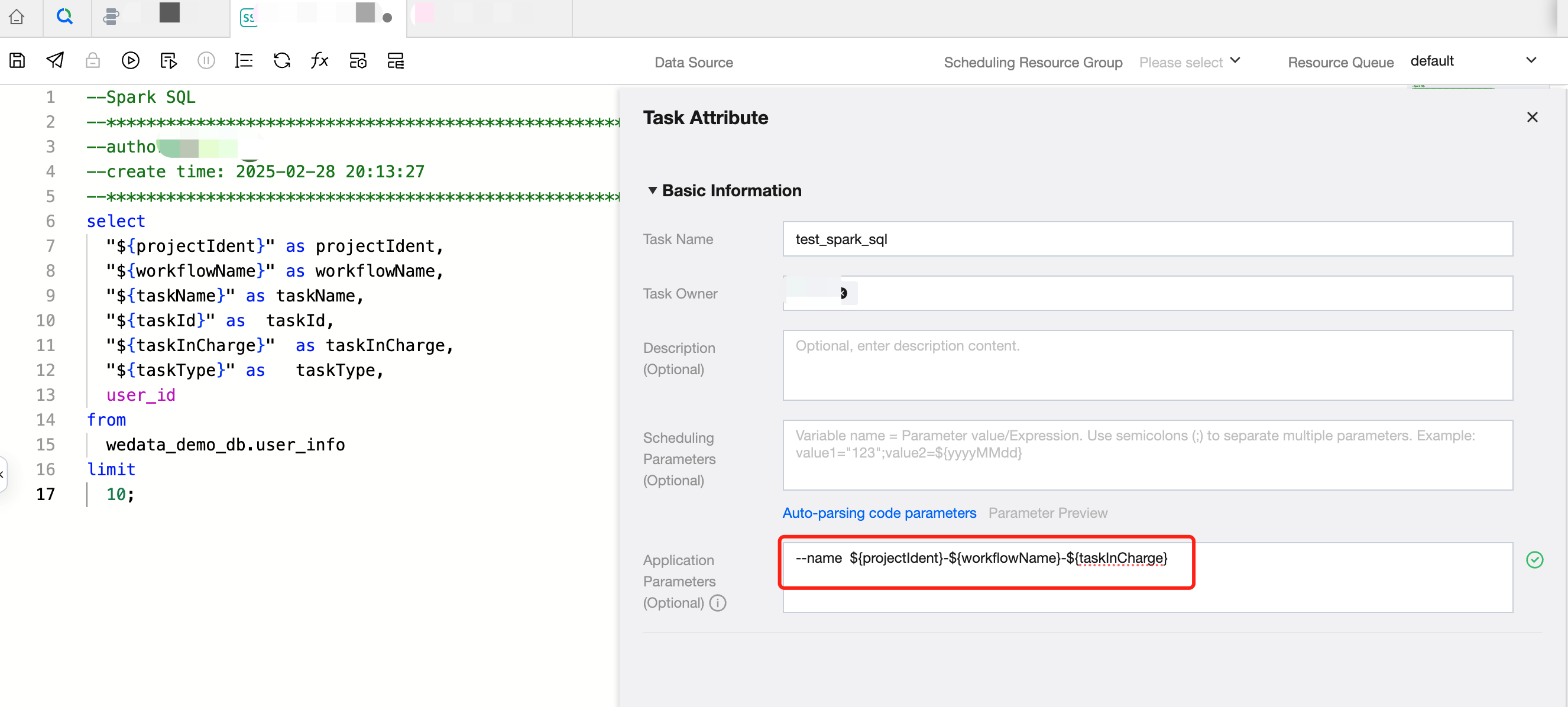
Use --name + variable to specify the task name on YARN in tasks of SparkSQL, PySpark and Spark.
--name ${projectIdent}-${workflowName}-${taskInCharge}
When connecting to the Kyuubi data source in SparkSQL, the parameter name currently needs to be specified using spark.app.name.
spark.app.name=${projectIdent}-${workflowName}-${taskInCharge}
The example diagram is as follows:
피드백