It is recommended to add QcloudCOSBucketConfigRead and QcloudCOSDataFullControl policies while configuring read and write permissions for Sub-account authorized data. This is because Spark requires HeadBucket Permission in some cases when operating on COS files.
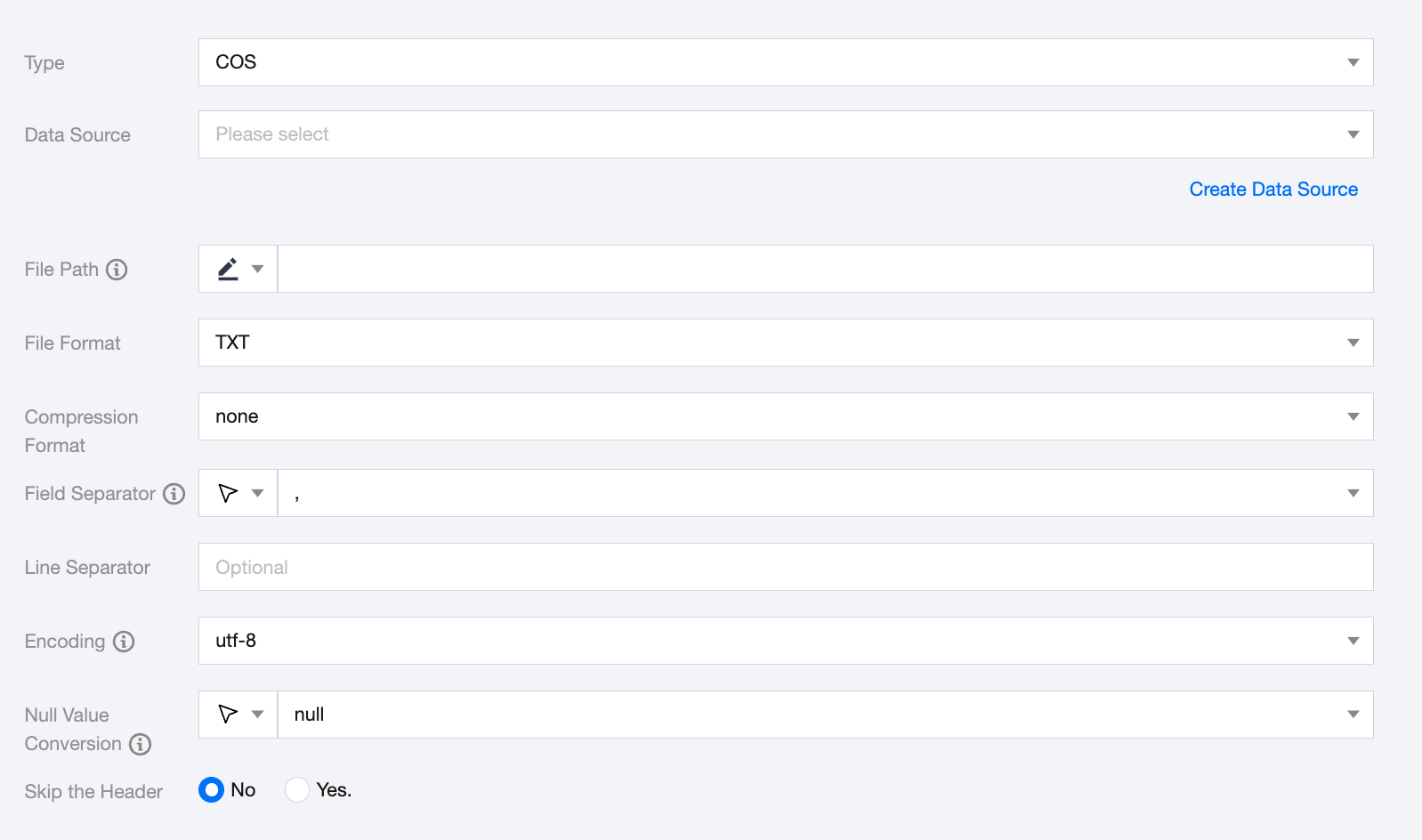
COS Offline Single Table Read Node Configuration
Parameters
Description
Data Source
Select an available COS data source in the current project.
File Path
COS file paths must include the bucket name, such as cosn://bucket_name.
File Format
COS supports five file types: txt, orc, parquet, csv, json.
txt: represents TextFile file format.
orc: represents ORCFile file format.
parquet: represents standard Parquet file format.
csv: represents standard HDFS file format (logical two-dimensional table).
json: represents the JSON file format.
Compression Format
When fileType (file type) is csv, the supported file compression methods are: none, deflate, gzip, bzip2, lz4, snappy.
Note:
Since snappy currently does not have a unified stream format, Data Integration currently only supports the most widely used hadoop-snappy (snappy stream format on hadoop) and framing-snappy (google recommended snappy stream format).
There is no need to fill in for ORC file types.
Field Separator
Field separator for reading. When reading TextFile data from COS, the field separator needs to be specified. If not specified, the default is a comma (,). When reading an ORC File from COS, you do not need to specify a field separator.
Other available delimiters: '\\t', '\\u001', '|', 'space', ';', ','.
If you want to treat each line as a column on the destination side, please use a character that does not exist in the line content as the delimiter. For example, invisible character \\u0001.
Encoding
Configuration for reading file encoding. Supports UTF-8 and GBK encoding.
Null Value Conversion
During reading, convert specified strings to null.
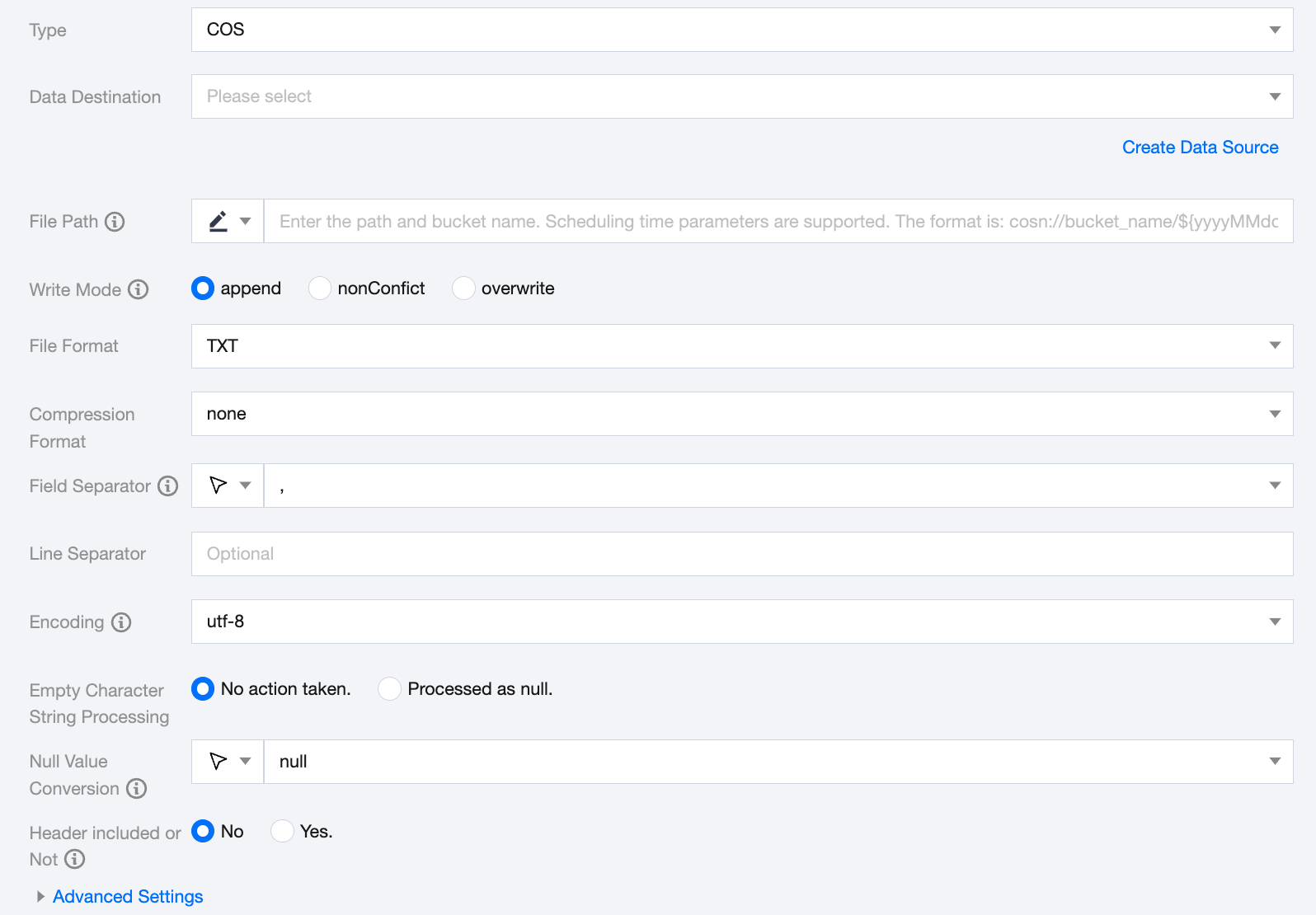
COS Offline Single Table Write Node Configuration
Parameters
Description
Data Destination
Select an available COS data source in the current project.
File Path
COS file paths must include the bucket name, such as cosn://bucket_name.
Write Mode
COS supports three write modes:
append: No processing before writing, directly use the filename to write, ensuring no file name conflicts.
nonConflict: Error when the filename is duplicated.
overwrite: Clean up all files with the file name as the prefix before writing. For example, "fileName": "abc" will clean up all files in the corresponding directory that start with 'abc'.
File Format
COS supports three file types: txt, csv, orc.
txt: represents TextFile file format.
csv: represents standard HDFS file format (logical two-dimensional table).
orc: represents ORCFile file format.
Compression Format
When fileType (file type) is csv, the supported file compression methods are: none, deflate, gzip, bzip2, lz4, snappy.
Note:
Since Snappy currently does not have a unified stream format, Data Integration only supports the most widely used hadoop-snappy (Snappy stream format on Hadoop) and framing-snappy (Google recommended Snappy stream format).
There is no need to fill in for ORC file types.
Field Separator
Field separator for writing. The field separator specified during writing to COS needs to match the field separator of the created COS table. Otherwise, data in the COS table cannot be retrieved. Options: '\\t', '\\u001', '|', 'space', ';', ','.
Encoding
Configuration for file encoding during writing. Supports UTF-8 and GBK encoding.
Empty Character String Processing
No action taken: When writing, do not process empty strings
Processed as null: When writing, treat empty strings as null
Header included or Not
Yes: When writing, include header
No: When writing, exclude header
Note:
Only the file formats txt and csv support selecting whether to include the header.
Advanced Settings (Optional)
You can configure parameters according to business needs.
Data type conversion support
COS Select determines the data type of your input data through the CAST Function. Generally, if you do not specify the data type through the CAST Function, COS Select will consider the input data type as String type.