Users can write UDF functions, package them into JAR files, and then use them in query analysis by defining them as functions in Data Lake Compute. Currently, DLC's UDFs are in HIVE format, inheriting from org.apache.hadoop.hive.ql.exec.UDF and implementing the evaluate method.
Example: Simple Array UDF Function.
public class MyDiff extends UDF {
public ArrayList<Integer> evaluate(ArrayList<Integer> input){
ArrayList<Integer> result = new ArrayList<Integer>();
result.add(0, 0);
for(int i =1; i < input.size(); i++){
result.add(i, input.get(i) - input.get(i - 1));
}
return result;
}
}
Reference for POM file:
<dependencies>
<dependency>
<groupId>org.slf4j</groupId>
<artifactId>slf4j-log4j12</artifactId>
<version>1.7.16</version>
<scope>test</scope>
</dependency>
<dependency>
<groupId>org.apache.hive</groupId>
<artifactId>hive-exec</artifactId>
<version>1.2.1</version>
</dependency>
</dependencies>
Best Practice for UDF Jar Packages
The JAR package of a UDF will be loaded into the engine during function registration or when in use. When using a UDF, it is advised to pay attention to the following features.
1. Hot update of the JAR package.
Spark does not support hot update of JAR packages by default. In DLC, it can be enabled through spark.jars.update.enabled=true (a static session parameter of the engine, which requires restarting the engine. Version support for the standard engine starts from 20250630). It is not recommended to enable this in a live production environment to avoid accidental updates of Jar packages on COS, which may lead to impacts on the production environment.
2. Version of the JAR package and class with the same name.
Since Java's ClassLoader prioritizes searching for class information from already loaded JAR packages, you need to pay attention to scenarios where multiple versions or multiple different named Jar packages contain classes with the same name during use. Otherwise, the JVM may load outdated classes, resulting in incorrect results.
3. Security check of the Jar package.
The Spark Engine of DLC can check JAR packages when loading them via UDF. You can choose to adjust both parameters (task-level parameters, no need to restart engines):
spark.sql.udf.check.jar: default value false, enable JAR package check.
spark.sql.udf.check.timeout.milliseconds: default value 30000, synchronous check time. If the check time exceeds this value, the check will be abandoned.
The check is mainly to avoid issues in JAR packages polluting the execution environment, including:
Check if the class of the specified UDF exists.
Check if the class of the specified UDF can be normally initialized, such as whether the static code segment is normal.
Check if the designated JAR introduces a new Class-Path, such as Class-Path: . defined in META-INF. This can cause loop loading.
Check if the signature of the specified JAR has issues, such as an invalid signature can cause the Jar cannot be loaded.
When the check failed, it will prompt "Resource/Class cannot be loaded safely, the source JAR should be ignored", thereby avoiding installing the problematic jar to the engine and causing cluster unavailability.
Creating function
Method one: Create an SQL command
Details can be accessed through data exploration to execute CREATE FUNCTION grammar for function creation.
-- Create a temporary function (temporary functions load Jar packages to the engine in real-time and are only valid for the current session)
createtempfunction DB.TEMP_FUNCTION as'JAR_CLASS_NAME'using jar 'cosn://bucket/path/to/jar';
-- Create a resident function (register to the metadata center, load the Jar package to the engine when called)
createfunction DB.FUNCTIONas'JAR_CLASS_NAME'using jar 'cosn://bucket/path/to/jar';
Method 2: Create through the console
Note:
If you are creating a UDAF/UDTF function, you need to add the _udaf/_udtf suffix to the function name accordingly.
2. Enter Data Management through the left sidebar, select the database for the function you need to create. If you need to create a new database, refer to Data Catalog and DMC.
3. Click Function to enter the function management page.
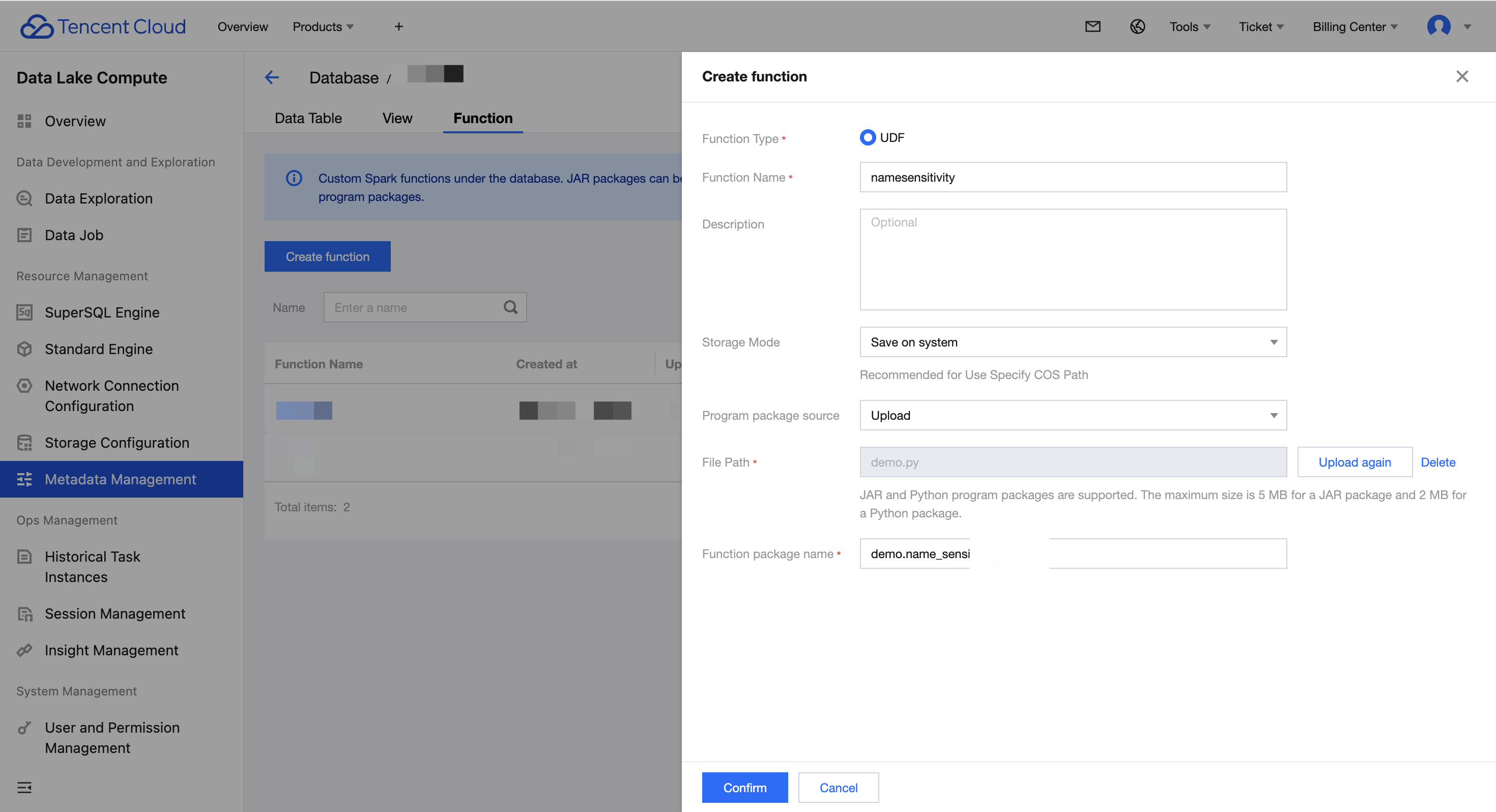
4. Click Create Function to proceed with creation.
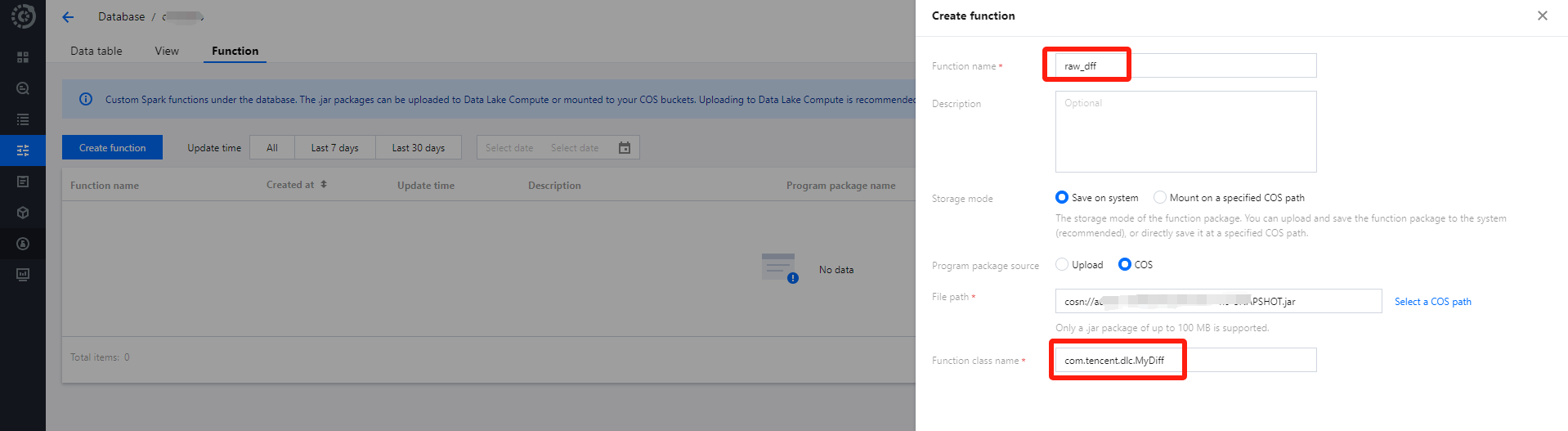
UDF's application package can be uploaded locally or a COS path can be selected (requires COS-related permissions), for instance, creating by selecting a COS path.
Function Class Name includes "Package Information" and "Function Execution Class Name".
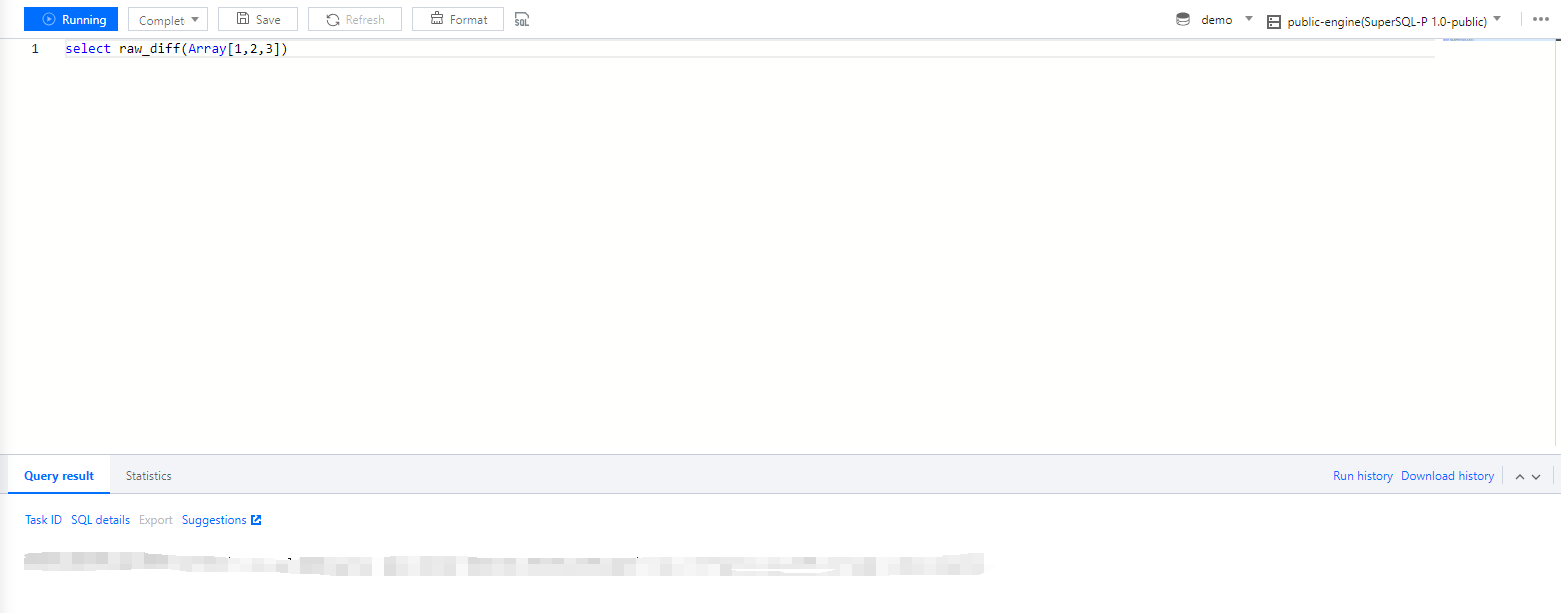
2. Enter Data Exploration via the left navigation menu, select a Compute Engine, and then you can use SQL to invoke the function.
Python UDF Development
To use the Python UDF feature, upgrade your cluster to the latest version. You can submit a ticket to consult us on whether the current cluster supports this feature.
1. Enable cluster Python UDF feature.
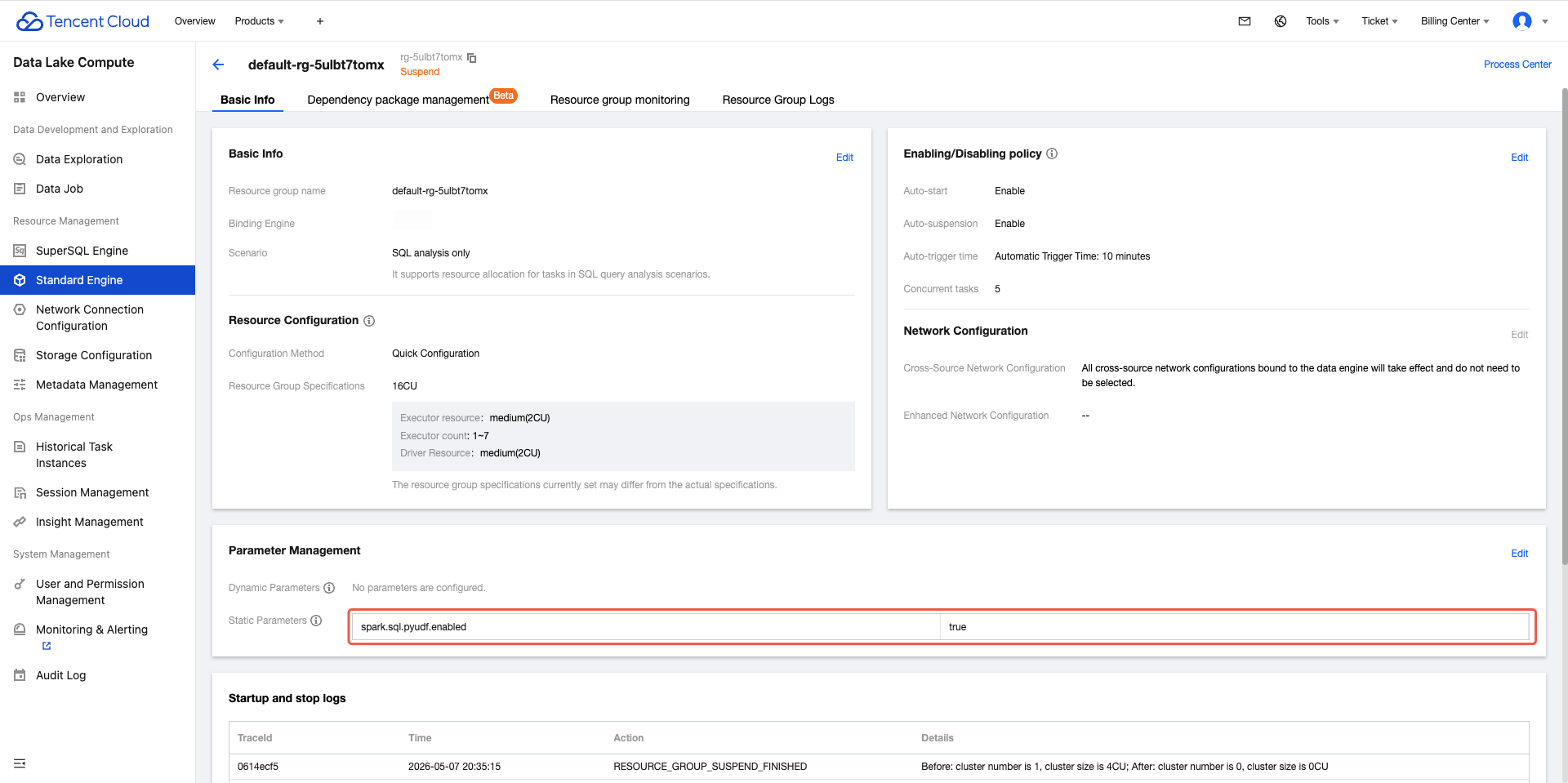
By default, the Python UDF feature is not enabled. On the engine page, select the engine you want to enable. Click Parameter Configurations, and add the configuration. Enter spark.sql.pyudf.enabled = true, then click Confirm to save. For Standard Engine interactive analysis, configure the Static parameter spark.sql.pyudf.enabled = true on the corresponding SQL analysis only Resource group.
The change takes effect for the resource group for the standard engine or the SparkSQL cluster after restart, and it takes effect immediately in the next task of the SparkBatch cluster.
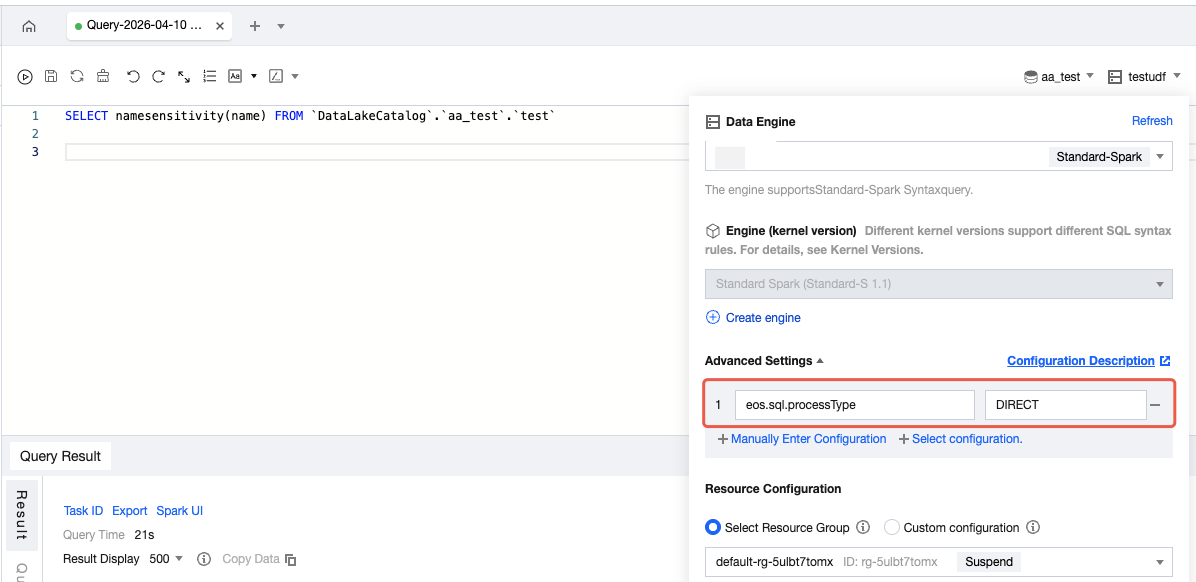
3. On the data explore interface, use a cluster that supports Python UDF and set the Session parameter eos.sql.processType=DIRECT. If you cannot edit this parameter, submit a ticket to contact us.
When you are editing and modifying a Python UDF function, the SparkSQL cluster loading mechanism has about a 30-second delay, and the change takes effect immediately in the next task of the SparkBatch cluster.
When you are deleting the current Python UDF function, the SparkSQL cluster requires a restart, and the change takes effect immediately in the next task of the SparkBatch cluster.
Configuring Edit Permissions for the Python Function
When creating a function via Python, the creator and administrator can configure editing permissions for the function. The process is as follows:
Portal 1: Configuring Editing Permission When Creating a Function
1. Log in to the DLC console and select the service region.
2. Enter the metadata management from the left menu bar, select the function page, click the blue create function button at the top left, and enter the page.
3. Click function edit permission on the right unfold. The creator can select users or workgroups (composable selection) to authorize "edit" and "delete" for the function. The creator and admin have full permissions by default.
4. After the settings are completed, click Confirm to complete the function editing permission configuration.
Portal 2: Configuring Editing Permission for Existing Functions
1. Log in to the DLC console and select the service region.
2. In the left sidebar, go to Metadata Management. On the Function page, select the Edit button in the operation column on the right side of the function you want to edit. You can go to the editing page.
3. After entering the function editing page, click function edit permission on the right unfold to modify and delete permissions.