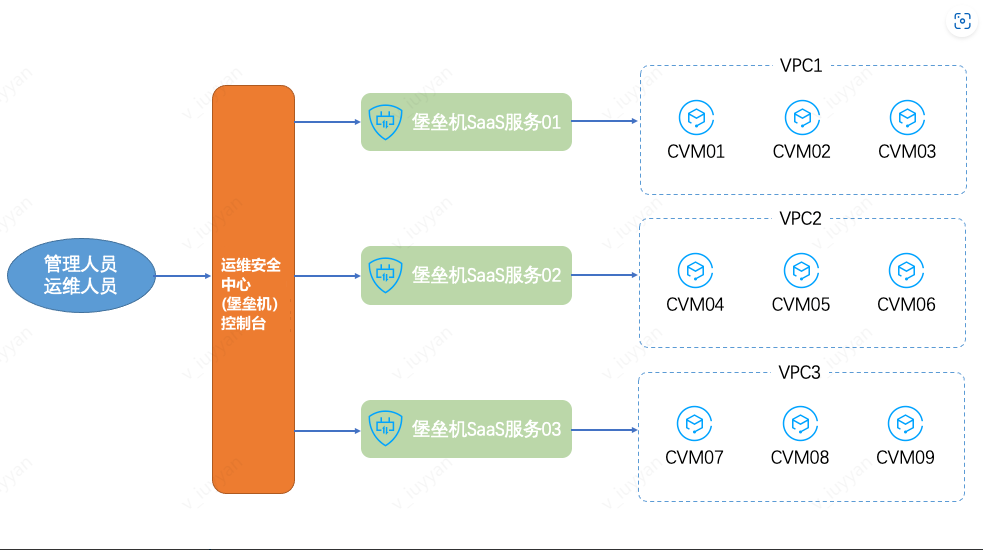
When assets (such as CVM) are distributed across multiple VPCs, unified management can be achieved through the BH. This document provides detailed instructions on how to manage assets across VPCs.
3. On the Activate Service page, click Purchase to enter the Purchase page, and select the appropriate specifications to proceed with the purchase.
4. After completing the purchase, return to the Activate Service page, locate the purchased BH service, and click Activate.
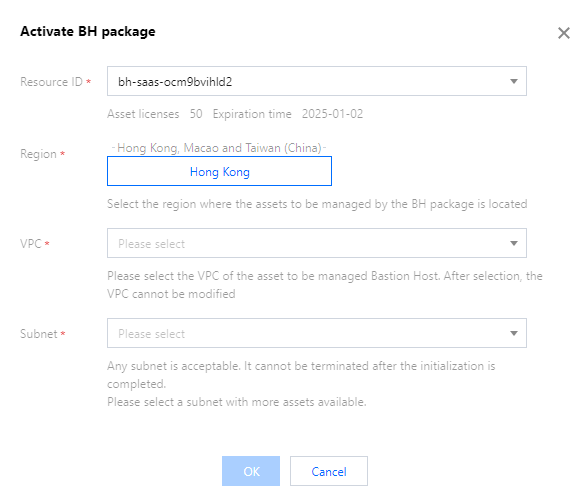
5. In the Activate Service popup, configure the region, VPC, and subnet information, and then click OK to complete the service activation.
Region: Select the region where the assets managed by the BH are located.
VPC: Select the VPC where the assets to be managed by the BH are located. Once selected, the VPC cannot be changed.
Subnet: You can select any subnet, but once the initialization is complete, the selected subnet cannot be terminated. It is recommended to choose a subnet with a larger number of assets.
6. After multiple services are enabled, assets in different VPCs can be managed by the BH within the corresponding VPC. This ensures the shortest network linkage and allows centralized management and maintenance through a unified management and Ops portal.
Note
For details on management and maintenance operations, see Quick Start for the BH.
In addition to enabling the BH service, you can also establish network connectivity between the BH and CVM through methods such as Network Domain, Peering Connection, or CCN.