Registering an Existing Cluster
다운로드
포커스 모드
폰트 크기
Prerequisites
1. Tencent Kubernetes Engine Distributed Cloud Center (TDCC) service has been enabled.
2. The target cluster can connect to the TDCC Hub cluster successfully.
Directions
1. Log in to the TDCC console and navigate to Distributed Infrastructure > Cluster page.
2. Click Register Existing Cluster and fill in the required configuration on the page to set the basic information for registering the cluster:
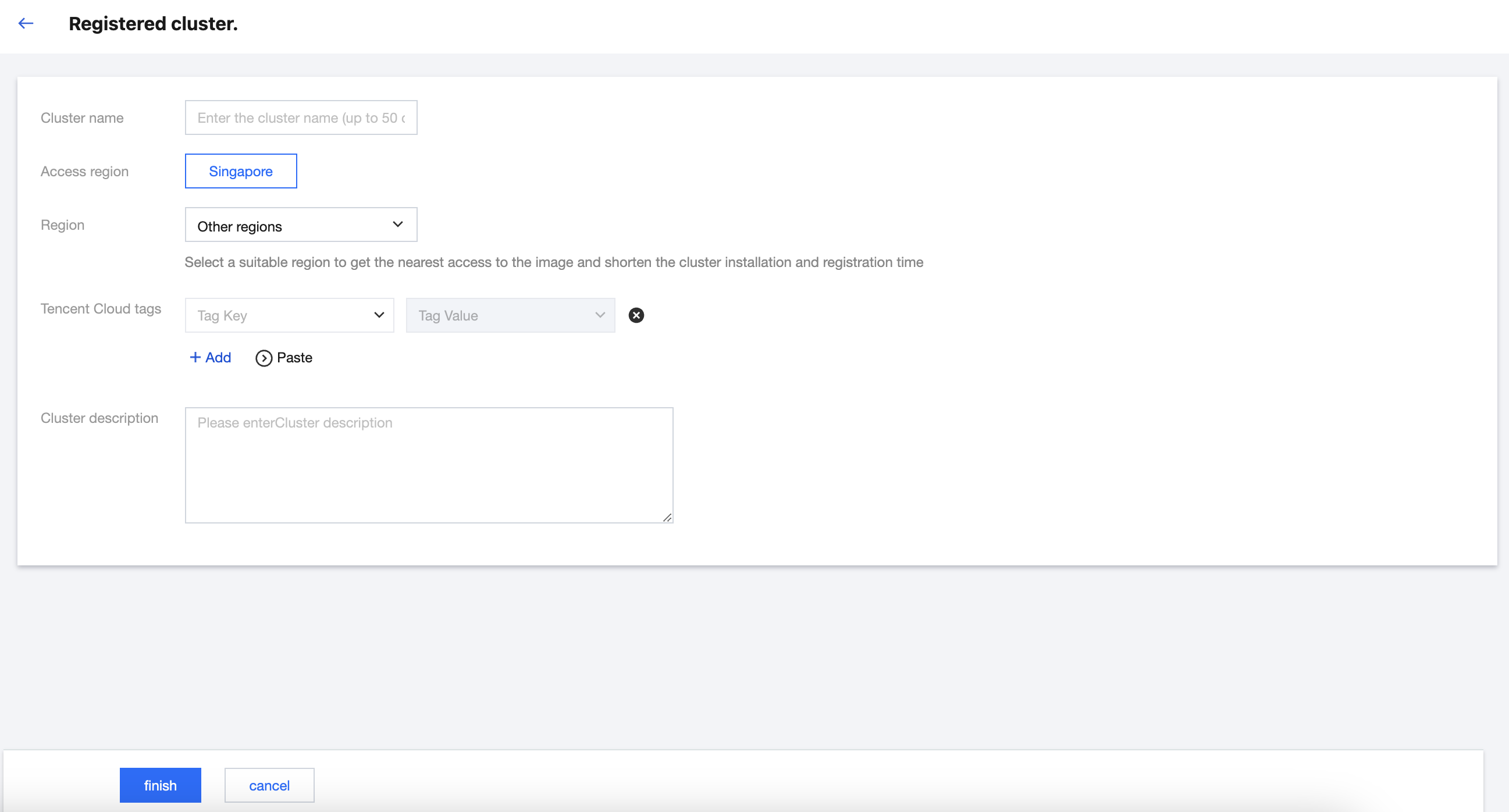
Cluster name: The name of the registered cluster, which should not exceed 60 characters.
Access region: Select the access region for the registered cluster. Currently, Guangzhou, Beijing, and Singapore are supported, with more regions to be supported in the future.
Cluster region: The actual region where the registered cluster will be operated.
Note:
The access region is independent of the actual region where the cluster to be registered will be operated. The access region refers to the location of the Hub Cluster that manages this registered cluster.
Tencent Cloud tags: By binding tags to the cluster, you can achieve categorized management of resources. For more details, see Query Resource by Tag.
Cluster description: Enter relevant information about the cluster. The information will be displayed on the cluster information page.
3. Click finish.
4. View the generated registration command and follow the prompts to complete the cluster registration.
4.1 On the cluster management page, locate the created registered cluster, and select View Registration Command on the right side of the row corresponding to the registered cluster to view the registration command.
Note:
The registration command for registering an existing cluster is available in two types: public network access and private network access. Ensure that the network configuration for registering the cluster allows connectivity to the Hub Cluster's entry address. The Hub Cluster entry address and port can be found in the registration command under
sepc.spec.containers.args: parentURL.4.2 You can choose either public network access or private network access to register the cluster. Copy or download the registration command, and execute the Kubectl command in the third-party cluster to complete the registration process.
Note:
The registration command is valid for 24 hours. Complete the registration within the validity period. If the validity period expires, you will need to regenerate the registration command on the page.
4.3 Execute the following command to check the proxy running status. An example is shown below:
# kubectl get pod -n clusternet-systemNAME READY STATUS RESTARTS AGEclusternet-agent-78444974d7-f6fsc 1/1 Running 0 7m32sclusternet-agent-78444974d7-qjp2q 1/1 Running 0 7m32sclusternet-agent-78444974d7-r575w 1/1 Running 0 7m32s
4.4 After successful registration, the status of the registered cluster will change to running.
피드백