Revenue Dashboard
다운로드
포커스 모드
폰트 크기
Overview
The Revenue Dashboard provides revenue analysis capabilities for resellers and distributors. Partners can view multiple types of billing data for their end customers and second-level resellers across months on the same page. The dashboard supports displaying aggregated data by dimensions such as end customer, second-level reseller, and product. It also allows quarterly or annual rebate amounts to be split by the original order month and displayed in the corresponding months.
Target audience
This document is applicable to resellers and distributors.
Data Scope Description
The data on the Revenue Dashboard comes from the following three types of bills:
1. Billing Center > Bills (Bill A): the partner bill that the reseller settles with Tencent Cloud.
2. Partner Center > Customer Bills/Reseller Bills (Bill B): a reference bill for resellers to view end customer consumption.
3. Partner Center > Commission Statement: a statement of rebates that Tencent Cloud issues to resellers.
Note:
Data is available from January 1, 2026 at the earliest. You can query up to 18 months of historical data, with a maximum span of 12 months for a single cross-month query. All time ranges are based on China Beijing Time (UTC+8:00).
Billing is generated at the beginning of each month. Data from the month before the previous month is displayed from the 1st to the 4th of each month, and data from the previous month is displayed after the 5th. Rebate data for the previous month is displayed after the 15th. To view real-time data for the current month, go to the corresponding bill.
If bill adjustments or rebate recalculations occur, the data on the Revenue Dashboard will be updated one day after the adjustment is completed (T+1).
If a partner UIN has self-consumption data, its attribution is displayed in the Customer tab.
Feature Description
Entry
1. Log in to Tencent Cloud with a partner account and enter the Partner Center.
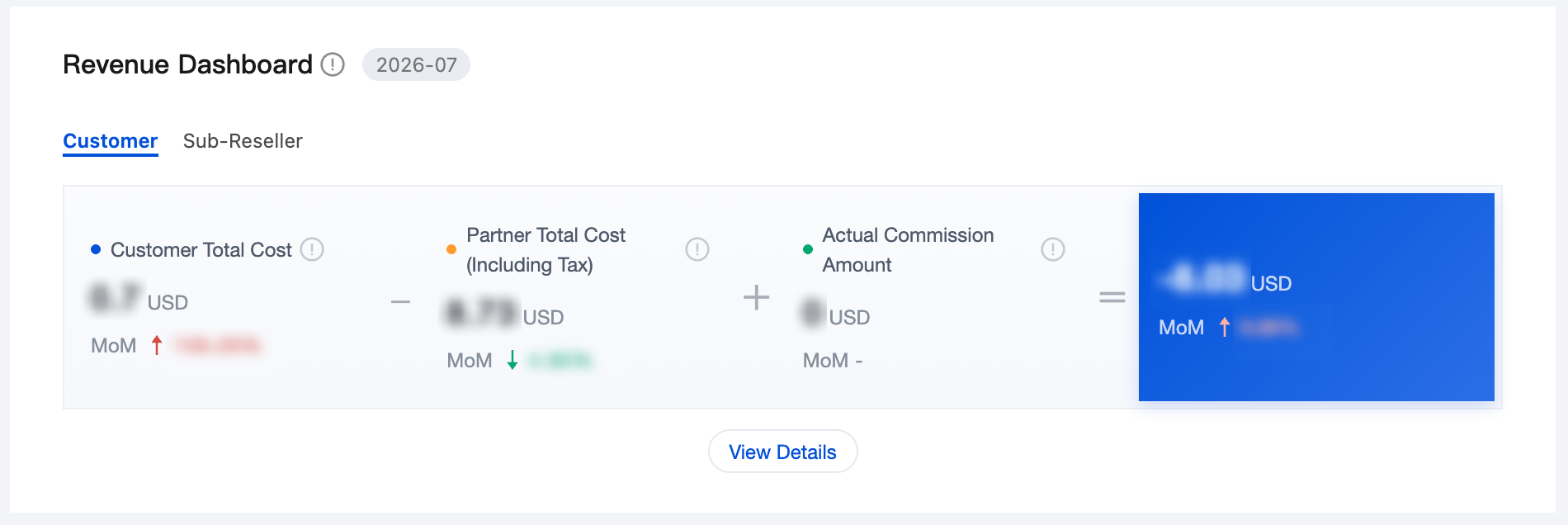
2. You can view Revenue Dashboard overview data on the Overview page. For example, the Customer tab displays the following aggregated amounts for all end customer UINs:
Customer total cost: The aggregated value of total cost in bill B.
Partner Total Cost (Including Tax): The aggregated value of Total Cost (Including Tax) in bill A.
Actual Commission Amount: The aggregated value of Actual Commission Amount in the commission statement.
3. Click View Details to go to the Revenue Dashboard details page.
Summary Page by UIN (Level 1 Page)
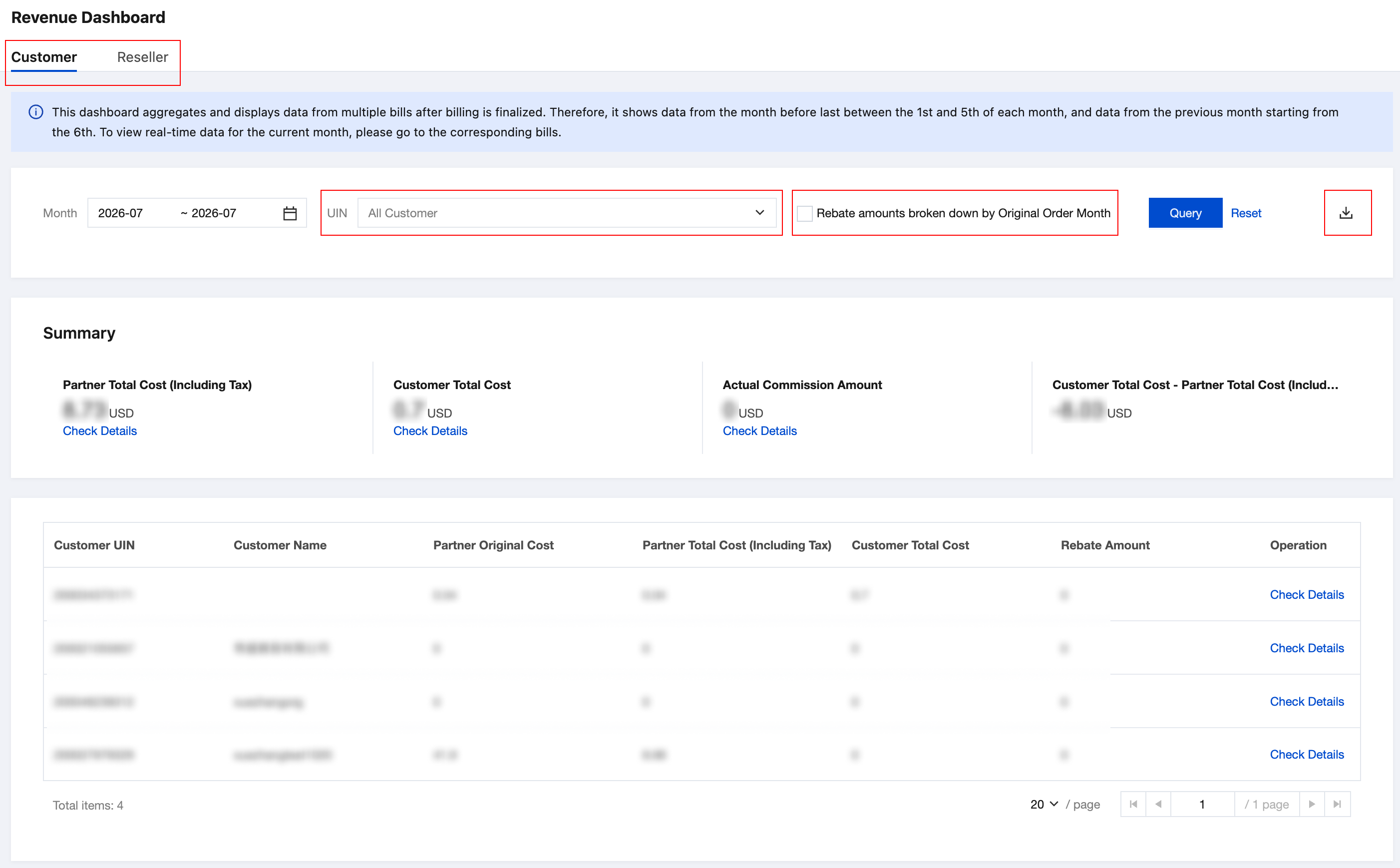
The Level 1 page summarizes and displays amount data for the selected month range by end customer or second-level reseller UIN. By default, data for all UINs is displayed, and you can filter UINs from the drop-down menu.
After "Rebate amounts broken down by Original Order Month" is selected, rebate amounts settled quarterly or annually will be broken down and displayed in the corresponding months of the original orders.
Click "Export" to export the data table of the view.
Note:
If the currently logged-in account is a reseller, only end customer data is displayed. If the currently logged-in account is a distributor, two switchable tabs are displayed: Customer and Reseller.
Data on the reseller tab is aggregated by second-level reseller, summarizing data of all end customers under them, and is not broken down to indirect end customers under second-level resellers.
Summary Information
The cards at the top of the page display the total amount for all UINs or the selected UIN:
The aggregation logic for Partner Total Cost (Including Tax), Customer Total Cost, Actual Commission Amount is the same as the entry logic described above.
Customer Total Cost - Partner Total Cost (Including Tac) + Actual Commission Amount: The calculation result of the above three values.
Click View Details to go to the corresponding bill details page.

Detailed Data Table
The table summarizes and displays amount data from bill A, bill B, and the rebate bill reconciliation by UIN. The data filtering logic is as follows:
Bill A: Filters bills where the billing month = the selected month and the end customer UIN = the selected UIN or all end customers, and retrieves the corresponding Partner Original Cost and Partner Total Cost (Including Tax).
Bill B: Filters bills where the billing month = the selected month and the end customer UIN = the selected UIN or all end customers, and retrieves the corresponding Customer Total Amount.
Commission Statement:
When "Rebate amounts broken down by Original Order Month" is not selected, the system filters the commission statement where the rebate month = the selected month and the end customer UIN = the selected UIN or all end customers, and retrieves the corresponding Actual Commission Amount.
When this option is selected, the system filters the commission statement where the original order month = the selected month and the end customer UIN = the selected UIN or all end customers, and retrieves the corresponding Actual Commission Amount.
Click Check Details in the operation column to go to the Level 2 page and view the summarized data by product under this UIN.
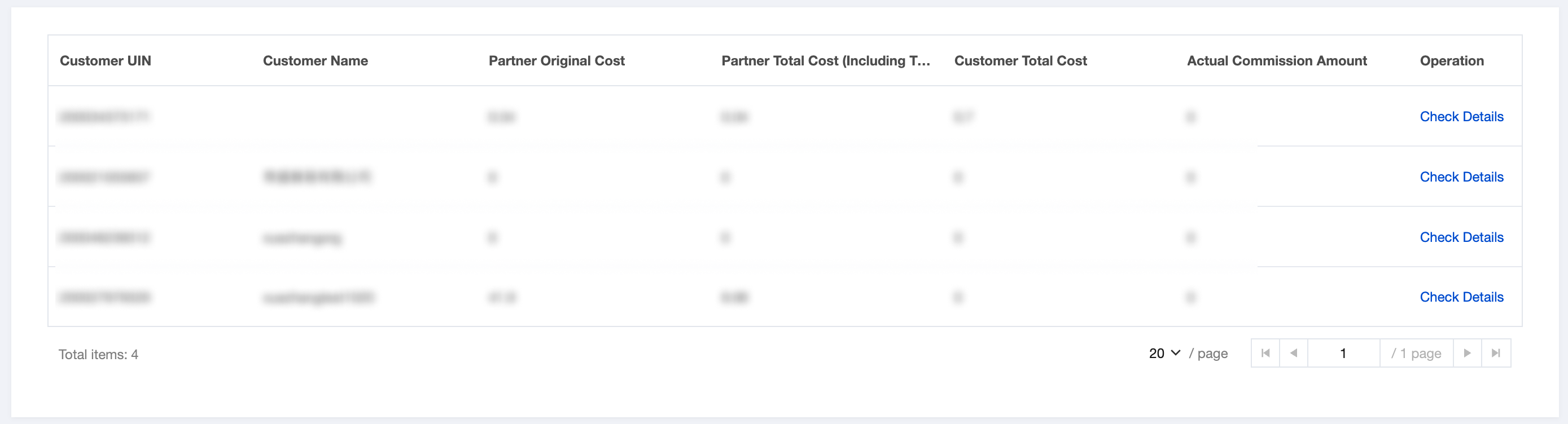
Field Description
Field Name | Description |
Customer UIN / Reseller UIN | UIN of the end customer and second-level reseller. |
Customer name / Reseller name | Display rule: verified name > contact full name > email. |
Partner Original Cost | Original Cost in bill A. |
Partner Total Cost (Including Tax) | Total Cost (Including Tax) in bill A. |
Customer Total Cost | Total Cost in bill B. |
Rebate Amount | Actual Commission Amount in the commission statement. |
Summary Page by Product (Level 2 Page)
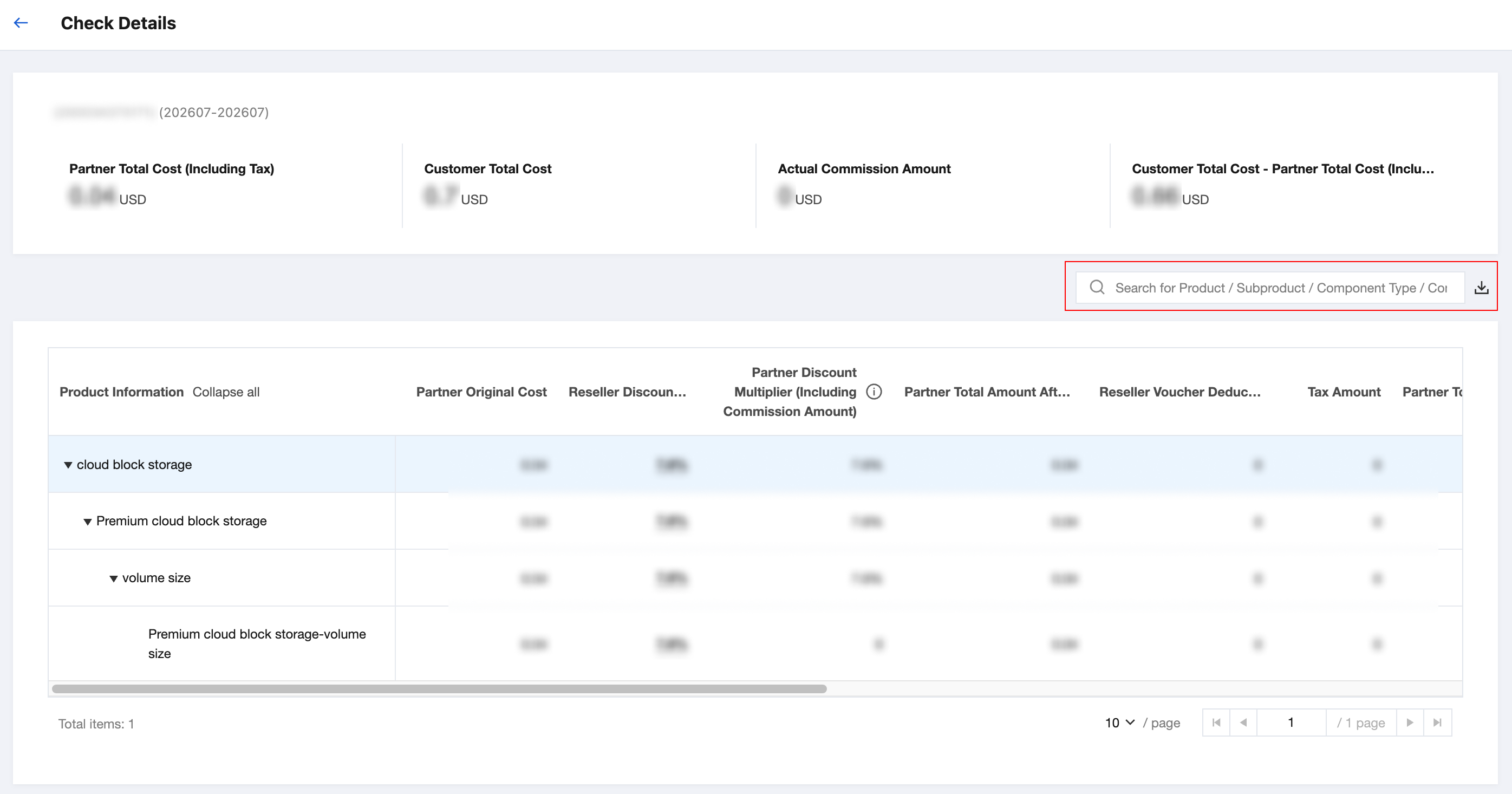
The Level 2 page summarizes the amount data of the current UIN by Product, Subproduct, Component type, Component name.
Supports search by product information and export of data views.
Note:
Search results do not affect the exported data.
Summary Information
The aggregation logic and fields are consistent with those on the Level 1 page.
Detailed Data Table
The table summarizes and displays amount data from bill A, bill B, and the Commission Statement by product, subproduct, component type, and component name. The data filtering criteria are as follows:
Bill A: Filters bills where the billing month = the month selected on the Level 1 page and the end customer UIN = the clicked UIN, and retrieves the corresponding Partner Original Cost, Partner Discount Rate, Partner Total Amount After Discount, Partner Voucher Deduction, Tax Amount, Partner Total Cost (Including Tax).
Bill B: Filters bills where the billing month = the month selected on the Level 1 page and the end customer UIN = the clicked UIN, and retrieves the corresponding Customer Original Cost, Customer Discount Rate, Customer Total Amount Before Voucher, Customer Voucher Deduction, Customer Total Cost.
Commission Statement: The splitting and filtering logic is consistent with that on the Level 1 page, and retrieves the corresponding Actual Commission Amount.
Supports expanding by product level to view the summarized results of each level.
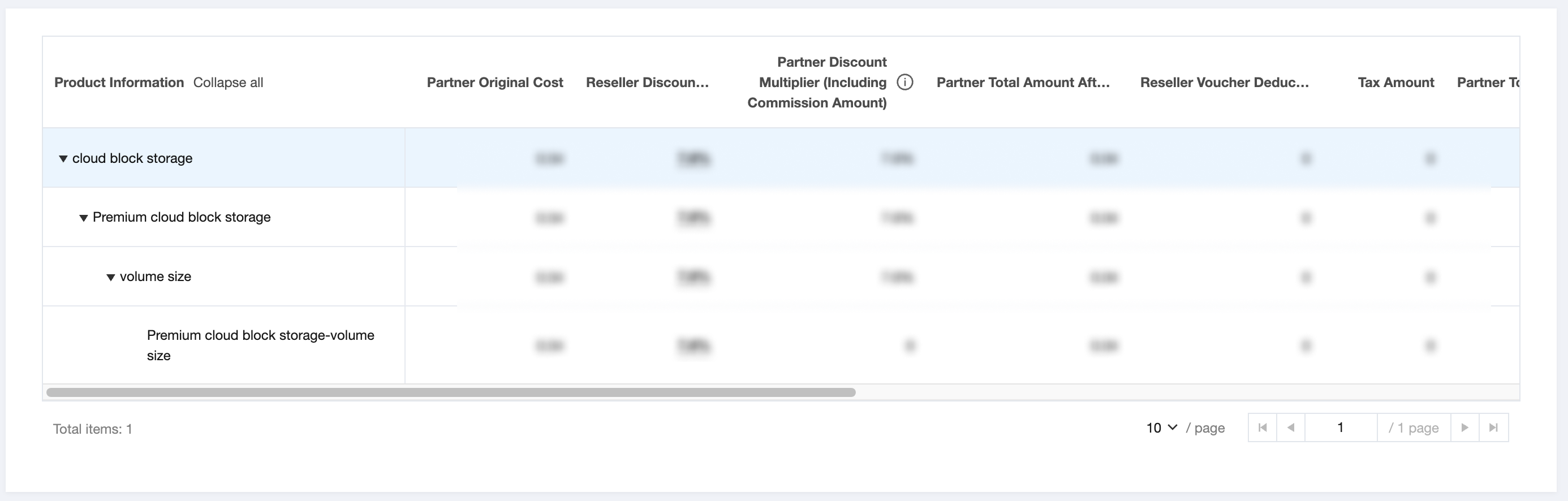
Field Description
Field Name | Description |
Product information | Display Product Name/Subproduct Name/Component Type/Component Name in a tree structure. |
Partner Original Cost | Original Cost in bill A. |
Partner Discount Rate | The Discount Multiplier of bill A is used by default. If multiple discount rates or contract prices exist in the data before aggregation, this value is the calculation result of (aggregated Total Amount After Discount / aggregated Original Cost). |
Partner Discount Rate (Including Commission Amount) | Calculation method: (Partner Total Amount After Discount - Partner Voucher Deduction - Partner Actual Commission Amount) / Partner Original Cost |
Partner Total Amount After Discount (Excluding Tax) | Total Amount After Discount (Excluding Tax) in bill A. |
Partner Voucher Deduction | Voucher Deduction in bill A. |
Tax Amount | Tax Amount in bill A. |
Partner Total Cost (Including Tax) | Partner Total Cost (Including Tax) in bill A. |
Customer Original Cost | Original Cost in bill B. |
Customer Discount Rate | The end customer discount rate of bill B is used by default. If multiple discount rates or contract prices exist in the data before aggregation, this value is the calculation result of (aggregated Total Amount Before Voucher / aggregated Original Cost). |
Customer Total Amount Before Voucher | Total Amount Before Voucher in bill B. |
Customer Voucher Deduction | Customer Voucher Deduction in bill B. |
Customer Total Cost | Total Cost in bill B. |
Rebate Amount | Actual Commission Amount in the Comission Statement. |
피드백