This document describes how to configure/update a garbage collection policy for TCR Individual instances.
Notes
A garbage collection policy for TCR Individual instances is only applicable for the instances in the specified regions. For example, TCR Individual instances deployed in Guangzhou and Silicon Valley regions can be configured with other different garbage collection policies.
Directions
1. Log in to the TCR console and select Instance Management in the left sidebar.
On the page that appears, you can view the list of instances under the current account. Select a TCR Individual instance in any region.
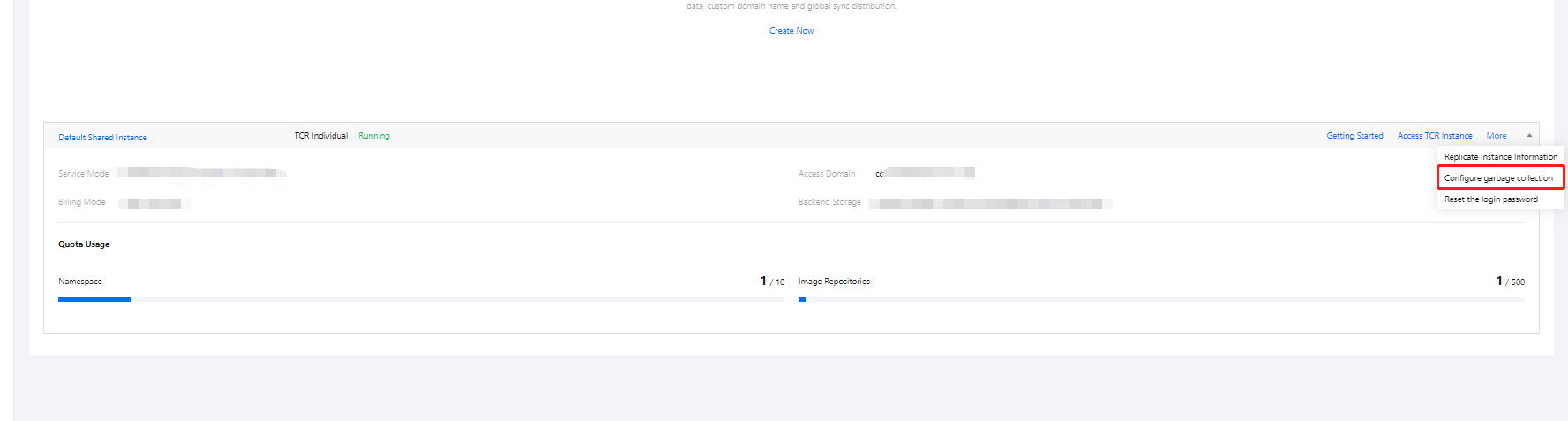
2. Click More > Configure garbage collection, as shown in the following figure.
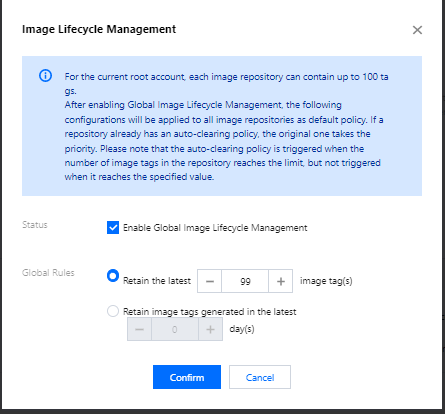
On/Off: Select Enable Global Image Lifecycle Management.
Global rules:
Retain the latest XX image tag: Enter a number based on your actual needs. The number cannot exceed the default quota of image tags under the current root account.
Retain the image tags in the last XX day: Enter a number based on your actual needs.