Access Credentials
Tencent Kubernetes Engine (TKE) implements the following features based on x509 certificates:
Each sub-account has a unique client certificate used for accessing Kubernetes API servers.
Under the new authorization method adopted by TKE, when different sub-accounts obtain access credentials for a cluster (i.e., for accessing the basic information page of the cluster or calling the DescribeClusterKubeconfig API), they will obtain a unique x509 client certificate, which is issued by the self-signed CA of each cluster.
When a sub-account accesses Kubernetes resources on the console, the backend uses the sub-account’s client certificate to access the Kubernetes API server by default.
A sub-account can update its unique client certificate to prevent credential disclosure.
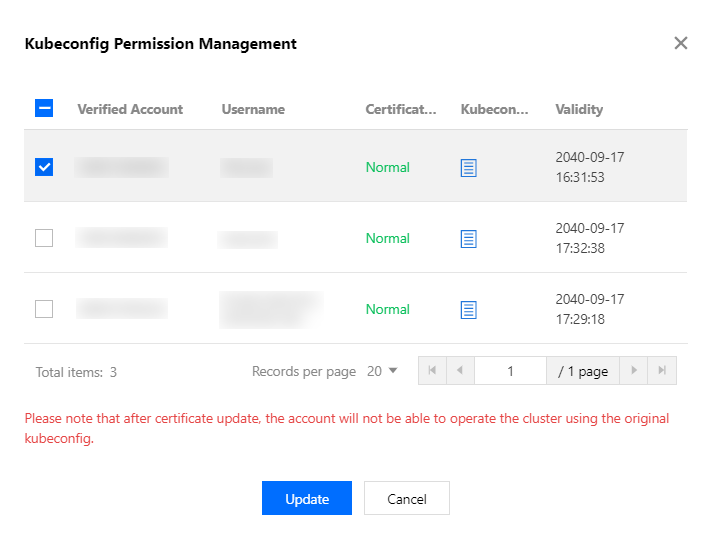
A root account or an account that has tke:admin permission for a cluster can view and update the certificates of other sub-accounts.
Directions
1. Log in to the TKE console and click Cluster on the left sidebar. 2. On the Cluster Management page, click the ID of the target cluster.
3. On the cluster details page, click Basic Information on the left sidebar. In the Cluster APIServer information section, click Kubeconfig.
4. On the Kubeconfig page, select the authentication account and click Update, as shown in the following figure.