Storage Encryption
ダウンロード
フォーカスモード
フォントサイズ
Overview
TencentDB for MongoDB provides the storage encryption feature, which is also known as Transparent Data Encryption (TDE) or static data encryption. It encrypts data before the data is written to disk and automatically decrypts data when the data is read from disk and then written to memory. This process is implemented by the database management system, meeting the compliance requirements of data encryption.
Important Notes
Description Item | Description |
Supported Version | MongoDB 4.4,5.0,6.0,7.0. |
Features and Limitations | Encryption algorithm: The AEGIS-256 encryption algorithm is used for storage encryption. Irreversibility: Once the storage encryption feature is enabled, it cannot be disabled, and the key in use cannot be modified. Backup method limitation: Before activation, the auto-backup method cannot be set to physical backup. After activation, the auto-backup method cannot be changed to physical backup, and manual physical backup cannot be performed. |
Dependencies | Before enabling the storage encryption feature, ensure that the following two dependent services have been configured: Purpose: Provides key management and encryption service support for TencentDB for MongoDB. Activation method: You can log in to the KMS console in advance to activate it, or you can activate it with one click by following the instructions during the storage encryption activation process. KMS Access Authorization Required role: MongoDB_QCSLinkedRoleInKMS. Purpose: Grants TencentDB for MongoDB the permission to access KMS and create and manage keys under your account. Authorization method: During the storage encryption activation process, you can complete authorization by following the on-page instructions. |
Impact Description | Before enabling the storage encryption feature, be sure to note the following impacts: Key and Authorization Dependency If you revoke the service authorization of KMS for MongoDB, restarting the database instance will make the database unavailable. If the encryption key is disabled or deleted, all encrypted data will become inaccessible. Ensure that the key remains available at all times. Encryption Scope and Performance After storage encryption is enabled, existing databases and tables remain unencrypted, and only newly created data is encrypted. To encrypt existing databases and tables, create a new encrypted instance and migrate data to it. Enabling storage encryption will affect database read/write performance. Evaluate your actual business performance requirements carefully before enabling it. |
Billing Overview | The storage encryption feature does not incur additional fees, but KMS may incur additional fees. For details, see Billing Overview. When your account is in arrears, you cannot obtain keys from KMS, which may cause tasks such as migration and upgrade to fail. For details, see Arrears Explanation. |
Directions
1. Log in to the TencentDB for MongoDB console.
2. In the dropdown list under MongoDB in the left sidebar, select Replica Set Instance or Shard Instance. The operations of replica set instances and sharded instances are similar.
3. Select a region at the top of the instance list page on the right.
4. Find the target instance in the instance list. You can enter an instance ID, an instance name, a private IP address, or a tag key in the search box at the upper right corner of the instance list to search for the target instance.
5. In the Instance ID/Name column of the target instance, click the Instance ID to go to the Instance Details page.
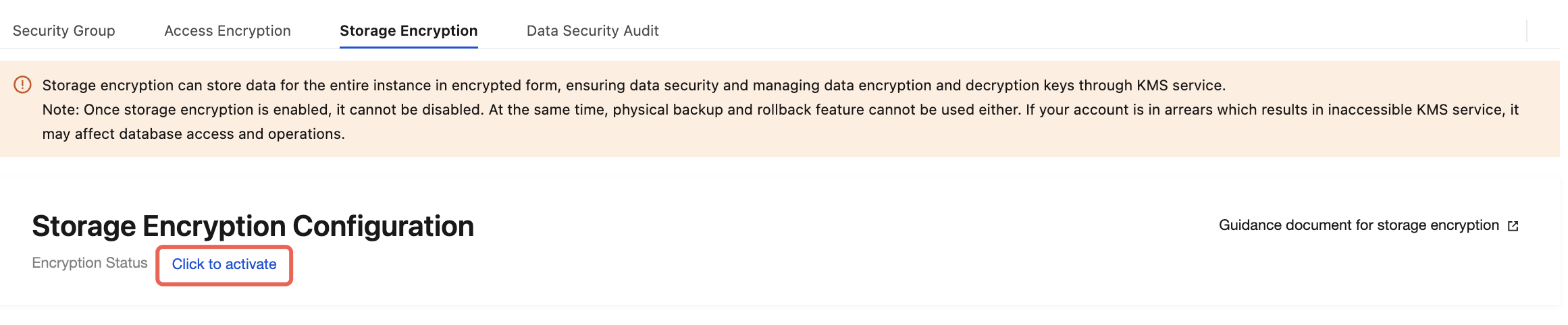
6. Switch to the Data Security page, and select the Storage Encryption tab. Click Click to activate for Encrypted Status under Storage Encryption Configuration.
7. In the Set Data Encryption window, enable KMS, complete KMS key authorization, and select the key generation method in the Select Key field.
Use key auto-generated by Tencent Cloud: Tencent Cloud will automatically generate the key.
Use existing custom key: Select a key that has been created on the KMS Key Management page, and select the region where the instance is located and the name of the key in the dropdown list below.
Notes:
If you use a custom key to enable storage encryption, you need to specify key usage as symmetric encryption and decryption. For details, see Creating a Key.
If no custom key is available, click Go to Create to create a key in the KMS console. For details, see Creating a Key.
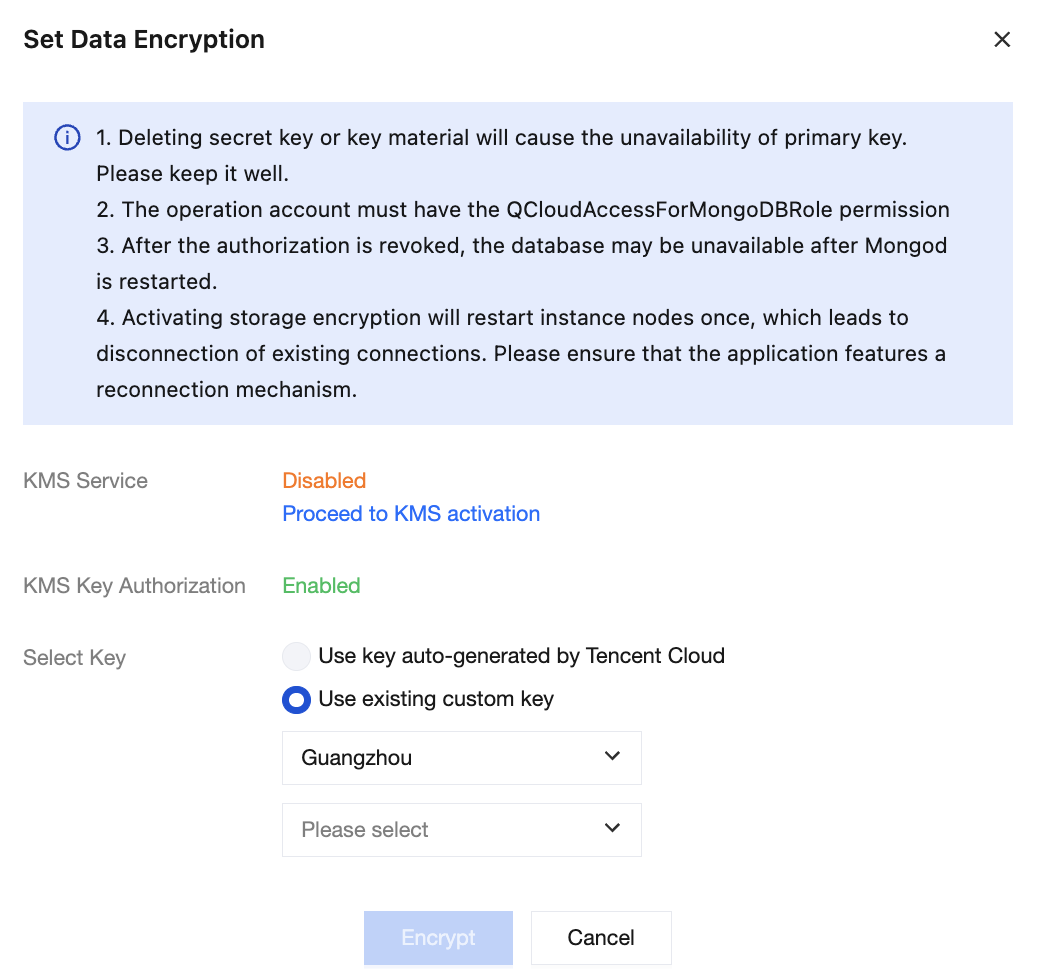
8. Click Encrypt to complete the configuration. In the left sidebar, click Task Management and wait for the task to finish execution.

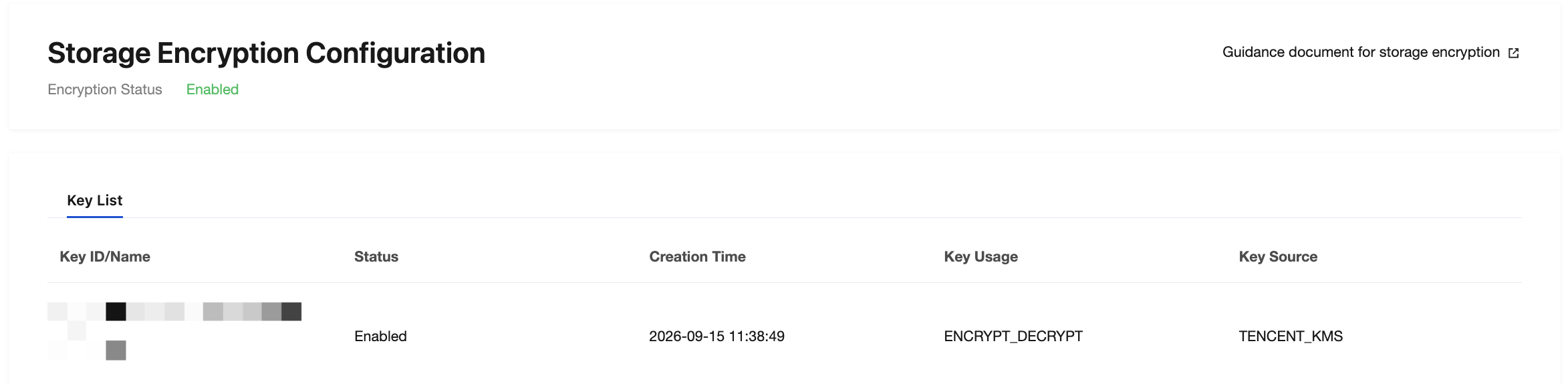
9. Switch to the Storage Encryption page. You can see that the Encryption Status is updated to Enabled, and the created key is displayed in the Key List.
Related APIs
API | Feature Description |
Enable transparent data encryption for TencentDB for MongoDB. | |
Obtain the enablement status of transparent data encryption for an instance. |
フィードバック