Adding Read-Only Node
ダウンロード
フォーカスモード
フォントサイズ
Overview
In high-concurrency read scenarios, primary/secondary nodes may struggle to handle massive read requests, resulting in delayed business responses and reduced throughput. TencentDB for MongoDB provides read-only nodes with independent connection addresses as a professional read scaling solution.
Data synchronization
Read-only nodes synchronize data in real time from the source node (primary or secondary) with the lowest latency through the operation log (oplog).
Read/Write Separation
Create one or more read-only nodes, configure read/write separation in your application, and route read requests to the read-only nodes. This effectively reduces the access pressure on primary and secondary nodes, ensuring write performance and comprehensively improving the database's read throughput.
Feature Description
To fully leverage the value of read-only nodes in read/write separation and read scaling architectures, follow the configuration recommendations below and understand their core value and limitations.
Independent Node Role Design
Read-only nodes are designed to be independent of the replica set's high-availability election mechanism. They will not be elected as the primary node, nor will they participate in voting for the primary node. This ensures that read-only nodes focus solely on read scaling without affecting the high-availability architecture of the existing cluster.
Build a high-availability read cluster
To achieve load balancing and high availability for read requests, configure at least two read-only nodes for your business. If a single read-only node fails, the business can automatically switch to other available nodes, ensuring uninterrupted read services.
Obtain the connection address.
The independent connection address (connection string) of a read-only node can be obtained and used directly in Network Configuration on the Instance Details page in the console.
Version Description
Prerequisites
Please ensure that your Tencent Cloud account has sufficient balance.
The instance is in the normal state (running), and no tasks are currently being executed.
Directions
1. Log in to the TencentDB for MongoDB console.
2. In the MongoDB drop-down list on the left sidebar, select Replica Set Instance or Shard Instance. The directions for replica set instances and sharded instances are similar.
3. Above the Instance List on the right, select the region.
4. In the instance list, find the target instance.
5. Click the Instance ID to enter the Instance Details page and click the Node Management tab.
6. On the Mongod Node tab, click Add Read-only Node.
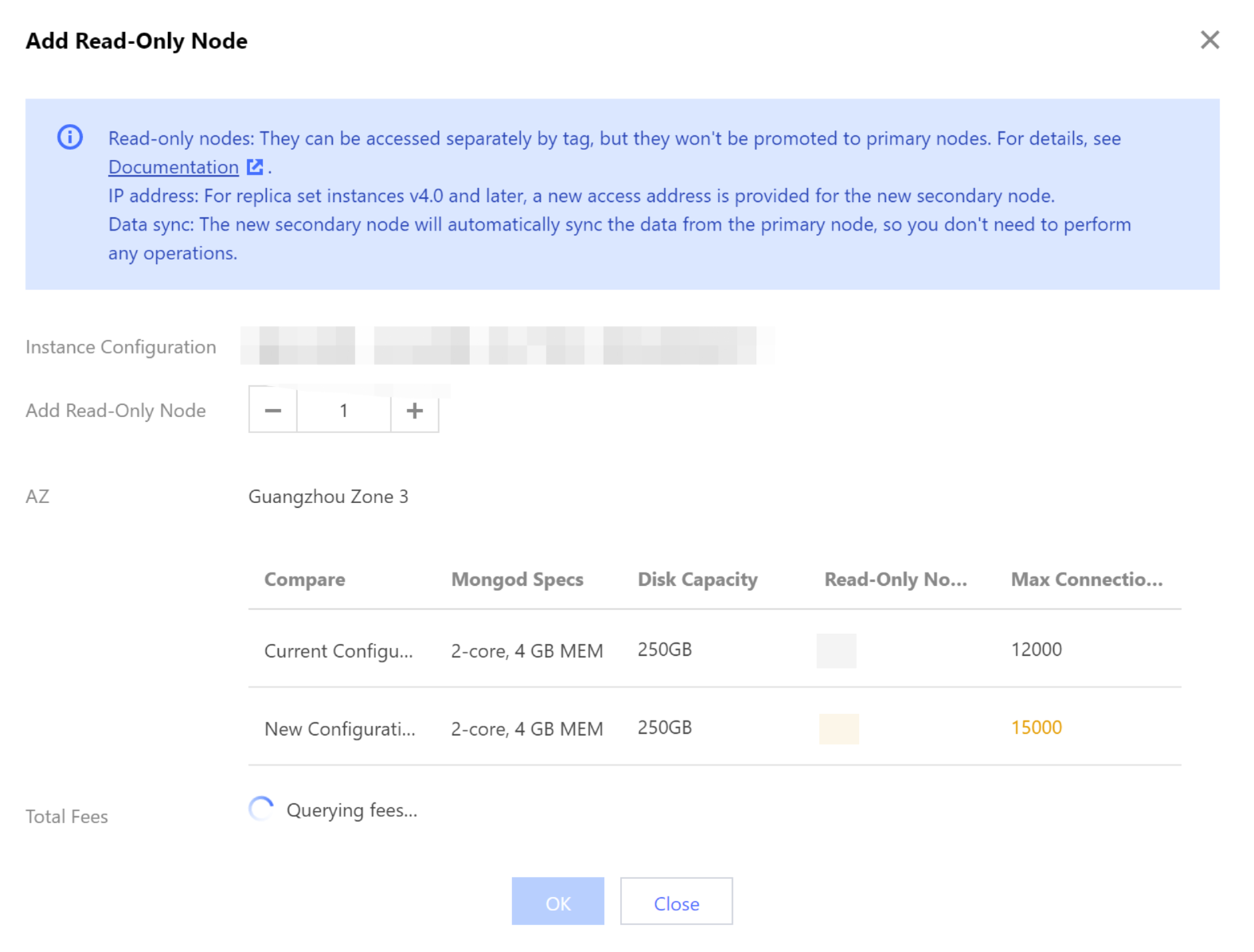
Parameter | Parameter Description |
Instance Configuration | Check the current specification of the instance, including the CPU core quantity, memory, disk capacity, total node quantity, and read-only node quantity to evaluate the number of read-only nodes to be added. |
Add Read-Only Node | The number of new read-only nodes. Value range: 0–5. |
AZ | The AZ where all read-only nodes are deployed. This parameter will be displayed if the instance nodes are in the same AZ. |
Compare | Compare the specifications before and after adding the read-only node to evaluate whether the new specification meets your needs. The specification of a replica set instance includes mongod specification, disk capacity, number of read-only nodes, and maximum number of connections. The specification of a sharded cluster instance includes number of shards, mongod specification, disk capacity, number of read-only nodes, and maximum number of connections. |
Total Fees | Pay-as-you-go: Hourly unit price after instance speciation adjustment. You can click Yearly/monthly subscription: the total cost within the validity period after the instance configuration is adjusted. For billing details after configuration adjustment, see Billing Instructions for Configuration Change. |
7. Click OK.
8. On the left sidebar, select Task Management. In the task list, find the instance by ID or name and wait until the Task Status for adding the read-only node is marked as Completed.
Related APIs
API | Feature Description |
Adjusts the cloud database instance configurations | |
Queries the sales specifications of cloud databases | |
Queries node properties, including the AZ where the node resides, node name, address, role, status, primary-secondary delay, priority, voting rights, tags, and other properties. |
フィードバック