Modifying Mongos Nodes
ダウンロード
フォーカスモード
フォントサイズ
Overview
Mongos is the request routing and coordination node of a MongoDB sharded cluster. As the only entry point for clients to access the cluster, its performance and availability directly affect the quality of the entire database service. In the following business scenarios, you can optimize cluster performance and resource utilization by adjusting the number of Mongos nodes:
Scale with the cluster
As the number of data shards increases, the cluster's processing capability improves. To prevent performance bottlenecks, you need to scale out the routing capability at the entry layer accordingly. Adding Mongos nodes at the same time helps maintain a balance in processing capability across all cluster components.
Handle high-concurrency access pressure
Adding Mongos nodes distributes client requests across multiple routing nodes, significantly improving the cluster's overall number of connections and request processing capability, and ensuring response speed and stability in high-concurrency scenarios.
Release redundant resources
When business traffic decreases or the cluster is scaled in, you can remove redundant Mongos nodes as appropriate to reduce resource costs.
Version requirements
MongoDB 4.0 and later versions support adjusting the number of Mongos nodes.
Usage Recommendations
Note:
After nodes are added, the system automatically binds IP addresses to the new nodes and activates access connection strings. You can copy the connection string in the Network Configuration section on the Instance Details page. For detailed operations, see Activating Mongos Access Addresses.
Configure multiple Mongos addresses in the application connection string, or use a load balancer to automatically distribute requests and handle failover.
When Mongos nodes are deleted, the system retains 3 Mongos nodes by default to ensure basic high availability of the cluster. Only nodes exceeding the default quantity can be deleted.
After a Mongos node is deleted, the connection address of that node becomes invalid. Remove the node address from your application in advance to avoid connection exceptions.
Prerequisites
Instance type: Sharded cluster instance.
Instance status: Running.
Mongos node addition
1. Log in to the TencentDB for MongoDB console.
2. In the MongoDB drop-down list on the left sidebar, select Shard Instance.
3. Above the Instance List on the right, select the region.
4. In the instance list, locate the target instance whose nodes you want to view.
5. Click the Instance ID to enter the Instance Details page and click the Node Management tab.
6. On the Node Management page, select the Mongos Node tab and click Add Mongos Node.
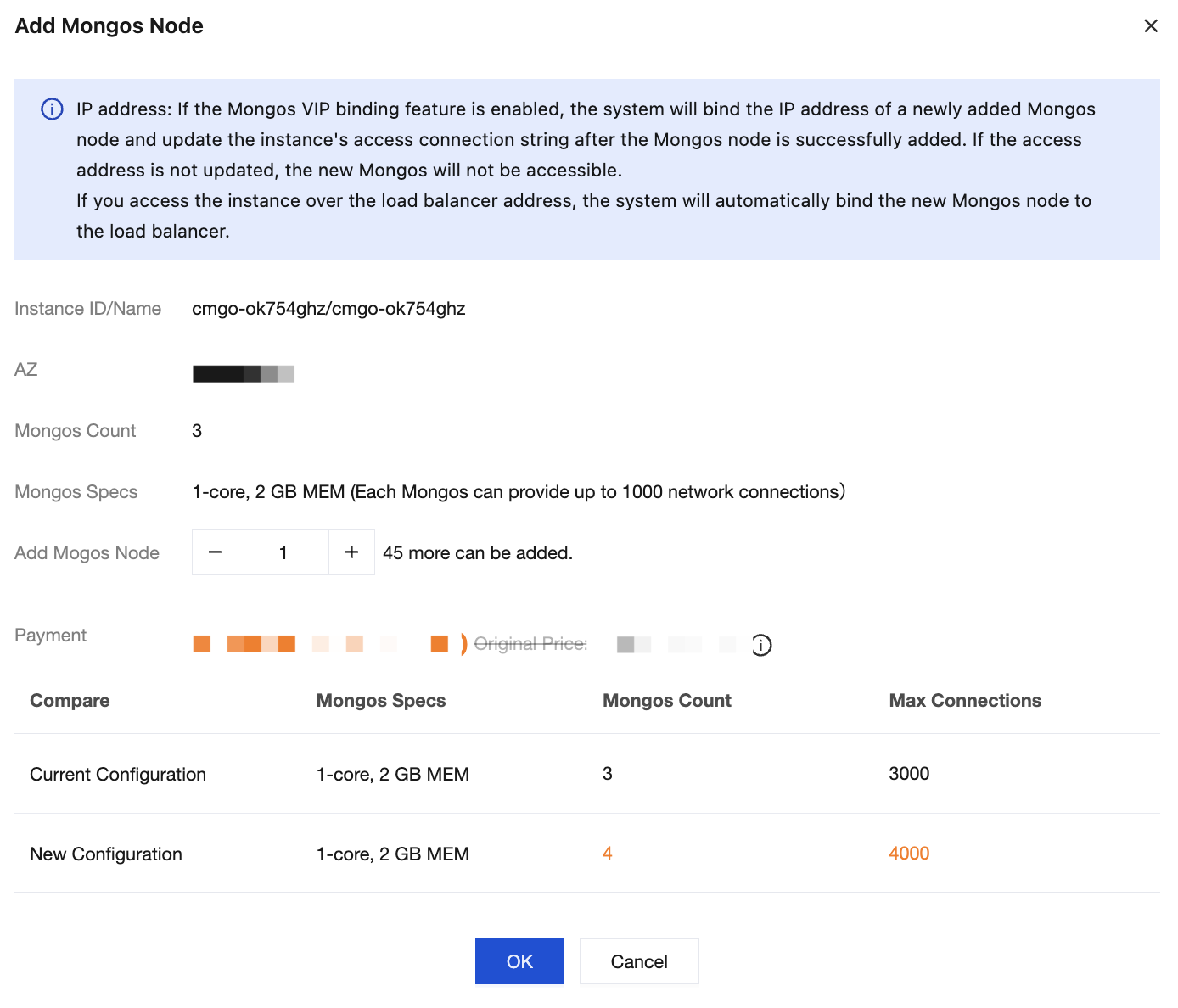
The instance is in the same AZ.
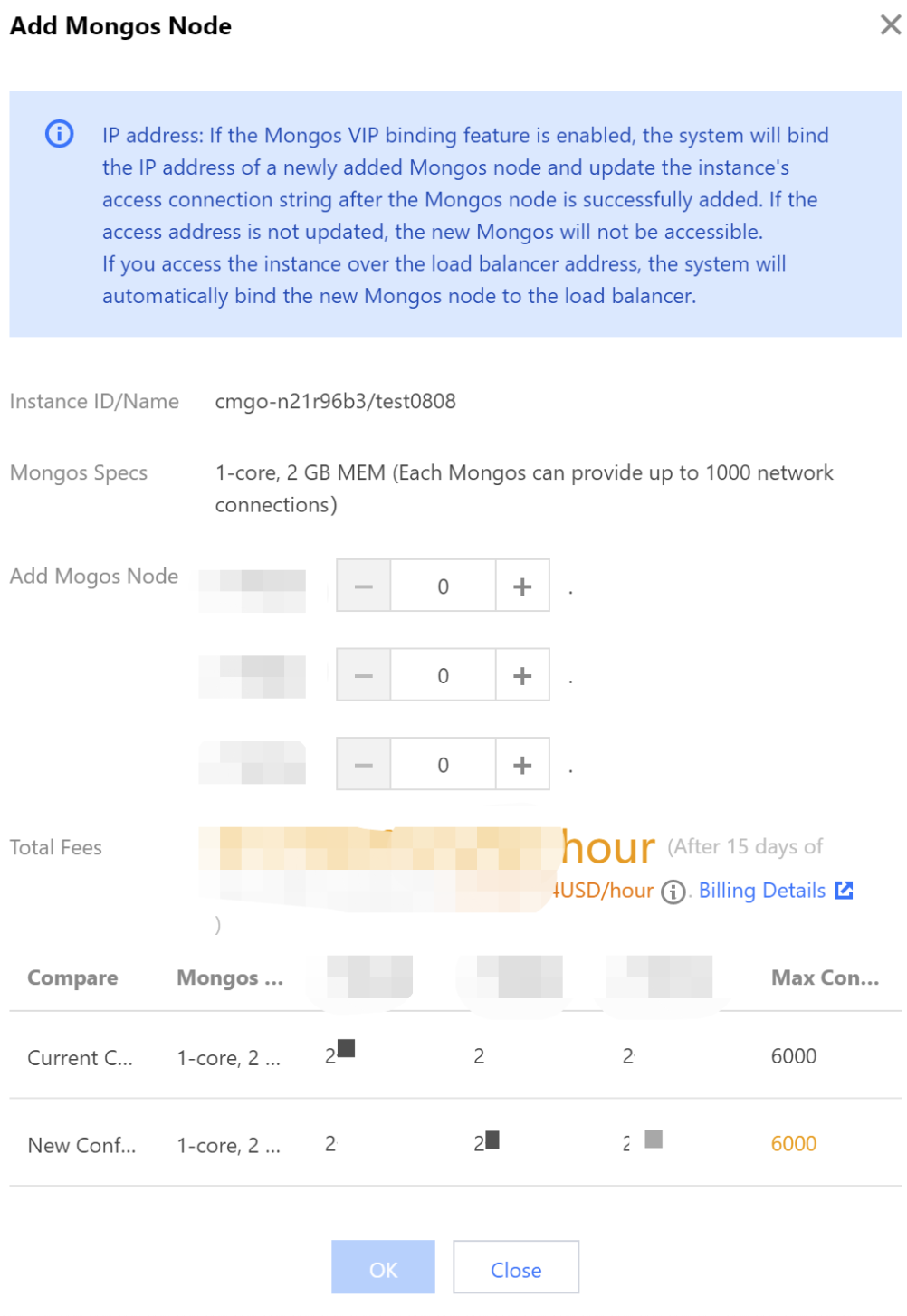
The instance is in different AZs.
Parameter | Parameter Description |
Instance ID/Name | The unique ID and name of the instance. |
AZ | If all instance nodes are in the same AZ, this parameter is displayed. It indicates the AZ of the instance. |
Mongos Count | The current number of mongos nodes configured for the instance. This parameter will be displayed if the instance nodes are in the same AZ. |
Mongos Specs | Specification of mongos nodes, including the number of CPU cores, memory, and maximum number of connections. |
Add Mongos Node | Select the number of mongos nodes to be added. An instance can have up to 48 mongos nodes. |
Total Fees | Fees after configuration adjustments. Pay-as-you-go: the hourly cost of the new specification. Billing is divided into three tiers. Yearly/monthly subscription: the total cost of the remaining usage period for the new specification. |
Compare | Compare the specifications and node counts in AZs and their maximum numbers of connections before and after the Mongos adjustment, and evaluate whether the new specifications meet your needs. |
7. After confirming that everything is correct, click OK.
Deleting a Mongos Node
1. Log in to the TencentDB for MongoDB console.
2. In the MongoDB drop-down list on the left sidebar, select Shard Instance.
3. Above the instance list on the right, select the target region.
4. Locate the target instance, click its Instance ID to go to the Instance Details page, and then select the Node Management tab.
5. On the Node Management page, select the Mongos Node tab. In the Operation column of the target Mongos node, click Delete.
Note
A sharded cluster must retain at least 3 Mongos nodes. Deletion is supported only when the number of nodes is greater than 3.
After the node is deleted, its IP address and connection string will immediately become invalid. Evaluate the impact of the connection interruption on your business.
6. In the confirmation dialog box, confirm the configuration information and fees of the instance after the node is deleted.
7. Click OK to complete the node deletion.
Related APIs
API | Feature Description |
Adjusts the cloud database instance configurations | |
Queries the sales specifications of cloud databases |
フィードバック