Quick Start
ダウンロード
フォーカスモード
フォントサイズ
Preparations
You need a HarmonyOS NEXT application, which can be an existing project or a newly created empty one. For details, see HarmonyOS NEXT Application Development Guide.
Ensure your HarmonyOS NEXT application target is API level 12 or higher.
Procedure
Step 1: Integrating the SDK
1. Run this command to install SDK dependencies:
ohpm install @tencentcloud/smh_sdk
This will add a line of dependency code to your project's oh-package.json5:
"dependencies": {..."@tencentcloud/smh_sdk":"1.0.2"}
2. The SDK requires network permission to communicate with the COS server. Please add the following permission statement in the module.json5 file under the application module:
..."requestPermissions":[{"name" : "ohos.permission.INTERNET",...}]...
Step 2: Initialization
Note:
After a media library is created in the console, the console will display the dedicated domain name generated for you. It is strongly recommended that you set SMHServiceConfig.sharedConfig().host to your dedicated domain name.
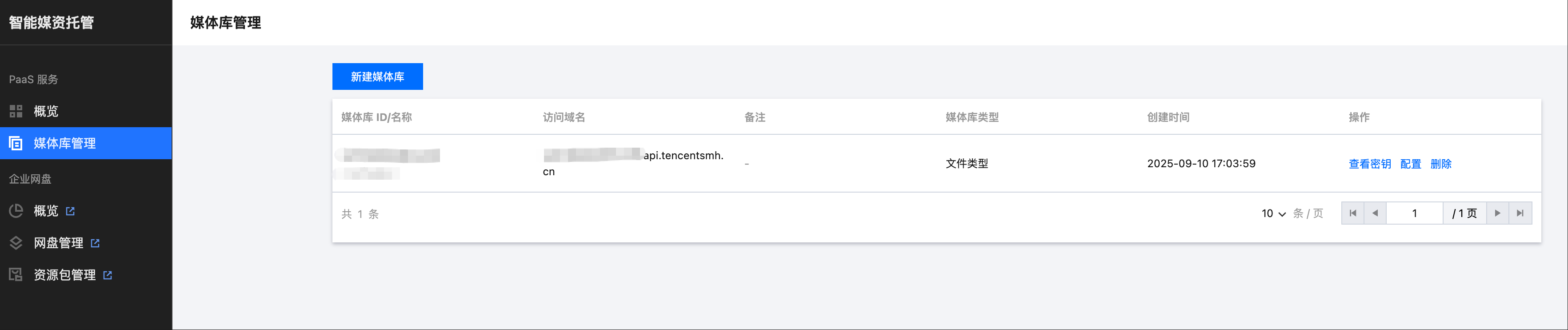
// Configure the access domain displayed after creating a media library in the consoleSMHServiceConfig.sharedConfig().host = "<libraryId>.api.tencentsmh.cn";// Configure the access token refresh callbackSMHAccessTokenProvider.singleProvider().accessRefreshCallBack = <T>(reqeust: SMHAPIRequest<T>) => {return new Promise(async (resolve, reject) => {try {let accessToken = new SMHAccessToken();accessToken.libraryId = "libraryId"; // Set Media Library ID.accessToken.spaceId = "spaceId"; // Set Space IDaccessToken.accessToken = "accessToken"; //set accessTokenaccessToken.expiresIn = 1800;resolve(accessToken);} catch (err) {}});}
Step 3: Accessing the SMH Service
Uploading Files
try {let filePath = "local file path";// Call the uploadObject method of SMHFileApis to perform file uploadlet task = SMHFileApis.uploadObject({spaceId: "spaceId",libraryId: "libraryId",body: filePath, // local pathuploadPath: `smh/test.jpg` // target path});task.onStateChange = (state: SMHTransferState) => {job status callback}task.confirmKeyInitCallback = (confimKey: string) => {// Upload returns confirmKey callback. Used for resumable upload}task.onProgress = (progress) => {// progress callback}task.onFinish = (result?: object, error?: SMHError) => {// complete callback}// start tasktask.start();//other methods//task.pause() pause task//task.cancel() cancel task//task.resume() restart task, can be used together with pause}catch (e) {// exception handling}
Resumable Transfer
try {let filePath = "local file path";// Call the uploadObject method of SMHFileApis to perform file uploadlet task = SMHFileApis.uploadObject({spaceId: "spaceId",libraryId: "libraryId",body: filePath, // local pathuploadPath: `smh/test.jpg`, // target pathconfirmKey:"confirmKey"// confirmKey returned by confirmKeyInitCallback.});task.onStateChange = (state: SMHTransferState) => {job status callback}task.confirmKeyInitCallback = (confimKey: string) => {// Upload returns confirmKey callback. Used for resumable upload}task.onProgress = (progress) => {// progress callback}task.onFinish = (result?: object, error?: SMHError) => {// complete callback}// start tasktask.start();//other methods//task.pause() pause task//task.cancel() cancel task//task.resume() restart task, can be used together with pause}catch (e) {// exception handling}
Downloading a File
Note:
The download interface supports resume transfer from breakpoints by default. Ensure that the local path for writing remains unchanged.
try {// Call the downloadObject method of SMHFileApis to perform file uploadlet task = SMHFileApis.downloadObject({spaceId: "spaceId",libraryId: "libraryId",filePath: `smh/test.jpg`, // remote pathsavePath: "local path" // local path})task.onStateChange = (state: SMHTransferState) => {job status callback}task.onProgress = (progress: HttpProgress) => {// progress callback}task.onFinish = (result?: object, error?: SMHError) => {// complete callback}// start tasktask.start();//other methods//task.pause() pause task//task.cancel() cancel task//task.resume() restart task, can be used together with pause} catch (e) {// exception handling}
Other Requests
// listing files in the foldertry {let result = await SMHDirectoryApis.listDirectory({libraryId:"libraryId",spaceId:"spaceId",dirPath:'',limit:'10',orderBy:SMHFileListOrderBy.name,orderByType:SMHOrderByType.asc,withFavoriteStatus:true,withInode:true});}catch (e) {// exception handling}// create foldertry {let result = await SMHDirectoryApis.createDirectory({libraryId:"libraryId",spaceId:"spaceId",dirPath:'path',withInode:true});}catch (e) {// exception handling}// Delete foldertry {let result = await SMHDirectoryApis.deleteDirectory({libraryId:"libraryId",spaceId:"spaceId",dirPath:'path'});}catch (e) {// exception handling}
Other Configurations
Retry Policy Configuration
// Set retry interval, default: 1sSMHServiceConfig.sharedConfig().retrySleep = 1 * 1000;// Set retry count, default: 3SMHServiceConfig.sharedConfig().maxRetryCount = 3;
Timeout Configuration
// Read timeout period in milliseconds (ms), default is 30 * 1000ms.SMHServiceConfig.sharedConfig().readTimeout = 30 * 1000;// Connection timeout in milliseconds (ms), default is 15 * 1000ms.SMHServiceConfig.sharedConfig().connectTimeout = 15 * 1000;
Concurrent Policy Configuration
// Set maximum number of concurrent uploads. Default: 4SMHServiceConfig.sharedConfig().setUploadMaxConcurrentCount(4);// Set maximum number of concurrent downloads. Default: 4SMHServiceConfig.sharedConfig().setDownloadMaxConcurrentCount(4);
Log configuration
// Custom log output callback for log collection in the business layerQCloudLogger.logOutputCallback = (log: string) => {console.log(log);}// Want to close logs: true: off, false: onQCloudLogger.setClose(true);
フィードバック