Using Anti-DDoS Pro Together with WFA
ダウンロード
フォーカスモード
フォントサイズ
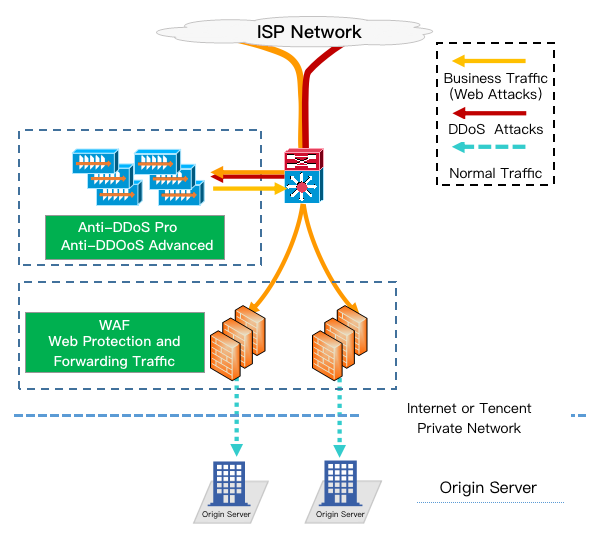
Anti-DDoS Pro can be used together with Web Application Firewall (WAF) to provide you with comprehensive protection.
Providing DDoS protection capability of hundreds of Gbps at one click, Anti-DDoS Pro can easily defend against DDoS attacks and ensure the smooth operation of your business.
WAF can block web attacks in real time to ensure the security of your business data and information.
Deployment scheme
Directions
Configuring WAF
Configuring Anti-DDoS Pro
1. Log in to the new Anti-DDoS console, and click Anti-DDoS Instances on the left sidebar.
2. On the Anti-DDoS Instances page, select a target instance and click Protected Resource in the Operation column.

3. In the Protected Resource window, select a device type and a resource instance as needed.
Device type: Public cloud resources (such as CVM, CLB, and WAF) with public IPs are supported.
Select instance: You can select multiple instances (no more than the maximum number of bound IPs).
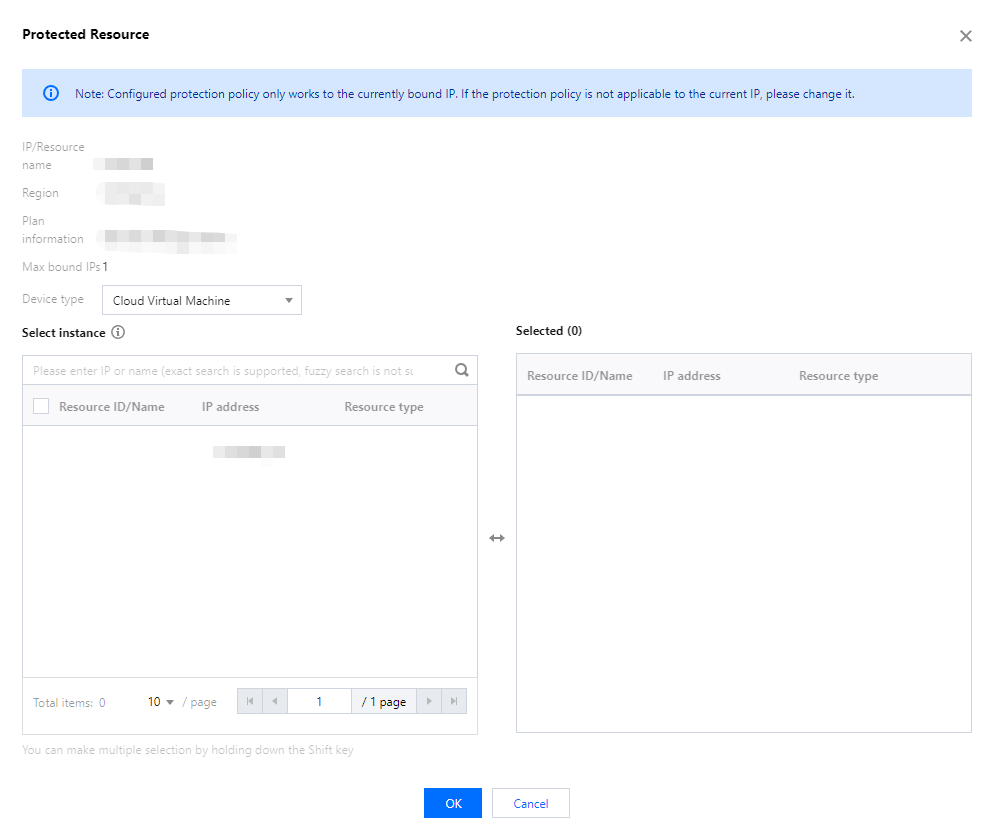
4. Click OK.
フィードバック