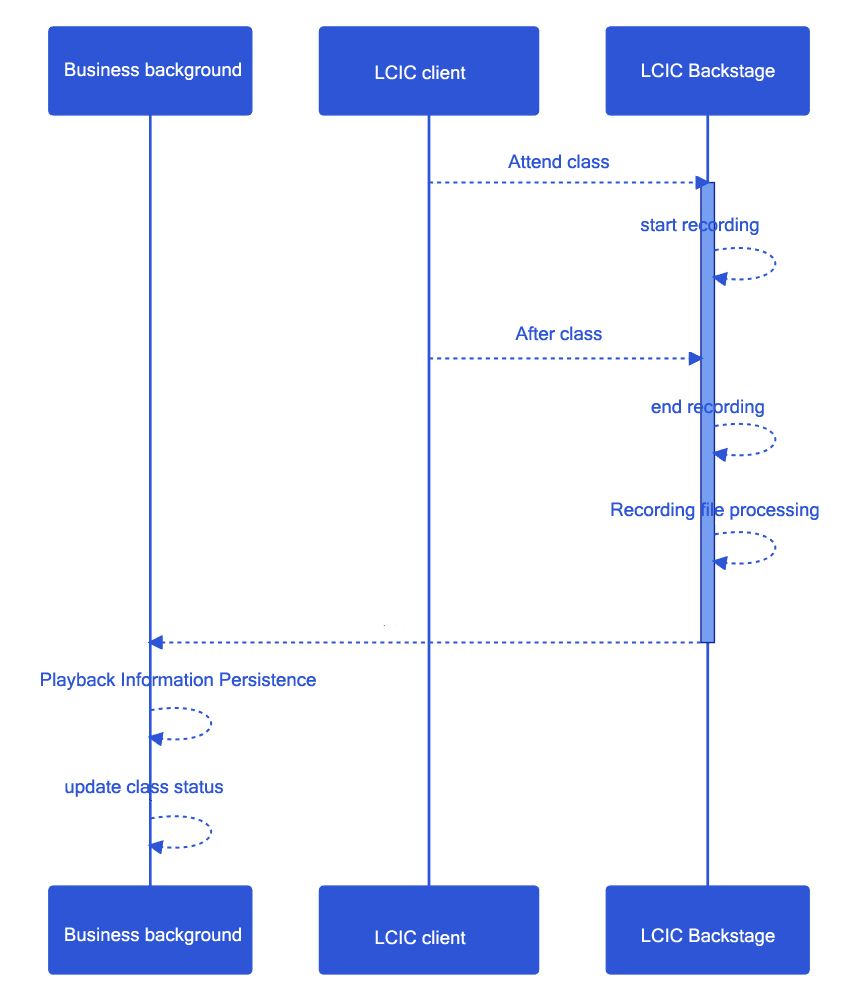
A complete classroom process, including pre-class scheduling, in-class teaching, and post-class playback. This article will use how to integrate with the business to complete the integration of classroom playback logic for reference by the business side.
Interface example
the list
The class list page is shown in the figure below:
details
Click View under the list operation column to enter the details page:
It can be seen that the business layer needs to be able to see the classroom history after the classroom is over. It can be broken down into the following abilities:
list
classroom information
playback file information
search
delete
details
classroom information
playback address
delete
download
Sequence diagram of connection between playback recording and business layer
For the business layer, it is only necessary to complete the processing of the classroom playback notification in the connection of the callback service.
Callback service processing failed
If the callback is not received correctly due to a service exception, our callback service will make multiple attempts, but will give up trying if the multiple attempts still fail.
At this point, the business layer can obtain the playback address through the class information interface.