TencentCloud Managed Service for Grafana (TCMG) provides the account management feature that allows you to determine which users support single sign-on (SSO) login and manage their permissions.
2. Find the target instance and click Instance ID.
Directions
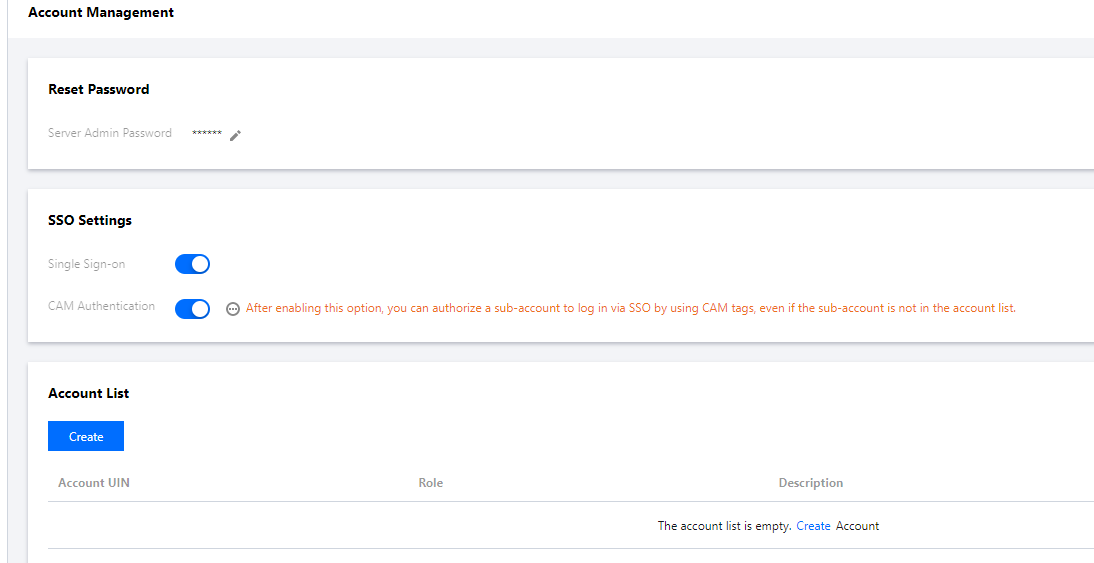
1. Enter the instance details page and click Account Management in the list on the left.
2. Make sure that Single Sign-on is enabled; otherwise, users can only log in to the instance with account ID and password.
If you want to authorize sub-accounts to log in via SSO by using CAM tags, enable CAM Authentication, after which unauthorized sub-accounts will be denied SSO login. You can go to the Account List module to control the permissions of sub-accounts that have successfully logged in via SSO.
If you want to allow unauthorized sub-accounts to log in via SSO, disable CAM Authentication and go to the Account List module to grant them the SSO login permission.
Account List
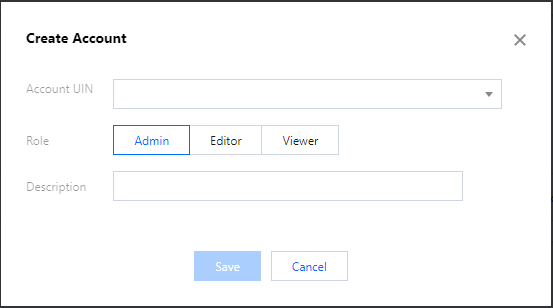
On the Account Management page, click Create in the Account List module, enter the account UIN, and select a role that defines the TCMG user’s permission.
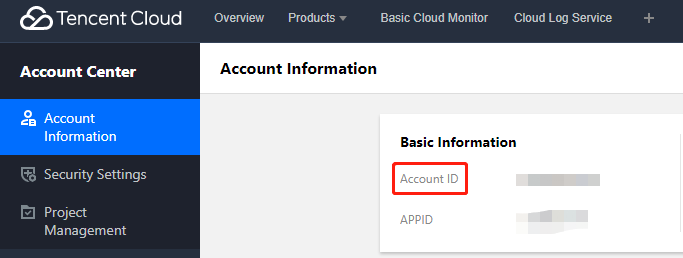
The account UIN here corresponds to the Account ID on the Account Information page in Account Center.
FAQ
What should I do if I cannot log in via SSO?
1. Check whether your root account is the same as the instance’s.
Currently, TCMG doesn’t support cross-root account SSO login.
2. Check whether the configurations on the Account Management page are correct.
If CAM Authentication is enabled, a user’s Tencent Cloud account will be authenticated by CAM, and only the authorized user can successfully log in via SSO. If the user account is in the account list on the Account Management page, permissions set in the list will apply.
If CAM Authentication is disabled, you can go to the Account List module to manage users who have the SSO login permission. Users in the account list can log in via SSO with the permissions they’ve been granted. Note that the account UIN corresponds to the Account ID on the Account Information page in the Account Center console.