tencent cloud

TDMQ for RocketMQ

Release Notes and Announcements
Release Notes
Announcements
Product Introduction
Introduction and Selection of the TDMQ Product Series
What Is TDMQ for RocketMQ
Strengths
Scenarios
Product Series
Comparison with Open-Source RocketMQ
High Availability
Quotas and Limits
Supported Regions
Basic Concepts
Billing
Billing Overview
Pricing
Billing Examples
Pay-as-you-go Switch to Monthly Subscription (5.x)
Renewal
Viewing Consumption Details
Refund
Overdue Payments
Getting Started
Getting Started Guide
Preparations
Step 1: Creating TDMQ for RocketMQ Resources
Step 2: Using the SDK to Send and Receive Messages (Recommended)
Step 2: Running the TDMQ for RocketMQ Client (Optional)
Step 3: Querying Messages
Step 4: Deleting Resources
User Guide
Usage Process Guide
Configuring Account Permissions
Creating the Cluster
Configuring the Namespace
Configuring the Topic
Configuring the Group
Connecting to the Cluster
Managing Messages
Managing the Cluster
Viewing Monitoring Data and Configuring Alarms
Cross-Cluster Message Replication
Use Cases
Naming Conventions for Common Concepts of TDMQ for RocketMQ
RocketMQ Client Use Cases
RocketMQ Performance Load Testing and Capacity Assessment
Access over HTTP
Client Risk Descriptions and Update Guide
Migration Guide for TencentCloud API Operations Related to RocketMQ 4.x Cluster Roles
Migration Guide
Disruptive Migration
Seamless Migration
Developer Guide
Message Types
Message Filtering
Message Retries
POP Consumption Mode (5.x)
Clustering Consumption and Broadcasting Consumption
Subscription Relationship Consistency
Traffic Throttling
​​API Reference(5.x)
History
API Category
Making API Requests
Topic APIs
Consumer Group APIs
Message APIs
Role Authentication APIs
Hitless Migration APIs
Cloud Migration APIs
Cluster APIs
Data Types
Error Codes
​​API Reference(4.x)
SDK Reference
SDK Overview
5.x SDK
4.x SDK
Security and Compliance
Permission Management
CloudAudit
Deletion Protection
FAQs
4.x Instance FAQs
Agreements
TDMQ for RocketMQ Service Level Agreement
Contact Us

Ordered Messages

PDF
フォーカスモード
フォントサイズ
最終更新日: 2026-01-23 17:52:23
Ordered messages are advanced messages provided by TDMQ for RocketMQ. For a specified topic, messages are published and consumed in strict accordance with the First In First Out (FIFO) principle, which means that the messages sent first are consumed first, and the messages sent later are consumed later.
Ordered messages are suitable for scenarios with strict requirements on the order of message sending and consumption.

Scenarios

The comparison between ordered messages and normal messages is as follows:
Message Type
Consumption Order
Performance
Scenario
Normal message
No specific order.
High
Suitable for scenarios requiring high throughput with no specific requirements on production and consumption orders.
Ordered message
Messages within a specified topic follow the FIFO principle.
Moderate
Suitable for scenarios with moderate throughput requirements but requiring that messages within a specific topic must be produced and consumed in strict accordance with the FIFO principle.
You can use ordered messages in the following business scenarios:
Order creation: In certain e-commerce systems, the creation, payment, refund, and logistics messages related to the same order must be produced or consumed in strict sequence; otherwise, the order status will be messed up during consumption, which will affect the normal operation of the business. Therefore, the messages of this order must be produced and consumed in a certain sequence in the client and message queue. At the same time, the messages are sequentially dependent, and the processing of the next message must be dependent on the processing result of the preceding message.
Log synchronization: In the scenario of sequential event processing or real-time incremental data synchronization, ordered messages can also play a big role. For example, it is necessary to ensure that database operations are in sequence when MySQL binlogs are synchronized.
Finance: In certain matchmaking transaction scenarios, such as certain securities transactions, the first bidder is given priority in the case of the same bidding price, so it is necessary to produce and consume ordered messages in a FIFO manner.
Note:
In certain cases, temporary out-of-order messages may occur, such as during frequent client restarts, before and after the specification adjustment of a 4.x cluster, or during cluster upgrades.

How It Works

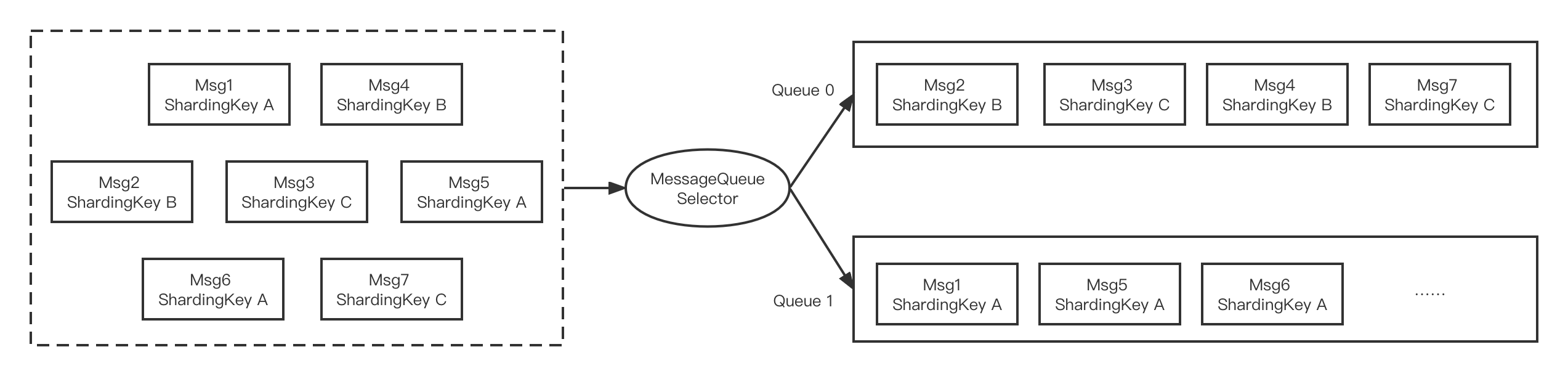
The following diagram illustrates how ordered messages in TDMQ for RocketMQ work. Messages can be partitioned based on a specific criterion (such as the ShardingKey in the diagram). Messages with the same ShardingKey are assigned to the same queue and consumed in order.

Sending ordered messages


Producing Ordered Messages

The following code shows how to produce ordered messages:
public class Producer {
public static void main(String[] args) throws UnsupportedEncodingException {
try {
// Instantiate a message producer.
DefaultMQProducer producer = new DefaultMQProducer(groupName,
// Access control list (ACL) permissions.
new AclClientRPCHook(new SessionCredentials(ACCESS_KEY, SECRET_KEY)), true, null);
// Set the NameServer address.
producer.setNamesrvAddr("rmq-xxx.rocketmq.xxxtencenttdmq.com:8080");
// Start the producer instance.
producer.start();

String[] tags = new String[] {"TagA", "TagB", "TagC", "TagD", "TagE"};
for (int i = 0; i < 100; i++) {
int orderId = i % 10;
Message msg =
new Message("TopicTest", tags[i % tags.length], "KEY" + i,
("Hello RocketMQ " + i).getBytes(RemotingHelper.DEFAULT_CHARSET));
SendResult sendResult = producer.send(msg, new MessageQueueSelector() {
@Override
public MessageQueue select(List<MessageQueue> mqs, Message msg, Object arg) {
Integer id = (Integer) arg;
int index = id % mqs.size();
return mqs.get(index);
}
}, orderId);

System.out.printf("%s%n", sendResult);
}

producer.shutdown();
} catch (MQClientException | RemotingException | MQBrokerException | InterruptedException e) {
e.printStackTrace();
}
}
}
The main difference here lies in calling the SendResult send(Message msg, MessageQueueSelector selector, Object arg) method. MessageQueueSelector is a queue selector, and arg is a Java object that can be passed in as the classification criterion for message sending partitions.
The interface of MessageQueueSelector is as follows:
public interface MessageQueueSelector {
MessageQueue select(final List<MessageQueue> mqs, final Message msg, final Object arg);
}
Here, mqs represents the queues available for sending, msg is the message, arg is the object passed in the send interface mentioned above, and the return value is the queue to which the message should be sent. In the example above, orderId is used as the partition classification criterion. Messages with the same orderId are sent to the same queue by calculating the remainder of the orderId divided by the total number of queues.
In production environments, it is recommended to select the most fine-grained partition key for splitting. For example, using order ID or user ID as the partition key ensures messages from the same end user are processed in order, while the order between messages from different users does not need to be guaranteed.
Note:
To ensure the high availability of messages, TDMQ for RocketMQ does not support global ordered messages on a single queue (existing users who have created global ordered messages can continue using them normally). If you need to guarantee global order, you can use the same ShardingKey for all related messages.

Consuming Ordered Messages

The following code shows how to consume ordered messages:
/**
* Description: Consumer of ordered messages.
*/
public class OrderConsumer {
/**
* Topic name.
*/
private static final String TOPIC_NAME = "order_topic";

/**
* Consumer group name.
*/
private static final String GROUP_NAME = "group2";
public static void main(String[] args) throws Exception {
// Create a message consumer.
// Instantiate a consumer.
DefaultMQPushConsumer consumer = new DefaultMQPushConsumer(GROUP_NAME,
new AclClientRPCHook(new SessionCredentials("accessKey", "secretKey")),
new AllocateMessageQueueAveragely(), true, null);
// Set the NameServer address.
consumer.setNamesrvAddr("rmq-xxx.rocketmq.xxxtencenttdmq.com:8080");
consumer.setConsumeFromWhere(ConsumeFromWhere.CONSUME_FROM_FIRST_OFFSET);
/*
* Set whether the consumer starts consuming from the beginning or the end of the queue on its first startup.
* If it is not the first startup, consumption continues from the last consumption position.
*/
consumer.setConsumeFromWhere(ConsumeFromWhere.CONSUME_FROM_FIRST_OFFSET);
// Subscribe to all messages in the topic.
consumer.subscribe(TOPIC_NAME, "*");
consumer.registerMessageListener(new MessageListenerOrderly() {
@Override
public ConsumeOrderlyStatus consumeMessage(List<MessageExt> msgs, ConsumeOrderlyContext context) {
context.setAutoCommit(true);
for (MessageExt msg : msgs) {
// It can be seen that each queue is consumed by a unique thread, ensuring order within each queue (partition).
System.out.println("consumeThread=" + Thread.currentThread().getName() + ", queueId=" + msg.getQueueId() + ", msgId=" + msg.getMsgId() + ", content:" + new String(msg.getBody()));
}
try {
// Simulating business logic processing...
TimeUnit.SECONDS.sleep(1);
} catch (Exception e) {
e.printStackTrace();
}
return ConsumeOrderlyStatus.SUCCESS;
}
});
consumer.start();
System.out.println("Consumer Started.");
}
}


ヘルプとサポート

この記事はお役に立ちましたか?

フィードバック