ネイティブHDFSデータをTencent Cloud CHDFSに移行します
ダウンロード
フォーカスモード
フォントサイズ
準備作業
1. Tencent Cloudの公式ウェブサイトでCHDFSファイルシステムとCHDFSマウントポイントを作成し、アクセス権限情報を設定します。
2. Tencent Cloud VPC環境のCVMマシンを介して、作成済みのCHDFSにアクセスします。詳細については、CHDFSの作成をご参照ください。
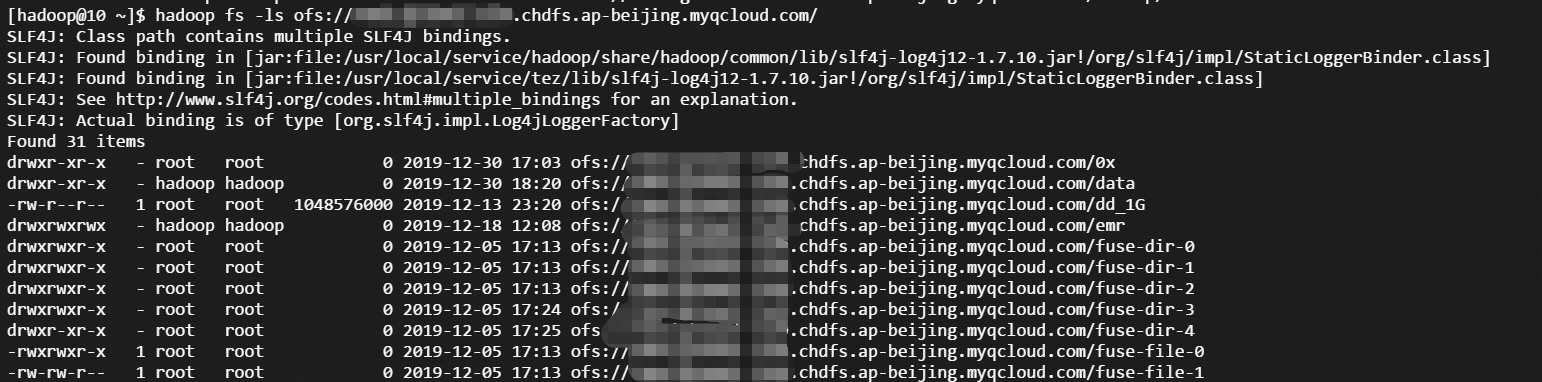
3. マウントが成功したら、hadoopコマンドラインツールを開き、以下のコマンドを実行して、CHDFS検証機能が正常かどうかを検証します。
hadoop fs -ls ofs://f4xxxxxxxxxxxxxxx.chdfs.ap-beijing.myqcloud.com/
以下のような出力が表示される場合は、Cloud HDFS機能のすべてが正常であることを意味します。
移行
準備ができたら、hadoopコミュニティ標準のDistcpツールを使用して、完全または増分のHDFSデータの移行を行うことができます。詳細については、Distcp公式ガイドラインドキュメントをご参照ください。
注意事項
hadoop distcpツールには、CHDFSと互換性のないパラメータがいくつか提供されています。次の表のパラメータのうちいくつかは、指定しても有効になりません。
パラメータ | 説明 | 状態 |
-p[rbax] | r:replication,b:block-size,a:ACL,x:XATTR | 無効 |
事例の説明
1. CHDFSの準備ができたら、以下のhadoopコマンドを実行してデータを移行します。
hadoop distcp hdfs://10.0.1.11:4007/testcp ofs://f4xxxxxxxx-xxxx.chdfs.ap-beijing.myqcloud.com/
そのうち
f4xxxxxxxx-xxxx.chdfs.ap-beijing.myqcloud.comはマウントポイントのドメイン名であり、実際に申請したマウントポイント情報に基づいて置き換える必要があります。2. Hadoopコマンドが実行された後、移行の具体的な詳細がログに印刷されます。以下に例を示します。
2019-12-31 10:59:31 [INFO ] [main:13300] [org.apache.hadoop.mapreduce.Job:] [Job.java:1385]Counters: 38File System CountersFILE: Number of bytes read=0FILE: Number of bytes written=387932FILE: Number of read operations=0FILE: Number of large read operations=0FILE: Number of write operations=0HDFS: Number of bytes read=1380HDFS: Number of bytes written=74HDFS: Number of read operations=21HDFS: Number of large read operations=0HDFS: Number of write operations=6OFS: Number of bytes read=0OFS: Number of bytes written=0OFS: Number of read operations=0OFS: Number of large read operations=0OFS: Number of write operations=0Job CountersLaunched map tasks=3Other local map tasks=3Total time spent by all maps in occupied slots (ms)=419904Total time spent by all reduces in occupied slots (ms)=0Total time spent by all map tasks (ms)=6561Total vcore-milliseconds taken by all map tasks=6561Total megabyte-milliseconds taken by all map tasks=6718464Map-Reduce FrameworkMap input records=3Map output records=2Input split bytes=408Spilled Records=0Failed Shuffles=0Merged Map outputs=0GC time elapsed (ms)=179CPU time spent (ms)=4830Physical memory (bytes) snapshot=1051619328Virtual memory (bytes) snapshot=12525191168Total committed heap usage (bytes)=1383071744File Input Format CountersBytes Read=972File Output Format CountersBytes Written=74org.apache.hadoop.tools.mapred.CopyMapper$CounterBYTESSKIPPED=5COPY=1SKIP=2
フィードバック