Video Remake Access
ダウンロード
フォーカスモード
フォントサイズ
Overview
The video face and body replacement feature leverages the video re-creation capability of Tencent Cloud's MPS. It uses AI models to achieve face replacement and full body replacement within videos. This feature is widely applied in scenarios such as film and television post-production, virtual digital humans, short video creative production, and advertising creativity.
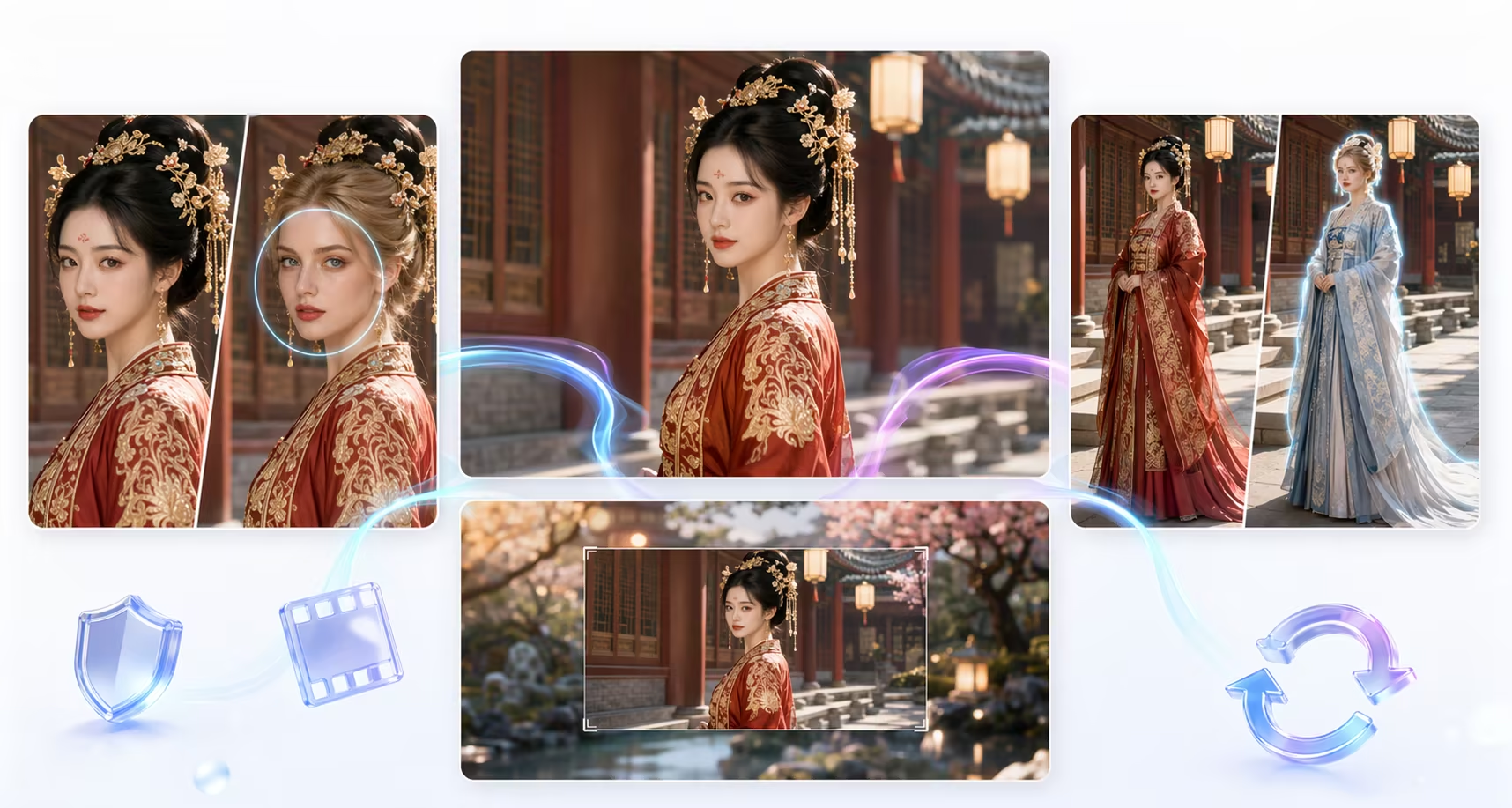
Feature Description
Function | Description | Effect Preview | Billing Overview |
AI Face Swap | Replaces specified faces in videos, supports multiple subjects and reference images, and retains body movements and clothing. | 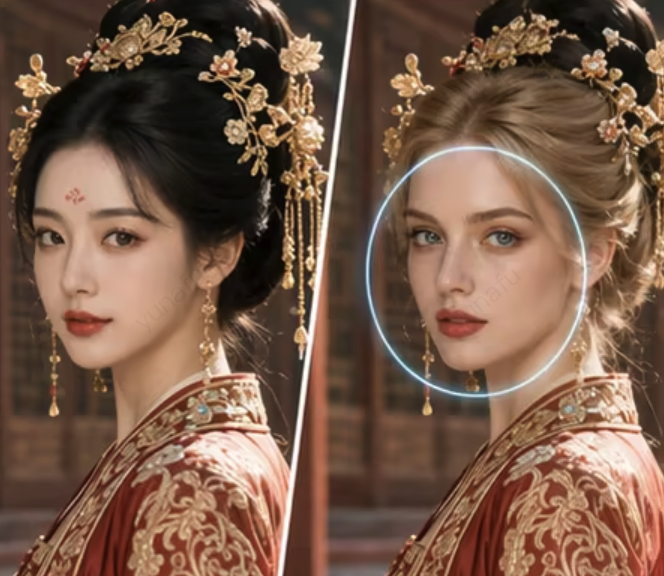 | Charges for "Video Remastering – AI Face Swap". |
AI Person Replacement | Replaces the overall appearance of a person in a video, including body shape, clothing, and other full-body features. | 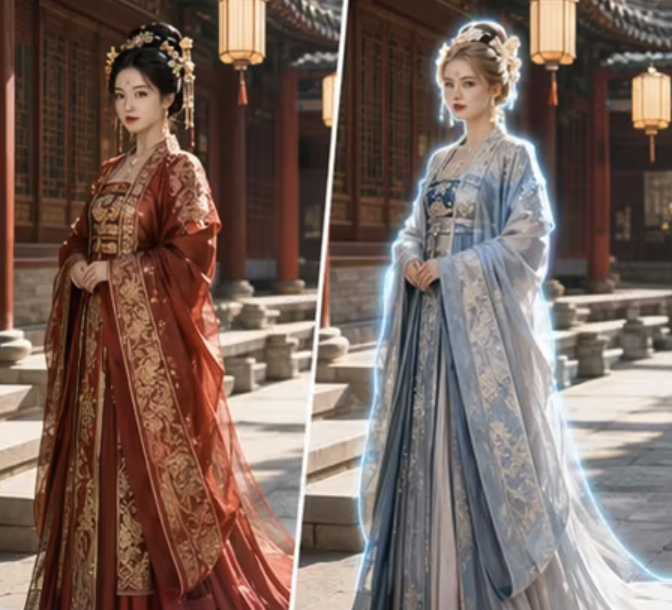 | Charges for "Video Remastering – AI Person Swap". |
Picture-in-picture | Embeds the original video, scaled down, into an AI-generated background. | | Charges for "Video Remastering – Video Image Adjustment". |
Background Extension | Inserts an extended background video image into the video. | | |
Vertical Fill | Generates top and bottom supplemental content for a landscape video. | | |
Horizontal Fill | Generates left and right supplemental content for a portrait video. | | |
Use Limits
Mode | Limit |
AI Face Swap | Video duration is recommended to be ≤ 20 minutes; resolution ≤ 1920×1920; a single image < 10 MB, supports jpg/png, resolution ≤ 4K. |
AI Person Replacement | Video duration ≤ 20 minutes; image size ≤ 5 MB; full-body front view required. |
Note:
Processing Time Reference: For AI face replacement and AI body replacement, the processing time is approximately 60 times the video duration (for example, a 1-minute video requires about 60 minutes of processing).
If you need to request dedicated resources, confirm specific configurations, or obtain additional technical support, please contact us.
Integration Preparation
1. Tencent Cloud Account Registration/Login.
2. Log in to the MPS console, enable the service, and complete the service role authorization.
3. Prepare a COS bucket to store input files and output results.
For detailed guidance, see Getting Started. For account authorization issues, see the Account Authorization document.
Initiating a Video Remastering Task
Initiating via API
Core Parameters
Parameter | Type | Description |
InputInfo | object | Input file information, supporting COS or URL. |
OutputStorage | object | Output storage configuration (COS). |
OutputDir | string | Output directory path. |
AiAnalysisTask.Definition | int | Fixed value: 29. |
AiAnalysisTask.ExtendedParameter | string | Extended parameter JSON string (needs to be escaped). |
Request Example (AI Face Swap)
{"InputInfo": {"Type": "URL","UrlInputInfo": {"Url": "https://your-bucket.cos.ap-guangzhou.myqcloud.com/input/video.mp4"}},"OutputStorage": {"Type": "COS","CosOutputStorage": {"Bucket": "your-bucket","Region": "ap-guangzhou"}},"OutputDir": "/output/","AiAnalysisTask": {"Definition": 29,"ExtendedParameter": "{\\"vremake\\":{\\"mode\\":\\"SwapFaceV2\\",\\"swapFaceV2\\":{\\"srcFaces\\":[[\\"https://your-bucket.cos.../p1_ref1.jpg\\",\\"https://your-bucket.cos.../p1_ref2.jpg\\"],[\\"https://your-bucket.cos.../p2_ref1.jpg\\"]],\\"dstFaces\\":[\\"https://your-bucket.cos.../p1_dst.jpg\\",\\"https://your-bucket.cos.../p2_dst.jpg\\"]}}}"}}
Note:
The JSON string needs to be escaped for
ExtendedParameter.Querying the Task Result
Event Notification Callback
When a task is initiated, configure the event callback via the
TaskNotifyConfig parameter. After the task is completed, the system actively pushes the results. You can parse the callback content using ParseNotification.API Query
Call the DescribeTaskDetail API, pass in the
TaskId returned when the task was initiated, and parse the WorkflowTask.AiAnalysisResultSet field to obtain the output results.Key Fields of the Task Result
AiAnalysisResultSet[0].VideoRemakeTask.Output.Path → Output video pathAiAnalysisResultSet[0].VideoRemakeTask.Output.OutputStorage → Output storage information
ExtendedParameter Extended Parameter Description
To specify different remake features and configure corresponding parameters, pass them in via
ExtendedParameter. The top-level structure is as follows:{"vremake": {"mode": "<Mode Name>","<Mode Parameter Object>": { ... }}}
Function | mode Value |
AI Face Swap | SwapFaceV2 |
AI Person Replacement | SwapCharacter |
Picture-in-picture | PicInPic |
Background Extension | BackgroundExtend |
Vertical Fill | VerticalExtend |
Horizontal Fill | HorizontalExtend |
AI Face Swap (SwapFaceV2) - One-Stop Automatic Processing Mode
For the entire input video, it automatically completes the process of shot segmentation → face tracking → face replacement synthesis → full video stitching in a one-stop manner, outputting the final face-swapped video.
ExtendedParameter extended parameter example:{"vremake": {"mode": "SwapFaceV2","swapFaceV2": {"srcFaces": [["<Character 1 Reference Image 1>", "<Character 1 Reference Image 2>"],["<Character 2 Reference Image 1>"]],"dstFaces": ["<Character 1 Target Face>","<Character 2 Target Face>"]}}}
Parameter | Required | Type | Description |
srcFaces | Yes | string[][] | A list of characters in the video that need to be replaced. The outer index corresponds to a character, and the inner layer contains all reference images for that character (different angles/expressions). At least one image per character, and each image is < 10 MB. |
dstFaces | Yes | string[] | A list of target face image URLs that correspond one-to-one with srcFaces by character, and the lengths must be equal. One image per character, and each image is < 10 MB. |
Note:
All reference images in
srcFaces[i] correspond to the same character. It is recommended to provide multiple front and side images to improve tracking accuracy.For
dstFaces[i], it is recommended to use clear, front-facing photos without obstructions.Intermediate Products and project.json
During the execution of the one-stop automatic processing mode, all intermediate products are archived to the
<Output Filename>_intermediates/ directory under the user's COS output directory. The project.json file in this directory serves as the single source of truth for the entire project. All subsequent fine-tuning operations are performed based on this file.Intermediate Product Directory Structure
<OutputDir>/├── <finalOutBase>.mp4 # Final output video└── <finalOutBase>_intermediates/├── project.json # Project description file (the core basis for fine-tuning)├── scenes/│ ├── scene_000.mp4 # Shot video after segmentation│ ├── scene_001.mp4│ └── ...├── masks/│ ├── scene_000_face_0.mp4 # Face trajectory mask for each shot│ ├── scene_000_face_1.mp4│ └── ...└── swapped/├── scene_000.mp4 # Face-swapping result for each shot├── scene_001.mp4└── ...
project.json Structure
{"faces": [{"face_id": "face_0","face_ref_urls": ["<Character 0 Reference Image 1>", "<Character 0 Reference Image 2>"],"face_dst_url": "<Character 0 Target Face>"}],"scenes": [{"video": "<Shot Source Video URL>","dst_video": "<Shot Face-swapping Result URL>","start_time": 0,"end_time": 5.32,"faces": [{"face_id": "face_0","face_ref_urls": ["<Reference Image URL>"],"face_dst_url": "<Target Face URL>","face_mask_url": "<Face Trajectory mask Video URL>"}]}],"dst_video": "<Final Product Video URL>"}
Key Field Description:
Field | Type | Description |
faces | object[] | A project-level character list, derived from the input parameters srcFaces/dstFaces, and numbered according to face_<i>. |
scenes | object[] | A list of storyboard segments obtained by slicing the video by shot. The array order is the splicing order. |
scenes[i].video | string | The source video URL of this storyboard segment. |
scenes[i].dst_video | string | The URL of the result video for this storyboard segment after face swapping. |
scenes[i].start_time / end_time | float | The start and end time (in seconds) of the storyboard segment in the source video. |
scenes[i].faces[j].face_mask_url | string | The face trajectory mask video of this character in the storyboard segment. It can be manually fine-tuned and then written back. |
dst_video | string | The URL of the final output video after all storyboard segments are spliced. |
Note:
When a task succeeds, the
project.json file is finalized and persisted before the callback is reported. Any subsequent read operation will always retrieve the final state.All URLs have been migrated to the user's COS and will not point to temporary addresses.
Fine-Tuning Process
Based on the
project.json file, you can fine-tune and regenerate any shot.SwapFaceV2 (All-in-One)│ Generates project.json▼To re-track a specific shot: SwapFaceV2TrackFace│ Writes back the face_mask_url▼To re-swap the face for a specific shot: SwapFaceV2SwapFace│ Writes back the dst_video▼To re-concatenate the entire piece: SwapFaceV2Concat│ Updates project.dst_video▼Save project.json to the same path in COS (idempotent overwrite).
After each fine-tuning subtask is completed, write back the results to the corresponding field in the
project.json file, and then PUT the entire JSON back to the same path in the user's COS.AI Face Swap (SwapFaceV2) - Fine-Tuning Process
Based on the
project.json file output by the one-stop automatic mode, you can fine-tune and regenerate any shot.SwapFaceV2 (All-in-One)│ Generates project.json▼To re-track a specific shot: SwapFaceV2TrackFace│ Writes back the face_mask_url▼To re-swap the face for a specific shot: SwapFaceV2SwapFace│ Writes back the dst_video▼To re-concatenate the entire piece: SwapFaceV2Concat│ Updates project.dst_video▼Save project.json to the same path in COS (idempotent overwrite).
mode | Purpose | Billing Overview |
SwapFaceV2TrackFace | Tracks faces only (single storyboard segment): Outputs a face trajectory mask. | Charges for "Video Remastering – AI Face Swap". |
SwapFaceV2SwapFace | Swaps faces only (single storyboard segment): Inputs a mask + a target face, and outputs the face-swapped result video for this segment. | Charges for "Video Remastering – AI Face Swap". |
SwapFaceV2Concat | Splices only: Inputs multiple video URLs (videoUrls), unifies their resolution and frame rate according to the array order, and splices them into the final output video. | Charges for "Video Remastering – Video Image Adjustment". |
After each fine-tuning subtask is completed, the system writes back the results to the corresponding field in the
project.json file and PUTs the entire JSON back to the same path in the user's COS.SwapFaceV2TrackFace
Only tracks faces (single shot): Outputs the face trajectory mask.
{"vremake": {"mode": "SwapFaceV2TrackFace","swapFaceV2TrackFace": {"srcFaces": [["<Character 1 Reference Image 1>", "<Character 1 Reference Image 2>"],["<Character 2 Reference Image 1>"]]}}}
The output is a JSON file containing the
face_mask_url (face trajectory mask video) for each character.SwapFaceV2SwapFace
Only swaps the face (single shot): Inputs a mask + target face, and outputs the face-swapped result video for this shot.
{"vremake": {"mode": "SwapFaceV2SwapFace","swapFaceV2SwapFace": {"faces": [{"face_id": "face_0","mask_url": "<Tracking Output mask Video URL>","dst_face_url": "<Target Face Image URL>"}]}}}
SwapFaceV2Concat
Only stitches: Inputs multiple video URLs (videoUrls) and stitches them into the final video product by unifying their resolution and frame rate according to the array order. This mode is commonly used to export the entire film after multiple rounds of single-shot fine-tuning with SwapFaceV2SwapFace.
{"vremake": {"mode": "SwapFaceV2Concat","swapFaceV2Concat": {"videoUrls": ["<Shot 1 Face-swapping Result URL>","<Shot 2 Face-swapping Result URL>"]}}}
Note:
You can specify an external audio source (it is recommended to pass in the original full video) via the task-level
InputInfo to avoid audio stuttering during clip stitching.When InputInfo is not specified or fails to download, the system automatically falls back to "stitching the audio from each clip," which does not block the main process.
AI Character Swap (SwapCharacter)
{"vremake": {"mode": "SwapCharacter","swapCharacter": {"srcCharacter": "<URL of the full-body frontal image of the character in the source video>","character": "<URL of the full-body frontal image of the target character>"}}}
Parameter | Required | Type | Description |
srcCharacter | Yes | string | URL of the character in the source video (full-body front view). |
character | Yes | string | URL of the target replacement character (full-body front view). |
templateId | No | string | Template ID. Enables specific effects (such as head replacement only). Default: full body replacement. |
Video Image Adjustment
Picture-in-Picture (PicInPic)
{"vremake": {"mode": "PicInPic","picInPic": {"llmPrompt": "Generate a background image with a technological feel."}}}
Parameter | Required | Type | Description |
llmVideoPrompt | Either-or | string | Prompt for generating a background video. |
llmPrompt | Either-or | string | Prompt for generating a background image. |
randomMove | No | bool | Whether to move randomly. The default value is false. |
frontRect | No | Rect | Position and size of the foreground video (x/y is centered by default, width/height is 0.5 by default). |
Background Extension (BackgroundExtend)
{"vremake": {"mode": "BackgroundExtend","backgroundExtend": {"minSceneSecs": 2.0}}}
Parameter | Required | Type | Description |
minSceneSecs | No | float | Minimum interval (in seconds) for inserting extended video images, default 2.0. |
Vertical Fill (VerticalExtend)
{"vremake": {"mode": "VerticalExtend","verticalExtend": {"llmVideoPrompt": "Generate a natural scenery video."}}}
Parameter | Required | Type | Description |
llmVideoPrompt | No | string | Generates the prompt for a video to be filled in. The default is "Randomly generate a video". |
Horizontal Fill (HorizontalExtend)
{"vremake": {"mode": "HorizontalExtend","horizontalExtend": {"llmVideoPrompt": "Generate a city street scene video."}}}
Parameter | Required | Type | Description |
llmVideoPrompt | No | string | Generates the prompt for a video to be filled in. The default is "Randomly generate a video". |
フィードバック