tencent cloud
プロモーション
製品
ソリューション
価格
パートナー
マーケットプレイス
詳しく知る
Prev
Next
TencentDB for TcaplusDB
Release Notes
Product Introduction
Product Overview
Benefits
Use Cases
Architecture
Regions
Purchase Guide
Product Pricing
Payment Overdue
Getting Started
Basic Concepts
Creating Cluster
Creating Table Group
Creating Table
Get Connection Information
Accessing TcaplusDB
Operation Guide
Managing Cluster and Table Group
Managing Table
Monitoring and Alarming
Access Management
Tag
Task List
TcaplusDB Client
Accessing by Client Tool
Client Tool Commands
TcaplusDB SDK
Release History
SDK Download
C++ SDK API
TcaplusDB Error Codes
SDK Installation
Directions for Protobuf Table SDK for C++
Directions for TDR Table SDK for C++
TcaplusDB RESTful APIs
Description
Go
Java
PHP
Python
Downloading RESTful API Samples in Multiple Languages
Practical Tutorial
Best Practice for Table Structure Design
Best Practice for Database Interaction
FAQs
Database Features
Database Use
Database Principles
API Documentation
History
Introduction
API Category
Making API Requests
Table Group APIs
Other APIs
Table APIs
Cluster APIs
Data Types
Error Codes
Service Agreement
Service Level Agreement
Terms of Service
Glossary
Contact Us
ドキュメント
TencentDB for TcaplusDB
Operation Guide
Managing Cluster and Table Group
Renaming Table Group
PDF
フォーカスモード
フォントサイズ
最終更新日: 2024-12-04 10:12:05
Operation Scenarios
This document describes how to rename a table group in the TcaplusDB Console.
Prerequisites
You have created a cluster and a table group. For more information, please see
Creating Cluster
and
Creating Table Group
.
Directions
1.
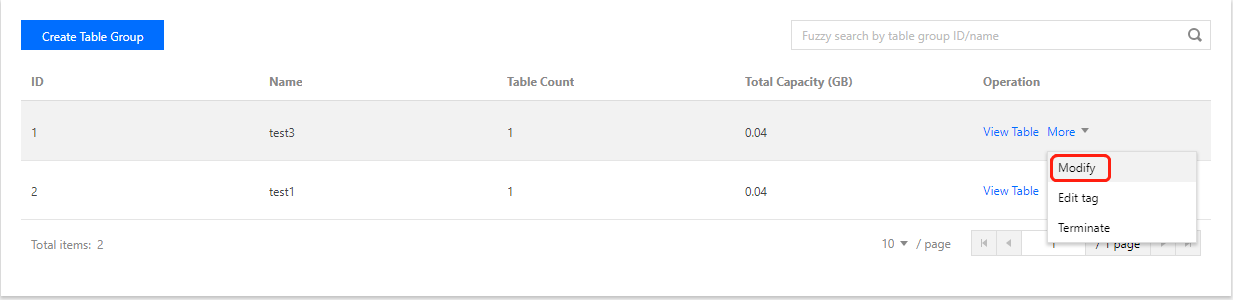
Enter the
Table Group List
page and click
Modify
in the "Operation" column.
2.
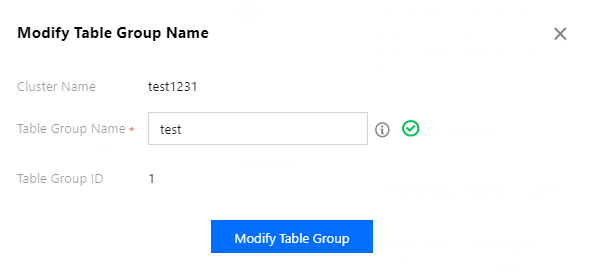
In the pop-up dialog box, click
Modify Table Group
to rename the table group. The table group name must be unique in the cluster.
前の記事へ: Renaming Cluster
次の記事へ: Backing up Cluster and Table Group
ヘルプとサポート
この記事はお役に立ちましたか?
はい
いいえ
営業担当者に
お問い合わせ
いただくか
チケットを提出
してサポートを求めることができます。
フィードバック