tencent cloud

NAT Gateway

Release Notes and Announcements
Release Notes
Announcements
Product Introduction
Overview
Features
Use Cases
Product Specifications
Relevant Products
Purchase Guide
Public NAT Gateway Billing Overview
Private NAT Gateway Operation Guide
Purchasing in the Console
Overdue Payment and Service Expiration Policies
Getting Started
Public NAT Gateway Operation Guide
Modifying NAT Gateway Configuration
Managing EIPs of NAT Gateway
Routing to NAT Gateway
Managing SNAT Rules
Managing Port Forwarding Rules
Public NAT Usage Limits
NAT Gateway Flow Logs
Binding with Anti-DDoS Pro
Monitoring and Alarms
Deleting NAT Gateway
Adjusting the Priorities of NAT Gateways and EIPs
Private NAT Gateway Operation Guide
Creating and Managing a NAT Gateway
Configuring a Route to Private NAT Gateway
Managing SNAT Rules
Managing DNAT Rules
Cloud Access Management
Practical Tutorial
Enabling Cross-VPC Access to Public Network via Standard NAT Gateway
Enabling Mutual Access between a Specified VPC Subnet and Public Network Resources via Private NAT Gateway
Enabling Secure Mutual Access with Public Network via Public CLB and NAT Gateway
Adjusting the Priorities of NAT Gateways and EIPs
API Documentation
FAQ
Billing
Concepts
Features
Service Level Agreement
Contact Us
Glossary

Querying Port Forwarding Rule

PDF
フォーカスモード
フォントサイズ
最終更新日: 2024-01-04 21:49:21
You can query port forwarding rules by completing the steps below.
1. Log in to NAT gateway Console
2. In the NAT gateway list, click the ID of the NAT gateway to be queried to go to its details page. Then, select Port Forwarding.

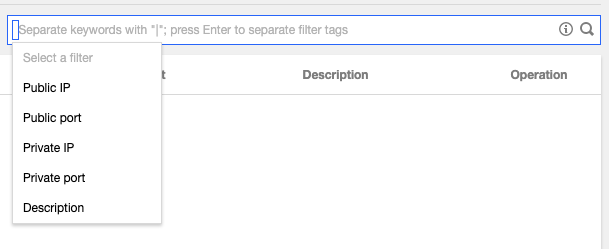
3. In the search box, select a resource attribute value or enter a keyword to query the corresponding port forwarding rule.
Note:
Be sure to check whether a NAT gateway routing policy has been added to the route table associated with the subnet where the instance resides.

ヘルプとサポート

この記事はお役に立ちましたか?

フィードバック