Web
Unduh
Mode fokus
Ukuran font
TUIRoomKit offers an integrated AI Meeting Assistant, delivering intelligent support for online meetings. By default, the meeting interface displays the AI Meeting Assistant entry button, giving users access to the following key features:
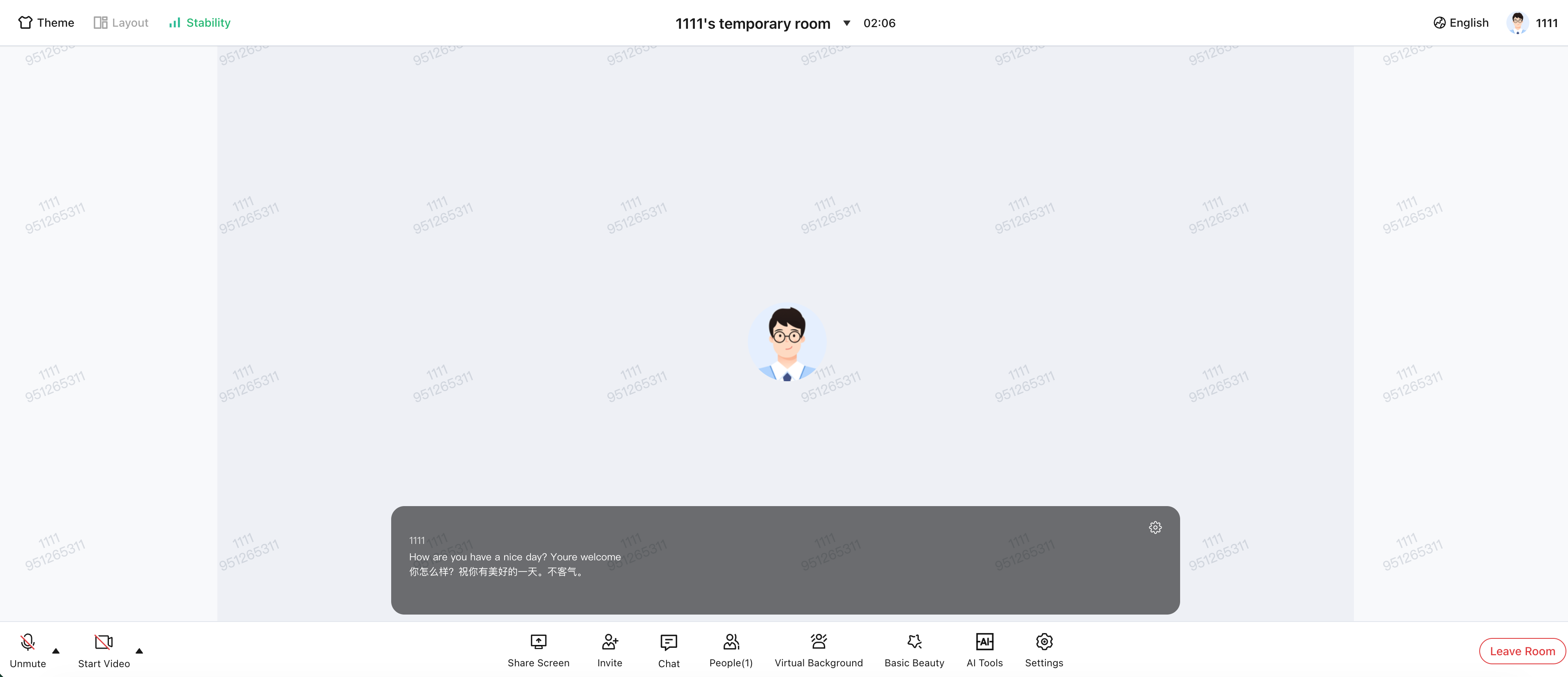
AI Real-Time Subtitles: Converts spoken discussion into live subtitles shown on screen, making communication clearer and easier to follow during meetings.
AI Real-Time Translation: When AI Real-Time Subtitles are enabled, real-time translation is also activated. The room owner can select the target translation language. For a list of supported languages, see the Language List.
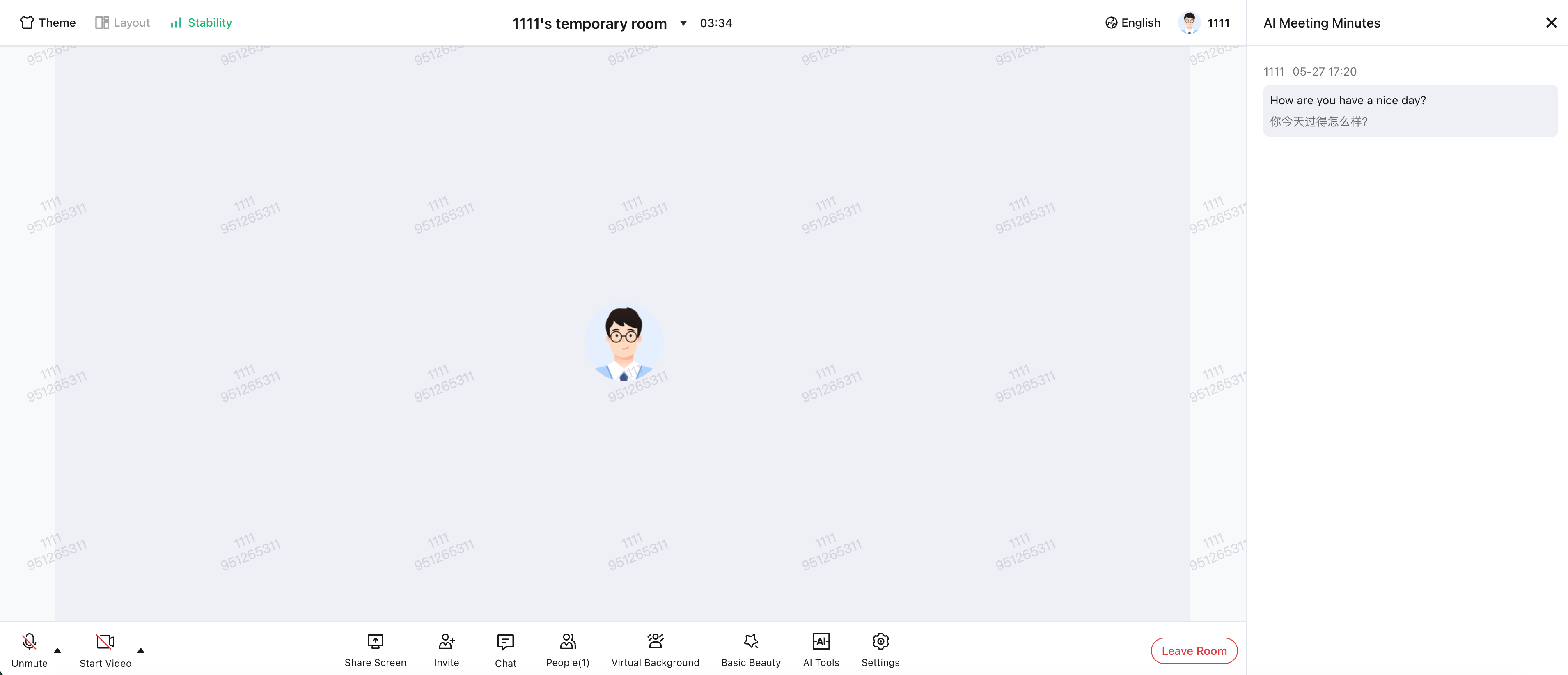
AI Real-Time Meeting Notes: Continuously transcribes spoken content into structured meeting notes, simplifying post-meeting review and organization.
AI Real-Time Subtitles
AI Real-Time Meeting Notes
Prerequisites
1. Enable Intelligent Voice Service
AI features are usage-based and incur fees. For detailed billing information, see AI Intelligent Voice.
2. Environment
Follow the Quick Integration Guide to add
@tencentcloud/roomkit-web-vue3 to your project. Make sure you are using version ≥ 5.1.2.AI Meeting Assistant Display
The AI Meeting Assistant entry button appears by default in the meeting interface and requires no extra setup. To hide or show this button, use the
conference.setWidgetVisible API to control the visibility of the AIToolsWidget component.Note:
Showing the entry button does not automatically start the transcription task. The room owner must manually click "AI Real-Time Subtitles" or "AI Real-Time Meeting Notes" to initiate the transcription task.
<template><ConferenceMainView /></template><script setup lang="ts">import { conference, BuiltinWidget } from '@tencentcloud/roomkit-web-vue3';// The AI Meeting Assistant entry button is displayed by default; to hide it, set its visibility to falseconference.setWidgetVisible({ [BuiltinWidget.AIToolsWidget]: false });</script>
Disable the AI Meeting Assistant
When using the AI Meeting Assistant component, manual termination of the transcription task is not required. The component automatically handles cleanup:
Upon Exiting Room: The transcription task stops automatically.
Resource Release: Associated memory resources are freed without developer intervention.
Development Notes
Version Dependency: The AI Meeting Assistant requires
@tencentcloud/roomkit-web-vue3 version ≥ 5.1.2. Confirm your installed version meets this requirement.Invocation Timing: The entry button is displayed by default. If you need to control its visibility using
conference.setWidgetVisible, ensure this code runs before ConferenceMainView is loaded.Billing Logic: Only the room owner can start the transcription task. Each room incurs a single billing instance; regular members are not charged.
Network Requirements: AI transcription relies on a stable upstream network. Network jitter may cause subtitle delays or loss.
FAQs
Why isn’t the "AI Meeting Assistant" button showing in the meeting interface?
Issue: TUIRoomKit is integrated, but the "AI Meeting Assistant" button is missing.
Solution: The entry button is shown by default. If it does not appear, check the following:
1. Confirm whether
conference.setWidgetVisible has set AIToolsWidget to false.2. Verify the meeting type—webinar rooms do not display this button.
3. Ensure
@tencentcloud/roomkit-web-vue3 is installed at the required version.Can all members access AI features?
Feature: Only the room owner can start the transcription task. Once enabled, all members in the room can use AI Real-Time Subtitles and AI Real-Time Meeting Notes.
Will AI features result in duplicate charges?
Billing: No. The transcription task is started only once by the room owner, resulting in a single charge per room. If the room owner does not start the transcription task, no transcription occurs and no related fees are incurred.
Bantuan dan Dukungan
Apakah halaman ini membantu?
Anda juga dapat Menghubungi Penjualan atau Mengirimkan Tiket untuk meminta bantuan.
masukan