Request Parameter Check Rule
Download
Mode fokus
Ukuran font
After you enable the request parameter check rule, the system validates API requests against predefined parameter contracts. It checks whether the name, location, type, and whether each parameter is required comply with the specifications. Requests missing required parameters or containing parameters of incorrect types are intercepted. This prevents business logic vulnerabilities that could be caused by tampered or artificially constructed illegal parameters. The request parameter check rule has no system-built-in rules. Custom rules must be added manually. You can create them in batches by importing Swagger 2.0 documents (YML/JSON) or add them manually one by one.
Note:
This module can be enabled independently even when the API security switch is not enabled.
Adding Custom Rule
After you enable the request parameter check rule, you can customize request parameter check rules based on your business scenarios. You can create rules in batches by importing Swagger 2.0 documents or add them manually one by one.
Importing APIs (Recommended)
1. On the API Security > Rule Configuration > Request Parameter Check page, click Import API.
2. In the Import API interface window, select the File type to upload, click Upload, and then provide the API file.
Note:
Currently, WAF supports parsing two types of Swagger 2.0 files: YML files and JSON files.
Import Rule Description:
Format: Import the API description file. The file extension must be .yml or .json. The API description file uploaded in a single operation must not exceed 100 KB.
Quantity: You can upload and create a maximum of 20 APIs per operation. APIs that already exist are skipped by default during import.
After you import a successfully created API, you can edit it. Please confirm the API based on your actual situation.
3. After you upload the file, the API security module automatically parses the API policies from the Swagger 2.0 file. After the parsing is complete, click OK to successfully add them.
4. After the addition is successful, you can view the newly imported API rules on the Request Parameter Check page.
Adding Request Parameter Check Rule
1. On the API Security > Rule Configuration > Request Parameter Check page, click Add Rule.
2. In the Add Rule window, configure the following parameters and click OK to create the rule.
Configuration Item Description
API Name: Enter the API path, which must start with a forward slash (/). The combination of the interface name + request method cannot be duplicated. For example: /guanjia/waf/config.
Description: Optional. The description of the API policy.
On/Off: Controls whether to enable or disable this rule. The default setting is On.
Request Method: GET, POST, PUT, and DELETE are supported.
Condition: You need to configure the Parameter name, Parameter location, Type, Required (after you select this, WAF checks whether the request contains this parameter and allows the request if it does or blocks it if it doesn't), and Remarks(optional). The parameter location supports three types: body, query, and path.
Action
Observe: Only attack logs are recorded, and no block is performed.
Block: Attack logs are recorded, and the request is blocked. Two response forms are supported: returning status code 429 or a custom return page.
Configuration Example
Configuration scenario: For the API
/test/123, which requires the input parameters user_id, api_key, and domain, configure an interception policy for requests whose input parameters do not comply with the input specification.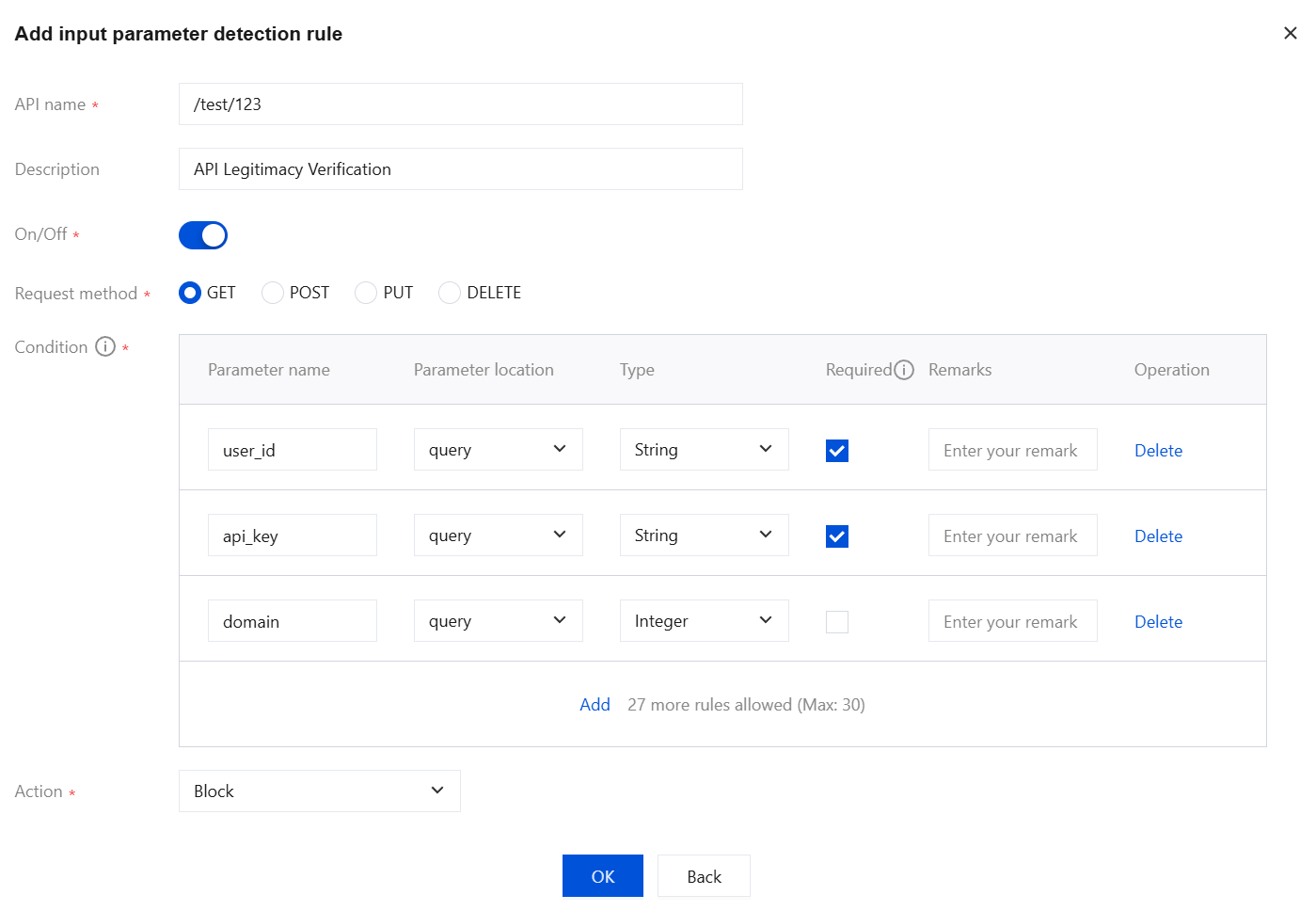
Configuration effect:
Requests that do not include the required parameters
user_id and api_key will be blocked.Requests will be blocked if the parameter types of
user_id, api_key, and domain do not match the configured type.
Bantuan dan Dukungan
Apakah halaman ini membantu?
Anda juga dapat Menghubungi Penjualan atau Mengirimkan Tiket untuk meminta bantuan.
masukan