This document describes how to enable and disable security protection for sub-users. This will determine whether sub-users need to go through security verification.
Directions
Enabling security protection for sub-user
1. Log in to the CAM Console and select Users > User List on the left sidebar.
2. In the user LIst management page, locate the sub-user you want to configure security protection for.
3. Click the username to go to the user details page.
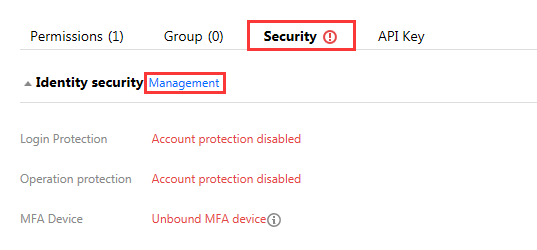
4. On the user details page, click Security to go to the security management section.
5. On the security management page, click Manage next to "Identity Security" as shown below:
6. In the identity security window that pops up, select the protection type you want to enable for the sub-user.
7. Click OK to complete enabling security protection for the sub-user.
Note:
If virtual MFA device verification is enabled, the sub-user will need to bind the MFA device the next time they log in.
Disabling security protection for sub-user
1. Log in to the CAM Console and select Users > User List on the left sidebar.
2. In the user list management page, locate the sub-user you want to configure security protection for.
3. Click the username to go to the user details page.
4. On the user details page, click Security to go to the security management section.
5. On the security management page, click Manage next to "Identity Security" as shown below:
6. In the identity security window that pops up, select the protection type you want to disable for the sub-user.
7. Click OK to complete disabling security protection for the sub-user.