Currently, an HTTP-triggered function allows you to connect the client to the server where it runs over the native WebSocket protocol.
How it Works
Starting service
You can use a bootstrap file to start the WebSocket server in the runtime environment of the HTTP-triggered function configured with support for the WebSocket protocol and listen on the specified port (9000) to wait for client connections.
In addition, for the API Gateway trigger, you need to configure WebSocket (WS) or WebSocket Secure (WSS) as the frontend protocol and configure the currently specified WebSocket-enabled HTTP-triggered function as the backend. The WebSocket path provided by API Gateway can be used for client connection.
Establishing WebSocket connection
The WebSocket client uses the WebSocket link provided by the API Gateway trigger to initiate a WebSocket connection. API Gateway and SCF will pass through the connection to the service process in the runtime environment. The negotiation and communication for connection establishment are both processed on the server through code.
After the connection is established, the client and server normally communicate over the WebSocket protocol.
WebSocket connection lifecycle
If an HTTP-triggered function supports WebSocket, the lifecycle of a WebSocket connection is the same as an invocation request of the function, the WebSocket connection establishment process equals request initiation, and disconnection equals request end.
Plus, function instances and connections are in one-to-one correspondence; that is, one instance only processes one WebSocket connection at a time. When more client connection requests are initiated, the same number of instances will be started for processing.
When a WebSocket connection request is initiated, a function instance will be started and receive the connection request.
After the WebSocket connection is established, the instance will run continuously and receive and process the upstream data from the client based on the actual business conditions. Or, the server actively pushes the downstream data.
After the WebSocket connection is closed, the instance will stop running.
Disconnection
A WebSocket connection will be closed in the following cases, and the current request execution will also end, as the request lifecycle is the same as the connection lifecycle:
Disconnection Conditions
Function Status
Function Status Code
The client or server initiates an operation of ending or closing the connection, and the end status code is 1000, 1010 (sent by client), or 1011 (sent by server).
The function ends normally after execution, and the execution status is "success".
200
The client or server initiates an operation of ending or closing the connection, and the end status code is not 1000, 1010, or 1011.
The function ends exceptionally, and the execution status is "failure".
439 (closed by server) or 456 (closed by client)
The connection is closed by SCF when there are no upstream or downstream messages sent over the WebSocket connection within the configured idle timeout period.
The function ends exceptionally, and the execution status is "failure".
455
The connection is closed by SCF as it is used continuously after being established and the function execution duration reaches the maximum value.
The function ends exceptionally, and the execution status is "failure".
433
For more information on WebSocket status codes for connection end, see WebSocket Status Codes.
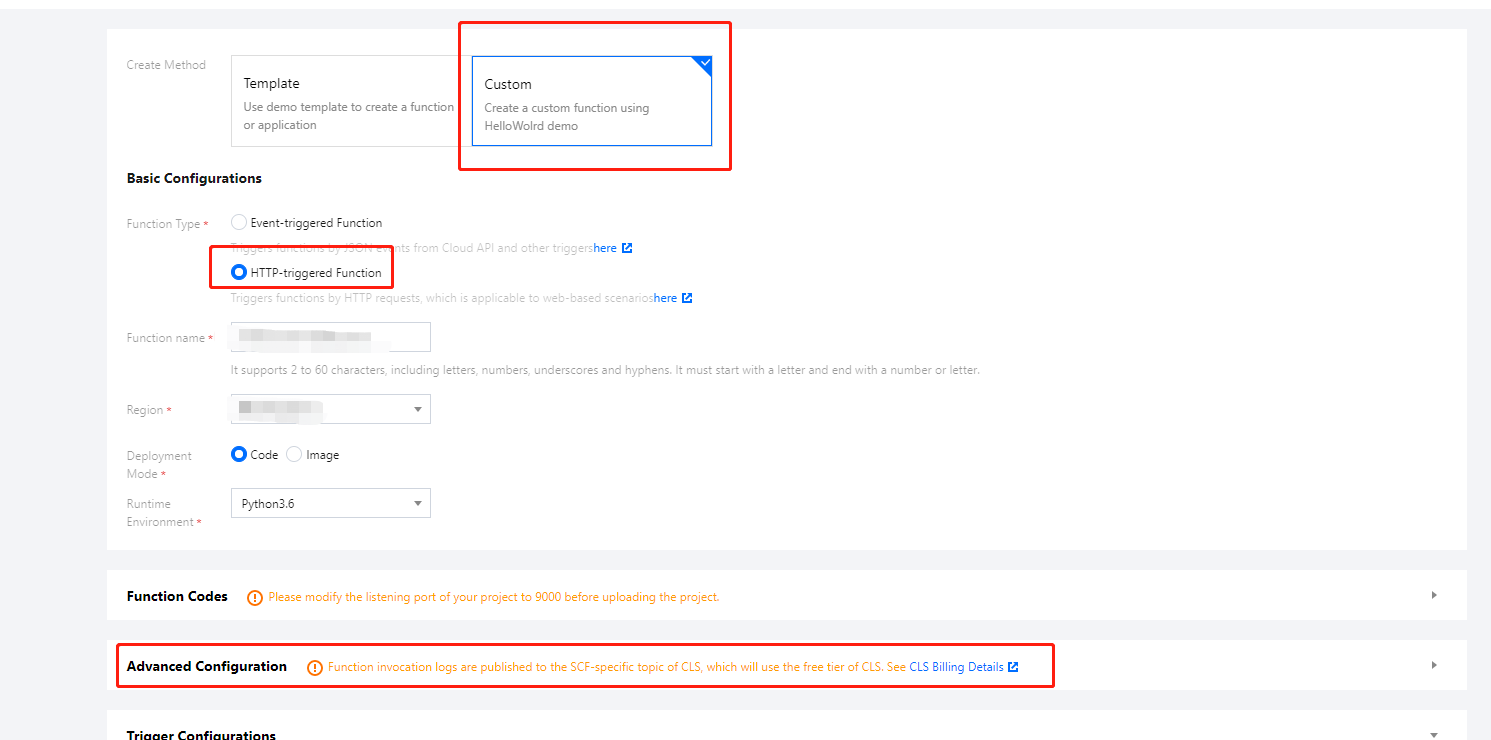
2. Click Create to create a function. You can select Custom > HTTP-Triggered Function > Advanced Configuration to view the supported protocols as shown below:
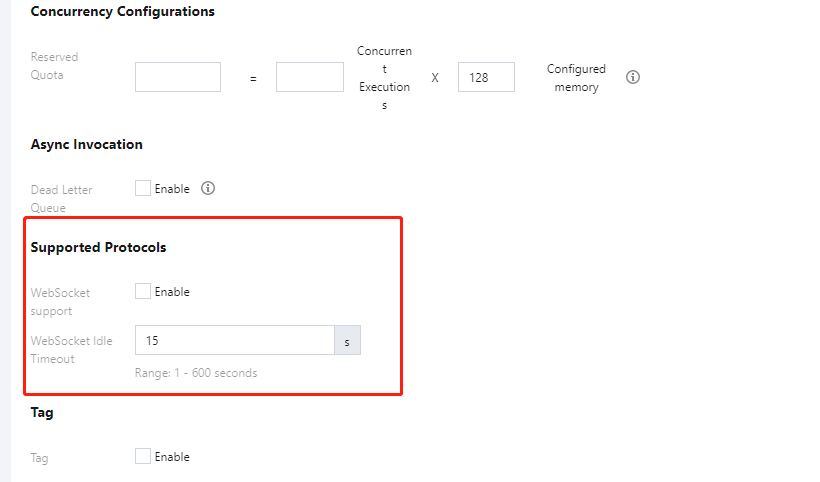
3. Select WebSocket Support and configure WebSocket Idle Timeout to support the WebSocket as shown below:
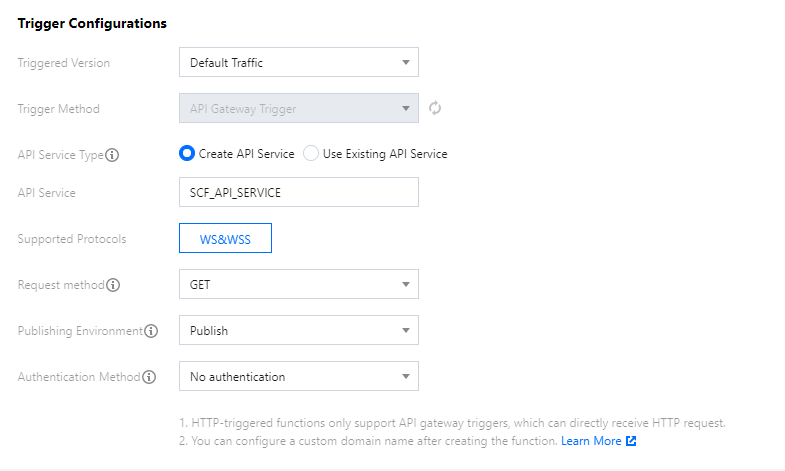
4. After WebSocket Support is selected, the supported protocols of API Gateway are also automatically switched to WS&WSS, and the link provided by the created API gateway will also be a WebSocket address as shown below:
Note:
After creation, the support for WebSocket protocol cannot be canceled, but the idle timeout period can be changed as needed.
Sample code
You can use the following demos to create a function and try out WebSocket: